Snowflake
When migrating Snowflake data to VeloDB Cloud, object storage is typically used as an intermediate medium. The overall process consists of two steps:
- Use Snowflake's COPY INTO statement to export data to object storage (such as AWS S3, Google Cloud Storage, or Azure Blob).
- Use VeloDB Cloud's S3 Load feature to read data from object storage and import it into your warehouse. For detailed parameters, see S3 Load.
Before you begin
Use a running warehouse and a warehouse SQL user with the privileges required by the selected method. Run SQL in SQL Editor or a connected SQL client. Create or select a database before running unqualified table statements. Replace sample paths and credentials with your own values. Use a new load label for each independent job.
This migration exports a snapshot to object storage and loads it into warehouse tables. It does not continuously synchronize later source changes. For supported object storage sources, Data Integration offers a guided import. Use the SQL path below when you need explicit load options or partition batches.
Plan source export, object storage, network transfer, and warehouse compute costs. Verify row counts, nulls, numeric ranges, timestamps, and key semantics before switching workloads. Remove staging files when validation and your retention requirements permit. Example output illustrates job and error fields; it is not a Cloud performance measurement.
Pre-migration preparation
Before performing the migration, plan the corresponding table structure and import strategy in your warehouse based on the Snowflake table structure:
- Choose an appropriate data model (Detail model / Unique Key model / Aggregate model).
- Design partitioning and bucketing strategies.
- Plan batch size and concurrency by referring to Load Best Practices.
Data type mapping
The following table lists the data type mappings between Snowflake and VeloDB Cloud, which helps you create matching table structures in your warehouse:
| Snowflake | VeloDB Cloud | Notes |
|---|---|---|
| NUMBER(p, s) / DECIMAL(p, s) / NUMERIC(p, s) | DECIMAL(p, s) | |
| INT / INTEGER | DECIMAL(38, 0) | Snowflake integer aliases have NUMBER(38, 0) range. Narrow only after checking values. |
| TINYINT / BYTEINT | DECIMAL(38, 0) | Snowflake integer aliases have NUMBER(38, 0) range. Narrow only after checking values. |
| SMALLINT | DECIMAL(38, 0) | Snowflake integer aliases have NUMBER(38, 0) range. Narrow only after checking values. |
| BIGINT | DECIMAL(38, 0) | Snowflake integer aliases have NUMBER(38, 0) range. Narrow only after checking values. |
| FLOAT / FLOAT4 / FLOAT8 / DOUBLE / DOUBLE PRECISION / REAL | DOUBLE | |
| VARCHAR / STRING / TEXT | VARCHAR / STRING | VARCHAR has a maximum length of 65533 bytes |
| CHAR / CHARACTER / NCHAR | VARCHAR / STRING | Select a target length for the actual byte size. Snowflake CHAR aliases do not imply the warehouse CHAR limit. |
| BINARY / VARBINARY | STRING | Encode as hex or Base64 before export and preserve the encoding convention. |
| BOOLEAN | BOOLEAN | |
| DATE | DATE | |
| DATETIME / TIMESTAMP / TIMESTAMP_NTZ | DATETIME | Check TIMESTAMP_TYPE_MAPPING and normalize the intended time zone before export |
| TIME | STRING | Must be cast to String type when exporting from Snowflake |
| VARIANT | VARIANT | |
| ARRAY | ARRAY<T> | |
| OBJECT | JSON | |
| GEOGRAPHY / GEOMETRY | STRING |
Migration process
The overall migration consists of three stages: create the target table in your warehouse -> export data from Snowflake to object storage -> import into your warehouse with S3 Load.
Step 1: create the target table in your warehouse
Assume the following table and data already exist in Snowflake:
CREATE OR REPLACE TABLE sales_data (
    order_id      INT PRIMARY KEY,
    customer_name VARCHAR(128),
    order_date    DATE,
    amount        DECIMAL(10,2),
    country       VARCHAR(48)
)
CLUSTER BY (order_date);

INSERT INTO sales_data VALUES
(1, 'Alice',   '2025-04-08',  99.99, 'USA'),
(2, 'Bob',     '2025-04-08', 149.50, 'Canada'),
(3, 'Charlie', '2025-04-09',  75.00, 'UK'),
(4, 'Diana',   '2025-04-10', 200.00, 'Australia');
The sample order IDs fit INT. Check the full source range before choosing this narrower target type. Based on this table structure, create a Unique Key partitioned table in your warehouse. The partition column matches Snowflake's clustering key, and explicit historical partitions cover the sample dates:
CREATE TABLE `sales_data` (
    order_id      INT,
    order_date    DATE NOT NULL,
    customer_name VARCHAR(128),
    amount        DECIMAL(10,2),
    country       VARCHAR(48)
) ENGINE=OLAP
UNIQUE KEY(`order_id`, `order_date`)
PARTITION BY RANGE(`order_date`) (
    PARTITION p20250408 VALUES [('2025-04-08'), ('2025-04-09')),
    PARTITION p20250409 VALUES [('2025-04-09'), ('2025-04-10')),
    PARTITION p20250410 VALUES [('2025-04-10'), ('2025-04-11'))
)
DISTRIBUTED BY HASH(`order_id`) BUCKETS 16
PROPERTIES (
    "dynamic_partition.enable" = "false",
    "dynamic_partition.time_unit" = "DAY",
    "dynamic_partition.end" = "5",
    "dynamic_partition.prefix" = "p",
    "dynamic_partition.buckets" = "16"
);
The example keeps the historical sample partitions fixed by disabling dynamic partition scheduling. For ongoing daily data, configure the desired dynamic partition window before enabling it.
Step 2: export data from Snowflake to object storage
Snowflake supports exporting data to multiple object storage services:
It is recommended to partition the export by VeloDB Cloud's partition column, so that subsequent imports can be performed in batches by partition.
2.1 Export to Parquet files with COPY INTO
The following example exports Snowflake data partitioned by order_date to AWS S3 in Parquet format:
CREATE FILE FORMAT my_parquet_format TYPE = parquet;

CREATE OR REPLACE STAGE external_stage
URL='s3://mybucket/sales_data'
CREDENTIALS=(AWS_KEY_ID='<ak>' AWS_SECRET_KEY='<sk>')
FILE_FORMAT = my_parquet_format;

COPY INTO @external_stage FROM sales_data
PARTITION BY (CAST(order_date AS VARCHAR))
HEADER=TRUE;
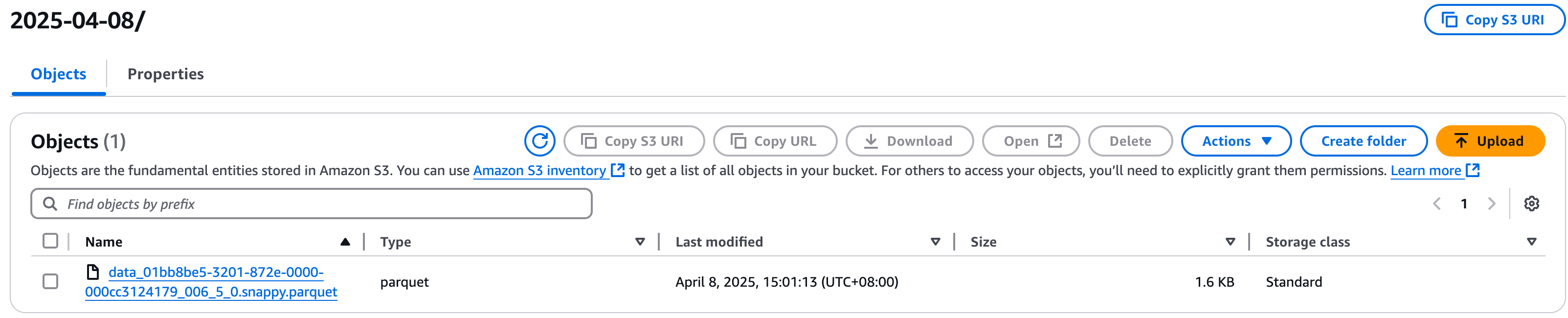
2.2 View the exported files on S3
After the export completes, S3 generates a corresponding subdirectory for each partition, with one directory per partition:

Step 3: import into your warehouse with S3 Load
S3 Load is an asynchronous data import method: after execution, VeloDB Cloud actively pulls data from the data source. Use the corresponding provider adapter for AWS S3, Google Cloud Storage, and Azure.
S3 Load is suitable for scenarios with large data volumes that require background asynchronous processing. For synchronous processing of small batches of data, you can use TVF Load.
Note:
For Parquet / ORC files containing complex types (Struct / Array / Map), validate the nested schema and target type mapping before loading. TVF can help inspect or transform the fields.
3.1 Import data from a single partition
The following example imports all Parquet files under the 2025_04_08 partition directory on S3 into the sales_data table in your warehouse:
LOAD LABEL sales_data_2025_04_08
(
    DATA INFILE("s3://mybucket/sales_data/2025_04_08/*")
    INTO TABLE sales_data
    FORMAT AS "parquet"
    (order_id, order_date, customer_name, amount, country)
)
WITH S3
(
    "provider" = "S3",
    "s3.endpoint" = "https://s3.ap-southeast-1.amazonaws.com",
    "s3.access_key" = "<ak>",
    "s3.secret_key" = "<sk>",
    "s3.region" = "ap-southeast-1"
);
3.2 Check job status with SHOW LOAD
Because S3 Load is submitted asynchronously, you need to query the import status of a specific Label with SHOW LOAD:
mysql> show load where label = "sales_data_2025_04_08"\G
*************************** 1. row ***************************
        JobId: 17956078
        Label: sales_data_2025_04_08
        State: FINISHED
     Progress: 100.00% (1/1)
         Type: BROKER
      EtlInfo: unselected.rows=0; dpp.abnorm.ALL=0; dpp.norm.ALL=2
     TaskInfo: cluster:s3.ap-southeast-1.amazonaws.com; timeout(s):3600; max_filter_ratio:0.0; priority:NORMAL
     ErrorMsg: NULL
   CreateTime: 2025-04-10 17:50:53
 EtlStartTime: 2025-04-10 17:50:54
EtlFinishTime: 2025-04-10 17:50:54
LoadStartTime: 2025-04-10 17:50:54
LoadFinishTime: 2025-04-10 17:50:54
          URL: NULL
   JobDetails: {"Unfinished backends":{"5eec1be8612d4872-91040ff1e7208a4f":[]},"ScannedRows":2,"TaskNumber":1,"LoadBytes":91,"All   backends":{"5eec1be8612d4872-91040ff1e7208a4f":[10022]},"FileNumber":1,"FileSize":1620}
TransactionId: 766228
 ErrorTablets: {}
         User: <warehouse-user>
      Comment:
1 row in set (0.00 sec)
3.3 Handle errors during import
When there are multiple import jobs, you can query failed jobs and their failure reasons in batch with the following statement:
mysql> show load where state='CANCELLED' and label like "label_test%"\G
*************************** 1. row ***************************
        JobId: 18312384
        Label: label_test123
        State: CANCELLED
     Progress: 100.00% (3/3)
         Type: BROKER
      EtlInfo: unselected.rows=0; dpp.abnorm.ALL=4; dpp.norm.ALL=0
     TaskInfo: cluster:s3.ap-southeast-1.amazonaws.com; timeout(s):14400; max_filter_ratio:0.0; priority:NORMAL
     ErrorMsg: type:ETL_QUALITY_UNSATISFIED; msg:quality not good enough to cancel
   CreateTime: 2025-04-15 17:32:59
 EtlStartTime: 2025-04-15 17:33:02
EtlFinishTime: 2025-04-15 17:33:02
LoadStartTime: 2025-04-15 17:33:02
LoadFinishTime: 2025-04-15 17:33:02
          URL: <load-error-url>
   JobDetails: {"Unfinished backends":{"7602ccd7c3a4854-95307efca7bfe341":[]},"ScannedRows":4,"TaskNumber":1,"LoadBytes":188,"All   backends":{"7602ccd7c3a4854-95307efca7bfe341":[10022]},"FileNumber":3,"FileSize":4839}
TransactionId: 769213
 ErrorTablets: {}
         User: <warehouse-user>
      Comment:
The above example is a data quality error (ETL_QUALITY_UNSATISFIED). For the specific error details, you need to access the link returned in the URL field. For example, the following error shows that the actual length of the country column in the data exceeds the length defined in the table schema:
curl "<load-error-url>"
Reason: column_name[country], the length of input is too long than schema. first 32 bytes of input str: [USA] schema length: 1; actual   length: 3; . src line [];
Reason: column_name[country], the length of input is too long than schema. first 32 bytes of input str: [Canada] schema length: 1; actual   length: 6; . src line [];
Reason: column_name[country], the length of input is too long than schema. first 32 bytes of input str: [UK] schema length: 1; actual   length: 2; . src line [];
Reason: column_name[country], the length of input is too long than schema. first 32 bytes of input str: [Australia] schema length: 1;   actual length: 9; . src line [];
For data quality errors, if some erroneous data is allowed to be skipped, you can set the error tolerance ratio in the PROPERTIES of the S3 Load job. For details, see Import Configuration Parameters.
3.4 Batch import multiple partitions
When migrating large-scale stock data, a batched import strategy is recommended:
- Each batch corresponds to one partition or a small number of partitions in your warehouse.
- As an initial planning example, test batches of 100 GB or less. This is planning guidance, not a Cloud limit. Tune batch size and concurrency for warehouse resources, file layout, and retry cost.
- This reduces system pressure and lowers the cost of retrying after a failed import.
You can refer to the script s3_load_demo.sh, which polls the partition directories on S3 and automatically submits S3 Load jobs to VeloDB Cloud, achieving batch import.
FAQ
Q1: An import job reports an ETL_QUALITY_UNSATISFIED error. How can I troubleshoot it?
This error is a data quality error. Common causes include: field length exceeding the schema definition, type mismatch, and required fields being null. Troubleshooting steps:
- View the
URLfield of the job withSHOW LOAD. - Use
curlto access the URL and obtain the detailed error log. - Fix the source data or adjust the VeloDB Cloud table schema based on the error message.
- If a small amount of dirty data is acceptable, set the
max_filter_ratioerror tolerance ratio in the jobPROPERTIES.
Q2: How do I import Parquet files containing complex types?
For Parquet / ORC files containing complex types such as Struct / Array / Map, S3 Load can load supported nested schemas. Match the target types and field layout, and test representative files. Use TVF Load when you need schema inspection or SQL transformations.
Q3: Why does the Snowflake TIME type need to be converted to string?
VeloDB Cloud does not have a type that fully corresponds to Snowflake's TIME. Therefore, when exporting from Snowflake with COPY INTO, you need to CAST the TIME field to STRING type. After being imported into your warehouse, it is stored as STRING.
Q4: How can I speed up the migration of large tables?
- On the Snowflake side, export by VeloDB Cloud's partition column to facilitate parallel import.
- On the VeloDB Cloud side, use batched imports, with 100 GB or less per batch as an initial test size. This is planning guidance, not a Cloud limit. Tune batch size and concurrency for warehouse resources, file layout, and retry cost.
- Use the s3_load_demo.sh script to submit multiple S3 Load jobs concurrently.
Q5: How do Snowflake's OBJECT and VARIANT types map?
- For
VARIANT, export a representation supported by the selected file format and validate how it parses into the targetVARIANTcolumn. Matching type names do not establish binary compatibility. - For
OBJECT, export valid JSON and load it into aJSONcolumn, checking nulls and nested values.
See also
- S3 Load
- Google Cloud Storage
- Azure Load
- TVF Load
- Load Best Practices
- Import Configuration Parameters
When an error URL refers to an internal service address that your client cannot reach, use the job error details available to you or contact VeloDB Cloud support with the label and job ID. Do not log in to warehouse hosts to retrieve error logs. Increasing max_filter_ratio can discard rows; reconcile rejected rows before accepting a migration.