Continuous Load Overview
A streaming job reads changes from a source and writes them into tables in your VeloDB Cloud warehouse. Use SQL mapping when you need to transform rows or select columns. Use automatic table creation when you want to replicate one or more database tables with their primary keys. For S3, choose a mode based on how new files arrive.
Note: SQL continuous load is experimental. Confirm the source, mode, and Core version available for your warehouse with VeloDB Cloud support. The Console also offers Public Preview import workflows for MySQL and PostgreSQL.
Supported data sources and sync modes
| Source | SQL mapping into an existing table | Automatic table creation | Source setup |
|---|---|---|---|
| MySQL 5.6, 5.7, 8.0.x | MySQL SQL mapping | MySQL automatic table creation | Amazon RDS for MySQL · Aurora MySQL |
| PostgreSQL 14–17 | PostgreSQL SQL mapping | PostgreSQL automatic table creation | Amazon RDS for PostgreSQL · Aurora PostgreSQL |
| OceanBase in MySQL compatibility mode | Unavailable | OceanBase automatic table creation | A reachable OBBinlog endpoint |
| Amazon S3 | S3 ingestion modes | Unavailable | Read access to the bucket and, for notifications, access to its SQS queue |
Core 26.1.1 introduced SQL mapping for MySQL and PostgreSQL through cdc_stream(). Core 26.1.2 includes the OceanBase database connector. Core 26.1.4 adds S3 notification and one-time ingestion alongside ordered listing. See the Core 26.1 release notes.
How to choose a sync method
Capability comparison
| Decision | SQL mapping for database CDC | Automatic table creation |
|---|---|---|
| Destination | Pre-create a Unique Key table and map the source key. | Select a target database. The job creates missing Unique Key tables from the source schemas. |
| Scope | One source table per job. | One or more source tables. Use include_tables to limit the selection. |
| Transformations | Use the SELECT in DO INSERT INTO ... SELECT ... FROM cdc_stream(...) to project, rename, cast, or filter rows. | Use FROM ... TO DATABASE to copy rows. You can rename tables or exclude non-key columns. |
| Delivery | The streaming insert commits the destination write and the source offset together for exactly-once processing within the job. | At-least-once delivery. A retry can apply the same source change again. |
| Schema changes | Maintain the target table and the projection when the source schema changes. | The job can propagate supported column changes. Review the source-specific restrictions below. |
For S3, use ordered listing if each new key sorts after the last processed key. Choose notifications to discover uploads from SQS, or one-time ingestion to load a bounded set of files. S3 notifications can be delivered more than once.
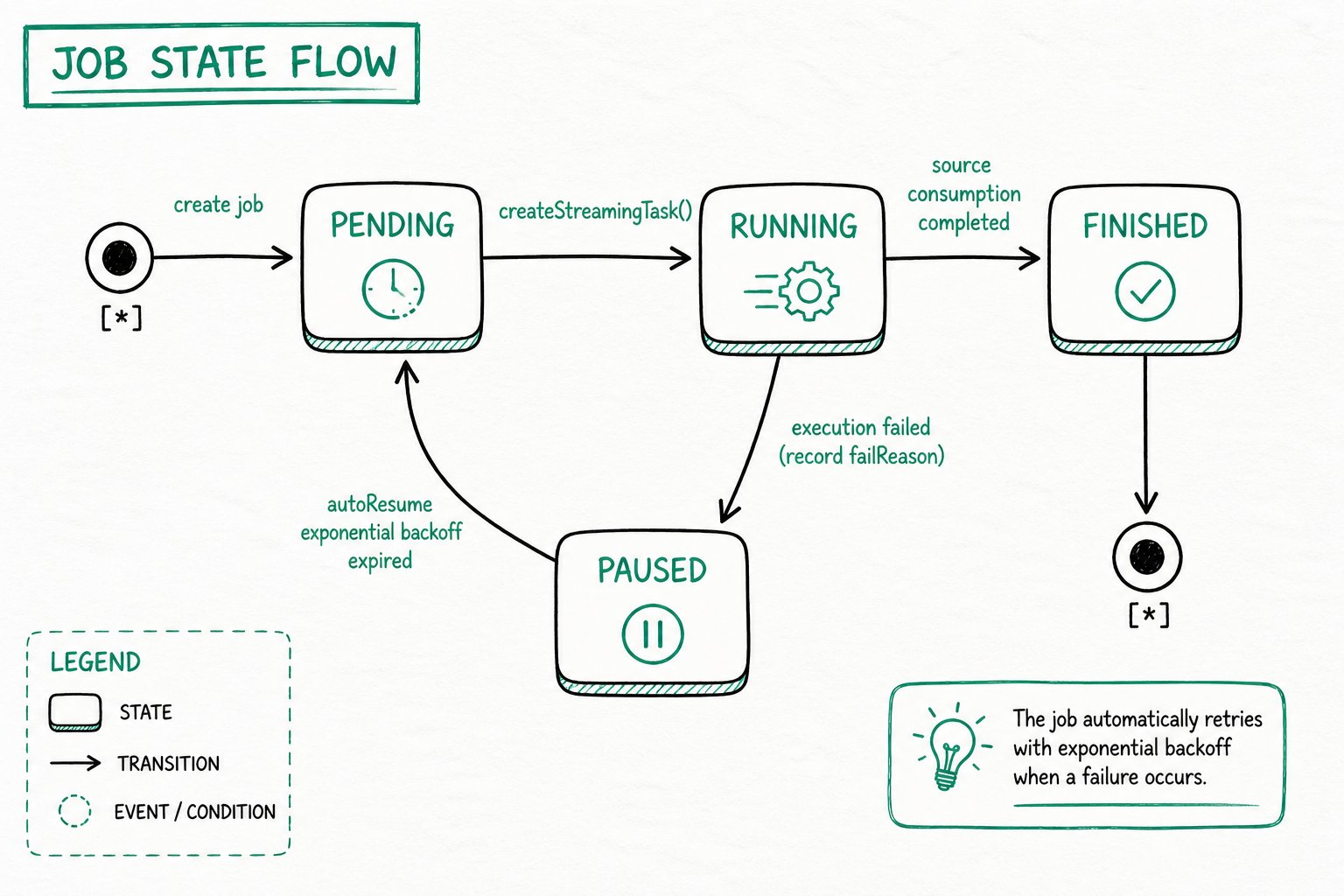
Job state transitions
| State | What it means |
|---|---|
PENDING | The scheduler is preparing the next task. |
RUNNING | The job is processing input or waiting for new data. An idle continuous source can stay in this state. |
PAUSED | A user paused the job or a task failed. Inspect ErrorMsg before deciding how to resume. |
FINISHED | A bounded job, such as a one-time S3 load or a snapshot-only database load, consumed its input. |
Automatic recovery
The scheduler retries eligible failures with increasing delays. A manually paused job stays paused. Data-quality errors, an invalidated replication slot, and some schema changes also require intervention. Check the last committed offset and correct the cause before resuming. If the source no longer retains the required log position, reconcile the target and plan a new snapshot.
CDC task identity and failure handling
From Core 26.1.3, background CDC operations use the job creator's warehouse SQL identity. Grant the creator LOAD on destination tables, CREATE for automatic table creation, and the visibility and ALTER privileges needed for schema changes. The user also needs access to the executing cluster. Revoking a grant can interrupt a running job.
In Core 26.1.3, a failed cdc_stream() insert task enters the ordinary task retry loop. In Core 26.1.4, it skips that loop. Check the job and task error messages to decide whether the job can recover automatically.
Common operations
View load status
Run the following query in the warehouse to find a streaming job and its last committed offset.
SELECT Id, Name, Definer, Status, CurrentOffset, EndOffset, ErrorMsg
FROM jobs("type" = "insert")
WHERE ExecuteType = 'STREAMING';
Use SELECT * to inspect all fields. LoadStatistic contains load counters, JobRuntimeMsg provides runtime details, and LastTaskSuccessTime identifies the last successful task. From Core 26.1.3, LagBytes reports the backlog in bytes for a database change stream. A value of -1 means the estimate is unavailable. Earlier 26.1 releases report Lag in seconds. LastSourceEventTimestamp, also available from Core 26.1.3, gives the Unix timestamp in seconds of the latest committed source event when available.
View task status
Use the job ID returned by the previous query in place of 12345. Check Status, ErrorMsg, RunningOffset, and the start and finish times to investigate a stalled load.
SELECT * FROM tasks("type" = "insert") WHERE JobId = 12345;
Pause a load job
PAUSE JOB WHERE jobname = 'my_load_job';
Resume a load job
RESUME JOB WHERE jobname = 'my_load_job';
Delete a load job
Drop the job when you want to stop scheduling it permanently.
DROP JOB WHERE jobname = 'my_load_job';
Common parameters
Set job properties in the PROPERTIES clause of CREATE JOB. For example, "max_interval" = "10" sets the idle scheduling interval to 10 seconds, the default. Specify a whole number of seconds of at least 1. For S3 notifications the interval must also be less than 7,200 seconds. VeloDB Cloud manages scheduler capacity and task-history limits.
Limitations
Primary key tables
Database CDC requires primary keys so that updates and deletes can identify the correct destination row. Check type compatibility before starting the job. See the type mappings for MySQL, PostgreSQL, and OceanBase.
Schema change (DDL)
Only automatic table creation propagates supported source DDL. The handling of added and dropped columns, defaults, and incompatible changes depends on the source and Core version. In Core 26.1.4, schema_change_behavior controls whether a database job applies supported changes (evolve, the default) or skips them (ignore). See MySQL schema changes, PostgreSQL schema changes, or OceanBase schema changes before changing a source table.
Troubleshoot MySQL authentication
If the source reports Public Key Retrieval is not allowed, check how Connector/J authenticates the source user and whether the connection uses TLS. Configure the job to verify the source certificate using the MySQL connection properties. Confirm that the certificate and the JDBC hostname match your source deployment.