Amazon Aurora PostgreSQL
Prepare your Aurora PostgreSQL cluster for change data capture (CDC) into VeloDB Cloud. Make these changes on the PostgreSQL source. Return to the Console import guide or the SQL streaming job guide to create the job in your warehouse.
Prerequisites
- Use PostgreSQL 14 or later for Console import. Check the continuous load source matrix for versions covered by SQL streaming jobs.
- Verify that the executing warehouse cluster can reach the Aurora writer endpoint and port. Configure security groups and any private connectivity for your deployment.
- Use an AWS account that can modify parameter groups and reboot the Aurora writer. Schedule a maintenance window if the parameter must change.
- Use a PostgreSQL administrator to grant the source account replication and read access. Identify the source database, schema, and primary-key tables you plan to replicate.
Step 1: Check the current configuration
Connect to the Aurora writer and run the following commands.
SHOW rds.logical_replication;
SHOW wal_level;
If the results are on and logical, continue to create the sync user. Otherwise, configure the parameter group.
Step 2: Configure the cluster parameter group
In the Amazon RDS console, use Parameter groups to create or edit a custom DB cluster parameter group in the same engine family as the Aurora PostgreSQL cluster. Set rds.logical_replication to 1 and save the change.
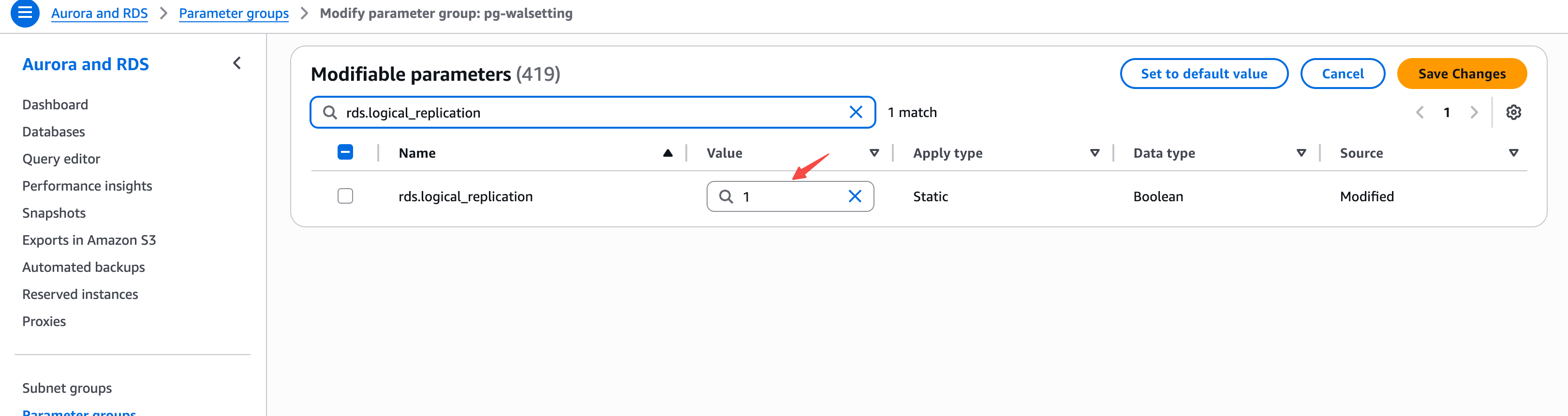
Step 3: Apply the cluster parameter group and restart
Select the Aurora PostgreSQL cluster, choose Modify, and assign the custom group under DB cluster parameter group. During the maintenance window, apply the change and reboot the Aurora writer. After it accepts connections, repeat the two checks in step 1. See the AWS logical replication instructions.
Step 4: Create the sync user
Connect to the source database as an administrator. Replace the password, schema, and example tables with your own values. Grant read access on every table that the job selects.
CREATE USER velodb_sync PASSWORD '<sync-password>';
GRANT rds_replication TO velodb_sync;
GRANT USAGE ON SCHEMA public TO velodb_sync;
GRANT SELECT ON TABLE public.orders, public.customers TO velodb_sync;
If the account also needs to read future tables, have each role that will create those tables run the following command in the source database.
ALTER DEFAULT PRIVILEGES IN SCHEMA public
GRANT SELECT ON TABLES TO velodb_sync;
Step 5: Create the publication
Choose how the job will obtain its publication on PostgreSQL.
- Job-managed publication. The Console wizard uses this mode. A SQL job also uses it when you omit
publication_name. The source account needsCREATEon the source database and ownership rights on every selected table so it can create a publication for the job. Arrange those privileges with the source administrator. See PostgreSQL publication permissions. - Existing publication for a SQL job. A source administrator with publication creation and table ownership rights can create a publication scoped to the selected tables. Pass its name as the SQL source property
"publication_name" = "warehouse_orders". In this mode, the sync account can use the read and replication grants from step 4.
For an existing publication, run this example on the source and check its membership. Replace the publication and table names to match your job.
CREATE PUBLICATION warehouse_orders FOR TABLE public.orders, public.customers;

SELECT schemaname, tablename
FROM pg_publication_tables
WHERE pubname = 'warehouse_orders';
A SQL job can use a job-managed replication slot with either publication mode. If you provide slot_name, prepare a dedicated logical slot for that job and manage its lifecycle on PostgreSQL. When retiring a job, check for inactive slots because they can retain WAL on the source.
Troubleshooting
| Symptom | What to check |
|---|---|
| Logical replication is still off | Verify that the custom DB cluster parameter group is attached to the correct Aurora PostgreSQL cluster and the Aurora writer has rebooted. |
| Connection or authentication fails | Confirm the warehouse can reach the source endpoint on the configured port and that the sync account can log in to the source database. |
| Replication permission is denied | Have the source administrator verify membership in rds_replication, schema usage, and read grants on the selected tables. |
| The job cannot create or use the publication | For a job-managed publication, check database CREATE and table ownership rights. For a named publication, verify its name and membership in the database used by the job. |