High-Concurrency Load Optimization (Group Commit)
In high-frequency, small-batch write scenarios, traditional load methods have the following problems:
- Each load creates an independent transaction, and each one has to go through SQL parsing and execution-plan generation on the FE, which hurts overall performance.
- Each load generates a new version, causing the version count to grow rapidly and increasing the pressure of background Compaction.
VeloDB Cloud supports Group Commit for these write patterns. Group Commit is not a new load method; it is an optimized extension of existing load methods, and mainly targets:
- The
INSERT INTO tbl VALUES(...)statement - Stream Load
By merging multiple small-batch loads into a single large transaction commit in the background, Group Commit can reduce transaction and version overhead for eligible small writes. Combining it with prepared statements can also reduce repeated SQL planning. Measure the result for your workload.
Applicable scenarios and selection
| Scenario | Recommended mode | Description |
|---|---|---|
| High-concurrency writes that require immediate visibility | sync_mode | Multiple loads are merged into a single transaction and the call waits for grouped transaction processing. Check the returned status. |
| Latency-sensitive, high-frequency writes | async_mode | Data is first written to the WAL and the call returns immediately; the commit happens asynchronously in the background. |
| Group Commit not needed | off_mode | Disables Group Commit and uses the regular load path. |
Group Commit modes
Group Commit writes have three modes:
-
Off mode (
off_mode)Disables Group Commit.
-
Sync mode (
sync_mode)VeloDB Cloud merges multiple loads into a single transaction commit based on load and on the table's
group_commit_interval_msproperty, and each load returns after the transaction commits. Use this mode when the client should wait for grouped transaction processing. Check the result, and verify transaction visibility if it times out or reports an uncertain outcome. -
Async mode (
async_mode)VeloDB Cloud first writes the data to the WAL (
Write Ahead Log), and the load returns immediately. VeloDB Cloud then commits the data asynchronously based on load and on the table'sgroup_commit_interval_msproperty, and the data becomes visible after the commit. To prevent the WAL from taking up too much disk space, the execution path can switch tosync_modewhen asynchronous WAL buffering is unsuitable. WAL capacity checks can also reject a request. Inspect the load result instead of assuming an automatic fallback. This mode fits latency-sensitive and high-frequency write scenarios.WAL monitoring and recovery are service-managed. If asynchronous loads remain invisible or report WAL errors, contact VeloDB Cloud support.
Quick start
Use a warehouse SQL user with the required load and table-creation privileges. Connect to the selected warehouse and cluster using connection methods. Select your database before running SQL. For HTTP loads, set STREAM_LOAD_URL to the complete request URL generated by Connect for database db and table dt, and set WAREHOUSE_USER to your SQL user name. Preserve the generated scheme, port, and TLS settings.
The following examples all use this table schema. Run one table-creation example, or use a different table name when comparing alternatives. Outputs and timings are illustrative upstream examples, not results measured on your warehouse:
CREATE TABLE `dt` (
    `id` int(11) NOT NULL,
    `name` varchar(50) NULL,
    `score` int(11) NULL
) ENGINE=OLAP
DUPLICATE KEY(`id`)
DISTRIBUTED BY HASH(`id`) BUCKETS 1;
Configure table properties
Note:
In Core 26.1.3 and later, you can use the
group_commit_modetable property as the default mode for Stream Load.
You can set a default Group Commit mode at the table level. When a Stream Load does not set the group_commit HTTP Header, the mode in the table property is used.
1. Configure the table at creation:
CREATE TABLE `dt` (
    `id` int(11) NOT NULL,
    `name` varchar(50) NULL,
    `score` int(11) NULL
) ENGINE=OLAP
DUPLICATE KEY(`id`)
DISTRIBUTED BY HASH(`id`) BUCKETS 1
PROPERTIES (
    "group_commit_mode" = "async_mode"
);
2. Modify the table property:
# Change to sync mode
ALTER TABLE dt SET ("group_commit_mode" = "sync_mode");

# Disable Group Commit
ALTER TABLE dt SET ("group_commit_mode" = "off_mode");
3. View the table property:
SHOW CREATE TABLE displays the group_commit_mode property (unless the value is off_mode):
mysql> SHOW CREATE TABLE dt;
+-------+----------------------------------------------------------------------------------------------------------------------------------------------------------------------------------------------------------------------+
| Table | Create Table                                                                                                                                                                                                       |
+-------+----------------------------------------------------------------------------------------------------------------------------------------------------------------------------------------------------------------------+
| dt    | CREATE TABLE `dt` (
  `id` int(11) NOT NULL,
  `name` varchar(50) NULL,
  `score` int(11) NULL
) ENGINE=OLAP
DUPLICATE KEY(`id`)
DISTRIBUTED BY HASH(`id`) BUCKETS 1
PROPERTIES (
    "group_commit_mode" = "async_mode"
) |
+-------+----------------------------------------------------------------------------------------------------------------------------------------------------------------------------------------------------------------------+
1 row in set (0.00 sec)
4. Priority:
| Load method | Priority (high to low) |
|---|---|
| Stream Load | group_commit HTTP Header > table property group_commit_mode |
INSERT INTO VALUES | Session variable group_commit (set explicitly for the SQL examples below) |
Usage
Use INSERT INTO VALUES
Enable Group Commit by setting the session variable group_commit. Set the session variable explicitly for the current SQL connection. Do not assume that the Stream Load table-property fallback also selects the SQL session mode.
Async mode:
# Set the session variable to enable group commit (default is `off_mode`), using async mode
mysql> set group_commit = async_mode;

# The returned label starts with `group_commit`, which tells you that group commit is in use
mysql> insert into dt values(1, 'Bob', 90), (2, 'Alice', 99);
Query OK, 2 rows affected (0.05 sec)
{'label':'group_commit_a145ce07f1c972fc-bd2c54597052a9ad', 'status':'PREPARE', 'txnId':'181508'}

# This label and `txn_id` match the previous one, indicating that the inserts are batched into the same load task
mysql> insert into dt(id, name) values(3, 'John');
Query OK, 1 row affected (0.01 sec)
{'label':'group_commit_a145ce07f1c972fc-bd2c54597052a9ad', 'status':'PREPARE', 'txnId':'181508'}

# The data is not immediately queryable
mysql> select * from dt;
Empty set (0.01 sec)

# After the grouped transaction becomes visible, the data is queryable. This sample uses a roughly 10-second interval. The data visibility delay is controlled by the table property `group_commit_interval_ms`.
mysql> select * from dt;
+------+-------+-------+
| id   | name  | score |
+------+-------+-------+
|    1 | Bob   |    90 |
|    2 | Alice |    99 |
|    3 | John  |  NULL |
+------+-------+-------+
3 rows in set (0.02 sec)
Sync mode:
# Set the session variable to enable group commit (default is `off_mode`), using sync mode
mysql> set group_commit = sync_mode;

# The returned label starts with `group_commit`, which tells you that group commit is in use. The wait depends on the commit thresholds and load scheduling.
mysql> insert into dt values(4, 'Bob', 90), (5, 'Alice', 99);
Query OK, 2 rows affected (10.06 sec)
{'label':'group_commit_d84ab96c09b60587_ec455a33cb0e9e87', 'status':'PREPARE', 'txnId':'3007', 'query_id':'fc6b94085d704a94-a69bfc9a202e66e2'}

# The data is queryable immediately
mysql> select * from dt;
+------+-------+-------+
| id   | name  | score |
+------+-------+-------+
|    1 | Bob   |    90 |
|    2 | Alice |    99 |
|    3 | John  |  NULL |
|    4 | Bob   |    90 |
|    5 | Alice |    99 |
+------+-------+-------+
5 rows in set (0.03 sec)
Off mode:
mysql> set group_commit = off_mode;
Use JDBC prepared statements
When you write data using JDBC insert into values, to reduce the overhead of SQL parsing and plan generation, VeloDB Cloud supports the MySQL protocol PreparedStatement feature on the FE side. With PreparedStatement, the SQL and its load plan are cached in a session-level memory cache, and subsequent loads use the cached object directly, which lowers FE CPU usage.
1. Set the JDBC URL and enable PreparedStatement on the server side:
url = jdbc:mysql://<warehouse-host>:<mysql-port>/<database>?useServerPrepStmts=true&useLocalSessionState=true&rewriteBatchedStatements=true&cachePrepStmts=true&prepStmtCacheSqlLimit=99999&prepStmtCacheSize=500
2. Configure the group_commit session variable in one of two ways:
-
Set it via the JDBC URL by adding
sessionVariables=group_commit=async_mode:url = jdbc:mysql://<warehouse-host>:<mysql-port>/<database>?useServerPrepStmts=true&useLocalSessionState=true&rewriteBatchedStatements=true&cachePrepStmts=true&prepStmtCacheSqlLimit=99999&prepStmtCacheSize=500&sessionVariables=group_commit=async_mode -
Set it by executing a SQL statement:
try (Statement statement = conn.createStatement()) {statement.execute("SET group_commit = async_mode;");}
Set JDBC_URL to the generated JDBC URL with the required TLS options and the Group Commit session settings above. Supply credentials through your application secret mechanism. The following method requires the standard java.sql imports and MySQL Connector/J.
3. Use PreparedStatement for batch writes:
private static final String JDBC_DRIVER = "com.mysql.cj.jdbc.Driver";
private static final String JDBC_URL = System.getenv("JDBC_URL");
private static final String TBL = "dt";
private static final String USER = System.getenv("WAREHOUSE_USER");
private static final String PASSWD = System.getenv("WAREHOUSE_PASSWORD");
private static final int INSERT_BATCH_SIZE = 10;

private static void groupCommitInsertBatch() throws Exception {
    Class.forName(JDBC_DRIVER);
    // add rewriteBatchedStatements=true and cachePrepStmts=true in JDBC url
    // set session variables by sessionVariables=`group_commit`=`async_mode` in JDBC url
    try (Connection conn = DriverManager.getConnection(
            JDBC_URL, USER, PASSWD)) {

        String query = "insert into " + TBL + " values(?, ?, ?)";
        try (PreparedStatement stmt = conn.prepareStatement(query)) {
            for (int j = 0; j < 5; j++) {
                // 10 rows per insert
                for (int i = 0; i < INSERT_BATCH_SIZE; i++) {
                    stmt.setInt(1, i);
                    stmt.setString(2, "name" + i);
                    stmt.setInt(3, i + 10);
                    stmt.addBatch();
                }
                int[] result = stmt.executeBatch();
            }
        }
    } catch (Exception e) {
        e.printStackTrace();
    }
}
Tip:
The checked Core 26.1.3 compiled default for
enable_prepared_stmt_audit_logisfalse. Inspect your session setting before changing it, and retain the auditing required by your organization. You can enable prepared-statement audit logging with this session variable.
For more details on JDBC usage, see Synchronizing Data with INSERT.
Batch with Go
The Go MySQL driver supports prepared statements. You can also batch rows on the client to reduce round trips. This bounded example writes to the same dt table and enables Group Commit on each worker connection.
Set MYSQL_DSN using the generated MySQL host, port, database, credentials, and required TLS configuration for the Go driver. For example, its format is <user>:<password>@tcp(<warehouse-host>:<mysql-port>)/<database>?tls=true for a TLS-enabled connection. Keep the DSN in your secret configuration and do not print it. The example requires github.com/go-sql-driver/mysql.
package main

import (
	"context"
	"database/sql"
	"os"
	"fmt"
	"math/rand"
	"strings"
	"sync"
	"sync/atomic"
	"time"

	_ "github.com/go-sql-driver/mysql"
)

const table = "dt"

var (
	threadCount = 20
	batchSize   = 100
)

var totalInsertedRows int64
var rowsInsertedLastSecond int64

func main() {
	dbDSN := os.Getenv("MYSQL_DSN")
	db, err := sql.Open("mysql", dbDSN)
	if err != nil {
		fmt.Printf("Error opening database: %s\n", err)
		return
	}
	defer db.Close()

	var wg sync.WaitGroup
	for i := 0; i < threadCount; i++ {
		wg.Add(1)
		go func() {
			defer wg.Done()
			groupCommitInsertBatch(db)
		}()
	}

	go logInsertStatistics()

	wg.Wait()
}

func groupCommitInsertBatch(db *sql.DB) {
    ctx := context.Background()
    conn, err := db.Conn(ctx)
    if err != nil {
        fmt.Printf("Error opening worker connection: %s\n", err)
        return
    }
    defer conn.Close()
    if _, err := conn.ExecContext(ctx, "SET group_commit = async_mode"); err != nil {
        fmt.Printf("Error setting Group Commit: %s\n", err)
        return
    }
	for batch := 0; batch < 5; batch++ {
		valueStrings := make([]string, 0, batchSize)
		valueArgs := make([]interface{}, 0, batchSize*3)
		for i := 0; i < batchSize; i++ {
		    valueStrings = append(valueStrings, "(?, ?, ?)")
            valueArgs = append(valueArgs, rand.Intn(1000), "sample", rand.Intn(100))
		}
		stmt := fmt.Sprintf("INSERT INTO %s VALUES %s",
			table, strings.Join(valueStrings, ","))
		_, err := conn.ExecContext(ctx, stmt, valueArgs...)
		if err != nil {
			fmt.Printf("Error executing batch: %s\n", err)
			return
		}
		atomic.AddInt64(&rowsInsertedLastSecond, int64(batchSize))
		atomic.AddInt64(&totalInsertedRows, int64(batchSize))
	}
}

func logInsertStatistics() {
	for {
		time.Sleep(1 * time.Second)
		fmt.Printf("Total inserted rows: %d\n", atomic.LoadInt64(&totalInsertedRows))
		fmt.Printf("Rows inserted in the last second: %d\n", atomic.SwapInt64(&rowsInsertedLastSecond, 0))
	}
}
Use Stream Load
When loading data through Stream Load, you can enable Group Commit by setting the group_commit parameter in the HTTP Header.
Note:
If the
group_commitHeader is not set andgroup_commit_modeis configured in the table properties, the mode in the table property is used automatically.
curl prompts for the password. Do not send a client-supplied label header when using Group Commit. Assume the contents of data.csv are:
6,Amy,60
7,Ross,98
Async mode:
# Add the "`group_commit`:`async_mode`" header during load

curl --location-trusted --user "$WAREHOUSE_USER" -T data.csv -H "group_commit:async_mode" -H "column_separator:," "$STREAM_LOAD_URL"
{
    "TxnId": 7009,
    "Label": "group_commit_c84d2099208436ab_96e33fda01eddba8",
    "Comment": "",
    "GroupCommit": true,
    "Status": "Success",
    "Message": "OK",
    "NumberTotalRows": 2,
    "NumberLoadedRows": 2,
    "NumberFilteredRows": 0,
    "NumberUnselectedRows": 0,
    "LoadBytes": 19,
    "LoadTimeMs": 35,
    "StreamLoadPutTimeMs": 5,
    "ReadDataTimeMs": 0,
    "WriteDataTimeMs": 26
}

# The returned GroupCommit is true, which means the load entered the group commit path
# The returned Label starts with `group_commit` and is the label associated with the load that actually consumes the data
Sync mode:
# Add the "`group_commit`:`sync_mode`" header during load

curl --location-trusted --user "$WAREHOUSE_USER" -T data.csv -H "group_commit:sync_mode" -H "column_separator:," "$STREAM_LOAD_URL"
{
    "TxnId": 3009,
    "Label": "group_commit_d941bf17f6efcc80_ccf4afdde9881293",
    "Comment": "",
    "GroupCommit": true,
    "Status": "Success",
    "Message": "OK",
    "NumberTotalRows": 2,
    "NumberLoadedRows": 2,
    "NumberFilteredRows": 0,
    "NumberUnselectedRows": 0,
    "LoadBytes": 19,
    "LoadTimeMs": 10044,
    "StreamLoadPutTimeMs": 4,
    "ReadDataTimeMs": 0,
    "WriteDataTimeMs": 10038
}

# The returned GroupCommit is true, which means the load entered the group commit path
# The returned Label starts with `group_commit` and is the label associated with the load that actually consumes the data
For more details on Stream Load syntax and best practices, see Stream Load.
Automatic commit conditions
The commit batch closes when its time or data-size threshold is reached. The checked Core 26.1.3 compiled defaults are 10 seconds and 128 MiB. Actual commit completion and visibility can take longer under load. Tune the table properties based on observed behavior.
Adjust the commit interval
The checked Core 26.1.3 compiled default commit interval is 10 seconds. Inspect SHOW CREATE TABLE dt for the table property before tuning it. You can adjust it by modifying the table configuration:
# Change the commit interval to 2 seconds
ALTER TABLE dt SET ("group_commit_interval_ms" = "2000");
Tuning suggestions:
| Example value | Pros | Cons |
|---|---|---|
| Shorter interval (such as 2 seconds) | Lower data visibility delay, suitable for scenarios that require higher real-time visibility | More frequent commits, faster version-count growth, and higher background Compaction pressure |
| Longer interval (such as 30 seconds) | Larger commit batches, slower version-count growth, lower system overhead | Higher data visibility delay |
Set the value based on how much visibility delay your business can tolerate. If the system is under heavy load, you can increase the interval as appropriate.
Adjust the commit data size
The checked Core 26.1.3 compiled default commit data size is 134217728 bytes (128 MiB). Warehouse settings can override the defaults. You can adjust it by modifying the table configuration:
# Set the commit data size to 128 MiB
ALTER TABLE dt SET ("group_commit_data_bytes" = "134217728");
Tuning suggestions:
| Example value | Pros | Cons |
|---|---|---|
| Smaller threshold (such as 32 MB) | Lower memory footprint, suitable for resource-constrained environments | Smaller commit batches, throughput may be limited |
| Larger threshold (such as 256 MB) | Higher batch-commit efficiency and higher system throughput | Higher memory footprint |
Choose a value that balances memory use against batching and visibility requirements. Changing this threshold does not remove the asynchronous WAL durability boundary. Measure the effects of a larger threshold on throughput, memory use, and visibility before retaining the change.
Service-managed configuration
The following settings describe the checked Core 26.1.3 implementation. Their compiled defaults do not establish effective warehouse configuration or the first release that introduced them. Customers do not edit FE/BE configuration files or restart managed nodes.
BE WAL configuration
group_commit_wal_path controls local WAL locations. WAL directories, disk capacity, monitoring, and recovery are managed by the service. Contact VeloDB Cloud support if asynchronous loads stop progressing.
Stream Load forwarding
When Group Commit requests pass through a load balancer, service forwarding can route writes for a table to the selected worker for batching. The internal forwarding path must be configured consistently across FE and BE.
| Setting | Component | Compiled default | Purpose |
|---|---|---|---|
enable_group_commit_streamload_be_forward | FE and BE | false | Controls Group Commit Stream Load forwarding and acceptance of the BE forwarding endpoint. |
enable_forward_group_commit_stream_load_to_follower | FE | false | Allows the Group Commit Stream Load path to use follower FEs when supported by the table. |
Core 26.1.3 release notes include forwarding and healthy-worker routing fixes. They also fix an overly broad global-privilege precheck so that valid database-level or table-level LOAD privileges can be used. Do not grant global LOAD or modify be.conf as a workaround for a routing failure. See Core 26.1 release notes and contact VeloDB Cloud support with the error and request timestamp.
WAL count limit
The checked implementation uses group_commit_max_wal_num_per_table to bound accumulated asynchronous WALs. Its compiled default is 10, and 0 disables that count check. The implementation counts WALs for a table on the receiving BE, rather than applying a warehouse-wide table total.
When the table WAL count reaches the configured bound and a WAL replay failure has been recorded, a new asynchronous Group Commit load can fail with EXCEEDED_LIMIT and a message such as:
Too many group commit async WALs for table <table_name>
This error can indicate that WAL replay is not progressing. Contact support to investigate replay and capacity. Raising the limit alone does not resolve the underlying failure.
Limitations
Group Commit fallback scenarios
| Load method | Conditions that fall back to non-Group Commit |
|---|---|
INSERT INTO VALUES | Using transactional writes (Begin; INSERT INTO VALUES; COMMIT)Specifying a label ( INSERT INTO dt WITH LABEL {label} VALUES)VALUES contains an expression (INSERT INTO dt VALUES (1 + 100))Column-update writes Tables that do not support lightweight schema change |
Stream Load | Using two-phase commit Specifying a label ( -H "label:my_label")Column-update writes Tables that do not support lightweight schema change |
Unique model
- Group Commit does not guarantee commit order. Use a Sequence column to ensure data consistency.
WAL limitations
Core 26.1.3 release notes include recovery from incomplete trailing WAL records. In the checked implementation, WAL replay treats an incomplete trailing length or payload as the end of the file. A complete data block can still be replayed when its trailing checksum field was not fully written. An unfinished trailing record is not recovered as a complete record. Missing or corrupt WAL files still cannot guarantee data integrity.
async_modewrites data to the WAL, deletes it on success, and recovers from the WAL on failure.- WAL files are stored as a single replica. If the corresponding disk is damaged or the file is deleted accidentally, data may be lost.
- Cluster maintenance and WAL draining are service-managed. Contact VeloDB Cloud support before maintenance that could affect pending asynchronous writes. Do not delete WAL files or run BE decommission commands.
async_modeautomatically switches tosync_modein the following cases:- The single load contains too much data (more than 80% of the space of a single WAL directory)
- Chunked Stream Load with an unknown data size
- Insufficient available disk space
- During a heavyweight Schema Change, Group Commit writes are rejected and the client needs to retry.
Performance
The following results and configurations are retained from Apache Doris document High-Concurrency Load Optimization (Group Commit). They were reported for self-managed Apache Doris 3.0.1, with the hardware, replicas, tools, and settings listed below. They have not been independently reproduced on VeloDB Cloud and do not establish warehouse throughput or latency guarantees. Historical replication_num, localhost endpoints, and planner settings belong to those tests. Use the Cloud examples above for application configuration.
The small-batch section is titled synchronous mode in the source, but its setup text and JDBC URL select async_mode. That inconsistency is retained as a limitation of the upstream report. Do not use those measurements as a validated synchronous-mode comparison.
The write performance of group commit (using async_mode) under high-concurrency, small-data-volume scenarios was tested with Stream Load and JDBC.
Stream Load log scenario test
Machine configuration:
- 1 FE: Alibaba Cloud, 8-core CPU, 16 GB memory, 1 x 100 GB ESSD PL1 cloud disk
- 3 BEs: Alibaba Cloud, 16-core CPU, 64 GB memory, 1 x 1 TB ESSD PL1 cloud disk
- 1 test client: Alibaba Cloud, 16-core CPU, 64 GB memory, 1 x 100 GB ESSD PL1 cloud disk
- Test version: Doris-3.0.1
Dataset:
httplogsdataset, 31 GB and 247 million rows in total
Test tool:
- doris-streamloader
Test method:
- Compare
non-group_commitmode andgroup_commitasync_mode, with different per-concurrency data sizes and concurrency levels, loading247249096rows.
Test results:
| Load method | Per-concurrency data size | Concurrency | Time (seconds) | Load rate (rows/second) | Load throughput (MB/second) |
|---|---|---|---|---|---|
group_commit | 10 KB | 10 | 2204 | 112,181 | 14.8 |
group_commit | 10 KB | 30 | 2176 | 113,625 | 15.0 |
group_commit | 100 KB | 10 | 283 | 873,671 | 115.1 |
group_commit | 100 KB | 30 | 244 | 1,013,315 | 133.5 |
group_commit | 500 KB | 10 | 125 | 1,977,992 | 260.6 |
group_commit | 500 KB | 30 | 122 | 2,026,631 | 267.1 |
group_commit | 1 MB | 10 | 119 | 2,077,723 | 273.8 |
group_commit | 1 MB | 30 | 119 | 2,077,723 | 273.8 |
group_commit | 10 MB | 10 | 118 | 2,095,331 | 276.1 |
non-group_commit | 1 MB | 10 | 1883 | 131,305 | 17.3 |
non-group_commit | 10 MB | 10 | 294 | 840,983 | 105.4 |
non-group_commit | 10 MB | 30 | 118 | 2,095,331 | 276.1 |
In the group_commit tests above, the BE CPU usage stays between 10% and 40%.
The results show that group_commit mode effectively improves load performance for concurrent small-data-volume loads, while reducing the version count and lowering the pressure of background data merging.
JDBC
Machine configuration:
- 1 FE: Alibaba Cloud, 8-core CPU, 16 GB memory, 1 x 100 GB ESSD PL1 cloud disk
- 1 BE: Alibaba Cloud, 16-core CPU, 64 GB memory, 1 x 500 GB ESSD PL1 cloud disk
- 1 test client: Alibaba Cloud, 16-core CPU, 64 GB memory, 1 x 100 GB ESSD PL1 cloud disk
- Test version: Doris-3.0.1
- Audit logging for prepared statements is disabled to improve performance
Dataset:
- TPC-H sf10
lineitemtable dataset, 30 files, about 22 GB and 180 million rows in total
Test tool:
Test method:
- Write data through
txtfilereadertomysqlwriter, with different concurrency levels and rows perINSERT.
Test results:
| Rows per insert | Concurrency | Load rate (rows/second) | Load throughput (MB/second) |
|---|---|---|---|
| 100 | 10 | 160,758 | 17.21 |
| 100 | 20 | 210,476 | 22.19 |
| 100 | 30 | 214,323 | 22.92 |
In the tests above, the FE CPU usage stays around 60-70% and the BE CPU usage stays around 10-20%.
INSERT INTO sync mode, small batches
Machine configuration:
- 1 FE: Alibaba Cloud, 16-core CPU, 64 GB memory, 1 x 500 GB ESSD PL1 cloud disk
- 5 BEs: Alibaba Cloud, 16-core CPU, 64 GB memory, 1 x 1 TB ESSD PL1 cloud disk
- 1 test client: Alibaba Cloud, 16-core CPU, 64 GB memory, 1 x 100 GB ESSD PL1 cloud disk
- Test version: Doris-3.0.1
Dataset:
-
TPC-H sf10
lineitemtable dataset. -
The CREATE TABLE statement is:
CREATE TABLE IF NOT EXISTS lineitem (L_ORDERKEY INTEGER NOT NULL,L_PARTKEY INTEGER NOT NULL,L_SUPPKEY INTEGER NOT NULL,L_LINENUMBER INTEGER NOT NULL,L_QUANTITY DECIMAL(15,2) NOT NULL,L_EXTENDEDPRICE DECIMAL(15,2) NOT NULL,L_DISCOUNT DECIMAL(15,2) NOT NULL,L_TAX DECIMAL(15,2) NOT NULL,L_RETURNFLAG CHAR(1) NOT NULL,L_LINESTATUS CHAR(1) NOT NULL,L_SHIPDATE DATE NOT NULL,L_COMMITDATE DATE NOT NULL,L_RECEIPTDATE DATE NOT NULL,L_SHIPINSTRUCT CHAR(25) NOT NULL,L_SHIPMODE CHAR(10) NOT NULL,L_COMMENT VARCHAR(44) NOT NULL)DUPLICATE KEY(L_ORDERKEY, L_PARTKEY, L_SUPPKEY, L_LINENUMBER)DISTRIBUTED BY HASH(L_ORDERKEY) BUCKETS 32PROPERTIES ("replication_num" = "3");
Test tool:
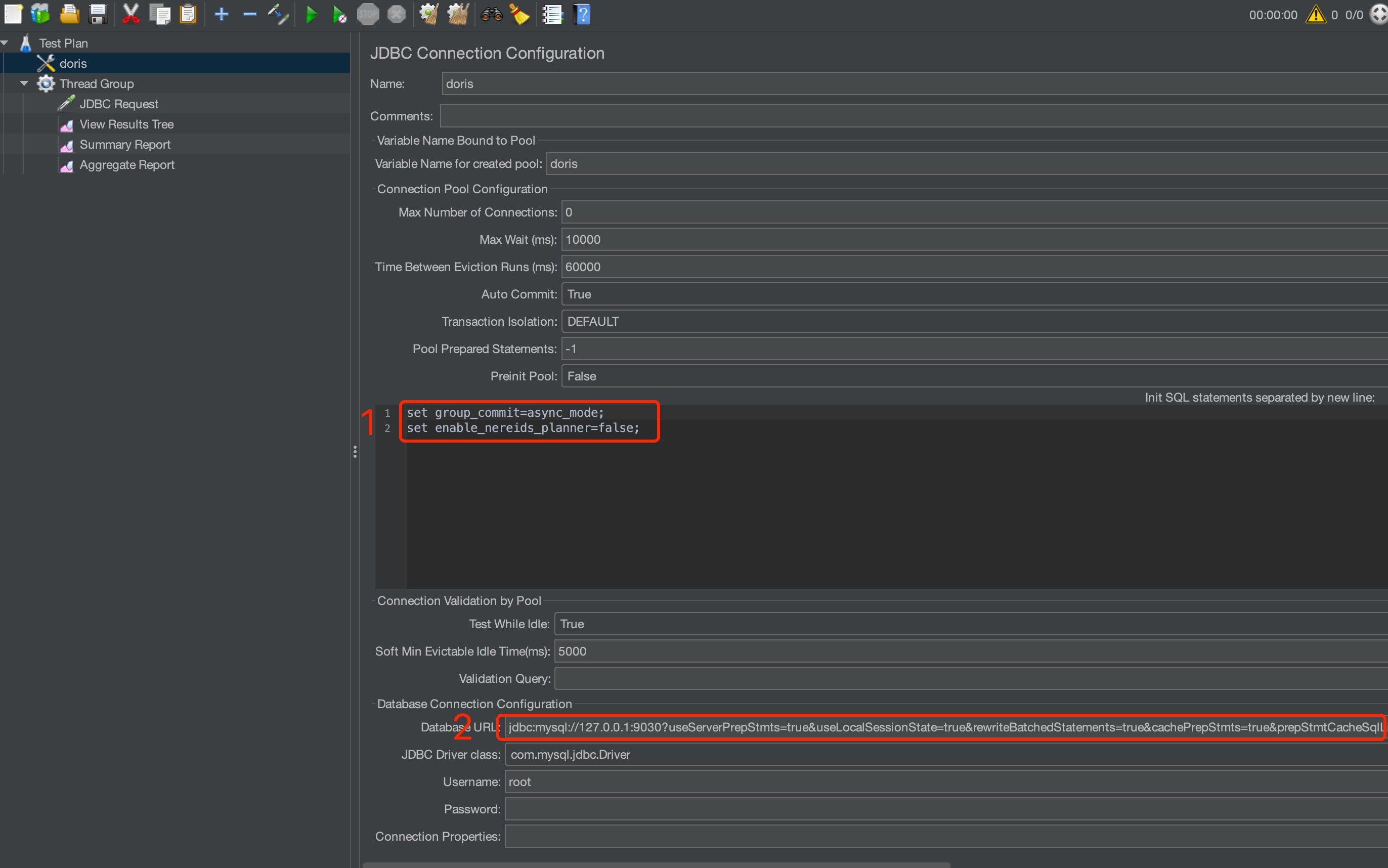
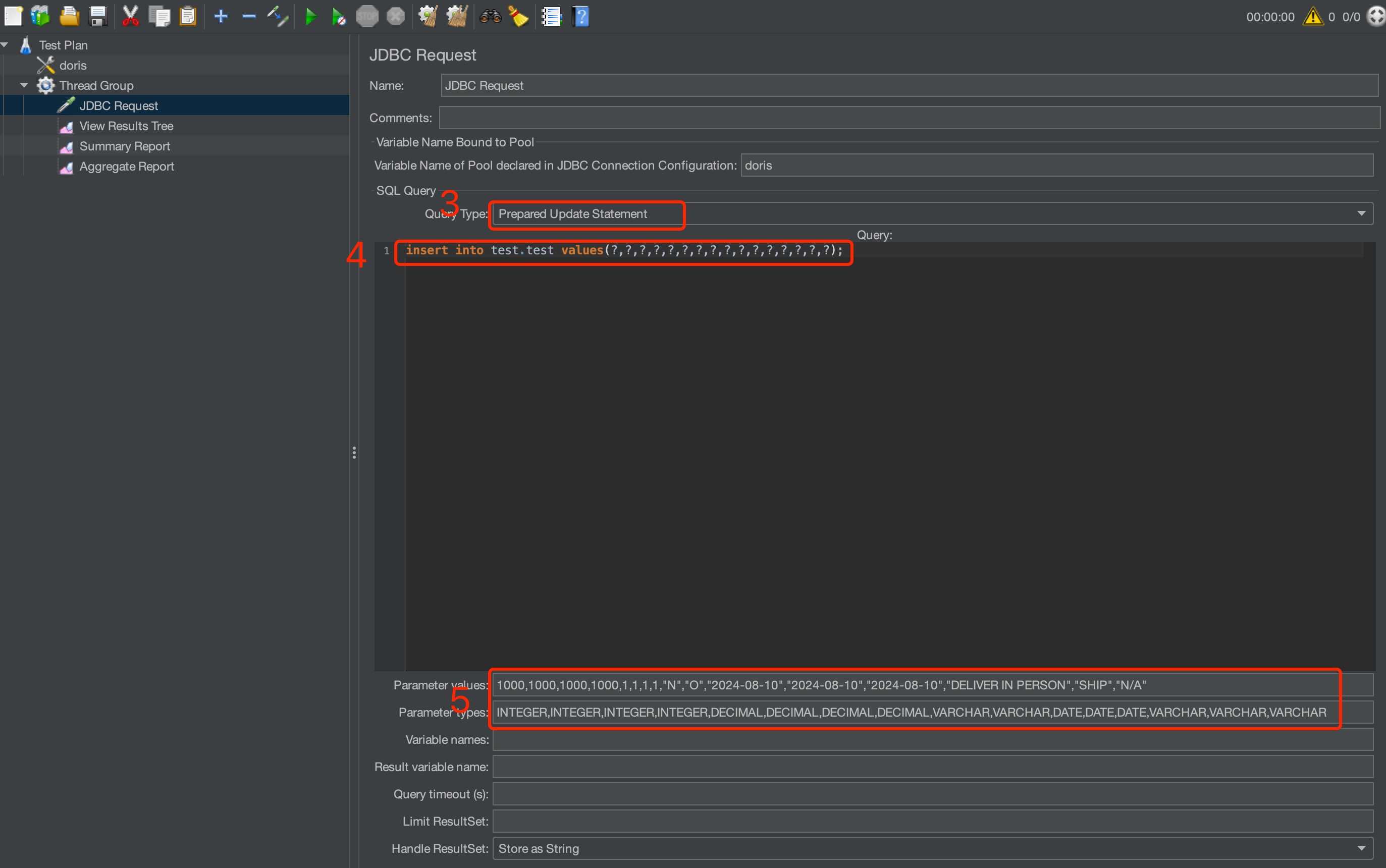
The Jmeter parameters to set are shown below:
-
Set the init statements before the test:
set group_commit=async_modeandset enable_nereids_planner=false. -
Enable JDBC PreparedStatement. The full URL is:
jdbc:mysql://127.0.0.1:9030?useServerPrepStmts=true&useLocalSessionState=true&rewriteBatchedStatements=true&cachePrepStmts=true&prepStmtCacheSqlLimit=99999&prepStmtCacheSize=50&sessionVariables=group_commit=async_mode,enable_nereids_planner=false`. -
Set the load type to prepared update statement.
-
Set the load statement.
-
Set the values to load each time. Make sure the values match the load value types one by one.
Test method:
- Write data to
DoristhroughJmeter. Each concurrency writes 1 row perINSERT INTO.
Test results (units in rows/second):
The tests below cover 30, 100, and 500 concurrency.
30 concurrency, sync mode, 5 BEs with 3 replicas:
| Group commit interval | 10ms | 20ms | 50ms | 100ms |
|---|---|---|---|---|
enable_nereids_planner=true | 891.8 | 701.1 | 400.0 | 237.5 |
enable_nereids_planner=false | 885.8 | 688.1 | 398.7 | 232.9 |
100 concurrency, sync mode, 5 BEs with 3 replicas:
| Group commit interval | 10ms | 20ms | 50ms | 100ms |
|---|---|---|---|---|
enable_nereids_planner=true | 2427.8 | 2068.9 | 1259.4 | 764.9 |
enable_nereids_planner=false | 2320.4 | 1899.3 | 1206.2 | 749.7 |
500 concurrency, sync mode, 5 BEs with 3 replicas:
| Group commit interval | 10ms | 20ms | 50ms | 100ms |
|---|---|---|---|---|
enable_nereids_planner=true | 5567.5 | 5713.2 | 4681.0 | 3131.2 |
enable_nereids_planner=false | 4471.6 | 5042.5 | 4932.2 | 3641.1 |
INSERT INTO sync mode, large batches
Machine configuration:
- 1 FE: Alibaba Cloud, 16-core CPU, 64 GB memory, 1 x 500 GB ESSD PL1 cloud disk
- 5 BEs: Alibaba Cloud, 16-core CPU, 64 GB memory, 1 x 1 TB ESSD PL1 cloud disk. Note: the tests used 1, 3, and 5 BEs respectively.
- 1 test client: Alibaba Cloud, 16-core CPU, 64 GB memory, 1 x 100 GB ESSD PL1 cloud disk
- Test version: Doris-3.0.1
Dataset:
-
TPC-H sf10
lineitemtable dataset. -
The CREATE TABLE statement is:
CREATE TABLE IF NOT EXISTS lineitem (L_ORDERKEY INTEGER NOT NULL,L_PARTKEY INTEGER NOT NULL,L_SUPPKEY INTEGER NOT NULL,L_LINENUMBER INTEGER NOT NULL,L_QUANTITY DECIMAL(15,2) NOT NULL,L_EXTENDEDPRICE DECIMAL(15,2) NOT NULL,L_DISCOUNT DECIMAL(15,2) NOT NULL,L_TAX DECIMAL(15,2) NOT NULL,L_RETURNFLAG CHAR(1) NOT NULL,L_LINESTATUS CHAR(1) NOT NULL,L_SHIPDATE DATE NOT NULL,L_COMMITDATE DATE NOT NULL,L_RECEIPTDATE DATE NOT NULL,L_SHIPINSTRUCT CHAR(25) NOT NULL,L_SHIPMODE CHAR(10) NOT NULL,L_COMMENT VARCHAR(44) NOT NULL)DUPLICATE KEY(L_ORDERKEY, L_PARTKEY, L_SUPPKEY, L_LINENUMBER)DISTRIBUTED BY HASH(L_ORDERKEY) BUCKETS 32PROPERTIES ("replication_num" = "3");
Test tool:
Test method:
- Write data to
DoristhroughJmeter. Each concurrency writes 1000 rows perINSERT INTO.
Test results (units in rows/second):
The tests below cover 30, 100, and 500 concurrency.
30 concurrency, sync mode, 5 BEs with 3 replicas:
| Group commit interval | 10ms | 20ms | 50ms | 100ms |
|---|---|---|---|---|
enable_nereids_planner=true | 9.1K | 11.1K | 11.4K | 11.1K |
enable_nereids_planner=false | 157.8K | 159.9K | 154.1K | 120.4K |
100 concurrency, sync mode, 5 BEs with 3 replicas:
| Group commit interval | 10ms | 20ms | 50ms | 100ms |
|---|---|---|---|---|
enable_nereids_planner=true | 10.0K | 9.2K | 8.9K | 8.9K |
enable_nereids_planner=false | 130.4K | 131.0K | 130.4K | 124.1K |
500 concurrency, sync mode, 5 BEs with 3 replicas:
| Group commit interval | 10ms | 20ms | 50ms | 100ms |
|---|---|---|---|---|
enable_nereids_planner=true | 2.5K | 2.5K | 2.3K | 2.1K |
enable_nereids_planner=false | 94.2K | 95.1K | 94.4K | 94.8K |
FAQ
Q1: How do I confirm whether my load uses Group Commit?
INSERT INTO VALUES: thelabelin the returned result starts withgroup_commit_, and multiple loads may share the samelabelandtxnId.- Stream Load: in the returned JSON, the
GroupCommitfield istrueand theLabelstarts withgroup_commit_.
Q2: After enabling async_mode, how soon can the data be queried?
- Commit batching is controlled by
group_commit_interval_msandgroup_commit_data_bytes. The checked Core 26.1.3 compiled defaults are 10000 ms and 134217728 bytes (128 MiB). Actual visibility also depends on scheduling and transaction completion. Inspect the table properties and verify your workload rather than assuming a fixed delay.
Q3: Can an asynchronous load become synchronous or fail before acceptance?
The execution path can choose synchronous processing when it cannot use asynchronous WAL buffering. A request can also be rejected for insufficient WAL space or for a WAL backlog with a recorded replay failure. Do not assume that every capacity error automatically falls back or that chunked transfer bypasses the WAL checks. Inspect the returned status and mode-related fields.
Q4: Why does my INSERT INTO VALUES not go through Group Commit?
- Check whether you are inside an explicit transaction, whether a label is specified, whether the
VALUEScontain an expression, whether it is a column-update write, or whether the table does not support lightweight schema change. For details, see Group Commit Fallback Scenarios.
Q5: Is there a risk of data loss when using async_mode?
- WAL files are stored as a single replica. If the corresponding disk is damaged or the file is deleted accidentally, data may be lost. Cluster maintenance and WAL recovery are service-managed. Contact VeloDB Cloud support if pending asynchronous data does not become visible.
Q6: What should I watch out for when using Group Commit with the Unique model?
- Group Commit does not guarantee commit order. Use a Sequence column to ensure data consistency.
Cost and cleanup
Load generators, Group Commit buffering, compaction, and retained data consume compute and storage. Run a bounded test, stop clients after measuring, and remove the dt test table when it is no longer needed. Before deleting test resources, confirm the outcome of pending asynchronous writes. See Billing.