Data Transformation During Import
Map source fields to target columns, transform values with expressions, and filter rows as you load data into a warehouse. Choose pre-filtering when you need to select parsed source rows before conversion, or post-filtering when the condition uses transformed values.
Before you start
Create or select the target database, and use a warehouse SQL user with the required table and load permissions. Run the SQL examples in the stated database. Copy the Stream Load request URL from Connection Methods. Replace <endpoint> with its scheme, host, and port, and preserve HTTPS when it is required. Replace <username> with your warehouse SQL username. The curl commands prompt for your password.
For S3 or Kafka, replace the source paths, connection properties, and job names with values for your environment. Confirm network access and use the authentication method supported by your source and deployment. The S3 snippets illustrate access-key authentication. Each load method is an alternative: use a fresh example table and a unique load label or job name for each run. Query results illustrate the source examples and are not measurements from your warehouse.
Transformation overview
VeloDB Cloud supports the following four data transformation methods during import:
| Transformation Method | Purpose | Execution Timing |
|---|---|---|
| Column mapping | Maps source data columns to different columns of the target table | After data parsing |
| Column transformation | Performs real-time transformation on source data using functions and expressions | After column mapping |
| Pre-filtering | Selects parsed source rows before target conversion and transformation | After parsing into source columns, before target conversion |
| Post-filtering | Filters the final result after column mapping and column transformation | After column transformation |
The support of each import method for the four transformation capabilities is as follows:
| Import Method | Column Mapping | Column Transformation | Pre-filtering | Post-filtering |
|---|---|---|---|---|
| Stream Load | Supported | Supported | Not supported | Supported |
| Broker Load | Supported | Supported | Supported | Supported |
| Routine Load | Supported | Supported | Supported | Supported |
| Insert Into | Implemented via SELECT | Implemented via SELECT | Implemented via WHERE | Implemented via WHERE |
Import syntax
Different import methods use different parameters or clauses to declare data transformation logic. The following sections summarize the syntax.
Stream Load
Set the following HTTP headers:
| Parameter | Description |
|---|---|
columns | Specifies column mapping and column transformation |
where | Specifies post-filtering |
Note:
Stream Load does not support pre-filtering.
Example:
curl --location-trusted -u "<username>" \
    -H "column_separator:," \
    -H "columns: k1, k2, tmp_k3, k3 = tmp_k3 + 1" \
    -H "where: k1 > 1" \
    -T data.csv \
    "<endpoint>/api/example_db/example_table/_stream_load"
Broker Load
Data transformation is implemented in the SQL statement through the following clauses:
| Clause | Description |
|---|---|
column list | Specifies column mapping, in the format (k1, k2, tmp_k3) |
SET | Specifies column transformation |
PRECEDING FILTER | Specifies pre-filtering |
WHERE | Specifies post-filtering |
Example:
LOAD LABEL test_db.label1
(
    DATA INFILE("s3://bucket_name/data.csv")
    INTO TABLE `test_tbl`
    COLUMNS TERMINATED BY ","
    (k1, k2, tmp_k3)
    SET (
        k3 = tmp_k3 + 1
    )
    PRECEDING FILTER k1 = 1
    WHERE k3 > 1
)
WITH S3
(
    "s3.endpoint" = "https://<s3-endpoint>",
    "s3.region" = "<region>",
    "s3.access_key" = "<access-key>",
    "s3.secret_key" = "<secret-key>"
);
Routine Load
Data transformation is implemented in the SQL statement through the following clauses:
| Clause | Description |
|---|---|
COLUMNS | Specifies column mapping and column transformation |
PRECEDING FILTER | Specifies pre-filtering |
WHERE | Specifies post-filtering |
Example:
CREATE ROUTINE LOAD test_db.label1 ON test_tbl
COLUMNS TERMINATED BY ",",
COLUMNS(k1, k2, tmp_k3, k3 = tmp_k3 + 1),
PRECEDING FILTER k1 = 1,
WHERE k3 > 1
FROM KAFKA
(
    "kafka_broker_list" = "<broker>:<port>",
    "kafka_topic" = "<topic>",
    "property.group.id" = "<consumer-group>"
);
INSERT INTO
Insert Into can perform data transformation directly in the SELECT statement, and uses the WHERE clause for data filtering.
Column mapping
Column mapping defines the correspondence between source data columns and target table columns. It can handle the following scenarios:
- The column order in the source data does not match that of the target table
- The number of columns in the source data does not match that of the target table
Mapping flow
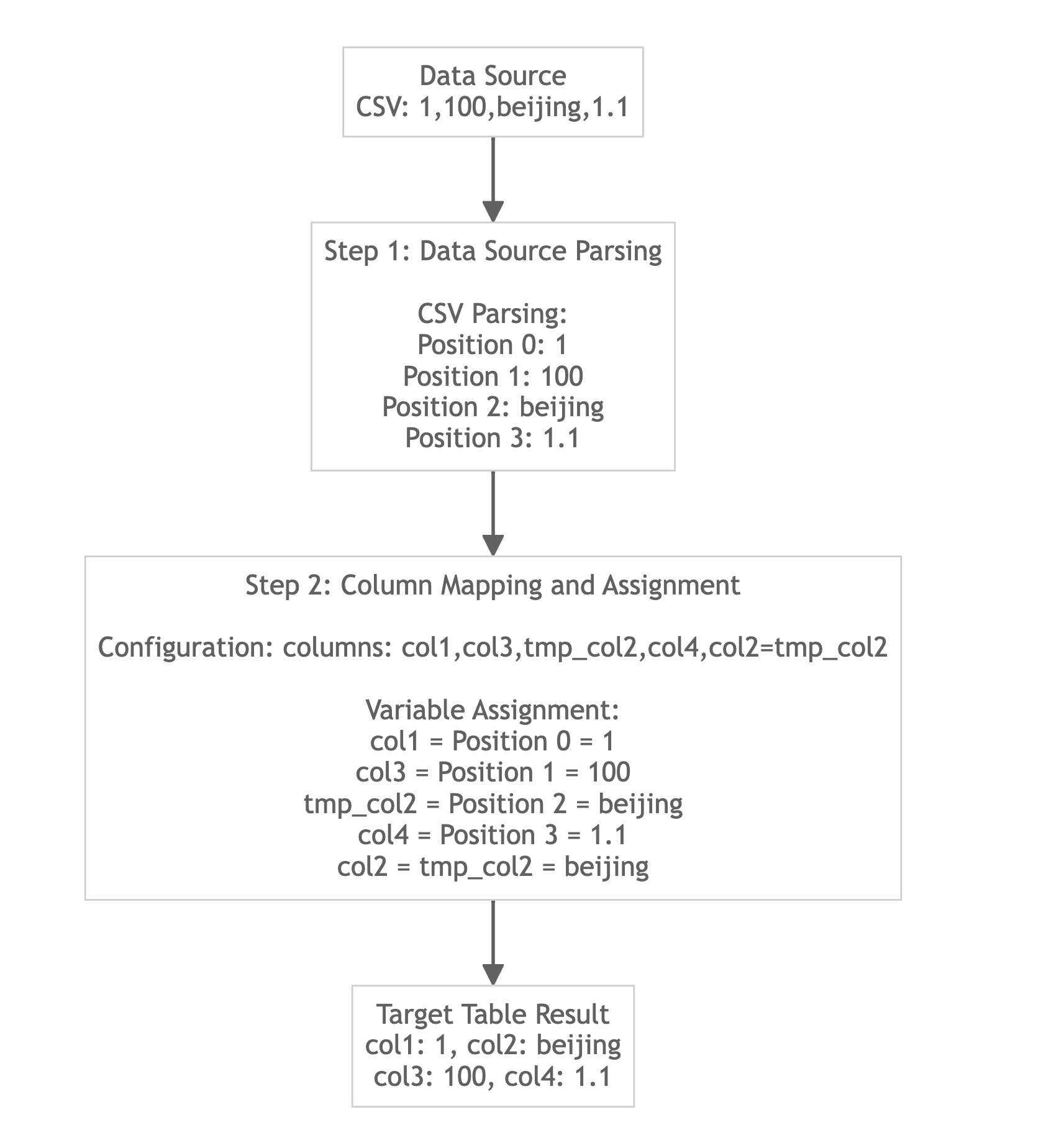
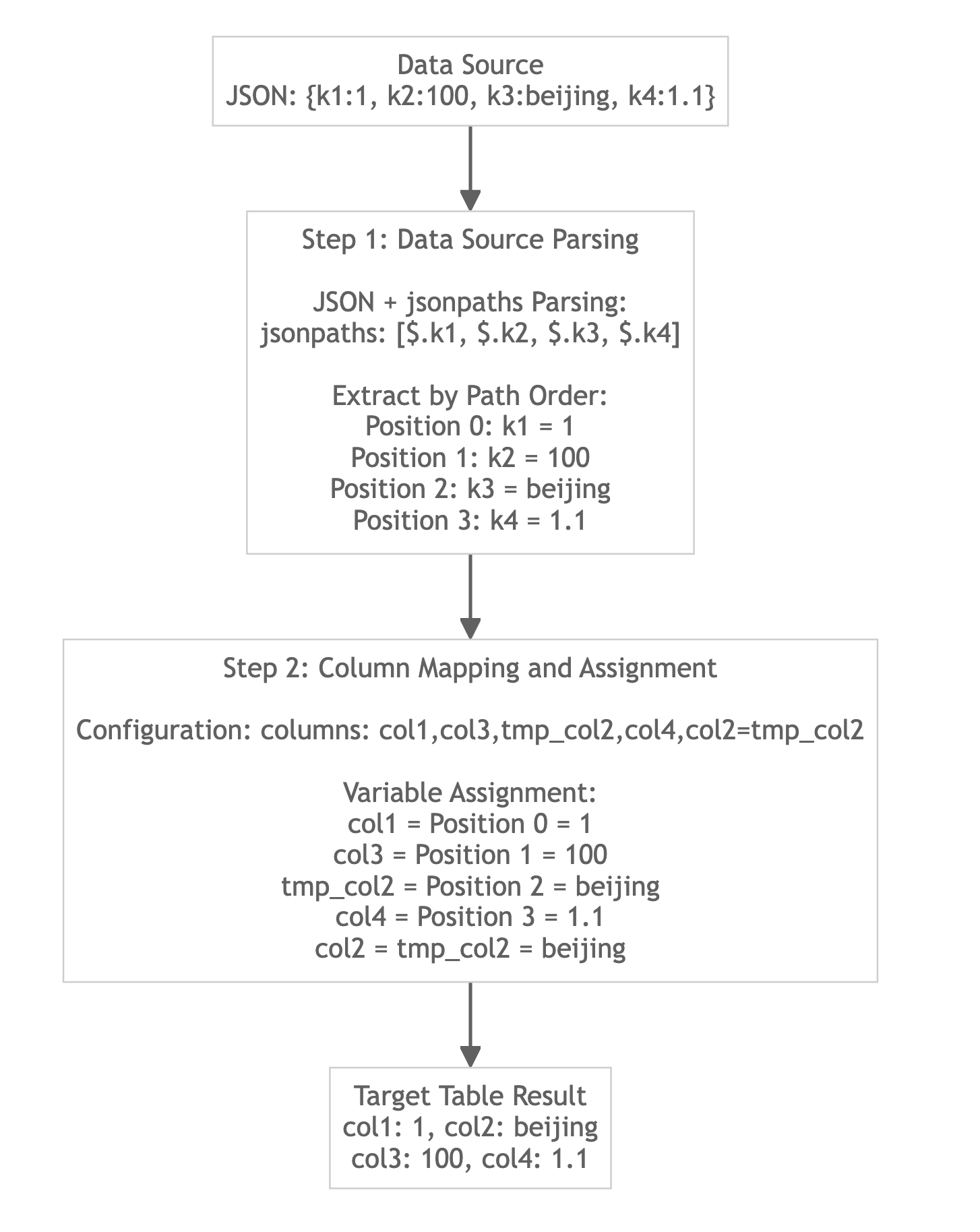
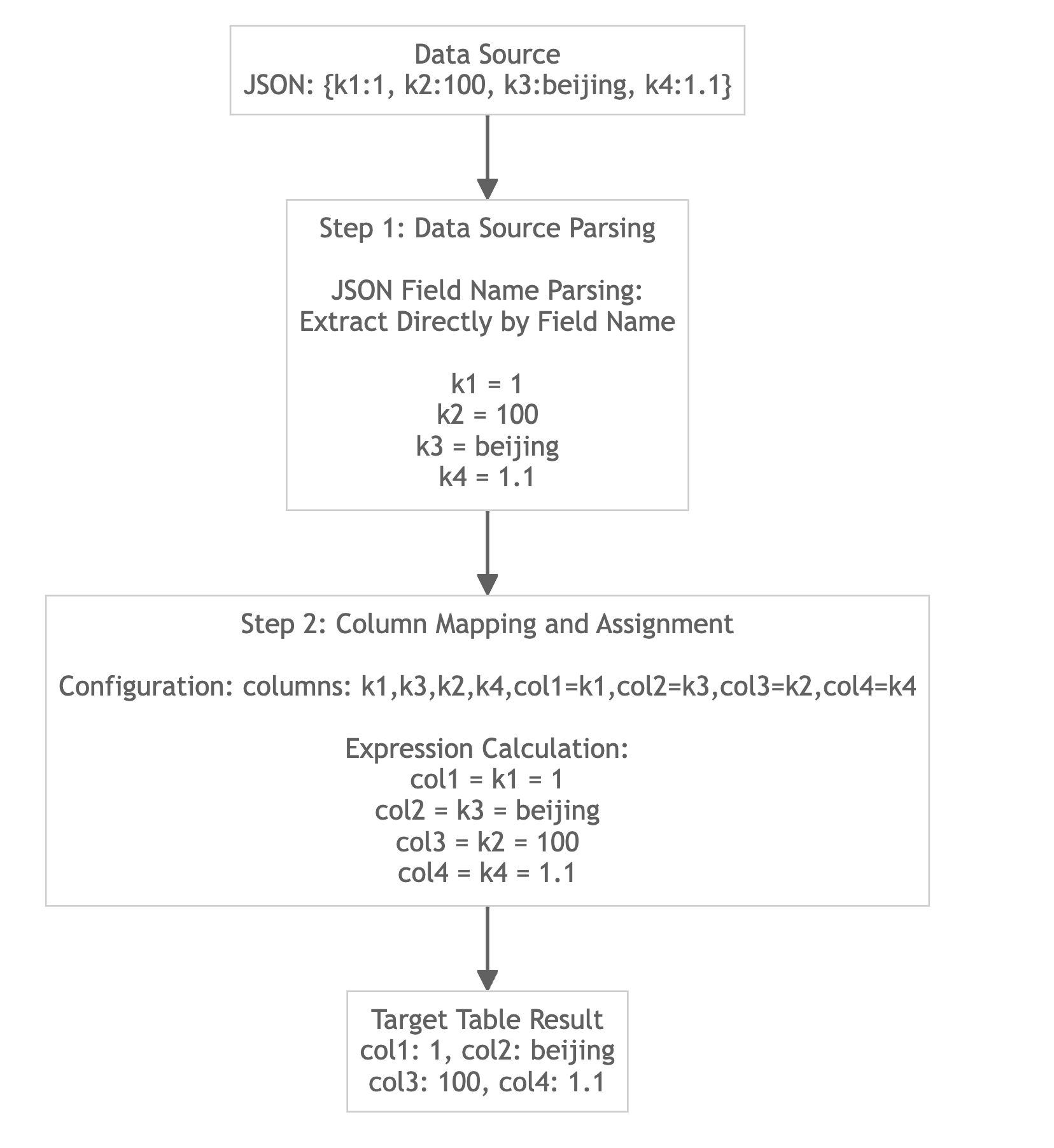
The implementation of column mapping can be divided into two core steps:
- Source data parsing: Parses the raw data into intermediate variables based on the data format.
- Assignment via column mapping: Maps the intermediate variables to the target table fields by column name.
The diagrams show field relationships schematically. Use the valid JSON and command syntax in the scenarios below when preparing input files and load requests.
Map CSV fields
Map JSON fields with jsonpaths
Map JSON fields by name
The JSON examples use non-strict loading: the string "\\N" is not JSON null, but its conversion to nullable INT produces NULL. In the CSV examples, the unquoted \N marker is parsed as NULL. Use strict mode if invalid source values must be rejected. See Handling Messy Data.
Scenario 1: Load JSON with jsonpaths
Use the following JSON Lines data for file loading. For Routine Load, publish each JSON object as a separate Kafka message:
{"k1":1,"k2":"100","k3":"beijing","k4":1.1}
{"k1":2,"k2":"200","k3":"shanghai","k4":1.2}
{"k1":3,"k2":"300","k3":"guangzhou","k4":1.3}
{"k1":4,"k2":"\\N","k3":"chongqing","k4":1.4}
Create the target table
USE example_db;

CREATE TABLE example_table
(
    col1 INT,
    col2 STRING,
    col3 INT,
    col4 DOUBLE
) ENGINE = OLAP
DUPLICATE KEY(col1)
DISTRIBUTED BY HASH(col1) BUCKETS 1;
Import the data
- Stream Load
curl --location-trusted -u "<username>" \
    -H "columns:col1, col3, col2, col4" \
    -H "jsonpaths:[\"$.k1\", \"$.k2\", \"$.k3\", \"$.k4\"]" \
    -H "strict_mode:false" \
    -H "format:json" \
    -H "read_json_by_line:true" \
    -T data.json \
    -X PUT \
    "<endpoint>/api/example_db/example_table/_stream_load"
- Broker Load
LOAD LABEL example_db.label_broker
(
    DATA INFILE("s3://bucket_name/data.json")
    INTO TABLE example_table
    FORMAT AS "json"
    (col1, col3, col2, col4)
    PROPERTIES
    (
        "read_json_by_line" = "true",
        "jsonpaths" = "[\"$.k1\", \"$.k2\", \"$.k3\", \"$.k4\"]"
    )
)
WITH S3
(
    "s3.endpoint" = "https://<s3-endpoint>",
    "s3.region" = "<region>",
    "s3.access_key" = "<access-key>",
    "s3.secret_key" = "<secret-key>"
)
PROPERTIES ("strict_mode" = "false");
- Routine Load
CREATE ROUTINE LOAD example_db.example_routine_load ON example_table
COLUMNS(col1, col3, col2, col4)
PROPERTIES
(
    "format" = "json",
    "strict_mode" = "false",
    "jsonpaths" = "[\"$.k1\", \"$.k2\", \"$.k3\", \"$.k4\"]"
)
FROM KAFKA
(
    "kafka_broker_list" = "<broker>:<port>",
    "kafka_topic" = "<topic>",
    "property.group.id" = "<consumer-group>"
);
Query result
mysql> SELECT * FROM example_table;
+------+-----------+------+------+
| col1 | col2      | col3 | col4 |
+------+-----------+------+------+
|    1 | beijing   |  100 |  1.1 |
|    2 | shanghai  |  200 |  1.2 |
|    3 | guangzhou |  300 |  1.3 |
|    4 | chongqing | NULL |  1.4 |
+------+-----------+------+------+
Scenario 2: Load JSON without jsonpaths
Use the following JSON Lines data for file loading. For Routine Load, publish each JSON object as a separate Kafka message:
{"k1":1,"k2":"100","k3":"beijing","k4":1.1}
{"k1":2,"k2":"200","k3":"shanghai","k4":1.2}
{"k1":3,"k2":"300","k3":"guangzhou","k4":1.3}
{"k1":4,"k2":"\\N","k3":"chongqing","k4":1.4}
Create the target table
USE example_db;

CREATE TABLE example_table
(
    col1 INT,
    col2 STRING,
    col3 INT,
    col4 DOUBLE
) ENGINE = OLAP
DUPLICATE KEY(col1)
DISTRIBUTED BY HASH(col1) BUCKETS 1;
Import the data
- Stream Load
curl --location-trusted -u "<username>" \
    -H "columns:k1, k3, k2, k4,col1 = k1, col2 = k3, col3 = k2, col4 = k4" \
    -H "strict_mode:false" \
    -H "format:json" \
    -H "read_json_by_line:true" \
    -T data.json \
    -X PUT \
    "<endpoint>/api/example_db/example_table/_stream_load"
- Broker Load
LOAD LABEL example_db.label_broker
(
    DATA INFILE("s3://bucket_name/data.json")
    INTO TABLE example_table
    FORMAT AS "json"
    (k1, k3, k2, k4)
    SET (
        col1 = k1,
        col2 = k3,
        col3 = k2,
        col4 = k4
    )
    PROPERTIES ("read_json_by_line" = "true")
)
WITH S3
(
    "s3.endpoint" = "https://<s3-endpoint>",
    "s3.region" = "<region>",
    "s3.access_key" = "<access-key>",
    "s3.secret_key" = "<secret-key>"
)
PROPERTIES ("strict_mode" = "false");
- Routine Load
CREATE ROUTINE LOAD example_db.example_routine_load ON example_table
COLUMNS(k1, k3, k2, k4, col1 = k1, col2 = k3, col3 = k2, col4 = k4)
PROPERTIES
(
    "format" = "json",
    "strict_mode" = "false"
)
FROM KAFKA
(
    "kafka_broker_list" = "<broker>:<port>",
    "kafka_topic" = "<topic>",
    "property.group.id" = "<consumer-group>"
);
Query result
mysql> SELECT * FROM example_table;
+------+-----------+------+------+
| col1 | col2      | col3 | col4 |
+------+-----------+------+------+
|    1 | beijing   |  100 |  1.1 |
|    2 | shanghai  |  200 |  1.2 |
|    3 | guangzhou |  300 |  1.3 |
|    4 | chongqing | NULL |  1.4 |
+------+-----------+------+------+
Scenario 3: Adjust column order
Assume the following source data (header column names are shown only for ease of explanation; the actual data has no header):
column 1, column 2, column 3, column 4
1,100,beijing,1.1
2,200,shanghai,1.2
3,300,guangzhou,1.3
4,\N,chongqing,1.4
The target table has four columns k1, k2, k3, and k4. The mapping should be as follows:
column 1 -> k1
column 2 -> k3
column 3 -> k2
column 4 -> k4
Create the target table
USE example_db;

CREATE TABLE example_table
(
    k1 INT,
    k2 STRING,
    k3 INT,
    k4 DOUBLE
) ENGINE = OLAP
DUPLICATE KEY(k1)
DISTRIBUTED BY HASH(k1) BUCKETS 1;
Import the data
- Stream Load
curl --location-trusted -u "<username>" \
    -H "column_separator:," \
    -H "columns: k1,k3,k2,k4" \
    -T data.csv \
    -X PUT \
    "<endpoint>/api/example_db/example_table/_stream_load"
- Broker Load
LOAD LABEL example_db.label_broker
(
    DATA INFILE("s3://bucket_name/data.csv")
    INTO TABLE example_table
    COLUMNS TERMINATED BY ","
    (k1, k3, k2, k4)
)
WITH S3
(
    "s3.endpoint" = "https://<s3-endpoint>",
    "s3.region" = "<region>",
    "s3.access_key" = "<access-key>",
    "s3.secret_key" = "<secret-key>"
);
- Routine Load
CREATE ROUTINE LOAD example_db.example_routine_load ON example_table
COLUMNS(k1, k3, k2, k4),
COLUMNS TERMINATED BY ","
FROM KAFKA
(
    "kafka_broker_list" = "<broker>:<port>",
    "kafka_topic" = "<topic>",
    "property.group.id" = "<consumer-group>"
);
Query result
mysql> select * from example_table;
+------+-----------+------+------+
| k1   | k2        | k3   | k4   |
+------+-----------+------+------+
|    2 | shanghai  |  200 |  1.2 |
|    4 | chongqing | NULL |  1.4 |
|    3 | guangzhou |  300 |  1.3 |
|    1 | beijing   |  100 |  1.1 |
+------+-----------+------+------+
Scenario 4: Skip extra source columns
Assume the following source data (header column names are shown only for ease of explanation; the actual data has no header):
column 1, column 2, column 3, column 4
1,100,beijing,1.1
2,200,shanghai,1.2
3,300,guangzhou,1.3
4,\N,chongqing,1.4
The target table has three columns k1, k2, and k3, while the source file contains four columns. Only the 1st, 2nd, and 4th columns of the source file are needed, with the following mapping:
column 1 -> k1
column 2 -> k2
column 4 -> k3
To skip certain columns in the source file, simply use any column name that does not exist in the target table during column mapping. Choose valid, unique source-column names. An unused source column is ignored; a temporary column can also be referenced by a transformation or pre-filter.
Create the example table
USE example_db;

CREATE TABLE example_table
(
    k1 INT,
    k2 STRING,
    k3 DOUBLE
) ENGINE = OLAP
DUPLICATE KEY(k1)
DISTRIBUTED BY HASH(k1) BUCKETS 1;
Import the data
- Stream Load
curl --location-trusted -u "<username>" \
    -H "column_separator:," \
    -H "columns: k1,k2,tmp_skip,k3" \
    -T data.csv \
    "<endpoint>/api/example_db/example_table/_stream_load"
- Broker Load
LOAD LABEL example_db.label_broker
(
    DATA INFILE("s3://bucket_name/data.csv")
    INTO TABLE example_table
    COLUMNS TERMINATED BY ","
    (tmp_k1, tmp_k2, tmp_skip, tmp_k3)
    SET (
        k1 = tmp_k1,
        k2 = tmp_k2,
        k3 = tmp_k3
    )
)
WITH S3
(
    "s3.endpoint" = "https://<s3-endpoint>",
    "s3.region" = "<region>",
    "s3.access_key" = "<access-key>",
    "s3.secret_key" = "<secret-key>"
);
- Routine Load
CREATE ROUTINE LOAD example_db.example_routine_load ON example_table
COLUMNS TERMINATED BY ",",
COLUMNS(k1, k2, tmp_skip, k3)
PROPERTIES
(
    "format" = "csv"
)
FROM KAFKA
(
    "kafka_broker_list" = "<broker>:<port>",
    "kafka_topic" = "<topic>",
    "property.group.id" = "<consumer-group>"
);
Note:
Replace
tmp_skipwith a valid source-column name that does not conflict with a target column.
Query result
mysql> select * from example_table;
+------+------+------+
| k1   | k2   | k3   |
+------+------+------+
|    1 | 100  |  1.1 |
|    2 | 200  |  1.2 |
|    3 | 300  |  1.3 |
|    4 | NULL |  1.4 |
+------+------+------+
Scenario 5: Fill omitted target columns
Assume the following source data (header column names are shown only for ease of explanation; the actual data has no header):
column 1, column 2, column 3, column 4
1,100,beijing,1.1
2,200,shanghai,1.2
3,300,guangzhou,1.3
4,\N,chongqing,1.4
The target table has five columns k1, k2, k3, k4, and k5, while the source file contains four columns. Only the 1st, 2nd, 3rd, and 4th columns of the source file are needed, with the following mapping:
column 1 -> k1
column 2 -> k3
column 3 -> k2
column 4 -> k4
k5 uses the default value
For ordinary full-row loads in these examples, omitted target columns follow these rules. Partial updates, generated columns, and auto-increment columns have separate behavior:
- If the column has a default value, the default value is used.
- If the column is nullable but has no default value, NULL is used.
- If the column is non-nullable and has no default value, the import fails.
Create the example table
USE example_db;

CREATE TABLE example_table
(
    k1 INT,
    k2 STRING,
    k3 INT,
    k4 DOUBLE,
    k5 INT DEFAULT 2
) ENGINE = OLAP
DUPLICATE KEY(k1)
DISTRIBUTED BY HASH(k1) BUCKETS 1;
Import the data
- Stream Load
curl --location-trusted -u "<username>" \
    -H "column_separator:," \
    -H "columns: k1,k3,k2,k4" \
    -T data.csv \
    "<endpoint>/api/example_db/example_table/_stream_load"
- Broker Load
LOAD LABEL example_db.label_broker
(
    DATA INFILE("s3://bucket_name/data.csv")
    INTO TABLE example_table
    COLUMNS TERMINATED BY ","
    (tmp_k1, tmp_k3, tmp_k2, tmp_k4)
    SET (
        k1 = tmp_k1,
        k3 = tmp_k3,
        k2 = tmp_k2,
        k4 = tmp_k4
    )
)
WITH S3
(
    "s3.endpoint" = "https://<s3-endpoint>",
    "s3.region" = "<region>",
    "s3.access_key" = "<access-key>",
    "s3.secret_key" = "<secret-key>"
);
- Routine Load
CREATE ROUTINE LOAD example_db.example_routine_load ON example_table
COLUMNS(k1, k3, k2, k4),
COLUMNS TERMINATED BY ","
FROM KAFKA
(
    "kafka_broker_list" = "<broker>:<port>",
    "kafka_topic" = "<topic>",
    "property.group.id" = "<consumer-group>"
);
Query result
mysql> select * from example_table;
+------+-----------+------+------+------+
| k1   | k2        | k3   | k4   | k5   |
+------+-----------+------+------+------+
|    1 | beijing   |  100 |  1.1 |    2 |
|    2 | shanghai  |  200 |  1.2 |    2 |
|    3 | guangzhou |  300 |  1.3 |    2 |
|    4 | chongqing | NULL |  1.4 |    2 |
+------+-----------+------+------+------+
Column transformation
Column transformation applies scalar expressions to parsed source columns before assigning them to target columns. Use supported scalar functions, CASE WHEN, and arithmetic expressions. Aggregate functions, window functions, and subqueries are not general load-mapping expressions. For transformations that require a query, use INSERT INTO ... SELECT.
Scenario 1: Apply arithmetic to source values
Assume the following source data (header column names are shown only for ease of explanation; the actual data has no header):
column 1, column 2, column 3, column 4
1,100,beijing,1.1
2,200,shanghai,1.2
3,300,guangzhou,1.3
4,\N,chongqing,1.4
The table has four columns k1, k2, k3, and k4. The import mapping and transformation are as follows:
column 1       -> k1
column 2 * 100 -> k3
column 3       -> k2
column 4       -> k4
Create the example table
USE example_db;

CREATE TABLE example_table
(
    k1 INT,
    k2 STRING,
    k3 INT,
    k4 DOUBLE
)
ENGINE = OLAP
DUPLICATE KEY(k1)
DISTRIBUTED BY HASH(k1) BUCKETS 1;
Import the data
- Stream Load
curl --location-trusted -u "<username>" \
    -H "column_separator:," \
    -H "columns: k1, tmp_k3, k2, k4, k3 = tmp_k3 * 100" \
    -T data.csv \
    "<endpoint>/api/example_db/example_table/_stream_load"
- Broker Load
LOAD LABEL example_db.label1
(
    DATA INFILE("s3://bucket_name/data.csv")
    INTO TABLE example_table
    COLUMNS TERMINATED BY ","
    (k1, tmp_k3, k2, k4)
    SET (
        k3 = tmp_k3 * 100
    )
)
WITH S3
(
    "s3.endpoint" = "https://<s3-endpoint>",
    "s3.region" = "<region>",
    "s3.access_key" = "<access-key>",
    "s3.secret_key" = "<secret-key>"
);
- Routine Load
CREATE ROUTINE LOAD example_db.example_routine_load ON example_table
COLUMNS(k1, tmp_k3, k2, k4, k3 = tmp_k3 * 100),
COLUMNS TERMINATED BY ","
FROM KAFKA
(
    "kafka_broker_list" = "<broker>:<port>",
    "kafka_topic" = "<topic>",
    "property.group.id" = "<consumer-group>"
);
Query result
mysql> select * from example_table;
+------+-----------+-------+------+
| k1   | k2        | k3    | k4   |
+------+-----------+-------+------+
|    1 | beijing   | 10000 |  1.1 |
|    2 | shanghai  | 20000 |  1.2 |
|    3 | guangzhou | 30000 |  1.3 |
|    4 | chongqing |  NULL |  1.4 |
+------+-----------+-------+------+
Scenario 2: Convert values with CASE WHEN
Assume the following source data (header column names are shown only for ease of explanation; the actual data has no header):
column 1, column 2, column 3, column 4
1,100,beijing,1.1
2,200,shanghai,1.2
3,300,guangzhou,1.3
4,\N,chongqing,1.4
The table has four columns k1, k2, k3, and k4. The values beijing, shanghai, guangzhou, and chongqing in the source data are converted to their corresponding region IDs before import:
column 1                                 -> k1
column 2                                 -> k2
column 3 (after region ID conversion)    -> k3
column 4                                 -> k4
Create the example table
USE example_db;

CREATE TABLE example_table
(
    k1 INT,
    k2 INT,
    k3 INT,
    k4 DOUBLE
)
ENGINE = OLAP
DUPLICATE KEY(k1)
DISTRIBUTED BY HASH(k1) BUCKETS 1;
Import the data
- Stream Load
curl --location-trusted -u "<username>" \
    -H "column_separator:," \
    -H "columns: k1, k2, tmp_k3, k4, k3 = CASE tmp_k3 WHEN 'beijing' THEN 1 WHEN 'shanghai' THEN 2 WHEN 'guangzhou' THEN 3 WHEN 'chongqing' THEN 4 ELSE NULL END" \
    -T data.csv \
    "<endpoint>/api/example_db/example_table/_stream_load"
- Broker Load
LOAD LABEL example_db.label1
(
    DATA INFILE("s3://bucket_name/data.csv")
    INTO TABLE example_table
    COLUMNS TERMINATED BY ","
    (k1, k2, tmp_k3, k4)
    SET (
        k3 = CASE tmp_k3 WHEN 'beijing' THEN 1 WHEN 'shanghai' THEN 2 WHEN 'guangzhou' THEN 3 WHEN 'chongqing' THEN 4 ELSE NULL END
    )
)
WITH S3
(
    "s3.endpoint" = "https://<s3-endpoint>",
    "s3.region" = "<region>",
    "s3.access_key" = "<access-key>",
    "s3.secret_key" = "<secret-key>"
);
- Routine Load
CREATE ROUTINE LOAD example_db.example_routine_load ON example_table
COLUMNS(k1, k2, tmp_k3, k4, k3 = CASE tmp_k3 WHEN 'beijing' THEN 1 WHEN 'shanghai' THEN 2 WHEN 'guangzhou' THEN 3 WHEN 'chongqing' THEN 4 ELSE NULL END),
COLUMNS TERMINATED BY ","
FROM KAFKA
(
    "kafka_broker_list" = "<broker>:<port>",
    "kafka_topic" = "<topic>",
    "property.group.id" = "<consumer-group>"
);
Query result
mysql> select * from example_table;
+------+------+------+------+
| k1   | k2   | k3   | k4   |
+------+------+------+------+
|    1 |  100 |    1 |  1.1 |
|    2 |  200 |    2 |  1.2 |
|    3 |  300 |    3 |  1.3 |
|    4 | NULL |    4 |  1.4 |
+------+------+------+------+
Scenario 3: Replace source NULL values
Assume the following source data (header column names are shown only for ease of explanation; the actual data has no header):
column 1, column 2, column 3, column 4
1,100,beijing,1.1
2,200,shanghai,1.2
3,300,guangzhou,1.3
4,\N,chongqing,1.4
The table has four columns k1, k2, k3, and k4. While converting the region ID, the null value of the k2 column in the source data is converted to 0 during import:
column 1                                  -> k1
column 2 (convert null to 0 if null)      -> k2
column 3                                  -> k3
column 4                                  -> k4
Create the example table
USE example_db;

CREATE TABLE example_table
(
    k1 INT,
    k2 INT,
    k3 INT,
    k4 DOUBLE
)
ENGINE = OLAP
DUPLICATE KEY(k1)
DISTRIBUTED BY HASH(k1) BUCKETS 1;
Import the data
- Stream Load
curl --location-trusted -u "<username>" \
    -H "column_separator:," \
    -H "columns: k1, tmp_k2, tmp_k3, k4, k2 = ifnull(tmp_k2, 0), k3 = CASE tmp_k3 WHEN 'beijing' THEN 1 WHEN 'shanghai' THEN 2 WHEN 'guangzhou' THEN 3 WHEN 'chongqing' THEN 4 ELSE NULL END" \
    -T data.csv \
    "<endpoint>/api/example_db/example_table/_stream_load"
- Broker Load
LOAD LABEL example_db.label1
(
    DATA INFILE("s3://bucket_name/data.csv")
    INTO TABLE example_table
    COLUMNS TERMINATED BY ","
    (k1, tmp_k2, tmp_k3, k4)
    SET (
        k2 = ifnull(tmp_k2, 0),
        k3 = CASE tmp_k3 WHEN 'beijing' THEN 1 WHEN 'shanghai' THEN 2 WHEN 'guangzhou' THEN 3 WHEN 'chongqing' THEN 4 ELSE NULL END
    )
)
WITH S3
(
    "s3.endpoint" = "https://<s3-endpoint>",
    "s3.region" = "<region>",
    "s3.access_key" = "<access-key>",
    "s3.secret_key" = "<secret-key>"
);
- Routine Load
CREATE ROUTINE LOAD example_db.example_routine_load ON example_table
COLUMNS(k1, tmp_k2, tmp_k3, k4, k2 = ifnull(tmp_k2, 0), k3 = CASE tmp_k3 WHEN 'beijing' THEN 1 WHEN 'shanghai' THEN 2 WHEN 'guangzhou' THEN 3 WHEN 'chongqing' THEN 4 ELSE NULL END),
COLUMNS TERMINATED BY ","
FROM KAFKA
(
    "kafka_broker_list" = "<broker>:<port>",
    "kafka_topic" = "<topic>",
    "property.group.id" = "<consumer-group>"
);
Query result
mysql> select * from example_table;
+------+------+------+------+
| k1   | k2   | k3   | k4   |
+------+------+------+------+
|    1 |  100 |    1 |  1.1 |
|    2 |  200 |    2 |  1.2 |
|    3 |  300 |    3 |  1.3 |
|    4 |    0 |    4 |  1.4 |
+------+------+------+------+
Pre-filtering
Pre-filtering selects parsed source rows before target-type conversion and column transformation. It can reduce the rows passed to subsequent processing. This feature is supported only by Broker Load and Routine Load.
Use cases
- Filter before transformation: Filtering before column mapping and column transformation can remove some unneeded data in advance.
- Filter columns are not in the table and are only used as filter flags: For example, the source data stores rows from multiple tables (or rows from multiple tables are written into the same Kafka message queue), and each row contains a column with a table name to indicate which table the row belongs to. You can use a pre-filter condition to select the data of the corresponding table for import.
Limitations
| Limitation | Description |
|---|---|
| Filter column limitation | Pre-filtering can only filter independent simple columns in the column list, and cannot filter columns produced by expressions. For example, when the column mapping is (a, tmp, b = tmp + 1), the column b cannot be used as a filter condition. |
| Data processing limitation | Pre-filtering receives values after file parsing. CSV fields generally enter the text-load mapping as strings, but the default unquoted \N marker is already parsed as NULL. Use IS NULL or IS NOT NULL to test it. Reader-specific types and null markers still apply. |
Example 1: Pre-filter with a numeric condition
Select source rows before target conversion
This example shows how to use a simple numeric comparison condition to filter source data. By setting the filter condition k1 > 1, unwanted records are filtered out before data transformation.
Assume the following source data (header column names are shown only for ease of explanation; the actual data has no header):
column 1, column 2, column 3, column 4
1,100,beijing,1.1
2,200,shanghai,1.2
3,300,guangzhou,1.3
4,\N,chongqing,1.4
The pre-filter condition is:
column 1 > 1, that is, only data with column 1 > 1 is imported, and the rest is filtered out.
Create the example table
USE example_db;

CREATE TABLE example_table
(
    k1 INT,
    k2 INT,
    k3 STRING,
    k4 DOUBLE
)
ENGINE = OLAP
DUPLICATE KEY(k1)
DISTRIBUTED BY HASH(k1) BUCKETS 1;
Import the data
- Broker Load
LOAD LABEL example_db.label1
(
    DATA INFILE("s3://bucket_name/data.csv")
    INTO TABLE example_table
    COLUMNS TERMINATED BY ","
    (k1, k2, k3, k4)
    PRECEDING FILTER k1 > 1
)
WITH S3
(
    "s3.endpoint" = "https://<s3-endpoint>",
    "s3.region" = "<region>",
    "s3.access_key" = "<access-key>",
    "s3.secret_key" = "<secret-key>"
);
- Routine Load
CREATE ROUTINE LOAD example_db.example_routine_load ON example_table
COLUMNS(k1, k2, k3, k4),
COLUMNS TERMINATED BY ",",
PRECEDING FILTER k1 > 1
FROM KAFKA
(
    "kafka_broker_list" = "<broker>:<port>",
    "kafka_topic" = "<topic>",
    "property.group.id" = "<consumer-group>"
);
Query result
mysql> select * from example_table;
+------+------+-----------+------+
| k1   | k2   | k3        | k4   |
+------+------+-----------+------+
|    2 |  200 | shanghai  |  1.2 |
|    3 |  300 | guangzhou |  1.3 |
|    4 | NULL | chongqing |  1.4 |
+------+------+-----------+------+
Example 2: Filter invalid data with a temporary column
Exclude an invalid source string before integer conversion
This example shows how to handle an import scenario that contains invalid data.
The source data is:
1,1
2,abc
3,3
Create the table
USE example_db;

CREATE TABLE example_table
(
    k1 INT,
    k2 INT NOT NULL
)
ENGINE = OLAP
DUPLICATE KEY(k1)
DISTRIBUTED BY HASH(k1) BUCKETS 1;
For the k2 column whose type is int, abc is invalid dirty data. To exclude this row before its target-column conversion, introduce an intermediate source column and pre-filter it.
Import the data
- Broker Load
LOAD LABEL example_db.label1
(
    DATA INFILE("s3://bucket_name/data.csv")
    INTO TABLE example_table
    COLUMNS TERMINATED BY ","
    (k1, tmp)
    SET (k2 = tmp)
    PRECEDING FILTER tmp != "abc"
)
WITH S3
(
    "s3.endpoint" = "https://<s3-endpoint>",
    "s3.region" = "<region>",
    "s3.access_key" = "<access-key>",
    "s3.secret_key" = "<secret-key>"
);
- Routine Load
CREATE ROUTINE LOAD example_db.example_routine_load ON example_table
COLUMNS(k1, tmp, k2 = tmp),
COLUMNS TERMINATED BY ",",
PRECEDING FILTER tmp != "abc"
FROM KAFKA
(
    "kafka_broker_list" = "<broker>:<port>",
    "kafka_topic" = "<topic>",
    "property.group.id" = "<consumer-group>"
);
Import result
mysql> select * from example_table;
+------+----+
| k1   | k2 |
+------+----+
|    1 |  1 |
|    3 |  3 |
+------+----+
Post-filtering
Post-filtering is performed after data transformation and can filter based on the transformed result.
Scenario 1: Filter without column transformation
Assume the following source data (header column names are shown only for ease of explanation; the actual data has no header):
column 1, column 2, column 3, column 4
1,100,beijing,1.1
2,200,shanghai,1.2
3,300,guangzhou,1.3
4,\N,chongqing,1.4
The table has four columns k1, k2, k3, and k4. Without column mapping or transformation, only the rows where the 4th column of the source file is greater than 1.2 are imported.
Create the example table
USE example_db;

CREATE TABLE example_table
(
    k1 INT,
    k2 INT,
    k3 STRING,
    k4 DOUBLE
)
ENGINE = OLAP
DUPLICATE KEY(k1)
DISTRIBUTED BY HASH(k1) BUCKETS 1;
Import the data
- Stream Load
curl --location-trusted -u "<username>" \
    -H "column_separator:," \
    -H "columns: k1, k2, k3, k4" \
    -H "where: k4 > 1.2" \
    -T data.csv \
    "<endpoint>/api/example_db/example_table/_stream_load"
- Broker Load
LOAD LABEL example_db.label1
(
    DATA INFILE("s3://bucket_name/data.csv")
    INTO TABLE example_table
    COLUMNS TERMINATED BY ","
    (k1, k2, k3, k4)
    WHERE k4 > 1.2
)
WITH S3
(
    "s3.endpoint" = "https://<s3-endpoint>",
    "s3.region" = "<region>",
    "s3.access_key" = "<access-key>",
    "s3.secret_key" = "<secret-key>"
);
- Routine Load
CREATE ROUTINE LOAD example_db.example_routine_load ON example_table
COLUMNS(k1, k2, k3, k4),
COLUMNS TERMINATED BY ",",
WHERE k4 > 1.2
FROM KAFKA
(
    "kafka_broker_list" = "<broker>:<port>",
    "kafka_topic" = "<topic>",
    "property.group.id" = "<consumer-group>"
);
Query result
mysql> select * from example_table;
+------+------+-----------+------+
| k1   | k2   | k3        | k4   |
+------+------+-----------+------+
|    3 |  300 | guangzhou |  1.3 |
|    4 | NULL | chongqing |  1.4 |
+------+------+-----------+------+
Scenario 2: Filter transformed values
Assume the following source data (header column names are shown only for ease of explanation; the actual data has no header):
column 1, column 2, column 3, column 4
1,100,beijing,1.1
2,200,shanghai,1.2
3,300,guangzhou,1.3
4,\N,chongqing,1.4
The table has four columns k1, k2, k3, and k4. In the column transformation example, the province name is converted to an ID. Here, the goal is to filter out rows whose ID is 3.
Create the example table
USE example_db;

CREATE TABLE example_table
(
    k1 INT,
    k2 INT,
    k3 INT,
    k4 DOUBLE
)
ENGINE = OLAP
DUPLICATE KEY(k1)
DISTRIBUTED BY HASH(k1) BUCKETS 1;
Import the data
- Stream Load
curl --location-trusted -u "<username>" \
    -H "column_separator:," \
    -H "columns: k1, k2, tmp_k3, k4, k3 = case tmp_k3 when 'beijing' then 1 when 'shanghai' then 2 when 'guangzhou' then 3 when 'chongqing' then 4 else null end" \
    -H "where: k3 != 3" \
    -T data.csv \
    "<endpoint>/api/example_db/example_table/_stream_load"
- Broker Load
LOAD LABEL example_db.label1
(
    DATA INFILE("s3://bucket_name/data.csv")
    INTO TABLE example_table
    COLUMNS TERMINATED BY ","
    (k1, k2, tmp_k3, k4)
    SET (
        k3 = CASE tmp_k3 WHEN 'beijing' THEN 1 WHEN 'shanghai' THEN 2 WHEN 'guangzhou' THEN 3 WHEN 'chongqing' THEN 4 ELSE NULL END
    )
    WHERE k3 != 3
)
WITH S3
(
    "s3.endpoint" = "https://<s3-endpoint>",
    "s3.region" = "<region>",
    "s3.access_key" = "<access-key>",
    "s3.secret_key" = "<secret-key>"
);
- Routine Load
CREATE ROUTINE LOAD example_db.example_routine_load ON example_table
COLUMNS(k1, k2, tmp_k3, k4, k3 = CASE tmp_k3 WHEN 'beijing' THEN 1 WHEN 'shanghai' THEN 2 WHEN 'guangzhou' THEN 3 WHEN 'chongqing' THEN 4 ELSE NULL END),
COLUMNS TERMINATED BY ",",
WHERE k3 != 3
FROM KAFKA
(
    "kafka_broker_list" = "<broker>:<port>",
    "kafka_topic" = "<topic>",
    "property.group.id" = "<consumer-group>"
);
Query result
mysql> select * from example_table;
+------+------+------+------+
| k1   | k2   | k3   | k4   |
+------+------+------+------+
|    1 |  100 |    1 |  1.1 |
|    2 |  200 |    2 |  1.2 |
|    4 | NULL |    4 |  1.4 |
+------+------+------+------+
Scenario 3: Combine filter conditions
Assume the following source data (header column names are shown only for ease of explanation; the actual data has no header):
column 1, column 2, column 3, column 4
1,100,beijing,1.1
2,200,shanghai,1.2
3,300,guangzhou,1.3
4,\N,chongqing,1.4
The table has four columns k1, k2, k3, and k4. Filter out rows where the k1 column is null, and retain only rows where the k4 column is greater than 1.2.
Create the example table
USE example_db;

CREATE TABLE example_table
(
    k1 INT,
    k2 INT,
    k3 STRING,
    k4 DOUBLE
)
ENGINE = OLAP
DUPLICATE KEY(k1)
DISTRIBUTED BY HASH(k1) BUCKETS 1;
Import the data
- Stream Load
curl --location-trusted -u "<username>" \
    -H "column_separator:," \
    -H "columns: k1, k2, k3, k4" \
    -H "where: k1 is not null and k4 > 1.2" \
    -T data.csv \
    "<endpoint>/api/example_db/example_table/_stream_load"
- Broker Load
LOAD LABEL example_db.label1
(
    DATA INFILE("s3://bucket_name/data.csv")
    INTO TABLE example_table
    COLUMNS TERMINATED BY ","
    (k1, k2, k3, k4)
    WHERE k1 is not null and k4 > 1.2
)
WITH S3
(
    "s3.endpoint" = "https://<s3-endpoint>",
    "s3.region" = "<region>",
    "s3.access_key" = "<access-key>",
    "s3.secret_key" = "<secret-key>"
);
- Routine Load
CREATE ROUTINE LOAD example_db.example_routine_load ON example_table
COLUMNS(k1, k2, k3, k4),
COLUMNS TERMINATED BY ",",
WHERE k1 is not null and k4 > 1.2
FROM KAFKA
(
    "kafka_broker_list" = "<broker>:<port>",
    "kafka_topic" = "<topic>",
    "property.group.id" = "<consumer-group>"
);
Query result
mysql> select * from example_table;
+------+------+-----------+------+
| k1   | k2   | k3        | k4   |
+------+------+-----------+------+
|    3 |  300 | guangzhou |  1.3 |
|    4 | NULL | chongqing |  1.4 |
+------+------+-----------+------+
FAQ
1. Why does Stream Load not have PRECEDING FILTER?
Stream Load does not support pre-filtering. It can only perform post-filtering through the where parameter. If pre-filtering is required, use Broker Load or Routine Load.
2. How does pre-filtering handle \N and NULL?
Pre-filtering runs after parsing. In CSV, the default unquoted \N null marker is already NULL at this point. Test it with IS NULL or IS NOT NULL, rather than comparing it to a string. JSON null and the JSON string "\\N" are different inputs. Use post-filtering (WHERE) when the condition must examine a transformed target value.
3. How do I skip certain columns in the source file during column mapping?
In the column mapping list, assign a column name that does not exist in the target table (such as tmp_skip) to the unwanted column. These temporary column names are placeholders only and are automatically ignored during import.
4. How are columns handled when the target table has columns that the source file does not have?
For ordinary full-row loads, omitted target columns follow these rules. Partial updates, generated columns, and auto-increment columns have separate behavior:
- If the column has a default value, the default value is used.
- If the column is nullable but has no default value, NULL is used.
- If the column is non-nullable and has no default value, the import fails.
5. Which functions can be used in column transformation?
Use supported scalar functions such as IFNULL(), string and date functions, CASE WHEN, and arithmetic expressions. Stream Load and Routine Load put assignments in columns/COLUMNS; Broker Load uses SET. Use INSERT INTO ... SELECT for query-level operations such as aggregation.
6. Why can pre-filtering not reference columns assigned by an expression?
Pre-filtering can only filter independent simple columns and cannot filter columns generated by expressions (such as b = tmp + 1). Use post-filtering (WHERE) to reference such columns instead.
Common errors
- Unexpected NULL or filtered rows: Check source null markers, target types, and strict mode. Explicitly compare the parsed source values with transformed target values.
- Unknown column in a pre-filter: Reference a simple source-column name. Use
WHEREto filter a transformed target column. - Routine Load syntax error: Separate load clauses with commas, put transformations inside
COLUMNS, and place the final semicolon afterFROM KAFKA (...). - Duplicate sample rows or an existing label: Run one method per fresh table, and use unique load labels or Routine Load job names.