Connect to Amazon S3 Tables
Amazon S3 Tables stores Apache Iceberg tables and automates maintenance such as compaction and snapshot management. Connect a VeloDB Cloud warehouse through the S3 Tables or AWS Glue Iceberg REST endpoint, then query and write tables.
Prerequisites
- Connect to a VeloDB Cloud warehouse with a SQL user allowed to create catalogs and use the required databases and tables.
- For SaaS and BYOC warehouses, configure network access from the warehouse to both the external catalog endpoint and the storage endpoints returned in table metadata. An endpoint reachable from your laptop may still be unreachable from the warehouse. Contact VeloDB Cloud support when the integration needs private networking or managed runtime configuration.
- Prepare external service permissions for the metadata and data operations you plan to run. Credential vending still requires the external service to grant storage access.
- Replace sample hosts, account IDs, bucket names, and credentials. The HTTP endpoints and development credentials in local service examples are for an isolated test environment. Use HTTPS and restricted credentials for remote access.
Use the integration
01 Create an S3 table bucket
S3 Table Bucket is the third type of Bucket launched by S3, on par with the previous General purpose bucket and Directory bucket.
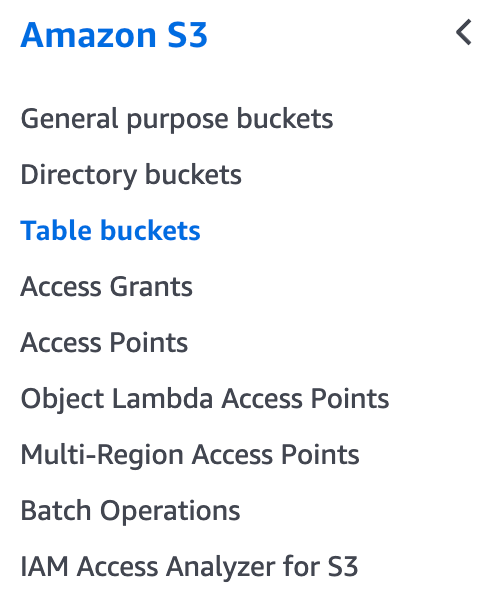
Create a table bucket with your own unique name and record its ARN. The screenshots use doris-s3-table-bucket as the upstream example name.

02 Create an Iceberg catalog
-
Connecting to
s3 tablesusing AWS S3 Table Rest CatalogCREATE CATALOG aws_s3_tables PROPERTIES ('type' = 'iceberg','iceberg.catalog.type' = 'rest','warehouse' = 'arn:aws:s3tables:us-east-1:<account_id>:bucket/<s3_table_bucket_name>','iceberg.rest.uri' = 'https://s3tables.us-east-1.amazonaws.com/iceberg','iceberg.rest.sigv4-enabled' = 'true','iceberg.rest.signing-name' = 's3tables','iceberg.rest.signing-region' = 'us-east-1','iceberg.rest.access-key-id' = '<ak>','iceberg.rest.secret-access-key' = '<sk>'); -
Connecting to
s3 tablesusing Glue Rest CatalogCREATE CATALOG glue_s3 PROPERTIES ('type' = 'iceberg','iceberg.catalog.type' = 'rest','iceberg.rest.uri' = 'https://glue.<region>.amazonaws.com/iceberg','warehouse' = '<account_id>:s3tablescatalog/<s3_table_bucket_name>','iceberg.rest.sigv4-enabled' = 'true','iceberg.rest.signing-name' = 'glue','iceberg.rest.access-key-id' = '<ak>','iceberg.rest.secret-access-key' = '<sk>','iceberg.rest.signing-region' = '<region>');
03 Access S3 Tables
Doris > SWITCH aws_s3_tables;

Doris > SHOW DATABASES;
+--------------------+
| Database           |
+--------------------+
| information_schema |
| my_namespace       |
| mysql              |
+--------------------+

Doris > USE my_namespace;

Doris > SHOW TABLES;
+------------------------+
| Tables_in_my_namespace |
+------------------------+
| my_table               |
+------------------------+

Doris > SELECT * FROM my_table;
+------+------+-------+
| id   | name | value |
+------+------+-------+
|    1 | ABC  |   100 |
|    2 | XYZ  |   200 |
+------+------+-------+
04 Create an S3 Tables table and write data
Doris > CREATE TABLE partition_table (
    ->   `ts` DATETIME COMMENT 'ts',
    ->   `id` INT COMMENT 'col1',
    ->   `pt1` STRING COMMENT 'pt1',
    ->   `pt2` STRING COMMENT 'pt2'
    -> )
    -> PARTITION BY LIST (day(ts), pt1, pt2) ();

Doris > INSERT INTO partition_table VALUES
    -> ("2024-01-01 08:00:00", 1000, "us-east", "PART1"),
    -> ("2024-01-02 10:00:00", 1002, "us-sout", "PART2");
Query OK, 2 rows affected
{'status':'COMMITTED', 'txnId':'1736935786473'}

Doris > SELECT * FROM partition_table;
+----------------------------+------+---------+-------+
| ts                         | id   | pt1     | pt2   |
+----------------------------+------+---------+-------+
| 2024-01-02 10:00:00.000000 | 1002 | us-sout | PART2 |
| 2024-01-01 08:00:00.000000 | 1000 | us-east | PART1 |
+----------------------------+------+---------+-------+
05 Query historical data
We can insert another batch of data, then use the $snapshots system table to view Iceberg Snapshots:
Doris > INSERT INTO partition_table VALUES
    -> ("2024-01-03 08:00:00", 1000, "us-east", "PART1"),
    -> ("2024-01-04 10:00:00", 1002, "us-sout", "PART2");
Query OK, 2 rows affected (9.76 sec)
{'status':'COMMITTED', 'txnId':'1736935786474'}
Doris > SELECT * FROM partition_table$snapshots\G
*************************** 1. row ***************************
 committed_at: 2025-01-15 23:27:01
  snapshot_id: 6834769222601914216
    parent_id: -1
    operation: append
manifest_list: s3://80afcb3f-6edf-46f2-7fhehwj6cengfwc7n6iz7ipzakd7quse1b--table-s3/metadata/snap-6834769222601914216-1-a6b2230d-fc0d-4c1d-8f20-94bb798f27b1.avro
      summary: {"added-data-files":"2","added-records":"2","added-files-size":"5152","changed-partition-count":"2","total-records":"2","total-files-size":"5152","total-data-files":"2","total-delete-files":"0","total-position-deletes":"0","total-equality-deletes":"0","iceberg-version":"Apache Iceberg 1.6.1 (commit 8e9d59d299be42b0bca9461457cd1e95dbaad086)"}
*************************** 2. row ***************************
 committed_at: 2025-01-15 23:30:00
  snapshot_id: 5670090782912867298
    parent_id: 6834769222601914216
    operation: append
manifest_list: s3://80afcb3f-6edf-46f2-7fhehwj6cengfwc7n6iz7ipzakd7quse1b--table-s3/metadata/snap-5670090782912867298-1-beeed339-be96-4710-858b-f39bb01cc3ff.avro
      summary: {"added-data-files":"2","added-records":"2","added-files-size":"5152","changed-partition-count":"2","total-records":"4","total-files-size":"10304","total-data-files":"4","total-delete-files":"0","total-position-deletes":"0","total-equality-deletes":"0","iceberg-version":"Apache Iceberg 1.6.1 (commit 8e9d59d299be42b0bca9461457cd1e95dbaad086)"}
Use the VERSION AS OF syntax to query different snapshots:
Doris > SELECT * FROM partition_table FOR VERSION AS OF 5670090782912867298;
+----------------------------+------+---------+-------+
| ts                         | id   | pt1     | pt2   |
+----------------------------+------+---------+-------+
| 2024-01-04 10:00:00.000000 | 1002 | us-sout | PART2 |
| 2024-01-03 08:00:00.000000 | 1000 | us-east | PART1 |
| 2024-01-01 08:00:00.000000 | 1000 | us-east | PART1 |
| 2024-01-02 10:00:00.000000 | 1002 | us-sout | PART2 |
+----------------------------+------+---------+-------+

Doris > SELECT * FROM partition_table FOR VERSION AS OF 6834769222601914216;
+----------------------------+------+---------+-------+
| ts                         | id   | pt1     | pt2   |
+----------------------------+------+---------+-------+
| 2024-01-02 10:00:00.000000 | 1002 | us-sout | PART2 |
| 2024-01-01 08:00:00.000000 | 1000 | us-east | PART1 |
+----------------------------+------+---------+-------+
06 Access S3 Tables using EMR Spark
Data written using VeloDB Cloud can also be accessed using Spark:
spark-shell --jars /usr/share/aws/iceberg/lib//iceberg-spark-runtime-3.5_2.12-1.6.1-amzn-1.jar \
--packages software.amazon.s3tables:s3-tables-catalog-for-iceberg-runtime:0.1.3 \
--conf spark.sql.catalog.s3tablesbucket=org.apache.iceberg.spark.SparkCatalog \
--conf spark.sql.catalog.s3tablesbucket.catalog-impl=software.amazon.s3tables.iceberg.S3TablesCatalog \
--conf spark.sql.catalog.s3tablesbucket.warehouse=arn:aws:s3tables:us-east-1:169698000000:bucket/doris-s3-table-bucket \
--conf spark.sql.defaultCatalog=s3tablesbucket \
--conf spark.sql.extensions=org.apache.iceberg.spark.extensions.IcebergSparkSessionExtensions
scala> spark.sql("SELECT * FROM s3tablesbucket.my_namespace.`partition_table` ").show()
+-------------------+----+-------+-----+
|                 ts|  id|    pt1|  pt2|
+-------------------+----+-------+-----+
|2024-01-02 10:00:00|1002|us-sout|PART2|
|2024-01-01 08:00:00|1000|us-east|PART1|
|2024-01-04 10:00:00|1002|us-sout|PART2|
|2024-01-03 08:00:00|1000|us-east|PART1|
+-------------------+----+-------+-----+
Common errors
| Symptom | Check and resolution |
|---|---|
| Connection timeout or hostname resolution failure | Check the catalog URI and connectivity from the warehouse, then check the storage endpoints in table metadata. Ask VeloDB Cloud support to investigate managed network access when needed. |
| Unauthorized or forbidden response | Check the catalog authentication method, token or client credentials, expiry, and permissions on the external catalog and namespace. |
| Catalog metadata loads but a table scan fails | Check storage credentials or credential vending, object permissions, and reachability of the data-file endpoint. Metadata access alone does not grant data access. |
Clean up test resources
Queries and writes consume warehouse compute, and the sample can create billable external storage or services. See Billing Overview. Remove only the test tables and external services you created when you finish. Check the external catalog's deletion behavior before dropping a table or namespace because it can also delete data files.