Query Hudi Tables
Query Hudi data from a VeloDB Cloud warehouse using an external catalog. This walkthrough retains the dataset and illustrative results from the upstream Apache Doris sample; timings, hostnames, and generated identifiers in that output are sample observations, not VeloDB Cloud measurements.
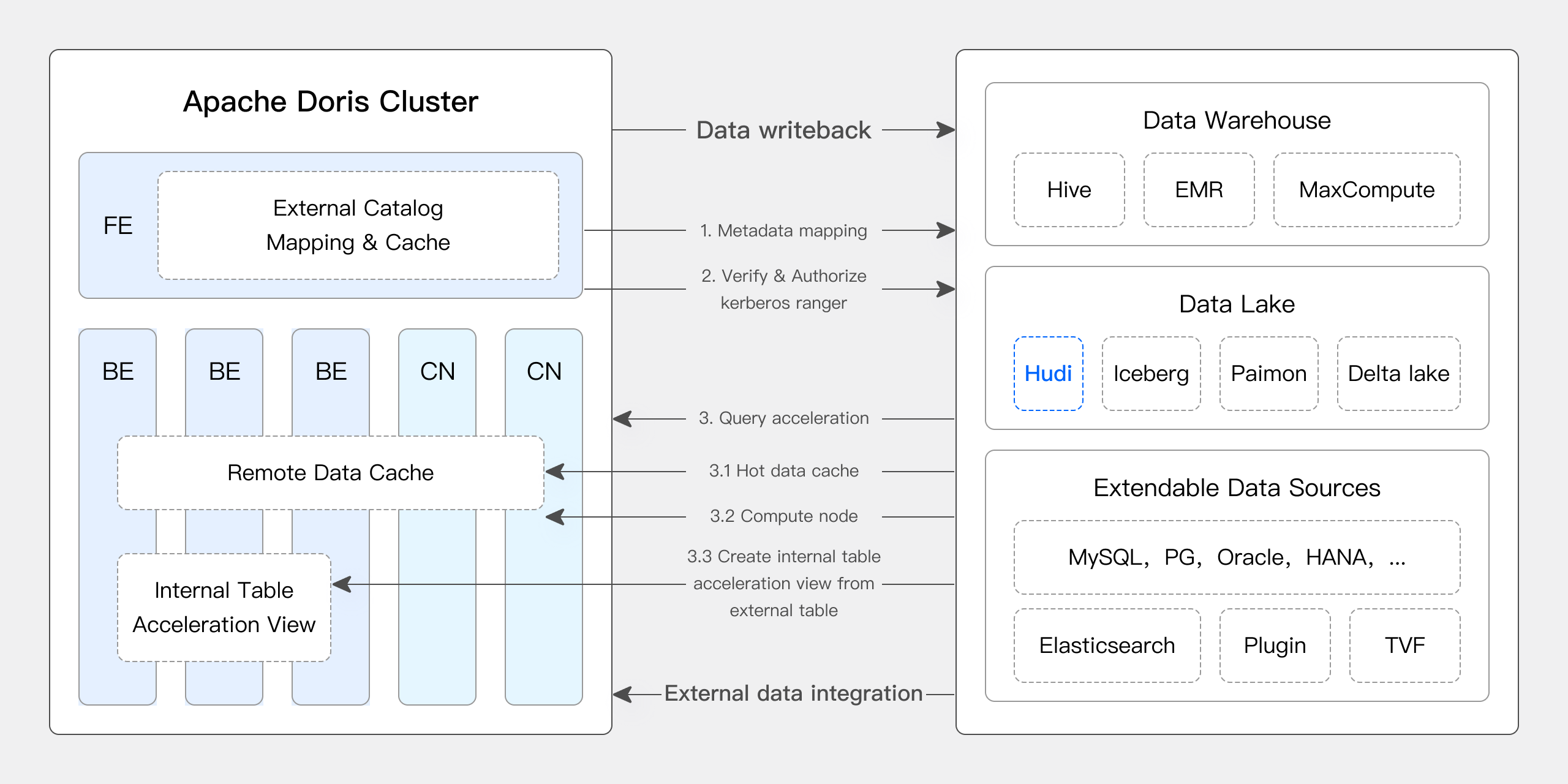
The upstream diagram describes the sample components. In the VeloDB Cloud workflow, your VeloDB Cloud warehouse supplies the query engine; the external lake services remain in your environment.
Prerequisites
- Connect to a VeloDB Cloud warehouse with a SQL user allowed to create catalogs and use the required databases and tables.
- For SaaS and BYOC warehouses, configure network access from the warehouse to both the external catalog endpoint and the storage endpoints returned in table metadata. An endpoint reachable from your laptop may still be unreachable from the warehouse. Contact VeloDB Cloud support when the integration needs private networking or managed runtime configuration.
- Prepare external service permissions for the metadata and data operations you plan to run. Credential vending still requires the external service to grant storage access.
- Replace sample hosts, account IDs, bucket names, and credentials. The HTTP endpoints and development credentials in local service examples are for an isolated test environment. Use HTTPS and restricted credentials for remote access.
Hudi query behavior
Apache Hudi is currently one of the most popular open data lake formats and a transactional data lake management platform, supporting various mainstream query engines including VeloDB Cloud.
VeloDB Cloud has also enhanced its ability to read Apache Hudi data tables:
- Supports Copy on Write Table: Snapshot Query
- Supports Merge on Read Table: Snapshot Queries, Read Optimized Queries
- Supports Time Travel
- Supports Incremental Read
Use Hudi snapshot queries for the latest table state, time travel for a retained historical commit, and incremental reads for changes in a specified interval. Snapshot queries on merge-on-read tables may combine base files with log records. You can join these external tables with warehouse tables or other catalogs.
Use the external Hudi, Hive Metastore, and storage components from the upstream sample to prepare test data. The bundled Apache Doris server is optional source-lab context, separate from your Cloud warehouse.
Use the sample
All scripts and code mentioned in this article can be obtained from this address: https://github.com/apache/doris/tree/master/samples/datalake/hudi
01 Prepare the environment
The upstream Docker lab uses the following component versions. Its bundled Apache Doris server is a local compatibility reference; use your warehouse for the Cloud steps.
| Component | Version |
|---|---|
| Apache Doris (upstream local lab only) | 2.1.4 |
| Apache Hudi | 0.14 |
| Apache Spark | 3.4.2 |
| Apache Hive | 2.1.3 |
| MinIO | 2022-05-26T05-48-41Z |
02 Deploy the sample environment
The following commands reproduce the upstream local Docker lab, including its Apache Doris container. They do not provision or configure VeloDB Cloud. Make the external metastore and storage endpoints reachable from your warehouse before continuing; Docker-only service names are not warehouse endpoints.
Reproduce the upstream local lab
-
Create a Docker network
sudo docker network create -d bridge hudi-net -
Start all components
sudo ./start-hudi-compose.shNote:
-
After starting, you can use the following script to log in to Spark command line or Apache Doris command line:
-- Sparksudo ./login-spark.sh-- Dorissudo ./login-doris.sh
03 Prepare data
Next, generate Hudi data through Spark. As shown in the code below, there is already a Hive table named customer in the cluster. You can create a Hudi table using this Hive table:
-- ./login-spark.sh
spark-sql> use default;

-- create a COW table
spark-sql> CREATE TABLE customer_cow
USING hudi
TBLPROPERTIES (
  type = 'cow',
  primaryKey = 'c_custkey',
  preCombineField = 'c_name'
)
PARTITIONED BY (c_nationkey)
AS SELECT * FROM customer;

-- create a MOR table
spark-sql> CREATE TABLE customer_mor
USING hudi
TBLPROPERTIES (
  type = 'mor',
  primaryKey = 'c_custkey',
  preCombineField = 'c_name'
)
PARTITIONED BY (c_nationkey)
AS SELECT * FROM customer;
04 Query data
The upstream lab precreates a catalog named hudi. In your warehouse, run CREATE CATALOG with reachable external endpoints and credentials, using the statement below as the template:
-- Create this catalog in your warehouse
CREATE CATALOG `hudi` PROPERTIES (
    "type"="hms",
    'hive.metastore.uris' = 'thrift://<metastore-host>:9083',
    "s3.access_key" = "<access-key-id>",
    "s3.secret_key" = "<secret-access-key>",
    "s3.endpoint" = "https://<storage-host>",
    "s3.region" = "us-east-1",
    "use_path_style" = "true"
);
-
Manually refresh this Catalog to synchronize the created Hudi table:
-- Run against your VeloDB Cloud warehousedoris> REFRESH CATALOG hudi; -
For this sample, queries after the Spark commit read the updated Hudi snapshot. If a query still sees stale metadata, follow the metadata cache refresh guidance. We insert a row of data into both COW and MOR tables using Spark:
spark-sql> insert into customer_cow values (100, "Customer#000000100", "jD2xZzi", "25-430-914-2194", 3471.59, "BUILDING", "cial ideas. final, furious requests", 25);spark-sql> insert into customer_mor values (100, "Customer#000000100", "jD2xZzi", "25-430-914-2194", 3471.59, "BUILDING", "cial ideas. final, furious requests", 25); -
Through VeloDB Cloud, you can directly query the latest inserted data:
doris> use hudi.default;doris> select * from customer_cow where c_custkey = 100;doris> select * from customer_mor where c_custkey = 100; -
Insert data with c_custkey=32 that already exists using Spark, thus overwriting the existing data:
spark-sql> insert into customer_cow values (32, "Customer#000000032_update", "jD2xZzi", "25-430-914-2194", 3471.59, "BUILDING", "cial ideas. final, furious requests", 15);spark-sql> insert into customer_mor values (32, "Customer#000000032_update", "jD2xZzi", "25-430-914-2194", 3471.59, "BUILDING", "cial ideas. final, furious requests", 15); -
With VeloDB Cloud, you can query the updated data:
doris> select * from customer_cow where c_custkey = 32;+-----------+---------------------------+-----------+-----------------+-----------+--------------+-------------------------------------+-------------+| c_custkey | c_name | c_address | c_phone | c_acctbal | c_mktsegment | c_comment | c_nationkey |+-----------+---------------------------+-----------+-----------------+-----------+--------------+-------------------------------------+-------------+| 32 | Customer#000000032_update | jD2xZzi | 25-430-914-2194 | 3471.59 | BUILDING | cial ideas. final, furious requests | 15 |+-----------+---------------------------+-----------+-----------------+-----------+--------------+-------------------------------------+-------------+doris> select * from customer_mor where c_custkey = 32;+-----------+---------------------------+-----------+-----------------+-----------+--------------+-------------------------------------+-------------+| c_custkey | c_name | c_address | c_phone | c_acctbal | c_mktsegment | c_comment | c_nationkey |+-----------+---------------------------+-----------+-----------------+-----------+--------------+-------------------------------------+-------------+| 32 | Customer#000000032_update | jD2xZzi | 25-430-914-2194 | 3471.59 | BUILDING | cial ideas. final, furious requests | 15 |+-----------+---------------------------+-----------+-----------------+-----------+--------------+-------------------------------------+-------------+
05 Read incremental data
Incremental Read is one of the features provided by Hudi. With Incremental Read, users can obtain incremental data within a specified time range, enabling incremental processing of data. In this regard, VeloDB Cloud can query the changed data after inserting c_custkey=100. As shown below, we inserted a data with c_custkey=32:
doris> select * from customer_cow@incr('beginTime'='20240603015018572');
+-----------+---------------------------+-----------+-----------------+-----------+--------------+-------------------------------------+-------------+
| c_custkey | c_name                    | c_address | c_phone         | c_acctbal | c_mktsegment | c_comment                           | c_nationkey |
+-----------+---------------------------+-----------+-----------------+-----------+--------------+-------------------------------------+-------------+
|        32 | Customer#000000032_update | jD2xZzi   | 25-430-914-2194 |   3471.59 | BUILDING     | cial ideas. final, furious requests |          15 |
+-----------+---------------------------+-----------+-----------------+-----------+--------------+-------------------------------------+-------------+
spark-sql> select * from hudi_table_changes('customer_cow', 'latest_state', '20240603015018572');

doris> select * from customer_mor@incr('beginTime'='20240603015058442');
+-----------+---------------------------+-----------+-----------------+-----------+--------------+-------------------------------------+-------------+
| c_custkey | c_name                    | c_address | c_phone         | c_acctbal | c_mktsegment | c_comment                           | c_nationkey |
+-----------+---------------------------+-----------+-----------------+-----------+--------------+-------------------------------------+-------------+
|        32 | Customer#000000032_update | jD2xZzi   | 25-430-914-2194 |   3471.59 | BUILDING     | cial ideas. final, furious requests |          15 |
+-----------+---------------------------+-----------+-----------------+-----------+--------------+-------------------------------------+-------------+
spark-sql> select * from hudi_table_changes('customer_mor', 'latest_state', '20240603015058442');
06 Query historical data
VeloDB Cloud supports querying specific snapshot versions of Hudi data, thereby enabling Time Travel functionality for data. First, you can query the commit history of two Hudi tables using Spark:
spark-sql> call show_commits(table => 'customer_cow', limit => 10);
20240603033556094        20240603033558249        commit        448833        0        1        1        183        0        0
20240603015444737        20240603015446588        commit        450238        0        1        1        202        1        0
20240603015018572        20240603015020503        commit        436692        1        0        1        1        0        0
20240603013858098        20240603013907467        commit        44902033        100        0        25        18751        0        0

spark-sql> call show_commits(table => 'customer_mor', limit => 10);
20240603033745977        20240603033748021        deltacommit        1240        0        1        1        0        0        0
20240603015451860        20240603015453539        deltacommit        1434        0        1        1        1        1        0
20240603015058442        20240603015100120        deltacommit        436691        1        0        1        1        0        0
20240603013918515        20240603013922961        deltacommit        44904040        100        0        25        18751        0        0
Next, using VeloDB Cloud, you can execute c_custkey=32 to query the data snapshot before the data insertion. As shown below, the data with c_custkey=32 has not been updated yet:
Note:
Note:
Core 26.1.3 supports Hudi time travel through the current planner. Keep the planner enabled; choose a commit retained by the Hudi table. The timestamps below come from the upstream sample and must be replaced with commits from your dataset.
doris> select * from customer_cow for time as of '20240603015018572' where c_custkey = 32 or c_custkey = 100;
+-----------+--------------------+---------------------------------------+-----------------+-----------+--------------+--------------------------------------------------+-------------+
| c_custkey | c_name             | c_address                             | c_phone         | c_acctbal | c_mktsegment | c_comment                                        | c_nationkey |
+-----------+--------------------+---------------------------------------+-----------------+-----------+--------------+--------------------------------------------------+-------------+
|        32 | Customer#000000032 | jD2xZzi UmId,DCtNBLXKj9q0Tlp2iQ6ZcO3J | 25-430-914-2194 |   3471.53 | BUILDING     | cial ideas. final, furious requests across the e |          15 |
|       100 | Customer#000000100 | jD2xZzi                               | 25-430-914-2194 |   3471.59 | BUILDING     | cial ideas. final, furious requests              |          25 |
+-----------+--------------------+---------------------------------------+-----------------+-----------+--------------+--------------------------------------------------+-------------+
-- compare with spark-sql
spark-sql> select * from customer_mor timestamp as of '20240603015018572' where c_custkey = 32 or c_custkey = 100;

doris> select * from customer_mor for time as of '20240603015058442' where c_custkey = 32 or c_custkey = 100;
+-----------+--------------------+---------------------------------------+-----------------+-----------+--------------+--------------------------------------------------+-------------+
| c_custkey | c_name             | c_address                             | c_phone         | c_acctbal | c_mktsegment | c_comment                                        | c_nationkey |
+-----------+--------------------+---------------------------------------+-----------------+-----------+--------------+--------------------------------------------------+-------------+
|       100 | Customer#000000100 | jD2xZzi                               | 25-430-914-2194 |   3471.59 | BUILDING     | cial ideas. final, furious requests              |          25 |
|        32 | Customer#000000032 | jD2xZzi UmId,DCtNBLXKj9q0Tlp2iQ6ZcO3J | 25-430-914-2194 |   3471.53 | BUILDING     | cial ideas. final, furious requests across the e |          15 |
+-----------+--------------------+---------------------------------------+-----------------+-----------+--------------+--------------------------------------------------+-------------+
spark-sql> select * from customer_mor timestamp as of '20240603015058442' where c_custkey = 32 or c_custkey = 100;
Inspect Hudi query plans
Data in Apache Hudi can be roughly divided into two categories - baseline data and incremental data. Baseline data is typically merged Parquet files, while incremental data refers to data increments generated by INSERT, UPDATE, or DELETE operations. Baseline data can be read directly, while incremental data needs to be read through Merge on Read.
For querying Hudi COW tables or Read Optimized queries on MOR tables, the data belongs to baseline data and can be directly read using VeloDB Cloud's native Parquet Reader, providing fast query responses. For incremental data, VeloDB Cloud needs to access Hudi's Java SDK through JNI calls. To achieve optimal query performance, VeloDB Cloud divides the data in a query into baseline and incremental data parts and reads them using the aforementioned methods.
To verify this optimization approach, we can use the EXPLAIN statement to see how many baseline and incremental data are present in a query example below. For a COW table, all 101 data shards are baseline data (hudiNativeReadSplits=101/101), so the COW table can be entirely read directly using VeloDB Cloud's Parquet Reader, avoiding the JNI path for these splits. For a MOR table, most data shards are baseline data (hudiNativeReadSplits=100/101), with one shard being incremental data, which limits JNI work to the remaining split.
-- COW table is read natively
doris> explain select * from customer_cow where c_custkey = 32;
|   0:VHUDI_SCAN_NODE(68)                                        |
|      table: customer_cow                                       |
|      predicates: (c_custkey[#5] = 32)                          |
|      inputSplitNum=101, totalFileSize=45338886, scanRanges=101 |
|      partition=26/26                                           |
|      cardinality=1, numNodes=1                                 |
|      pushdown agg=NONE                                         |
|      hudiNativeReadSplits=101/101                              |

-- MOR table: because only the base file contains `c_custkey = 32` that is updated, 100 splits are read natively, while the split with log file is read by JNI.
doris> explain select * from customer_mor where c_custkey = 32;
|   0:VHUDI_SCAN_NODE(68)                                        |
|      table: customer_mor                                       |
|      predicates: (c_custkey[#5] = 32)                          |
|      inputSplitNum=101, totalFileSize=45340731, scanRanges=101 |
|      partition=26/26                                           |
|      cardinality=1, numNodes=1                                 |
|      pushdown agg=NONE                                         |
|      hudiNativeReadSplits=100/101                              |
You can further observe the changes in Hudi baseline data and incremental data by performing some deletion operations using Spark:
-- Use delete statement to see more differences
spark-sql> delete from customer_cow where c_custkey = 64;
doris> explain select * from customer_cow where c_custkey = 64;

spark-sql> delete from customer_mor where c_custkey = 64;
doris> explain select * from customer_mor where c_custkey = 64;
Additionally, you can reduce the data volume further by using partition conditions for partition pruning to improve query speed. In the example below, partition pruning is done using the partition condition c_nationkey=15, allowing the query request to access data from only one partition (partition=1/26).
-- customer_xxx is partitioned by c_nationkey, we can use the partition column to prune data
doris> explain select * from customer_mor where c_custkey = 64 and c_nationkey = 15;
|   0:VHUDI_SCAN_NODE(68)                                        |
|      table: customer_mor                                       |
|      predicates: (c_custkey[#5] = 64), (c_nationkey[#12] = 15) |
|      inputSplitNum=4, totalFileSize=1798186, scanRanges=4      |
|      partition=1/26                                            |
|      cardinality=1, numNodes=1                                 |
|      pushdown agg=NONE                                         |
|      hudiNativeReadSplits=3/4                                  |
Common errors
| Symptom | Check and resolution |
|---|---|
| Connection timeout or hostname resolution failure | Check the catalog URI and connectivity from the warehouse, then check the storage endpoints in table metadata. Ask VeloDB Cloud support to investigate managed network access when needed. |
| Unauthorized or forbidden response | Check the catalog authentication method, token or client credentials, expiry, and permissions on the external catalog and namespace. |
| Catalog metadata loads but a table scan fails | Check storage credentials or credential vending, object permissions, and reachability of the data-file endpoint. Metadata access alone does not grant data access. |
Clean up test resources
Queries and writes consume warehouse compute, and the sample can create billable external storage or services. See Billing Overview. Remove only the test tables and external services you created when you finish. Check the external catalog's deletion behavior before dropping a table or namespace because it can also delete data files.