Query and Write Iceberg Tables
Query Iceberg data from a VeloDB Cloud warehouse using an external catalog. This walkthrough retains the dataset and illustrative results from the upstream Apache Doris sample; timings, hostnames, and generated identifiers in that output are sample observations, not VeloDB Cloud measurements.
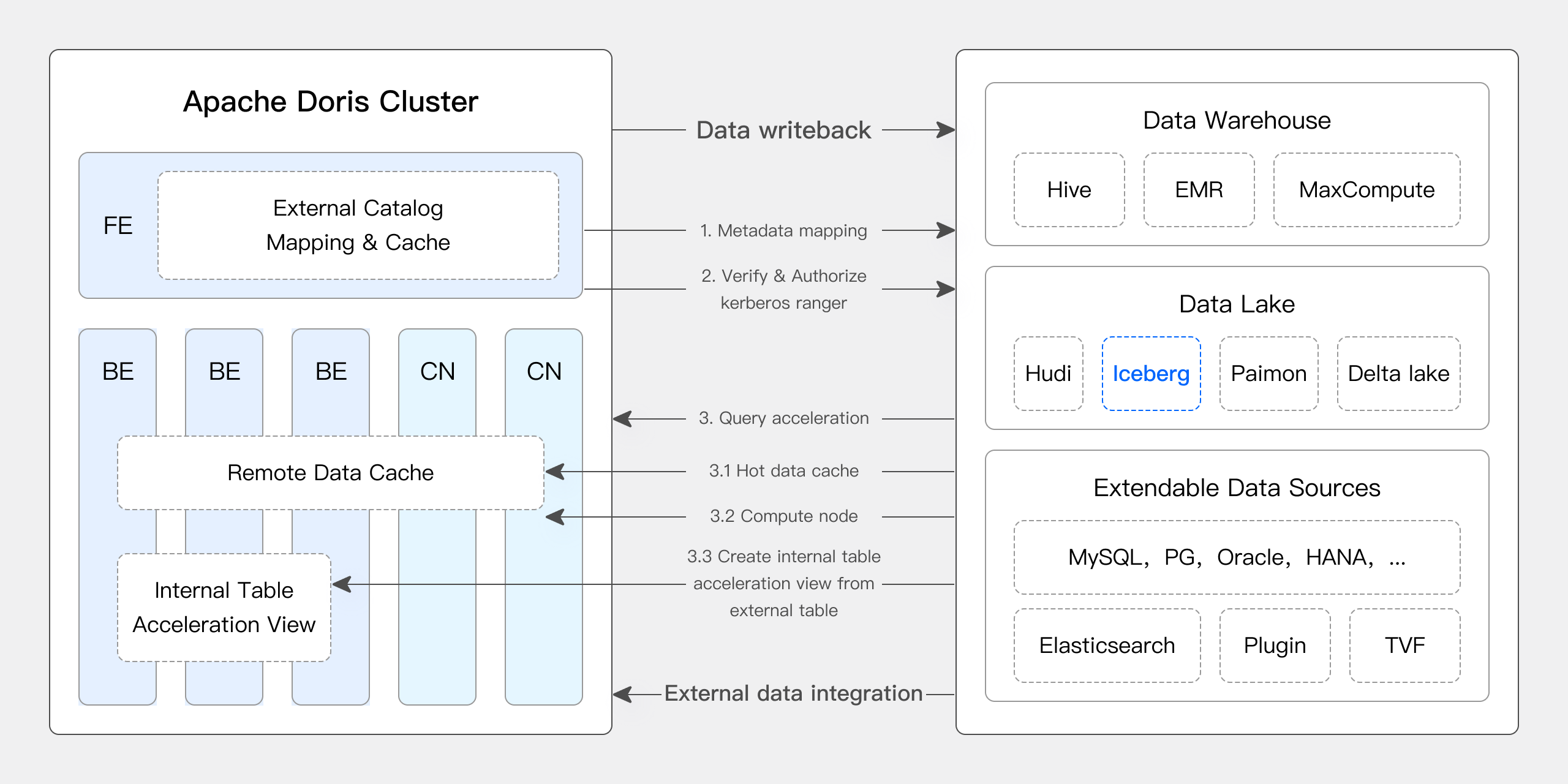
The upstream diagram describes the sample components. In the VeloDB Cloud workflow, your VeloDB Cloud warehouse supplies the query engine; the external lake services remain in your environment.
Prerequisites
- Connect to a VeloDB Cloud warehouse with a SQL user allowed to create catalogs and use the required databases and tables.
- For SaaS and BYOC warehouses, configure network access from the warehouse to both the external catalog endpoint and the storage endpoints returned in table metadata. An endpoint reachable from your laptop may still be unreachable from the warehouse. Contact VeloDB Cloud support when the integration needs private networking or managed runtime configuration.
- Prepare external service permissions for the metadata and data operations you plan to run. Credential vending still requires the external service to grant storage access.
- Replace sample hosts, account IDs, bucket names, and credentials. The HTTP endpoints and development credentials in local service examples are for an isolated test environment. Use HTTPS and restricted credentials for remote access.
Iceberg query and write behavior
Apache Iceberg is an open table format for data stored in HDFS or object storage. Its table metadata supports snapshots, schema evolution, hidden partitioning, and partition evolution. VeloDB Cloud accesses these tables through an Iceberg catalog.
VeloDB Cloud provides native support for several core features of Iceberg:
- Supports multiple Iceberg Catalog types such as Hive Metastore, Hadoop, REST, Glue, Google Dataproc Metastore, DLF, etc.
- Native support for Iceberg V1/V2 table formats and reading of Position Delete, Equality Delete files.
- Supports querying Iceberg table snapshot history through table functions.
- Supports Time Travel functionality.
- Native support for the Iceberg table engine. It allows VeloDB Cloud to directly create, manage, and write data to Iceberg tables. It supports comprehensive partition Transform functions, providing capabilities like hidden partitioning and partition layout evolution.
- Supports row-level DML on Iceberg V2 tables, including
UPDATE,DELETE, andMERGE INTO.
Users can quickly build an efficient Data Lakehouse solution based on VeloDB Cloud + Apache Iceberg to flexibly address various real-time data analysis and processing needs.
- Join Iceberg tables with warehouse tables or other catalogs for federated analysis.
- Manage and build Iceberg tables directly through VeloDB Cloud, complete data cleaning, processing, and writing to Iceberg tables in VeloDB Cloud, building a unified data processing platform for data lakes.
- Share VeloDB Cloud data with other upstream and downstream systems for further processing through the Iceberg table engine, building a unified open data storage platform.
Core 26.1.3 supports Iceberg V2 and V3 reads and writes, including row-level UPDATE, DELETE, and MERGE INTO on supported tables. The walkthrough below uses V2 examples; see the catalog reference for operation-specific constraints.
For more information, please refer to Iceberg Catalog
Use the sample
Use the upstream Docker sample to prepare the external Iceberg REST service and storage, then run the catalog and table operations against your warehouse.
All scripts and code mentioned in this document can be obtained from this address: https://github.com/apache/doris/tree/master/samples/datalake/iceberg_and_paimon
01 Prepare the environment
The upstream Docker lab uses the following component versions. Its bundled Apache Doris server is a local compatibility reference; use your warehouse for the Cloud steps.
| Component | Version |
|---|---|
| Apache Doris (upstream local lab only) | 2.1.5 |
| Apache Iceberg | 1.4.3 |
| MinIO | RELEASE.2024-04-29T09-56-05Z |
02 Deploy the sample environment
The following commands reproduce the upstream local Docker lab, including its Apache Doris container. They do not provision or configure VeloDB Cloud. Make the external metastore and storage endpoints reachable from your warehouse before continuing; Docker-only service names are not warehouse endpoints.
Reproduce the upstream local lab
-
Start all components
bash ./start_all.sh -
After starting, you can use the following script to log in to the Apache Doris command line:
-- login dorisbash ./start_doris_client.sh
03 Create an Iceberg table
The upstream lab precreates an iceberg catalog. In your warehouse, create the catalog below with your reachable REST endpoint, storage endpoint, and credentials:
-- Create this catalog in your warehouse
CREATE CATALOG `iceberg` PROPERTIES (
    "type" = "iceberg",
    "iceberg.catalog.type" = "rest",
    "warehouse" = "s3://warehouse/",
    "uri" = "https://<iceberg-rest-host>",
    "s3.access_key" = "<access-key-id>",
    "s3.secret_key" = "<secret-access-key>",
    "s3.endpoint" = "https://<storage-host>"
);
Create a database and an Iceberg table in the Iceberg Catalog:
mysql> SWITCH iceberg;
Query OK, 0 rows affected (0.00 sec)

mysql> CREATE DATABASE nyc;
Query OK, 0 rows affected (0.12 sec)

mysql> CREATE TABLE iceberg.nyc.taxis
       (
           vendor_id BIGINT,
           trip_id BIGINT,
           trip_distance FLOAT,
           fare_amount DOUBLE,
           store_and_fwd_flag STRING,
           ts DATETIME
       )
       PARTITION BY LIST (vendor_id, DAY(ts)) ()
       PROPERTIES (
           "compression-codec" = "zstd",
           "write-format" = "parquet"
       );
Query OK, 0 rows affected (0.15 sec)
04 Insert data
Insert data into the Iceberg table:
mysql> INSERT INTO iceberg.nyc.taxis
       VALUES
        (1, 1000371, 1.8, 15.32, 'N', '2024-01-01 9:15:23'),
        (2, 1000372, 2.5, 22.15, 'N', '2024-01-02 12:10:11'),
        (2, 1000373, 0.9, 9.01, 'N', '2024-01-01 3:25:15'),
        (1, 1000374, 8.4, 42.13, 'Y', '2024-01-03 7:12:33');
Query OK, 4 rows affected (1.61 sec)
{'status':'COMMITTED', 'txnId':'10085'}
Create an Iceberg table using CREATE TABLE AS SELECT:
mysql> CREATE TABLE iceberg.nyc.taxis2 AS SELECT * FROM iceberg.nyc.taxis;
Query OK, 4 rows affected (0.25 sec)
{'status':'COMMITTED', 'txnId':'10088'}
05 Query data
-
Simple query
mysql> SELECT * FROM iceberg.nyc.taxis;+-----------+---------+---------------+-------------+--------------------+----------------------------+| vendor_id | trip_id | trip_distance | fare_amount | store_and_fwd_flag | ts |+-----------+---------+---------------+-------------+--------------------+----------------------------+| 1 | 1000374 | 8.4 | 42.13 | Y | 2024-01-03 07:12:33.000000 || 1 | 1000371 | 1.8 | 15.32 | N | 2024-01-01 09:15:23.000000 || 2 | 1000373 | 0.9 | 9.01 | N | 2024-01-01 03:25:15.000000 || 2 | 1000372 | 2.5 | 22.15 | N | 2024-01-02 12:10:11.000000 |+-----------+---------+---------------+-------------+--------------------+----------------------------+4 rows in set (0.37 sec)mysql> SELECT * FROM iceberg.nyc.taxis2;+-----------+---------+---------------+-------------+--------------------+----------------------------+| vendor_id | trip_id | trip_distance | fare_amount | store_and_fwd_flag | ts |+-----------+---------+---------------+-------------+--------------------+----------------------------+| 1 | 1000374 | 8.4 | 42.13 | Y | 2024-01-03 07:12:33.000000 || 1 | 1000371 | 1.8 | 15.32 | N | 2024-01-01 09:15:23.000000 || 2 | 1000373 | 0.9 | 9.01 | N | 2024-01-01 03:25:15.000000 || 2 | 1000372 | 2.5 | 22.15 | N | 2024-01-02 12:10:11.000000 |+-----------+---------+---------------+-------------+--------------------+----------------------------+4 rows in set (0.35 sec) -
Partition pruning
mysql> SELECT * FROM iceberg.nyc.taxis where vendor_id = 2 and ts >= '2024-01-01' and ts < '2024-01-02';+-----------+---------+---------------+-------------+--------------------+----------------------------+| vendor_id | trip_id | trip_distance | fare_amount | store_and_fwd_flag | ts |+-----------+---------+---------------+-------------+--------------------+----------------------------+| 2 | 1000373 | 0.9 | 9.01 | N | 2024-01-01 03:25:15.000000 |+-----------+---------+---------------+-------------+--------------------+----------------------------+1 row in set (0.06 sec)mysql> EXPLAIN VERBOSE SELECT * FROM iceberg.nyc.taxis where vendor_id = 2 and ts >= '2024-01-01' and ts < '2024-01-02';....| 0:VICEBERG_SCAN_NODE(71)| table: taxis| predicates: (ts[#5] < '2024-01-02 00:00:00'), (vendor_id[#0] = 2), (ts[#5] >= '2024-01-01 00:00:00')| inputSplitNum=1, totalFileSize=3539, scanRanges=1| partition=1/0| backends:| 10002| s3://warehouse/wh/nyc/taxis/data/vendor_id=2/ts_day=2024-01-01/40e6ca404efa4a44-b888f23546d3a69c_5708e229-2f3d-4b68-a66b-44298a9d9815-0.zstd.parquet start: 0 length: 3539| cardinality=6, numNodes=1| pushdown agg=NONE| icebergPredicatePushdown=| ref(name="ts") < 1704153600000000| ref(name="vendor_id") == 2| ref(name="ts") >= 1704067200000000....By examining the result of the
EXPLAIN VERBOSEstatement, it can be seen that the predicate conditionvendor_id = 2 and ts >= '2024-01-01' and ts < '2024-01-02'ultimately only hits one partition (partition=1/0).It can also be observed that because a partition Transform function
DAY(ts)was specified when creating the table, the original value in the data2024-01-01 03:25:15.000000will be transformed into the partition information in the file directoryts_day=2024-01-01.
06 Query historical data
Let's insert a few more rows of data:
INSERT INTO iceberg.nyc.taxis VALUES (1, 1000375, 8.8, 55.55, 'Y', '2024-01-01 8:10:22'), (3, 1000376, 7.4, 32.35, 'N', '2024-01-02  1:14:45');
Query OK, 2 rows affected (0.17 sec)
{'status':'COMMITTED', 'txnId':'10086'}

mysql> SELECT * FROM iceberg.nyc.taxis;
+-----------+---------+---------------+-------------+--------------------+----------------------------+
| vendor_id | trip_id | trip_distance | fare_amount | store_and_fwd_flag | ts                         |
+-----------+---------+---------------+-------------+--------------------+----------------------------+
|         3 | 1000376 |           7.4 |       32.35 | N                  | 2024-01-02 01:14:45.000000 |
|         2 | 1000372 |           2.5 |       22.15 | N                  | 2024-01-02 12:10:11.000000 |
|         1 | 1000374 |           8.4 |       42.13 | Y                  | 2024-01-03 07:12:33.000000 |
|         1 | 1000371 |           1.8 |       15.32 | N                  | 2024-01-01 09:15:23.000000 |
|         1 | 1000375 |           8.8 |       55.55 | Y                  | 2024-01-01 08:10:22.000000 |
|         2 | 1000373 |           0.9 |        9.01 | N                  | 2024-01-01 03:25:15.000000 |
+-----------+---------+---------------+-------------+--------------------+----------------------------+
6 rows in set (0.11 sec)
Use the $snapshots system table to query table snapshot information. This is the supported metadata path in Core 26.1.3; older Apache Doris examples using iceberg_meta() do not apply:
mysql> select * from iceberg.nyc.taxis$snapshots;
+---------------------+---------------------+---------------------+-----------+-----------------------------------------------------------------------------------------------------------+----------------------------------------------------------------------------------------------------------------------------------------------------------------------------------------------------------------------------------------------------------------+
| committed_at        | snapshot_id         | parent_id           | operation | manifest_list                                                                                             | summary                                                                                                                                                                                                                                                        |
+---------------------+---------------------+---------------------+-----------+-----------------------------------------------------------------------------------------------------------+----------------------------------------------------------------------------------------------------------------------------------------------------------------------------------------------------------------------------------------------------------------+
| 2024-07-29 03:38:22 | 8483933166442433486 |                  -1 | append    | s3://warehouse/wh/nyc/taxis/metadata/snap-8483933166442433486-1-5f7b7736-8022-4ba1-9db2-51ae7553be4d.avro | {"added-data-files":"4","added-records":"4","added-files-size":"14156","changed-partition-count":"4","total-records":"4","total-files-size":"14156","total-data-files":"4","total-delete-files":"0","total-position-deletes":"0","total-equality-deletes":"0"} |
| 2024-07-29 03:40:23 | 4726331391239920914 | 8483933166442433486 | append    | s3://warehouse/wh/nyc/taxis/metadata/snap-4726331391239920914-1-6aa3d142-6c9c-4553-9c04-08ad4d49a4ea.avro | {"added-data-files":"2","added-records":"2","added-files-size":"7078","changed-partition-count":"2","total-records":"6","total-files-size":"21234","total-data-files":"6","total-delete-files":"0","total-position-deletes":"0","total-equality-deletes":"0"}  |
+---------------------+---------------------+---------------------+-----------+-----------------------------------------------------------------------------------------------------------+----------------------------------------------------------------------------------------------------------------------------------------------------------------------------------------------------------------------------------------------------------------+
2 rows in set (0.07 sec)
Query a specified snapshot using the FOR VERSION AS OF statement:
mysql> SELECT * FROM iceberg.nyc.taxis FOR VERSION AS OF 8483933166442433486;
+-----------+---------+---------------+-------------+--------------------+----------------------------+
| vendor_id | trip_id | trip_distance | fare_amount | store_and_fwd_flag | ts                         |
+-----------+---------+---------------+-------------+--------------------+----------------------------+
|         1 | 1000371 |           1.8 |       15.32 | N                  | 2024-01-01 09:15:23.000000 |
|         1 | 1000374 |           8.4 |       42.13 | Y                  | 2024-01-03 07:12:33.000000 |
|         2 | 1000372 |           2.5 |       22.15 | N                  | 2024-01-02 12:10:11.000000 |
|         2 | 1000373 |           0.9 |        9.01 | N                  | 2024-01-01 03:25:15.000000 |
+-----------+---------+---------------+-------------+--------------------+----------------------------+
4 rows in set (0.05 sec)

mysql> SELECT * FROM iceberg.nyc.taxis FOR VERSION AS OF 4726331391239920914;
+-----------+---------+---------------+-------------+--------------------+----------------------------+
| vendor_id | trip_id | trip_distance | fare_amount | store_and_fwd_flag | ts                         |
+-----------+---------+---------------+-------------+--------------------+----------------------------+
|         1 | 1000374 |           8.4 |       42.13 | Y                  | 2024-01-03 07:12:33.000000 |
|         1 | 1000375 |           8.8 |       55.55 | Y                  | 2024-01-01 08:10:22.000000 |
|         3 | 1000376 |           7.4 |       32.35 | N                  | 2024-01-02 01:14:45.000000 |
|         2 | 1000372 |           2.5 |       22.15 | N                  | 2024-01-02 12:10:11.000000 |
|         2 | 1000373 |           0.9 |        9.01 | N                  | 2024-01-01 03:25:15.000000 |
|         1 | 1000371 |           1.8 |       15.32 | N                  | 2024-01-01 09:15:23.000000 |
+-----------+---------+---------------+-------------+--------------------+----------------------------+
6 rows in set (0.04 sec)
Query a specified snapshot using the FOR TIME AS OF statement:
mysql> SELECT * FROM iceberg.nyc.taxis FOR TIME AS OF "2024-07-29 03:38:23";
+-----------+---------+---------------+-------------+--------------------+----------------------------+
| vendor_id | trip_id | trip_distance | fare_amount | store_and_fwd_flag | ts                         |
+-----------+---------+---------------+-------------+--------------------+----------------------------+
|         1 | 1000374 |           8.4 |       42.13 | Y                  | 2024-01-03 07:12:33.000000 |
|         1 | 1000371 |           1.8 |       15.32 | N                  | 2024-01-01 09:15:23.000000 |
|         2 | 1000372 |           2.5 |       22.15 | N                  | 2024-01-02 12:10:11.000000 |
|         2 | 1000373 |           0.9 |        9.01 | N                  | 2024-01-01 03:25:15.000000 |
+-----------+---------+---------------+-------------+--------------------+----------------------------+
4 rows in set (0.04 sec)

mysql> SELECT * FROM iceberg.nyc.taxis FOR TIME AS OF "2024-07-29 03:40:22";
+-----------+---------+---------------+-------------+--------------------+----------------------------+
| vendor_id | trip_id | trip_distance | fare_amount | store_and_fwd_flag | ts                         |
+-----------+---------+---------------+-------------+--------------------+----------------------------+
|         2 | 1000373 |           0.9 |        9.01 | N                  | 2024-01-01 03:25:15.000000 |
|         1 | 1000374 |           8.4 |       42.13 | Y                  | 2024-01-03 07:12:33.000000 |
|         2 | 1000372 |           2.5 |       22.15 | N                  | 2024-01-02 12:10:11.000000 |
|         1 | 1000371 |           1.8 |       15.32 | N                  | 2024-01-01 09:15:23.000000 |
+-----------+---------+---------------+-------------+--------------------+----------------------------+
4 rows in set (0.05 sec)
07 Update and delete Iceberg rows
For row-level DML (UPDATE, DELETE, and MERGE INTO), the target table must use Iceberg V2. To keep the iceberg.nyc.taxis state from the Time Travel section unchanged, the following example initializes a dedicated table from iceberg.nyc.taxis2.
mysql> CREATE TABLE iceberg.nyc.taxis_dml
       (
           vendor_id BIGINT,
           trip_id BIGINT,
           trip_distance FLOAT,
           fare_amount DOUBLE,
           store_and_fwd_flag STRING,
           ts DATETIME
       )
       PARTITION BY LIST (vendor_id, DAY(ts)) ()
       PROPERTIES (
           "format-version" = "2",
           "compression-codec" = "zstd",
           "write-format" = "parquet"
       );
Query OK, 0 rows affected (0.18 sec)

mysql> INSERT INTO iceberg.nyc.taxis_dml SELECT * FROM iceberg.nyc.taxis2;
Query OK, 4 rows affected (0.32 sec)
{'status':'COMMITTED', 'txnId':'10089'}
Update rows in the Iceberg table:
mysql> UPDATE iceberg.nyc.taxis_dml
       SET fare_amount = fare_amount + 3,
           store_and_fwd_flag = 'Y'
       WHERE trip_id = 1000371;
Query OK, 1 row affected (0.44 sec)
{'status':'COMMITTED', 'txnId':'10090'}

mysql> SELECT trip_id, fare_amount, store_and_fwd_flag
       FROM iceberg.nyc.taxis_dml
       WHERE trip_id = 1000371;
+---------+-------------+--------------------+
| trip_id | fare_amount | store_and_fwd_flag |
+---------+-------------+--------------------+
| 1000371 |       18.32 | Y                  |
+---------+-------------+--------------------+
1 row in set (0.07 sec)
Delete rows from the Iceberg table:
mysql> DELETE FROM iceberg.nyc.taxis_dml
       WHERE trip_id = 1000373;
Query OK, 1 row affected (0.31 sec)
{'status':'COMMITTED', 'txnId':'10091'}

mysql> SELECT trip_id
       FROM iceberg.nyc.taxis_dml
       ORDER BY trip_id;
+---------+
| trip_id |
+---------+
| 1000371 |
| 1000372 |
| 1000374 |
+---------+
3 rows in set (0.06 sec)
Use MERGE INTO to update existing rows and insert new rows in one statement:
mysql> MERGE INTO iceberg.nyc.taxis_dml t
       USING (
           SELECT 2 AS vendor_id, 1000372 AS trip_id, 2.5 AS trip_distance,
                  30.00 AS fare_amount, 'Y' AS store_and_fwd_flag,
                  CAST('2024-01-02 12:10:11' AS DATETIME) AS ts
           UNION ALL
           SELECT 3, 1000380, 6.7, 28.50, 'N', CAST('2024-01-04 10:20:00' AS DATETIME)
       ) s
       ON t.trip_id = s.trip_id
       WHEN MATCHED THEN UPDATE SET
           fare_amount = s.fare_amount,
           store_and_fwd_flag = s.store_and_fwd_flag
       WHEN NOT MATCHED THEN INSERT
           (vendor_id, trip_id, trip_distance, fare_amount, store_and_fwd_flag, ts)
       VALUES
           (s.vendor_id, s.trip_id, s.trip_distance, s.fare_amount, s.store_and_fwd_flag, s.ts);
Query OK, 2 rows affected (0.53 sec)
{'status':'COMMITTED', 'txnId':'10092'}

mysql> SELECT vendor_id, trip_id, fare_amount, store_and_fwd_flag
       FROM iceberg.nyc.taxis_dml
       ORDER BY trip_id;
+-----------+---------+-------------+--------------------+
| vendor_id | trip_id | fare_amount | store_and_fwd_flag |
+-----------+---------+-------------+--------------------+
|         1 | 1000371 |       18.32 | Y                  |
|         2 | 1000372 |       30.00 | Y                  |
|         1 | 1000374 |       42.13 | Y                  |
|         3 | 1000380 |       28.50 | N                  |
+-----------+---------+-------------+--------------------+
4 rows in set (0.09 sec)
08 Use PyIceberg
Note:
The PyIceberg client must be able to reach the same external REST service and storage as the warehouse. These examples use the upstream sample service; update its endpoints and credentials for your environment.
To keep the previous examples unchanged, the examples below use nyc.taxis2.
Load an iceberg table:
from pyiceberg.catalog import load_catalog

catalog = load_catalog(
	"iceberg",
	**{
		"warehouse" = "warehouse",
		"uri" = "https://<iceberg-rest-host>",
		"s3.access-key-id" = "admin",
		"s3.secret-access-key" = "password",
		"s3.endpoint" = "https://<storage-host>"
	},
)
table = catalog.load_table("nyc.taxis2")
Read table as Arrow Table:
print(table.scan().to_arrow())

pyarrow.Table
vendor_id: int64
trip_id: int64
trip_distance: float
fare_amount: double
store_and_fwd_flag: large_string
ts: timestamp[us]
----
vendor_id: [[1],[1],[2],[2]]
trip_id: [[1000371],[1000374],[1000373],[1000372]]
trip_distance: [[1.8],[8.4],[0.9],[2.5]]
fare_amount: [[15.32],[42.13],[9.01],[22.15]]
store_and_fwd_flag: [["N"],["Y"],["N"],["N"]]
ts: [[2024-01-01 09:15:23.000000],[2024-01-03 07:12:33.000000],[2024-01-01 03:25:15.000000],[2024-01-02 12:10:11.000000]]
Read table as Pandas DataFrame:
print(table.scan().to_pandas())

vendor_id  trip_id  trip_distance  fare_amount store_and_fwd_flag                    ts
0          1  1000371            1.8        15.32                  N   2024-01-01 09:15:23
1          1  1000374            8.4        42.13                  Y   2024-01-03 07:12:33
2          2  1000373            0.9         9.01                  N   2024-01-01 03:25:15
3          2  1000372            2.5        22.15                  N   2024-01-02 12:10:11
Read table as Polars DataFrame:
import polars as pl

print(pl.scan_iceberg(table).collect())

shape: (4, 6)
┌───────────┬─────────┬───────────────┬─────────────┬────────────────────┬─────────────────────┐
│ vendor_id ┆ trip_id ┆ trip_distance ┆ fare_amount ┆ store_and_fwd_flag ┆ ts                  │
│ ---       ┆ ---     ┆ ---           ┆ ---         ┆ ---                ┆ ---                 │
│ i64       ┆ i64     ┆ f32           ┆ f64         ┆ str                ┆ datetime[μs]        │
╞═══════════╪═════════╪═══════════════╪═════════════╪════════════════════╪═════════════════════╡
│ 1         ┆ 1000371 ┆ 1.8           ┆ 15.32       ┆ N                  ┆ 2024-01-01 09:15:23 │
│ 1         ┆ 1000374 ┆ 8.4           ┆ 42.13       ┆ Y                  ┆ 2024-01-03 07:12:33 │
│ 2         ┆ 1000373 ┆ 0.9           ┆ 9.01        ┆ N                  ┆ 2024-01-01 03:25:15 │
│ 2         ┆ 1000372 ┆ 2.5           ┆ 22.15       ┆ N                  ┆ 2024-01-02 12:10:11 │
└───────────┴─────────┴───────────────┴─────────────┴────────────────────┴─────────────────────┘
Write iceberg table by PyIceberg, please see step
09 PyIceberg reference
Write an Iceberg table using PyIceberg
Load an iceberg table:
from pyiceberg.catalog import load_catalog

catalog = load_catalog(
	"iceberg",
	**{
		"warehouse" = "warehouse",
		"uri" = "https://<iceberg-rest-host>",
		"s3.access-key-id" = "admin",
		"s3.secret-access-key" = "password",
		"s3.endpoint" = "https://<storage-host>"
	},
)
table = catalog.load_table("nyc.taxis2")
Write table with Arrow Table :
import pyarrow as pa

df = pa.Table.from_pydict(
	{
		"vendor_id": pa.array([1, 2, 2, 1], pa.int64()),
		"trip_id": pa.array([1000371, 1000372, 1000373, 1000374], pa.int64()),
		"trip_distance": pa.array([1.8, 2.5, 0.9, 8.4], pa.float32()),
		"fare_amount": pa.array([15.32, 22.15, 9.01, 42.13], pa.float64()),
		"store_and_fwd_flag": pa.array(["N", "N", "N", "Y"], pa.string()),
		"ts": pa.compute.strptime(
			["2024-01-01 9:15:23", "2024-01-02 12:10:11", "2024-01-01 3:25:15", "2024-01-03 7:12:33"],
			"%Y-%m-%d %H:%M:%S",
			"us",
		),
	}
)
table.append(df)
Write table with Pandas DataFrame :
import pyarrow as pa
import pandas as pd

df = pd.DataFrame(
	{
		"vendor_id": pd.Series([1, 2, 2, 1]).astype("int64[pyarrow]"),
		"trip_id": pd.Series([1000371, 1000372, 1000373, 1000374]).astype("int64[pyarrow]"),
		"trip_distance": pd.Series([1.8, 2.5, 0.9, 8.4]).astype("float32[pyarrow]"),
		"fare_amount": pd.Series([15.32, 22.15, 9.01, 42.13]).astype("float64[pyarrow]"),
		"store_and_fwd_flag": pd.Series(["N", "N", "N", "Y"]).astype("string[pyarrow]"),
		"ts": pd.Series(["2024-01-01 9:15:23", "2024-01-02 12:10:11", "2024-01-01 3:25:15", "2024-01-03 7:12:33"]).astype("timestamp[us][pyarrow]"),
	}
)
table.append(pa.Table.from_pandas(df))
Write table with Polars DataFrame :
import polars as pl

df = pl.DataFrame(
	{
		"vendor_id": [1, 2, 2, 1],
		"trip_id": [1000371, 1000372, 1000373, 1000374],
		"trip_distance": [1.8, 2.5, 0.9, 8.4],
		"fare_amount": [15.32, 22.15, 9.01, 42.13],
		"store_and_fwd_flag": ["N", "N", "N", "Y"],
		"ts": ["2024-01-01 9:15:23", "2024-01-02 12:10:11", "2024-01-01 3:25:15", "2024-01-03 7:12:33"],
	},
	{
		"vendor_id": pl.Int64,
		"trip_id": pl.Int64,
		"trip_distance": pl.Float32,
		"fare_amount": pl.Float64,
		"store_and_fwd_flag": pl.String,
		"ts": pl.String,
	},
).with_columns(pl.col("ts").str.strptime(pl.Datetime, "%Y-%m-%d %H:%M:%S"))
table.append(df.to_arrow())
Common errors
| Symptom | Check and resolution |
|---|---|
| Connection timeout or hostname resolution failure | Check the catalog URI and connectivity from the warehouse, then check the storage endpoints in table metadata. Ask VeloDB Cloud support to investigate managed network access when needed. |
| Unauthorized or forbidden response | Check the catalog authentication method, token or client credentials, expiry, and permissions on the external catalog and namespace. |
| Catalog metadata loads but a table scan fails | Check storage credentials or credential vending, object permissions, and reachability of the data-file endpoint. Metadata access alone does not grant data access. |
Clean up test resources
Queries and writes consume warehouse compute, and the sample can create billable external storage or services. See Billing Overview. Remove only the test tables and external services you created when you finish. Check the external catalog's deletion behavior before dropping a table or namespace because it can also delete data files.