Query Paimon Tables
Query Paimon data from a VeloDB Cloud warehouse using an external catalog. This walkthrough retains the dataset and illustrative results from the upstream Apache Doris sample; timings, hostnames, and generated identifiers in that output are sample observations, not VeloDB Cloud measurements.
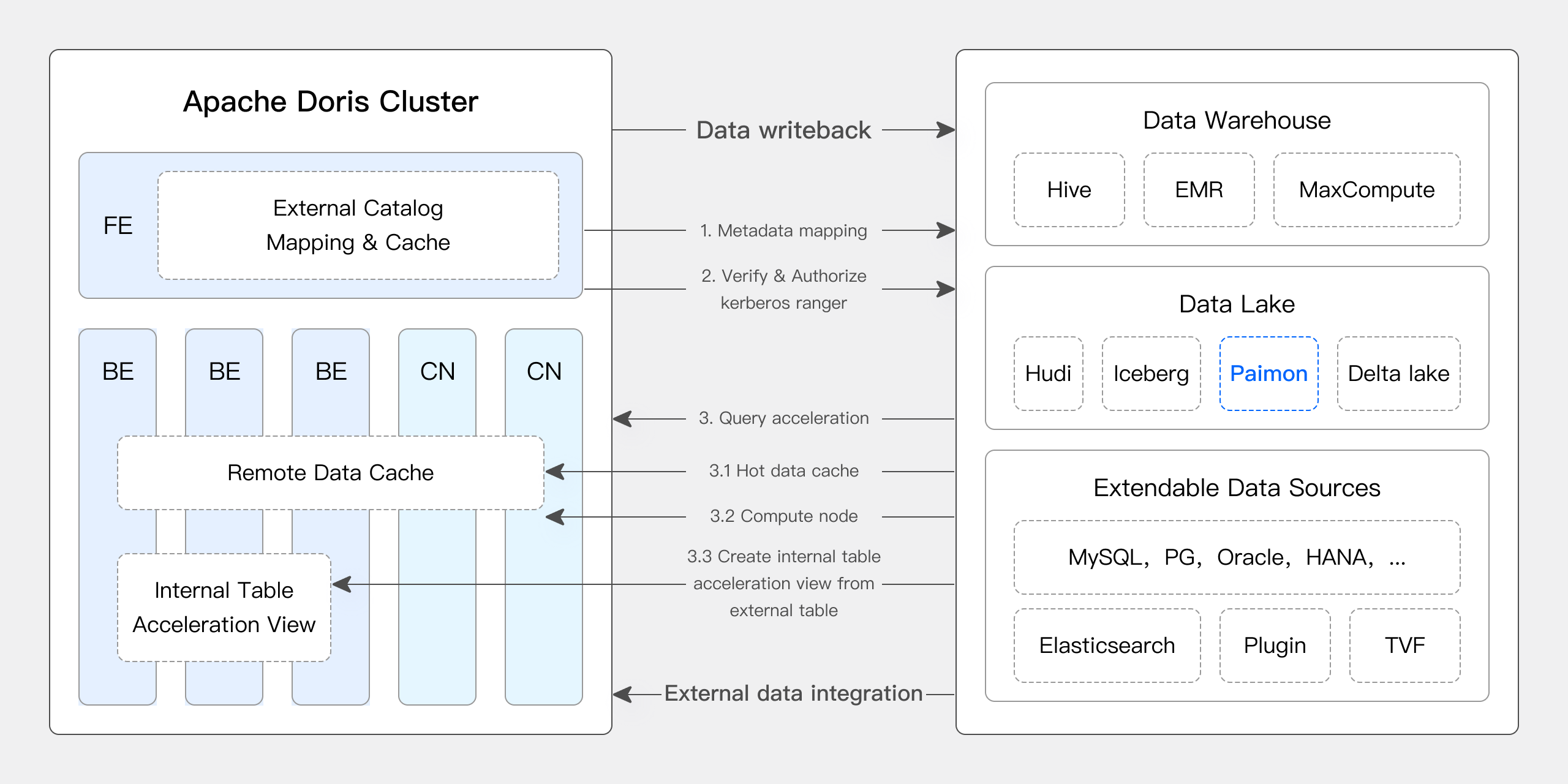
The upstream diagram describes the sample components. In the VeloDB Cloud workflow, your VeloDB Cloud warehouse supplies the query engine; the external lake services remain in your environment.
Prerequisites
- Connect to a VeloDB Cloud warehouse with a SQL user allowed to create catalogs and use the required databases and tables.
- For SaaS and BYOC warehouses, configure network access from the warehouse to both the external catalog endpoint and the storage endpoints returned in table metadata. An endpoint reachable from your laptop may still be unreachable from the warehouse. Contact VeloDB Cloud support when the integration needs private networking or managed runtime configuration.
- Prepare external service permissions for the metadata and data operations you plan to run. Credential vending still requires the external service to grant storage access.
- Replace sample hosts, account IDs, bucket names, and credentials. The HTTP endpoints and development credentials in local service examples are for an isolated test environment. Use HTTPS and restricted credentials for remote access.
Paimon query behavior
Apache Paimon is a data lake format that innovatively combines the advantages of data lake formats and LSM structures, successfully introducing efficient real-time streaming update capabilities into data lake architecture. This enables Paimon to efficiently manage data and perform real-time analysis, providing strong support for building real-time Data Lakehouse architecture.
To fully leverage Paimon's capabilities and improve query efficiency for Paimon data, VeloDB Cloud provides native support for several of Paimon's latest features:
- Supports various types of Paimon Catalogs such as Hive Metastore and FileSystem.
- Native support for Paimon 0.6's Primary Key Table Read Optimized feature.
- Native support for Paimon 0.8's Primary Key Table Deletion Vector feature.
Use Paimon tables for streaming updates written by Flink and queried from your warehouse. Native reads are eligible only when the Paimon split can expose the underlying files; other splits use the Java reader.
Time travel and incremental reads are described in Paimon Catalog. The update-and-query example below reads the latest table state; it is not an incremental scan.
Use the external Paimon, Flink, and storage components from the upstream sample to prepare test data. Run the query steps against your warehouse.
For more information, please refer to Paimon Catalog
Use the sample
All scripts and code mentioned in this article can be obtained from the following address: https://github.com/apache/doris/tree/master/samples/datalake/iceberg_and_paimon
01 Prepare the environment
The upstream Docker lab uses the following component versions. Its bundled Apache Doris server is a local compatibility reference; use your warehouse for the Cloud steps.
| Component | Version |
|---|---|
| Apache Doris (upstream local lab only) | 2.1.5 |
| Apache Paimon | 0.8 |
| Apache Flink | 1.18 |
| MinIO | RELEASE.2024-04-29T09-56-05Z |
02 Deploy the sample environment
The following commands reproduce the upstream local Docker lab, including its Apache Doris container. They do not provision or configure VeloDB Cloud. Make the external metastore and storage endpoints reachable from your warehouse before continuing; Docker-only service names are not warehouse endpoints.
Reproduce the upstream local lab
-
Start all components
bash ./start_all.sh -
After starting, you can use the following scripts to log in to the Flink command line or Apache Doris command line:
-- login flinkbash ./start_flink_client.sh-- login dorisbash ./start_doris_client.sh
03 Prepare data
After logging into the Flink command line, you can see a pre-built table. The table already contains some data that can be viewed using Flink SQL.
Flink SQL> use paimon.db_paimon;
[INFO] Execute statement succeed.

Flink SQL> show tables;
+------------+
| table name |
+------------+
|   customer |
+------------+
1 row in set

Flink SQL> show create table customer;
+------------------------------------------------------------------------+
|                                                                 result |
+------------------------------------------------------------------------+
| CREATE TABLE `paimon`.`db_paimon`.`customer` (
  `c_custkey` INT NOT NULL,
  `c_name` VARCHAR(25),
  `c_address` VARCHAR(40),
  `c_nationkey` INT NOT NULL,
  `c_phone` CHAR(15),
  `c_acctbal` DECIMAL(12, 2),
  `c_mktsegment` CHAR(10),
  `c_comment` VARCHAR(117),
  CONSTRAINT `PK_c_custkey_c_nationkey` PRIMARY KEY (`c_custkey`, `c_nationkey`) NOT ENFORCED
) PARTITIONED BY (`c_nationkey`)
WITH (
  'bucket' = '1',
  'path' = 's3://warehouse/wh/db_paimon.db/customer',
  'deletion-vectors.enabled' = 'true'
)
 |
+-------------------------------------------------------------------------+
1 row in set

Flink SQL> desc customer;
+--------------+----------------+-------+-----------------------------+--------+-----------+
|         name |           type |  null |                         key | extras | watermark |
+--------------+----------------+-------+-----------------------------+--------+-----------+
|    c_custkey |            INT | FALSE | PRI(c_custkey, c_nationkey) |        |           |
|       c_name |    VARCHAR(25) |  TRUE |                             |        |           |
|    c_address |    VARCHAR(40) |  TRUE |                             |        |           |
|  c_nationkey |            INT | FALSE | PRI(c_custkey, c_nationkey) |        |           |
|      c_phone |       CHAR(15) |  TRUE |                             |        |           |
|    c_acctbal | DECIMAL(12, 2) |  TRUE |                             |        |           |
| c_mktsegment |       CHAR(10) |  TRUE |                             |        |           |
|    c_comment |   VARCHAR(117) |  TRUE |                             |        |           |
+--------------+----------------+-------+-----------------------------+--------+-----------+
8 rows in set

Flink SQL> select * from customer order by c_custkey limit 4;
+-----------+--------------------+--------------------------------+-------------+-----------------+-----------+--------------+--------------------------------+
| c_custkey |             c_name |                      c_address | c_nationkey |         c_phone | c_acctbal | c_mktsegment |                      c_comment |
+-----------+--------------------+--------------------------------+-------------+-----------------+-----------+--------------+--------------------------------+
|         1 | Customer#000000001 |              IVhzIApeRb ot,c,E |          15 | 25-989-741-2988 |    711.56 |     BUILDING | to the even, regular platel... |
|         2 | Customer#000000002 | XSTf4,NCwDVaWNe6tEgvwfmRchLXak |          13 | 23-768-687-3665 |    121.65 |   AUTOMOBILE | l accounts. blithely ironic... |
|         3 | Customer#000000003 |                   MG9kdTD2WBHm |           1 | 11-719-748-3364 |   7498.12 |   AUTOMOBILE |  deposits eat slyly ironic,... |
|        32 | Customer#000000032 | jD2xZzi UmId,DCtNBLXKj9q0Tl... |          15 | 25-430-914-2194 |   3471.53 |     BUILDING | cial ideas. final, furious ... |
+-----------+--------------------+--------------------------------+-------------+-----------------+-----------+--------------+--------------------------------+
4 rows in set
04 Query data
The upstream lab precreates a catalog named paimon. In your warehouse, create the catalog below with your reachable storage endpoint and credentials:
-- Create this catalog in your warehouse
CREATE CATALOG `paimon` PROPERTIES (
    "type" = "paimon",
    "warehouse" = "s3://warehouse/wh/",
    "s3.endpoint"="https://<storage-host>",
    "s3.access_key"="<access-key-id>",
    "s3.secret_key"="<secret-access-key>",
    "s3.region"="us-east-1"
);
You can query Paimon's data in VeloDB Cloud:
mysql> use paimon.db_paimon;
Reading table information for completion of table and column names
You can turn off this feature to get a quicker startup with -A

Database changed
mysql> show tables;
+---------------------+
| Tables_in_db_paimon |
+---------------------+
| customer            |
+---------------------+
1 row in set (0.00 sec)

mysql> select * from customer order by c_custkey limit 4;
+-----------+--------------------+---------------------------------------+-------------+-----------------+-----------+--------------+--------------------------------------------------------------------------------------------------------+
| c_custkey | c_name             | c_address                             | c_nationkey | c_phone         | c_acctbal | c_mktsegment | c_comment                                                                                              |
+-----------+--------------------+---------------------------------------+-------------+-----------------+-----------+--------------+--------------------------------------------------------------------------------------------------------+
|         1 | Customer#000000001 | IVhzIApeRb ot,c,E                     |          15 | 25-989-741-2988 |    711.56 | BUILDING     | to the even, regular platelets. regular, ironic epitaphs nag e                                         |
|         2 | Customer#000000002 | XSTf4,NCwDVaWNe6tEgvwfmRchLXak        |          13 | 23-768-687-3665 |    121.65 | AUTOMOBILE   | l accounts. blithely ironic theodolites integrate boldly: caref                                        |
|         3 | Customer#000000003 | MG9kdTD2WBHm                          |           1 | 11-719-748-3364 |   7498.12 | AUTOMOBILE   |  deposits eat slyly ironic, even instructions. express foxes detect slyly. blithely even accounts abov |
|        32 | Customer#000000032 | jD2xZzi UmId,DCtNBLXKj9q0Tlp2iQ6ZcO3J |          15 | 25-430-914-2194 |   3471.53 | BUILDING     | cial ideas. final, furious requests across the e                                                       |
+-----------+--------------------+---------------------------------------+-------------+-----------------+-----------+--------------+--------------------------------------------------------------------------------------------------------+
4 rows in set (1.89 sec)
05 Read updated data
You can update the data in the Paimon table using Flink SQL:
Flink SQL> update customer set c_address='c_address_update' where c_nationkey = 1;
[INFO] Submitting SQL update statement to the cluster...
[INFO] SQL update statement has been successfully submitted to the cluster:
Job ID: ff838b7b778a94396b332b0d93c8f7ac
After the Flink SQL execution is complete, you can directly view the latest data in VeloDB Cloud:
mysql> select * from customer where c_nationkey=1 limit 2;
+-----------+--------------------+-----------------+-------------+-----------------+-----------+--------------+--------------------------------------------------------------------------------------------------------+
| c_custkey | c_name             | c_address       | c_nationkey | c_phone         | c_acctbal | c_mktsegment | c_comment                                                                                              |
+-----------+--------------------+-----------------+-------------+-----------------+-----------+--------------+--------------------------------------------------------------------------------------------------------+
|         3 | Customer#000000003 | c_address_update |           1 | 11-719-748-3364 |   7498.12 | AUTOMOBILE   |  deposits eat slyly ironic, even instructions. express foxes detect slyly. blithely even accounts abov |
|       513 | Customer#000000513 | c_address_update |           1 | 11-861-303-6887 |    955.37 | HOUSEHOLD    | press along the quickly regular instructions. regular requests against the carefully ironic s          |
+-----------+--------------------+-----------------+-------------+-----------------+-----------+--------------+--------------------------------------------------------------------------------------------------------+
2 rows in set (0.19 sec)
Benchmark
The upstream Apache Doris walkthrough reports a TPC-DS 1000 comparison using Paimon 0.8, Apache Doris 2.1.5, and Trino 422, with Primary Key Table Read Optimized enabled on both engines. It does not provide the complete hardware, storage configuration, query settings, or reproduction commands.
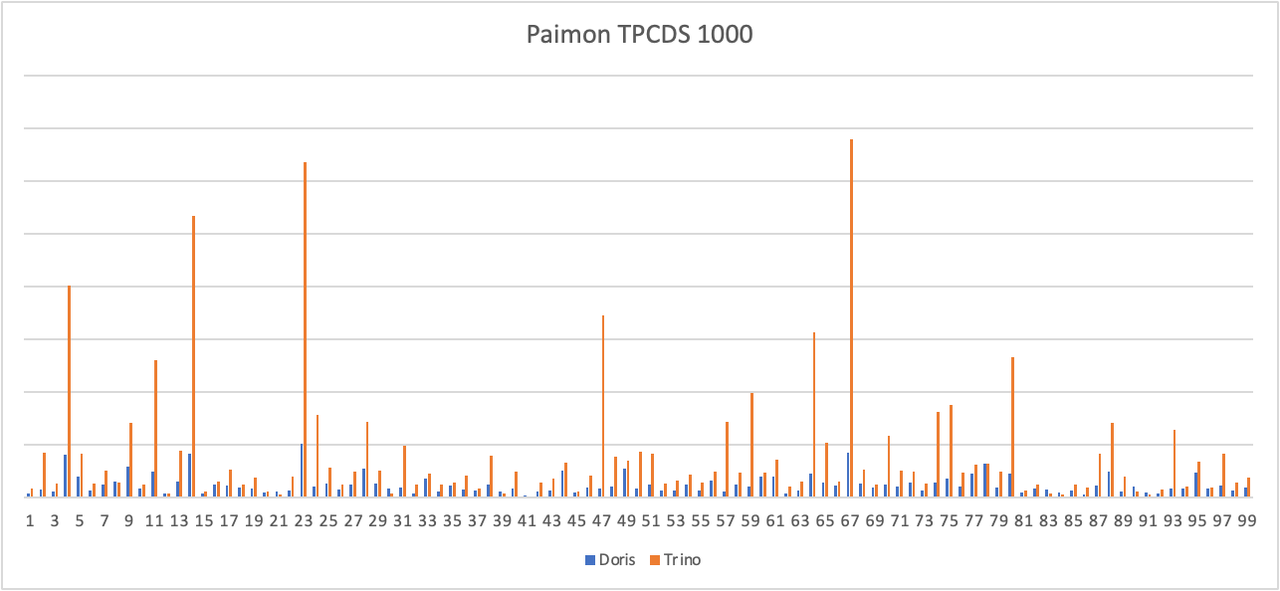
The upstream report describes a 3–5× average query-performance difference for that static dataset. These are attributed upstream results; they have not been reproduced for VeloDB Cloud and are not a prediction for your warehouse.
Inspect Paimon query plans
For baseline data, after introducing the Primary Key Table Read Optimized feature in Apache Paimon version 0.6, the query engine can directly access the underlying Parquet/ORC files, significantly improving the reading efficiency of baseline data. For unmerged incremental data (data increments generated by INSERT, UPDATE, or DELETE), they can be read through Merge-on-Read. In addition, Paimon introduced the Deletion Vector feature in version 0.8, which further enhances the query engine's efficiency in reading incremental data.
VeloDB Cloud supports reading Deletion Vector through native Reader and performing Merge on Read. We demonstrate the query methods for baseline data and incremental data in a query using the EXPLAIN statement.
mysql> explain verbose select * from customer where c_nationkey < 3;
+------------------------------------------------------------------------------------------------------------------------------------------------+
| Explain String(Nereids Planner)                                                                                                                |
+------------------------------------------------------------------------------------------------------------------------------------------------+
| ...............                                                                                                                                |
|                                                                                                                                                |
|   0:VPAIMON_SCAN_NODE(68)                                                                                                                      |
|      table: customer                                                                                                                           |
|      predicates: (c_nationkey[#3] < 3)                                                                                                         |
|      inputSplitNum=4, totalFileSize=238324, scanRanges=4                                                                                       |
|      partition=3/0                                                                                                                             |
|      backends:                                                                                                                                 |
|        10002                                                                                                                                   |
|          s3://warehouse/wh/db_paimon.db/customer/c_nationkey=1/bucket-0/data-15cee5b7-1bd7-42ca-9314-56d92c62c03b-0.orc start: 0 length: 66600 |
|          s3://warehouse/wh/db_paimon.db/customer/c_nationkey=1/bucket-0/data-5d50255a-2215-4010-b976-d5dc656f3444-0.orc start: 0 length: 44501 |
|          s3://warehouse/wh/db_paimon.db/customer/c_nationkey=2/bucket-0/data-e98fb7ef-ec2b-4ad5-a496-713cb9481d56-0.orc start: 0 length: 64059 |
|          s3://warehouse/wh/db_paimon.db/customer/c_nationkey=0/bucket-0/data-431be05d-50fa-401f-9680-d646757d0f95-0.orc start: 0 length: 63164 |
|      cardinality=18751, numNodes=1                                                                                                             |
|      pushdown agg=NONE                                                                                                                         |
|      paimonNativeReadSplits=4/4                                                                                                                |
|      PaimonSplitStats:                                                                                                                         |
|        SplitStat [type=NATIVE, rowCount=1542, rawFileConvertable=true, hasDeletionVector=true]                                                 |
|        SplitStat [type=NATIVE, rowCount=750, rawFileConvertable=true, hasDeletionVector=false]                                                 |
|        SplitStat [type=NATIVE, rowCount=750, rawFileConvertable=true, hasDeletionVector=false]                                                 |
|      tuple ids: 0
| ...............                                                                                                           |                                                                                                  |
+------------------------------------------------------------------------------------------------------------------------------------------------+
67 rows in set (0.23 sec)
It can be seen that the table just updated by Flink SQL contains 4 shards, and all shards can be accessed through Native Reader (paimonNativeReadSplits=4/4). In addition, the hasDeletionVector property of the first shard is true, indicating that the shard has a corresponding Deletion Vector, and data will be filtered according to the Deletion Vector when reading.
Common errors
| Symptom | Check and resolution |
|---|---|
| Connection timeout or hostname resolution failure | Check the catalog URI and connectivity from the warehouse, then check the storage endpoints in table metadata. Ask VeloDB Cloud support to investigate managed network access when needed. |
| Unauthorized or forbidden response | Check the catalog authentication method, token or client credentials, expiry, and permissions on the external catalog and namespace. |
| Catalog metadata loads but a table scan fails | Check storage credentials or credential vending, object permissions, and reachability of the data-file endpoint. Metadata access alone does not grant data access. |
Clean up test resources
Queries and writes consume warehouse compute, and the sample can create billable external storage or services. See Billing Overview. Remove only the test tables and external services you created when you finish. Check the external catalog's deletion behavior before dropping a table or namespace because it can also delete data files.