Connect to Snowflake Catalogs
VeloDB Cloud can connect to Snowflake Catalog services through the Iceberg REST Catalog API. This integration allows VeloDB Cloud to query Iceberg tables managed by Snowflake, and to create and write Iceberg tables when using Snowflake Open Catalog internal catalogs.
This document covers two Snowflake catalog services:
- Snowflake Horizon Catalog: used to access Snowflake-managed Iceberg tables in an existing Snowflake account.
- Snowflake Open Catalog: Snowflake's managed Apache Polaris / Iceberg REST Catalog service, used to manage Iceberg catalogs, namespaces, and tables.
Prerequisites
- Connect to a VeloDB Cloud warehouse with a SQL user allowed to create catalogs and use the required databases and tables.
- For SaaS and BYOC warehouses, configure network access from the warehouse to both the external catalog endpoint and the storage endpoints returned in table metadata. An endpoint reachable from your laptop may still be unreachable from the warehouse. Contact VeloDB Cloud support when the integration needs private networking or managed runtime configuration.
- Prepare external service permissions for the metadata and data operations you plan to run. Credential vending still requires the external service to grant storage access.
- Replace sample hosts, account IDs, bucket names, and credentials. The HTTP endpoints and development credentials in local service examples are for an isolated test environment. Use HTTPS and restricted credentials for remote access.
Choose a Snowflake catalog
| Item | Snowflake Horizon Catalog | Snowflake Open Catalog |
|---|---|---|
| Main use case | Query Snowflake-managed Iceberg tables | Manage Iceberg tables in Snowflake Open Catalog |
VeloDB Cloud warehouse | Snowflake database name | Open Catalog catalog name |
| Credential | Snowflake Programmatic Access Token (PAT) | Service connection <client_id>:<client_secret> |
| OAuth scope | session:role:<ROLE_NAME> | PRINCIPAL_ROLE:<ROLE_NAME> |
| Create tables from VeloDB Cloud | Not recommended | Supported on internal catalogs |
| Write from VeloDB Cloud | Insert into existing Snowflake-managed Iceberg tables | Insert into tables in internal catalogs |
Use Horizon Catalog when your tables are managed by Snowflake. Use Open Catalog internal catalogs when you want VeloDB Cloud to create and manage Iceberg tables through Snowflake Open Catalog.
Note:
When connecting to Horizon Catalog, set
iceberg.rest.view-enabledtofalse.
Storage access model
Horizon Catalog is used for Snowflake-managed Iceberg tables, whose storage access is managed by Snowflake. VeloDB Cloud obtains table metadata through the REST Catalog API, and Snowflake returns temporary object storage credentials when iceberg.rest.vended-credentials-enabled is set to true. Therefore, you do not need to configure an AWS IAM role or S3 credentials in the VeloDB Cloud catalog for Horizon Catalog.
Open Catalog internal catalogs use the object storage location configured for the catalog. When the location is on AWS S3, Open Catalog needs an IAM role that it can assume to read and write Iceberg metadata and data files. In the IAM role trust policy, the trust principal is the AWS principal allowed to call sts:AssumeRole. For Snowflake Open Catalog, use the IAM user ARN shown in the catalog storage details as the trust principal, and configure the External ID from the same page. The External ID limits role assumption to this Open Catalog integration and helps prevent confused-deputy access.
Connect to Snowflake Horizon Catalog
Configure Snowflake
Snowflake Horizon Catalog exposes Snowflake-managed Iceberg tables through the Iceberg REST Catalog API.
The REST endpoints are:
REST endpoint:
https://<snowflake_account_identifier>.snowflakecomputing.com/polaris/api/catalog

Token endpoint:
https://<snowflake_account_identifier>.snowflakecomputing.com/polaris/api/catalog/v1/oauth/tokens
Create a Snowflake-managed Iceberg table:
CREATE OR REPLACE ICEBERG TABLE <database_name>.<schema_name>.<table_name> (
  ID BIGINT,
  NAME STRING
)
CATALOG = 'SNOWFLAKE'
EXTERNAL_VOLUME = 'SNOWFLAKE_MANAGED';
SNOWFLAKE_MANAGED is a Snowflake reserved value. It is not a user-created external volume, and you do not need to grant VeloDB Cloud access to an external volume for this value.
Grant privileges to the Snowflake role used by VeloDB Cloud:
GRANT USAGE ON DATABASE <database_name> TO ROLE <role_name>;
GRANT USAGE ON SCHEMA <database_name>.<schema_name> TO ROLE <role_name>;
GRANT SELECT ON TABLE <database_name>.<schema_name>.<table_name> TO ROLE <role_name>;
If VeloDB Cloud needs to write to the table, grant write privileges:
GRANT SELECT, INSERT, UPDATE, DELETE, TRUNCATE
ON TABLE <database_name>.<schema_name>.<table_name>
TO ROLE <role_name>;
Create a Programmatic Access Token (PAT) for the service user:
ALTER USER IF EXISTS <service_user>
ADD PAT <pat_name>
  DAYS_TO_EXPIRY = 7
  ROLE_RESTRICTION = '<role_name>'
  COMMENT = 'Horizon Iceberg REST access for Doris';
You can verify the PAT with the token endpoint:
curl -i --fail -X POST \
  "https://<snowflake_account_identifier>.snowflakecomputing.com/polaris/api/catalog/v1/oauth/tokens" \
  --header "Content-Type: application/x-www-form-urlencoded" \
  --data-urlencode "grant_type=client_credentials" \
  --data-urlencode "scope=session:role:<role_name>" \
  --data-urlencode "client_secret=<PAT_token>"
Create the warehouse catalog
Create an Iceberg REST Catalog in VeloDB Cloud:
CREATE CATALOG snowflake_horizon PROPERTIES (
    'type' = 'iceberg',
    'iceberg.catalog.type' = 'rest',
    'iceberg.rest.uri' = 'https://<snowflake_account_identifier>.snowflakecomputing.com/polaris/api/catalog',
    'warehouse' = '<snowflake_database_name>',
    'iceberg.rest.security.type' = 'oauth2',
    'iceberg.rest.oauth2.credential' = '<PAT_token>',
    'iceberg.rest.oauth2.server-uri' = 'https://<snowflake_account_identifier>.snowflakecomputing.com/polaris/api/catalog/v1/oauth/tokens',
    'iceberg.rest.oauth2.scope' = 'session:role:<role_name>',
    'iceberg.rest.vended-credentials-enabled' = 'true',
    'client.region' = '<storage_region>',
    'iceberg.rest.nested-namespace-enabled' = 'true',
    'iceberg.rest.view-enabled' = 'false',
    'iceberg.rest.connection-timeout-ms' = '30000',
    'iceberg.rest.socket-timeout-ms' = '120000'
);
Parameter notes:
warehouse: Snowflake database name, not a Snowflake compute warehouse.iceberg.rest.oauth2.credential: the Snowflake PAT.iceberg.rest.oauth2.scope:session:role:<role_name>.iceberg.rest.vended-credentials-enabled: enables Snowflake to return temporary object storage credentials.client.region: the region of the underlying object storage.iceberg.rest.view-enabled: set tofalsewhen connecting to Horizon Catalog.
Access Horizon tables
After the catalog is created, query Snowflake-managed Iceberg tables from VeloDB Cloud:
SHOW DATABASES FROM snowflake_horizon;
SHOW TABLES FROM snowflake_horizon.<schema_name>;

SELECT COUNT(*)
FROM snowflake_horizon.<schema_name>.<table_name>;
Example output:
mysql> SHOW DATABASES FROM snowflake_horizon;
+--------------------+
| Database           |
+--------------------+
| PUBLIC             |
| information_schema |
| mysql              |
+--------------------+

mysql> SHOW TABLES FROM snowflake_horizon.PUBLIC;
+------------------+
| Tables_in_PUBLIC |
+------------------+
| DORIS_HORIZON_T  |
+------------------+

mysql> SELECT * FROM snowflake_horizon.PUBLIC.DORIS_HORIZON_T;
+------+-------+
| id   | name  |
+------+-------+
|    1 | alice |
|    2 | bob   |
+------+-------+
To write to an existing Snowflake-managed Iceberg table:
INSERT INTO snowflake_horizon.<schema_name>.<table_name>
VALUES (1, 'doris_insert');
Connect to Snowflake Open Catalog
Snowflake Open Catalog is Snowflake's managed Apache Polaris / Iceberg REST Catalog service. To use Open Catalog with VeloDB Cloud, prepare object storage access first, then create an Open Catalog catalog, namespace, catalog role, and service connection.
The REST endpoints are:
REST endpoint:
https://<open_catalog_account_identifier>.snowflakecomputing.com/polaris/api/catalog

Token endpoint:
https://<open_catalog_account_identifier>.snowflakecomputing.com/polaris/api/catalog/v1/oauth/tokens
Prepare the AWS environment
Open Catalog stores Iceberg metadata and data files in the object storage location specified by the catalog. If you use AWS S3, prepare an S3 bucket and an IAM role before creating the Open Catalog catalog.
Create an S3 bucket
Create a bucket for Iceberg table data:
aws s3 mb s3://<bucket_name> --region <region>
aws s3 ls | grep <bucket_name>
The Open Catalog catalog will use a path in this bucket as its default base location, for example:
s3://<bucket_name>/<catalog_prefix>/
Create an IAM policy for S3 access
Create an IAM policy that allows Open Catalog to access the catalog location. Save the following content as snowflake-open-catalog-s3-policy.json:
cat > snowflake-open-catalog-s3-policy.json <<'EOF'
{
  "Version": "2012-10-17",
  "Statement": [
    {
      "Effect": "Allow",
      "Action": [
        "s3:ListBucket",
        "s3:GetBucketLocation",
        "s3:ListBucketMultipartUploads"
      ],
      "Resource": "arn:aws:s3:::<bucket_name>",
      "Condition": {
        "StringLike": {
          "s3:prefix": [
            "<catalog_prefix>",
            "<catalog_prefix>/*"
          ]
        }
      }
    },
    {
      "Effect": "Allow",
      "Action": [
        "s3:GetObject",
        "s3:PutObject",
        "s3:DeleteObject",
        "s3:AbortMultipartUpload",
        "s3:ListMultipartUploadParts"
      ],
      "Resource": "arn:aws:s3:::<bucket_name>/<catalog_prefix>/*"
    }
  ]
}
EOF
Create an IAM role
Create a temporary trust policy first. After the Open Catalog catalog is created, update the trust policy with the IAM user ARN and External ID provided by Snowflake Open Catalog.
Create snowflake-open-catalog-trust-policy.json:
cat > snowflake-open-catalog-trust-policy.json <<'EOF'
{
  "Version": "2012-10-17",
  "Statement": [
    {
      "Effect": "Allow",
      "Principal": {
        "AWS": "arn:aws:iam::<aws_account_id>:root"
      },
      "Action": "sts:AssumeRole"
    }
  ]
}
EOF
Create the IAM role and attach the S3 policy:
aws iam create-role \
    --role-name <open_catalog_role_name> \
    --assume-role-policy-document file://snowflake-open-catalog-trust-policy.json \
    --description "IAM role for Snowflake Open Catalog to access S3"

aws iam put-role-policy \
    --role-name <open_catalog_role_name> \
    --policy-name snowflake-open-catalog-s3-access \
    --policy-document file://snowflake-open-catalog-s3-policy.json
Verify that the IAM role and inline policy are created:
aws iam get-role --role-name <open_catalog_role_name>
aws iam list-role-policies --role-name <open_catalog_role_name>
Record the role ARN. You will use it when creating the Open Catalog catalog:
arn:aws:iam::<aws_account_id>:role/<open_catalog_role_name>
Configure Snowflake Open Catalog
Create an Open Catalog catalog. Use an internal catalog if VeloDB Cloud needs to create and write Iceberg tables.
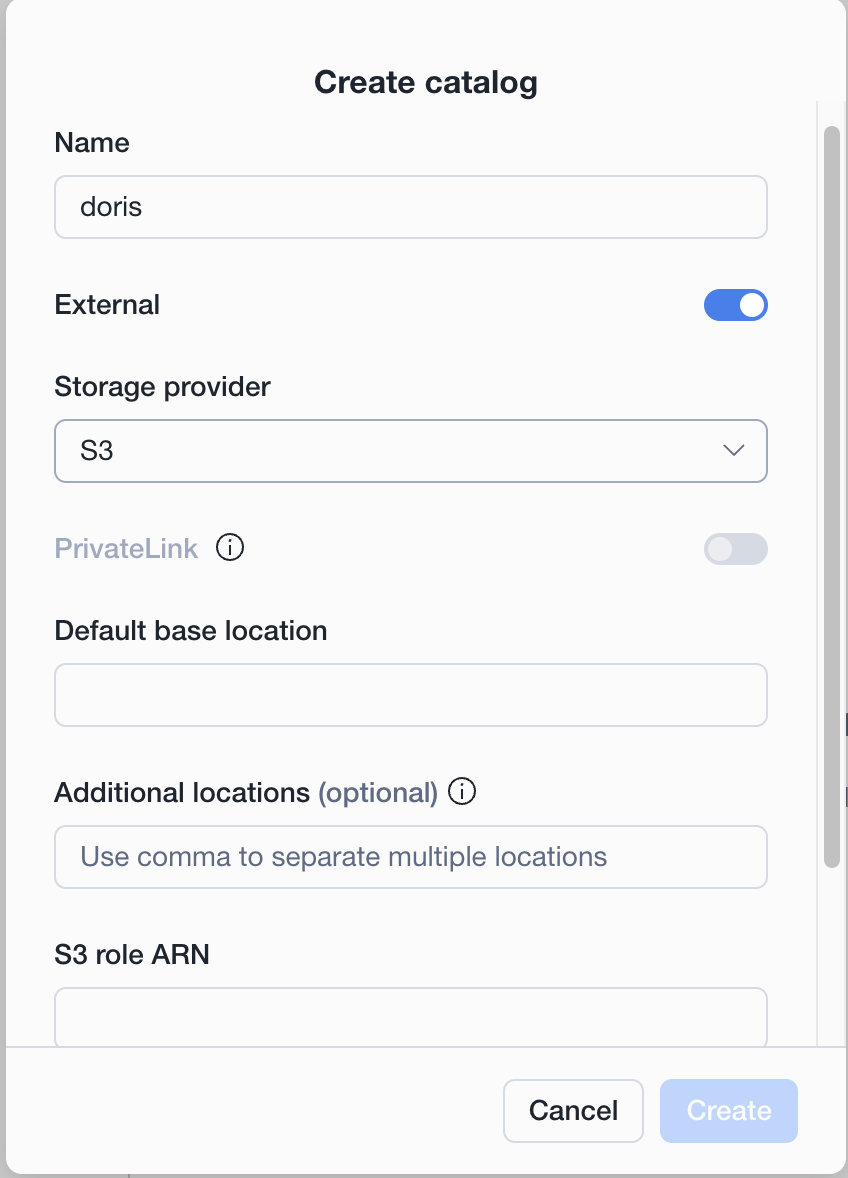
Typical catalog settings:
name: <catalog_name>
type: INTERNAL
storage provider: S3
default base location: s3://<bucket_name>/<catalog_prefix>/
S3 role ARN: arn:aws:iam::<aws_account_id>:role/<open_catalog_role_name>
After creating the Open Catalog catalog, open the catalog details page and copy the following values from storage details:
- IAM user ARN
- External ID
Then update the IAM role trust relationship to use the exact values from Snowflake Open Catalog:
cat > snowflake-open-catalog-trust-policy.json <<'EOF'
{
  "Version": "2012-10-17",
  "Statement": [
    {
      "Effect": "Allow",
      "Principal": {
        "AWS": "<open_catalog_iam_user_arn>"
      },
      "Action": "sts:AssumeRole",
      "Condition": {
        "StringEquals": {
          "sts:ExternalId": "<external_id>"
        }
      }
    }
  ]
}
EOF

aws iam update-assume-role-policy \
    --role-name <open_catalog_role_name> \
    --policy-document file://snowflake-open-catalog-trust-policy.json
Do not publish the IAM user ARN, External ID, or real role ARN in public documents or screenshots.
Create a namespace, for example public.
Create a catalog role and grant the required privileges.
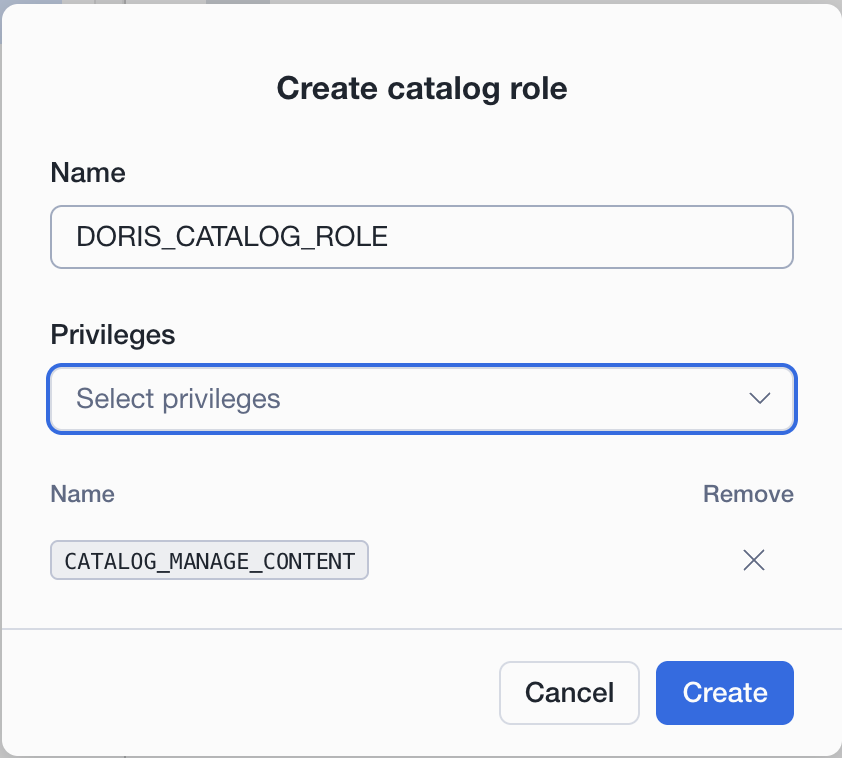
For a quick start, you can grant CATALOG_MANAGE_CONTENT. In production, use the minimum privileges required by your workload.
Create a service connection for the warehouse.
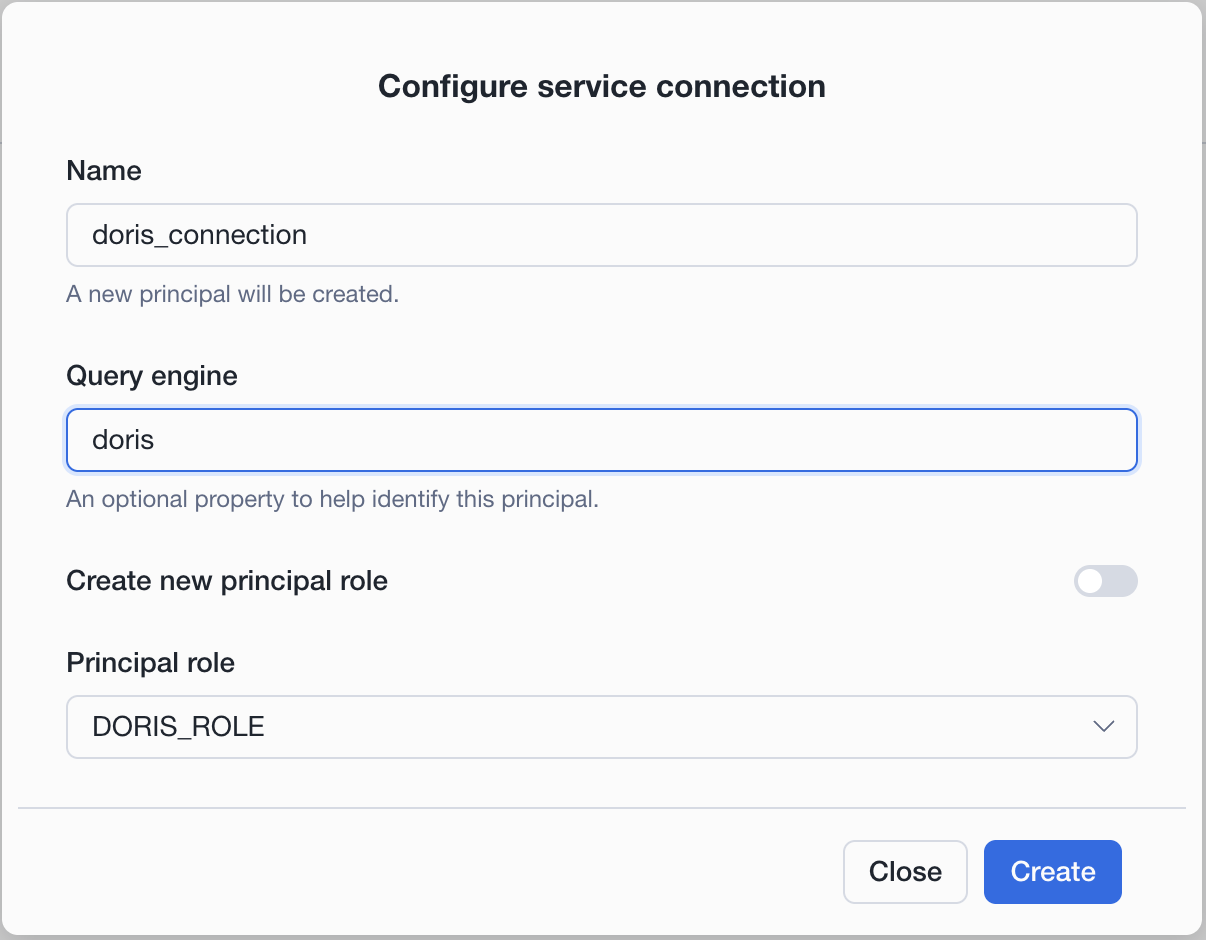
Typical service connection settings:
name: doris_connection
query engine: doris
principal role: <principal_role_name>
After the service connection is created, copy the client credentials. The value used by VeloDB Cloud is in the format <client_id>:<client_secret>.
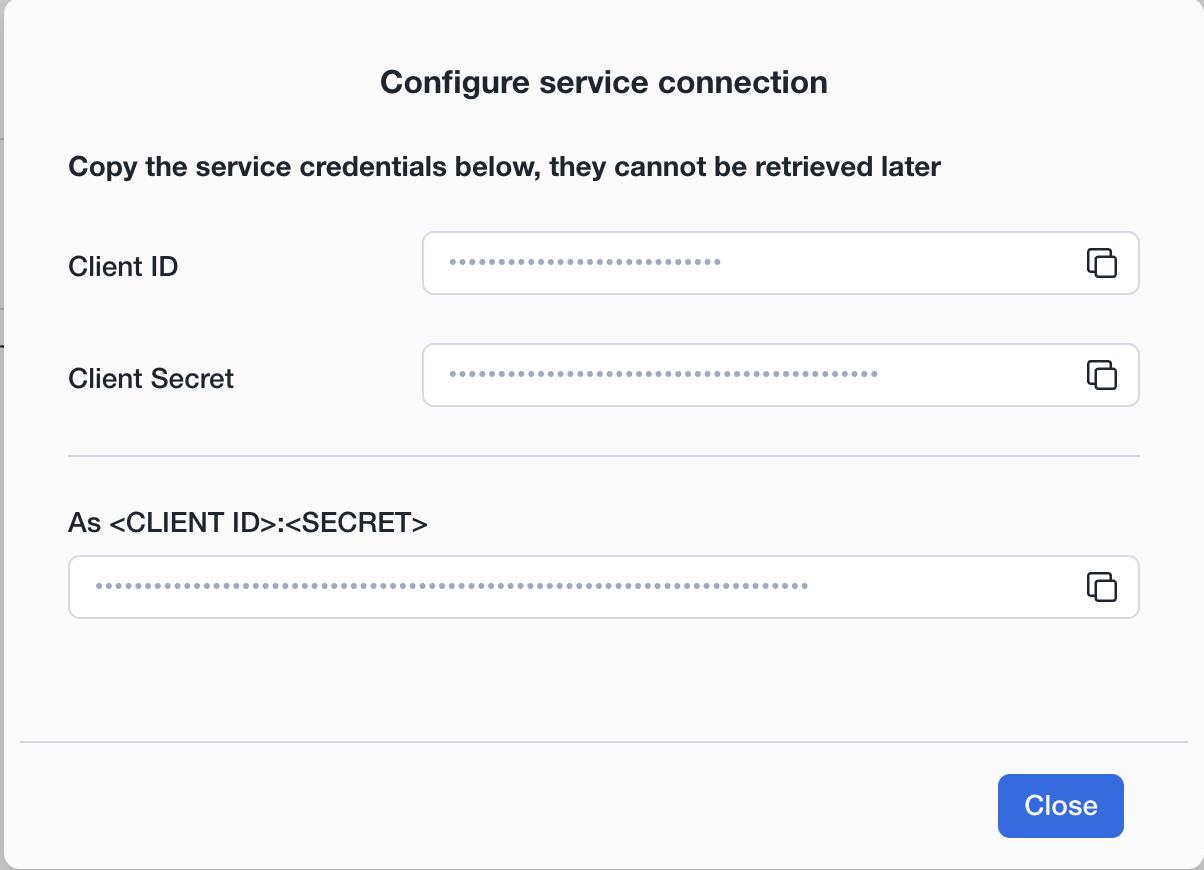
Do not store real client secrets in public files or screenshots.
Create the warehouse catalog
Create an Iceberg REST Catalog in VeloDB Cloud:
CREATE CATALOG snowflake_open_catalog PROPERTIES (
    'type' = 'iceberg',
    'iceberg.catalog.type' = 'rest',
    'iceberg.rest.uri' = 'https://<open_catalog_account_identifier>.snowflakecomputing.com/polaris/api/catalog',
    'warehouse' = '<open_catalog_catalog_name>',
    'iceberg.rest.security.type' = 'oauth2',
    'iceberg.rest.oauth2.credential' = '<client_id>:<client_secret>',
    'iceberg.rest.oauth2.server-uri' = 'https://<open_catalog_account_identifier>.snowflakecomputing.com/polaris/api/catalog/v1/oauth/tokens',
    'iceberg.rest.oauth2.scope' = 'PRINCIPAL_ROLE:<principal_role_name>',
    'iceberg.rest.vended-credentials-enabled' = 'true',
    'client.region' = '<storage_region>',
    'iceberg.rest.nested-namespace-enabled' = 'true'
);
Parameter notes:
warehouse: the Open Catalog catalog name.iceberg.rest.oauth2.credential: service connection credentials in<client_id>:<client_secret>format.iceberg.rest.oauth2.scope:PRINCIPAL_ROLE:<principal_role_name>.iceberg.rest.vended-credentials-enabled: set totrueso VeloDB Cloud can use credentials vended by Open Catalog.client.region: the region of the object storage.
Access and manage Open Catalog tables
Access the Open Catalog namespace:
SHOW DATABASES FROM snowflake_open_catalog;
SHOW TABLES FROM snowflake_open_catalog.public;
Create an Iceberg table through VeloDB Cloud:
CREATE TABLE snowflake_open_catalog.public.doris_open_catalog_t (
  id INT,
  name STRING
)
PROPERTIES (
  'write-format' = 'parquet'
);
Insert and query data:
INSERT INTO snowflake_open_catalog.public.doris_open_catalog_t
VALUES (1, 'open_catalog_insert');

SELECT *
FROM snowflake_open_catalog.public.doris_open_catalog_t
ORDER BY id;
Connection choices
Through the Iceberg REST Catalog API, VeloDB Cloud can connect to Snowflake Catalog services and analyze Iceberg data managed by Snowflake.
- Use Snowflake Horizon Catalog to query Snowflake-managed Iceberg tables. Configure
iceberg.rest.view-enabled = falsewhen creating the VeloDB Cloud catalog. - Use Snowflake Open Catalog internal catalogs when you want VeloDB Cloud to create, write, and query Iceberg tables managed by Snowflake Open Catalog.
Common errors
| Symptom | Check and resolution |
|---|---|
| Connection timeout or hostname resolution failure | Check the catalog URI and connectivity from the warehouse, then check the storage endpoints in table metadata. Ask VeloDB Cloud support to investigate managed network access when needed. |
| Unauthorized or forbidden response | Check the catalog authentication method, token or client credentials, expiry, and permissions on the external catalog and namespace. |
| Catalog metadata loads but a table scan fails | Check storage credentials or credential vending, object permissions, and reachability of the data-file endpoint. Metadata access alone does not grant data access. |
Clean up test resources
Queries and writes consume warehouse compute, and the sample can create billable external storage or services. See Billing Overview. Remove only the test tables and external services you created when you finish. Check the external catalog's deletion behavior before dropping a table or namespace because it can also delete data files.