Data Cache
Data Cache keeps copies of remote file data on the local disks of the cluster running your queries. Reusing cached data reduces remote reads. Queries can fetch uncached data from remote storage. Evicting a cached copy does not delete the source data.
For external Hive, Iceberg, Hudi, and Paimon tables, caching is populated by eligible file scans or explicit warmup. Creating a catalog does not import the source data into the warehouse or preload it into every cluster. JDBC and Elasticsearch queries do not use this file-content cache.
The SQL controls below are verified for Core 26.1.3. See the Core release notes for release scope and preview status.
How caching works
When an external query uses Data Cache:
- The selected cluster's compute nodes scan the file ranges assigned to them.
- Available cached blocks can serve the reads locally.
- Missing data is fetched from remote storage. Eligible reads also populate the local cache, subject to capacity and cache policies.
- Later scans can reuse those blocks while they remain cached. The queries do not have to return the same results to reuse the same file data.
- As space is needed, the service evicts cached blocks according to its cache policies. Eviction removes local copies and leaves the source data intact.
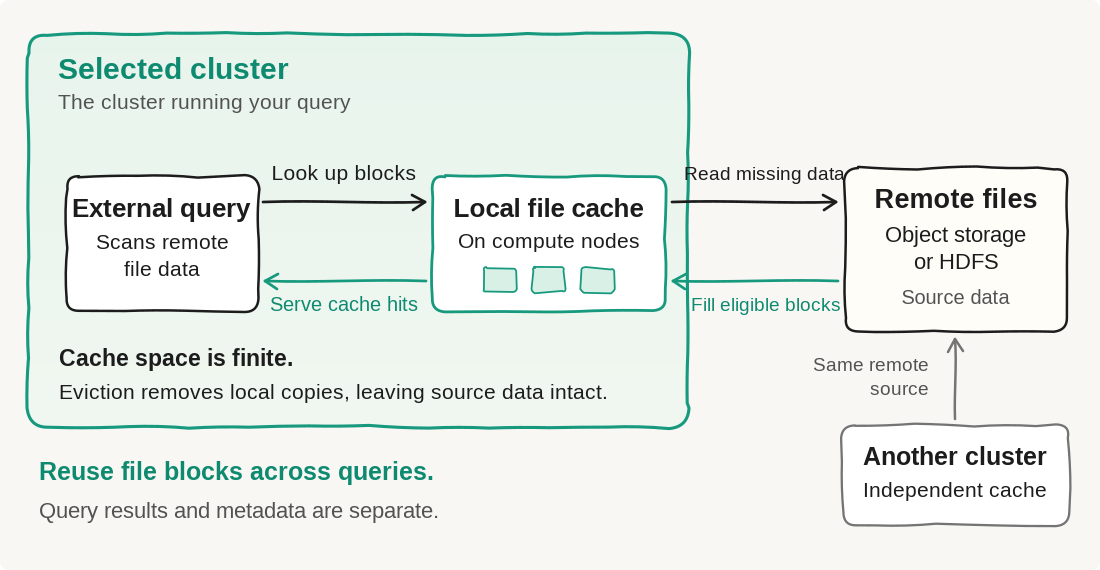
Caches belong to compute nodes within a cluster. Clusters in the same warehouse share access to stored data, but have independent cache capacity and contents. Warming one cluster does not automatically warm every other cluster, and a table's cached blocks need not reside on every node.
Data Cache stores file contents, rather than query results. Metadata Cache separately caches information such as table schemas and file listings. Source changes remain subject to the connector's metadata-refresh and consistency rules.
VeloDB Cloud manages the cache service, local disks, and eviction. You cannot edit its FE/BE configuration files or choose cache directories. You can control eligible external queries with SQL session variables, inspect cache behavior, warm selected data, and adjust cluster resources through the supported console controls.
Choose a cache strategy
| Workload or goal | Approach |
|---|---|
| Repeated queries read a reusable set of external files | Enable Data Cache for the queries and compare cache reads with remote reads |
| A one-time scan reads much more data than the normal working set | Reuse existing cache hits while preventing new cache fills with a query byte threshold |
| A known dataset must be ready before interactive queries start | Warm only the required tables, columns, and partitions on the cluster that will run the queries |
| Low hit rate persists under a repeated workload | Compare the working set, cache utilization, and query profiles before changing capacity |
A first scan still needs to fetch uncached data. A workload that continually reads new files can have a low hit rate even when the cache works correctly.
Enable Data Cache
Use a running cluster and a warehouse SQL user with SELECT privileges on the external table. In the VeloDB Cloud console, select the warehouse, open SQL Editor under Development, and choose the query's Cluster. You can also use a SQL client connected to that warehouse and cluster.
Check the effective session setting rather than assuming a warehouse default:
SHOW VARIABLES LIKE 'enable_file_cache';
Set enable_file_cache to true for the session that runs the query. This changes the external-query session setting and does not modify backend service configuration.
Note:
In SQL Editor, submit the
SETstatements and the target query together with one Run action. A submission uses one session, which closes after its statements finish. A separate Run creates another session. In a persistent SQL client connection, settings remain in that session until you change them or disconnect.
The batches below use an existing external table, hive_catalog.sales.orders, with order_id, order_date, and amount columns. Replace the table, columns, and date filter with values from your dataset. Use a query that reads file data when evaluating caching.
SET enable_file_cache = true;
SET enable_profile = true;
SET profile_level = 2;

SELECT order_id, order_date, amount
FROM hive_catalog.sales.orders
WHERE order_date >= '2026-11-01';
This query can read existing cached blocks and fill eligible misses. It does not preload the rest of the table. To compare with uncached external reads, run the query with enable_file_cache = false in the same submission. Restore the original settings afterward if you use a persistent client session.
Verify cache use
Use cluster metrics to identify workload trends and a query profile to inspect a particular execution.
Inspect cluster metrics
- In the console, select the warehouse and open Clusters under Compute.
- Select the cluster used by your queries.
- In Resource Overview, inspect Disk Cache Utilization and Disk Cache Hit Rate.
- Select a metric to open its time series in Metrics.
| Metric | Meaning | Interpretation |
|---|---|---|
| Disk Cache Utilization | Used cache bytes divided by cache capacity | High utilization alone does not mean the cache is too small. Compare it with hit rate and the workload's working set |
| Disk Cache Hit Rate | Bytes read from cache divided by total read bytes over the monitoring interval | This is a byte ratio, not the percentage of queries that avoid remote reads |
The overview shows recent five-minute averages. An idle interval or unavailable metric is not evidence about a specific query. See View and Manage Clusters and Metrics for the console views.
Inspect a query profile
Enable profiling before the query, as in the batch above, and open Query History in SQL Editor. Select the scan query's Query ID, then choose Text in its Profile. Select the SELECT statement rather than a preceding SET statement. If the profile is unavailable, follow Query Profile Analysis. Inspect the scan's FileCache counters:
| Counter | What to check |
|---|---|
BytesScannedFromCache | Bytes served from cached data |
BytesScannedFromRemote | Bytes read remotely |
BytesWriteIntoCache | Bytes written into the cache during this execution |
LocalIOUseTimer, RemoteIOUseTimer | Time spent on local and remote reads |
NumLocalIOTotal, NumRemoteIOTotal | Local and remote read operations |
NumSkipCacheIOTotal | Reads that skipped caching. Interpret it together with the query's cache settings and other counters |
Compare repeated executions on the same cluster with the same query and data. Check that both executions actually scan files. A zero-byte scan or a faster elapsed time alone does not prove a cache hit.
For lower-level statistics from the current cluster, query:
SELECT BE_ID, CACHE_PATH, METRIC_NAME, METRIC_VALUE
FROM information_schema.file_cache_statistics
LIMIT 20;
The table returns metrics for cache paths on nodes in the current cluster. A metric name can appear more than once per node, and METRIC_VALUE is text. Do not treat one row as the cluster total or aggregate values without accounting for their metric and path.
Protect hot data from large scans
Use the file_cache_query_limit_bytes session variable to limit cache fills by a SELECT query. It applies independently on each compute node involved in the query, shared by that query's scanners on the node. It is not a cluster-wide total.
| Value | Behavior |
|---|---|
Below 0 | Disables this byte limit |
0 | Keeps existing cache hits available and prevents misses from filling the cache |
Above 0 | Admits cache blocks until the next block would exceed the byte budget, then stops filling misses on that node |
The limit controls new cache writes. It does not limit source bytes read, result size, or query memory, and it does not apply to explicit cache warmup. After the limit takes effect, fully cached request ranges can still read locally. Ranges that are not fully cached are read remotely without filling the cache.
For a one-time scan that should not replace hot data:
SET enable_file_cache = true;
SET file_cache_query_limit_bytes = 0;

SELECT order_id, order_date, amount
FROM hive_catalog.sales.orders
WHERE order_date >= '2026-11-01';
To allow up to 1 GiB of admitted cache blocks per involved compute node, use SET file_cache_query_limit_bytes = 1073741824 in the same submission as the query. Before changing a persistent client session, inspect SHOW VARIABLES LIKE 'file_cache_query_limit_bytes' and restore its previous value when you finish.
For diagnosis, enable profiling and inspect RemoteOnlyOnMissTriggered and RemoteOnlyOnMissThresholdBytes in the scan's FileCache counters. The first counter indicates that the scanner observed the mode that reads misses remotely without filling the cache. Compare it with actual cache writes and remote reads. Avoiding cache fills can protect hot data while increasing remote I/O for later queries.
Warm up the cache
Use WARM UP SELECT to read external file data into the selected cluster's cache before the workload needs it. This requires source-table SELECT privileges and consumes compute, remote reads, and cache space. Remote storage can charge for requests and data transfer.
Start with the columns and partition range that the next queries will read. Submit the following statements together in SQL Editor, or run them in the same SQL client session:
SET enable_file_cache = true;
SET disable_file_cache = false;

WARM UP SELECT order_id, order_date, amount
FROM hive_catalog.sales.orders
WHERE order_date >= '2026-11-01';
disable_file_cache = false is required for WARM UP SELECT in VeloDB Cloud. It is a session setting, not a service configuration change.
To warm all columns in that range, replace the column list with *. To warm the entire table, omit WHERE, after reviewing the amount of data and cache capacity. A filter does not guarantee that only matching rows are read or cached: file and row-group pruning depend on the format, layout, and predicate.
WARM UP SELECT accepts a single table, simple column references or *, and an optional WHERE clause. It does not support joins, FROM subqueries, CTEs, UNION, aggregation, GROUP BY, HAVING, ORDER BY, LIMIT, or INTO OUTFILE.
The statement returns statistics for the involved compute nodes and a TOTAL row:
| Field | Meaning |
|---|---|
BackendId | Compute node that performed the scan |
ScanRows, ScanBytes | Rows and bytes scanned |
ScanBytesFromLocalStorage | Bytes served from local cache |
ScanBytesFromRemoteStorage | Bytes read remotely |
BytesWriteIntoCache | Bytes written into Data Cache |
Inspect the remote-read and cache-write values, then verify cache use with the actual workload. Completion does not guarantee that the entire dataset fits in cache or remains there after other workloads run.
WARM UP SELECT returns its statistics directly. It does not create an entry on the console's Warmup Jobs page. For internal-table and cluster-to-cluster warmup with WARM UP COMPUTE GROUP, see Manage Warmup Jobs.
Plan cache capacity and lifecycle
Choose capacity for the reusable working set rather than the total size of the external data lake. Queries on the same cluster compete for its finite cache. Separate clusters have independent compute and caches, which can help isolate workloads with different working sets.
If repeated scans still need substantial remote I/O, compare cache metrics and query profiles before increasing capacity. Use Manual Scaling to review the compute and cache options available for your cluster. Capacity changes require cluster-management permission and can incur additional charges. Follow the available ranges and restrictions in the console.
A new cluster starts with a different cache state from an existing cluster. Scaling, node replacement, and resume behavior can also affect which data is cached. Cache retention depends on the storage type and operation, so do not assume every restart clears the cache or every resume preserves it. See Pause and Resume a Cluster for retention behavior, and warm required data before sending latency-sensitive traffic when needed.
Troubleshoot cache behavior
| Symptom | What to check or do |
|---|---|
| The first query reads mostly from remote storage | This is expected for uncached data. Warm the required range, then compare a repeated scan on the same cluster |
SET appears to have no effect in SQL Editor | Submit the setting and query together with one Run action, and confirm the selected cluster |
| Repeated queries still have low cache hit rate | Confirm session caching is enabled, the same files are read on the same cluster, and the query's byte limit permits fills. Inspect working-set changes and competing scans before changing capacity |
| Warmup writes little or no new data | Data can already be cached, the query might prune most files, or cache policies can prevent fills. Inspect the returned statistics and the query plan |
| Warmup reports that file cache is disabled | Run SET disable_file_cache = false and SET enable_file_cache = true with the warmup statement in the same session |
| A query or warmup fails to read external storage | Check catalog credentials, source privileges, and network access. A cache is not a substitute for source connectivity |
For an unresolved cache-policy or service issue, provide the warehouse, cluster, query ID, time range, and profile to VeloDB Cloud support. VeloDB Cloud manages service configuration and cache-policy deployment. These are not user-editable warehouse settings.