Lakehouse Overview
Use VeloDB Cloud to query data held in a lakehouse, join it with warehouse tables or other sources, and store reusable results. External catalogs connect the warehouse to metadata services and storage without requiring an initial copy of all source data.
VeloDB Cloud lakehouse capabilities
A lakehouse combines open data files with table metadata that describes schemas, partitions, and snapshots. VeloDB Cloud supplies SQL query compute over supported external systems and can store query results in warehouse tables for further analysis.
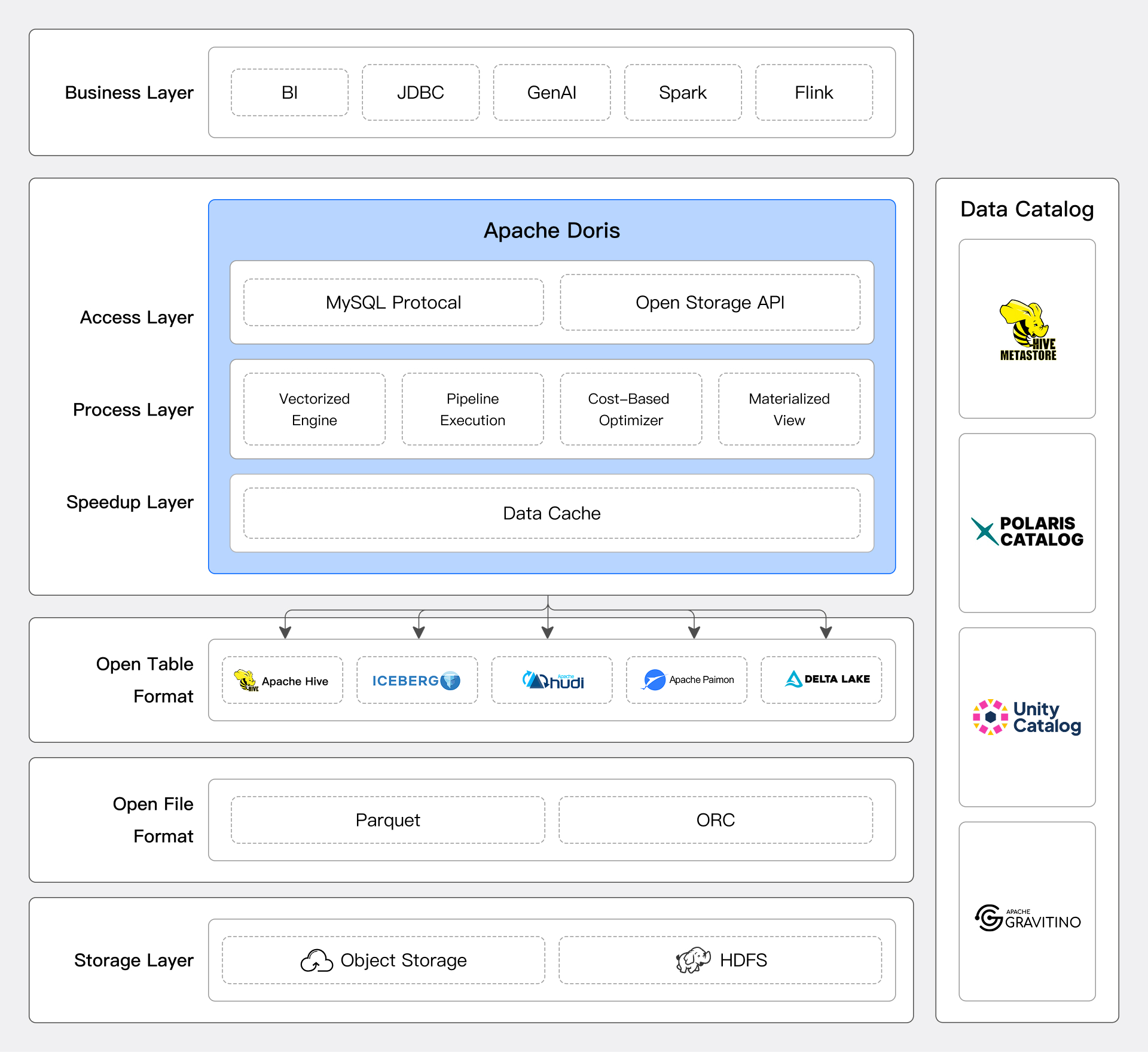
The following architecture illustration comes from the upstream Apache Doris documentation. It illustrates the connector and query-engine relationships; service provisioning and configuration are managed by VeloDB Cloud.
Flexible data access
Create catalogs for supported sources such as Hive, Iceberg, Hudi, Paimon, and JDBC databases. The catalog obtains metadata and locates source data. A query can then read the external data without first loading it into warehouse tables. See Data Catalog Overview.
Data source connectors
Lakehouse catalogs use metadata services such as Hive Metastore or Iceberg REST, together with storage such as S3 or HDFS. The warehouse must be able to reach both services, and its source credentials need the appropriate permissions. See Iceberg Catalog for one example.
Connector framework
Catalogs expose the hierarchy catalog.database.table. Connector types differ in their supported reads, writes, type mappings, and metadata caching. Check the relevant catalog guide before choosing a source.
Some connectors, including Kudu, BigQuery, and Delta Lake, rely on the Trino connector framework. Their plugin installation and service configuration require VeloDB Cloud support. The existence of an upstream plugin does not establish that it is provisioned in a warehouse.
Process data across sources
You can create multiple catalogs and join their tables. For example, join Hive facts with MySQL dimension data:
SELECT h.id, m.name
FROM hive.db.hive_table h JOIN mysql.db.mysql_table m
ON h.id = m.id;
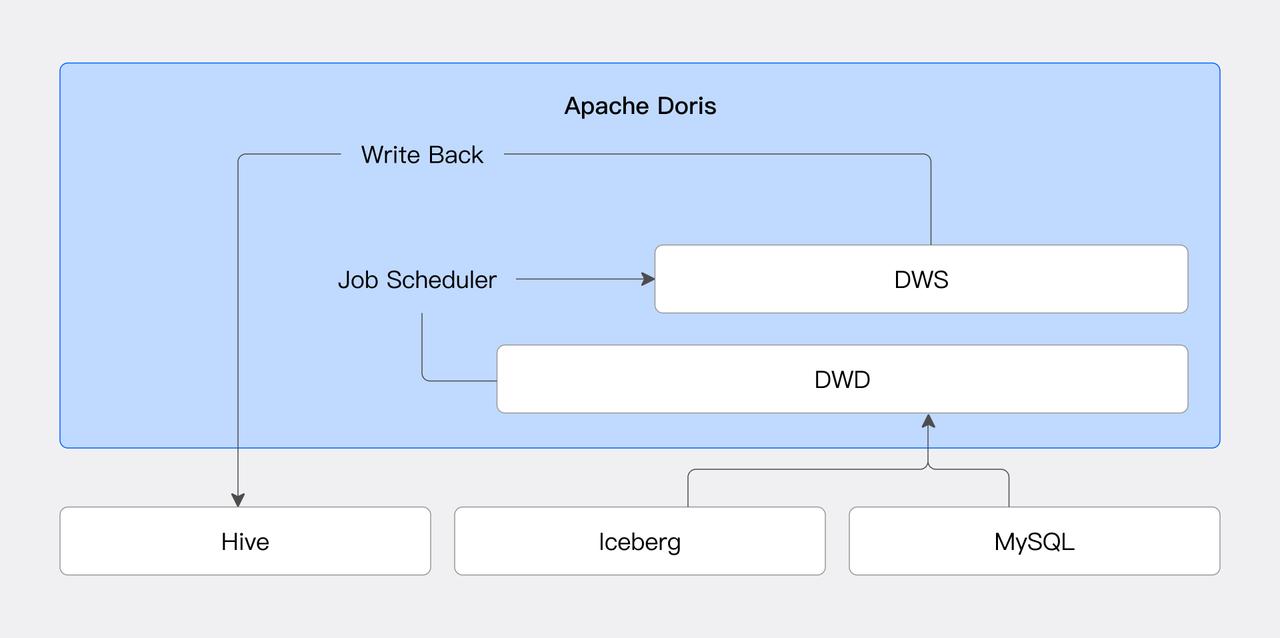
Scheduled SQL jobs can run supported data-processing statements periodically. For example, after creating the catalogs and destination table, a job can write a join result to Iceberg:
CREATE JOB schedule_load
ON SCHEDULE EVERY 1 HOUR DO
INSERT INTO iceberg.db.ice_table
SELECT h.id, m.name
FROM hive.db.hive_table h JOIN mysql.db.mysql_table m
ON h.id = m.id;
Confirm the destination catalog's write support and privileges before scheduling the job. Scheduled scans and writes consume compute and can incur external storage request or transfer charges. Remove temporary jobs when they are no longer needed.
Query processing and acceleration
The distributed execution engine processes query fragments in parallel. The optimizer uses predicates, joins, and available statistics to select a plan. Query performance depends on data layout, source throughput, metadata latency, compute capacity, and query shape.
Data Cache can reuse recently read external file contents on local disks. Metadata Cache reduces repeated metadata requests. Materialized views store precomputed results in warehouse tables and can serve eligible queries through transparent rewrite. Refreshing a materialized view consumes compute and introduces a freshness tradeoff.
The upstream documentation reports that Apache Doris executed 99 Iceberg TPC-DS queries on a 1 TB dataset in about one third of Trino's total time. It also reports a separate user workload with 20% lower average latency, 50% lower 95th-percentile latency, and half the resources relative to Presto. The illustrations below preserve those upstream results. The source page does not supply complete versions, hardware, query settings, or reproduction details for these comparisons. They are not VeloDB Cloud measurements or performance guarantees.
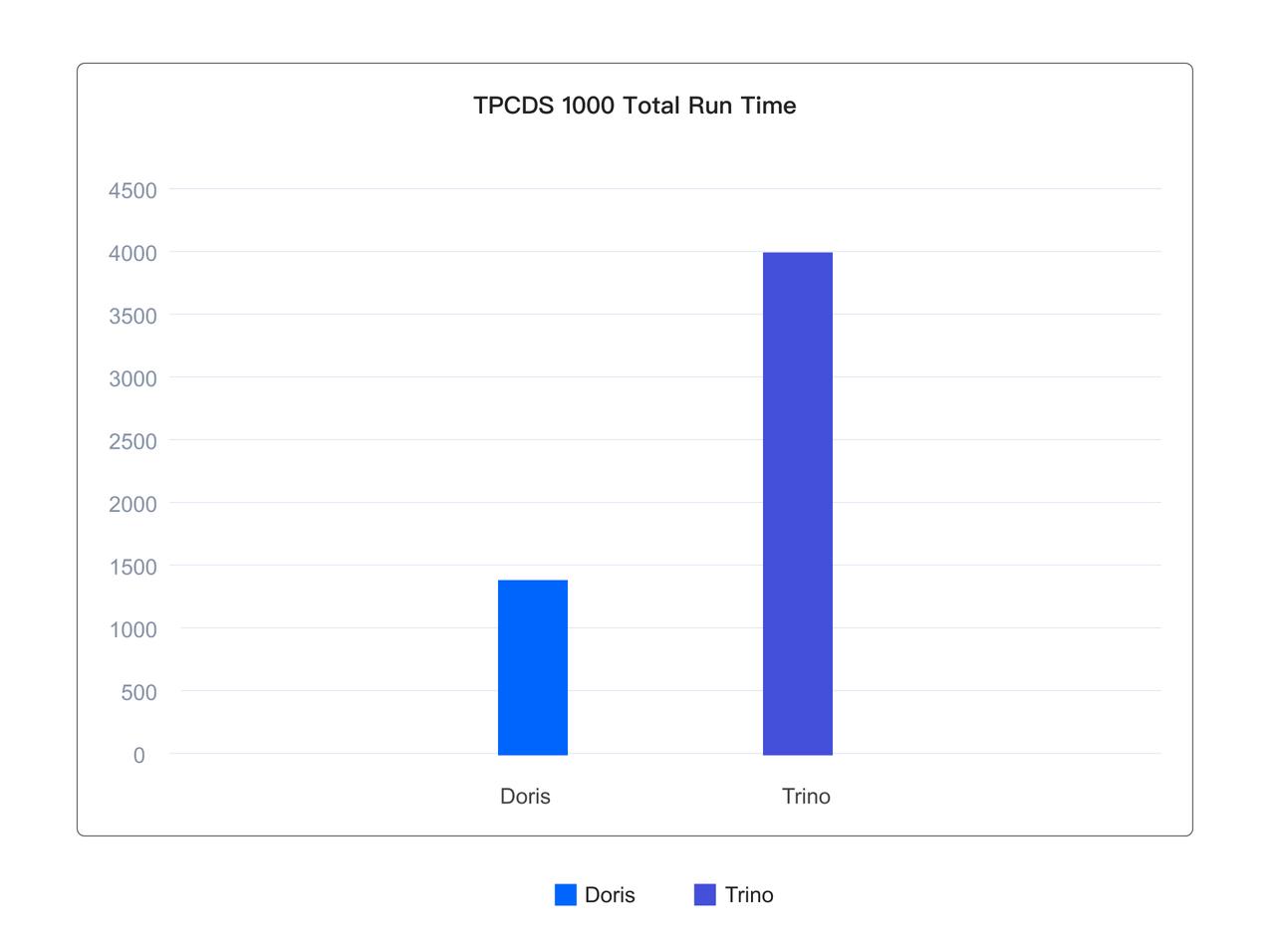
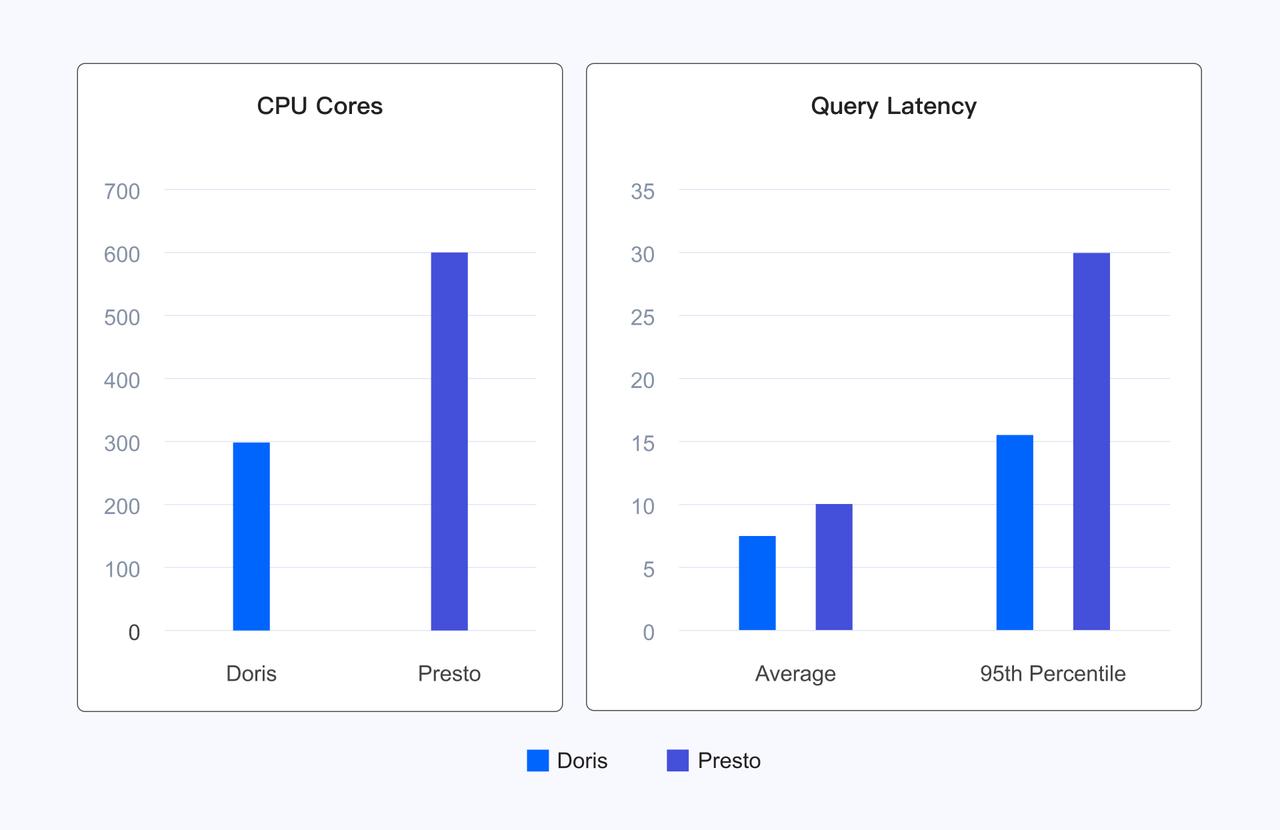
For the supplied benchmark procedures and their conditions, see TPC-H and TPC-DS.
Migrate queries
When moving queries from another engine, check SQL dialect, function support, source type mappings, and null or timestamp semantics. Start with representative queries and compare results before changing production clients. A catalog connection alone does not make every source engine's SQL syntax compatible.
Storage and compute separation
A warehouse separates compute clusters from its shared object storage. External catalog data remains in its original source storage until a statement explicitly writes or loads data. Scaling warehouse compute does not move ownership of the external files into the warehouse.
The upstream diagram below illustrates the engine's storage and compute separation. Cloud resource provisioning is performed through warehouse and cluster controls.
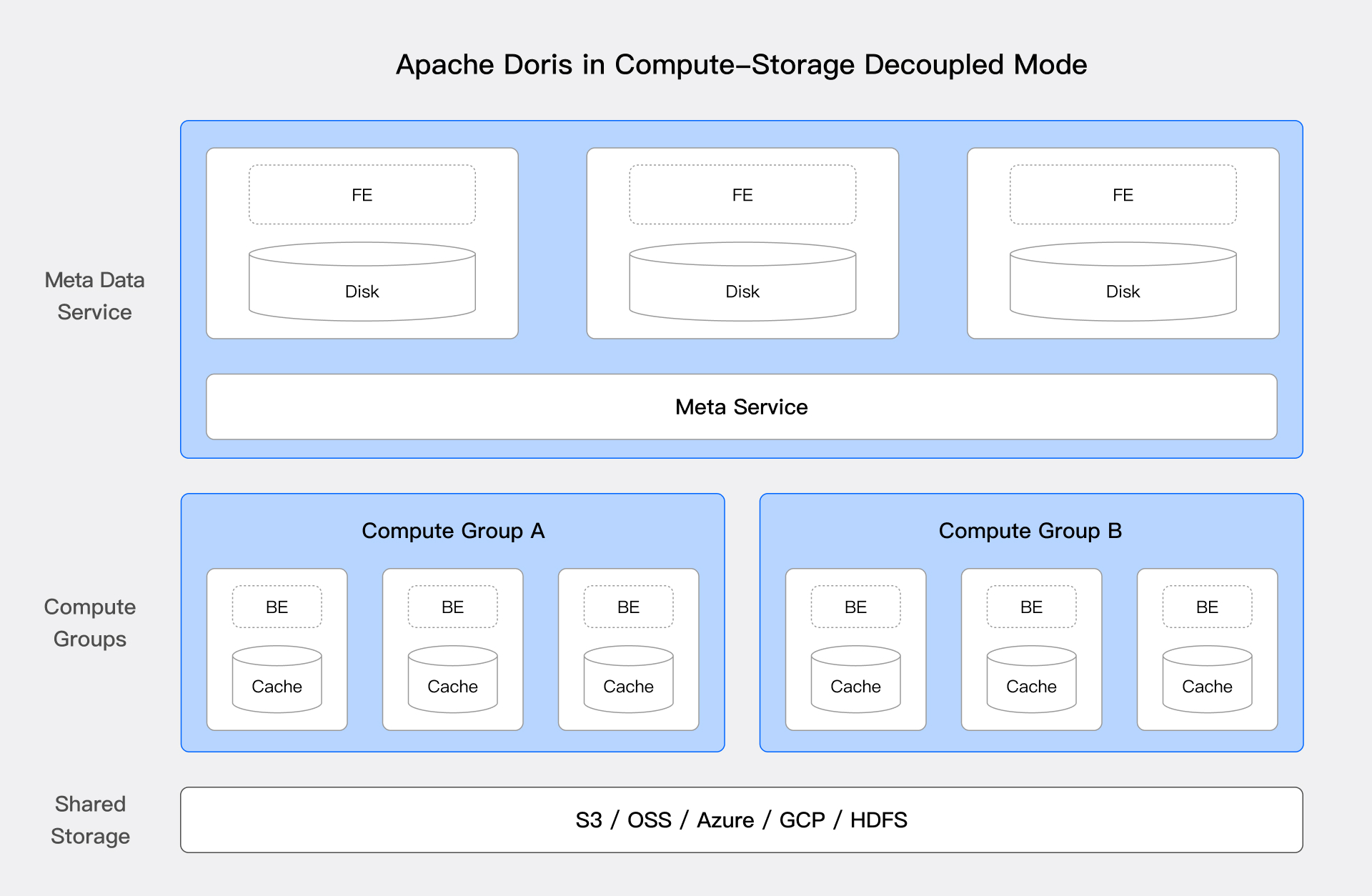
- Independent capacity: Scale compute for the workload without requiring a copy of all external data. Source bandwidth and metadata-service limits can still constrain throughput.
- Shared warehouse data: Clusters in a warehouse share warehouse data while using separate compute capacity. External data consistency follows the source's table format and commit behavior.
- Workload isolation: Use separate clusters for workloads that need their own compute capacity. See Lakehouse Compute Resources.
Client access
Use a supported SQL client or the Console SQL Editor to query warehouse and external tables. Client protocols and source connectors are separate choices: a JDBC client connects to a warehouse, while a JDBC catalog lets the warehouse query another database.
Lakehouse use cases
Query lakehouse data
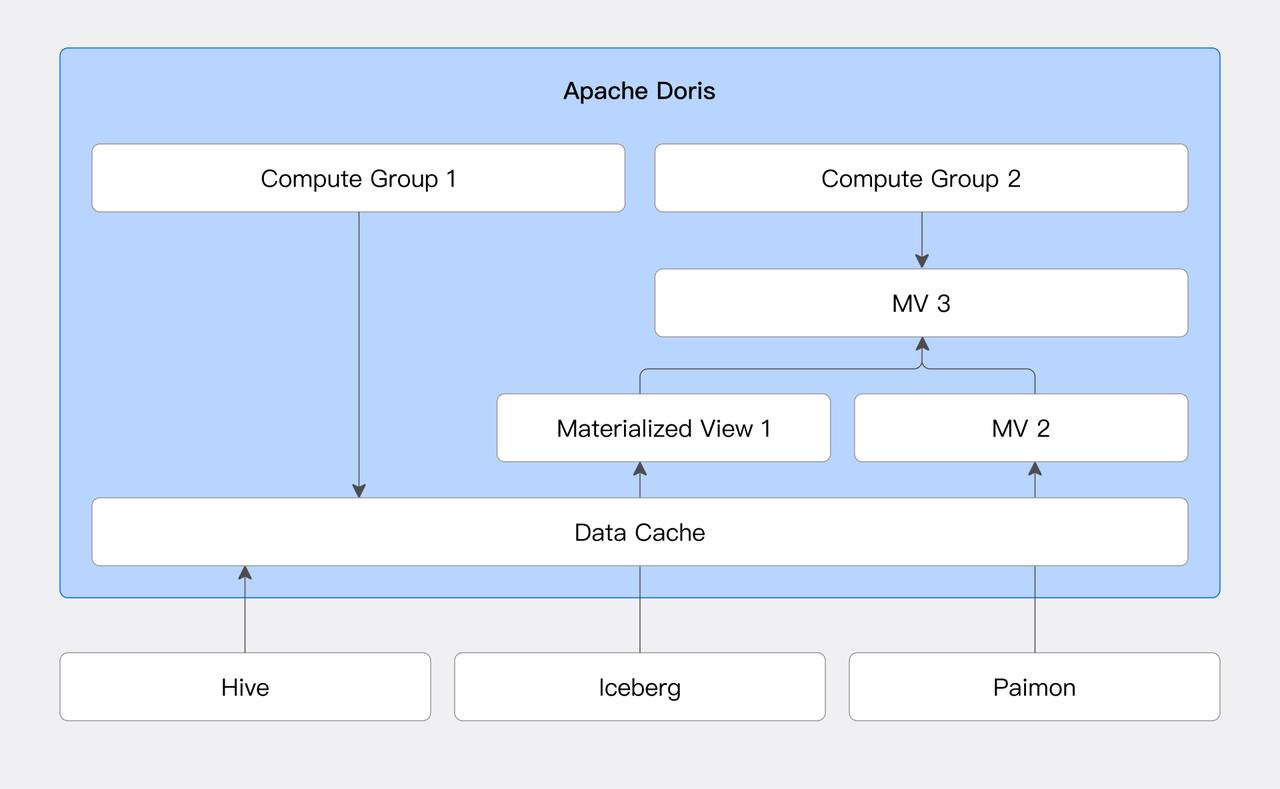
Use a warehouse cluster as query compute for external lakehouse tables:
Reuse cached data
Data Cache stores recently read portions of eligible external files. Repeated queries can avoid some remote reads when the requested blocks remain cached. Caching is most useful when the working set has reusable hot data; a first scan still needs to fetch uncached blocks.
Use materialized views
Create materialized views over supported external tables to store reusable transformations. The optimizer can rewrite eligible queries to those results when the view definition, refresh state, and query semantics permit it. Verify rewrite and freshness for the workload rather than assuming every query uses the view.
Analyze multiple sources
Use catalog-qualified names to join tables across sources and warehouse tables:
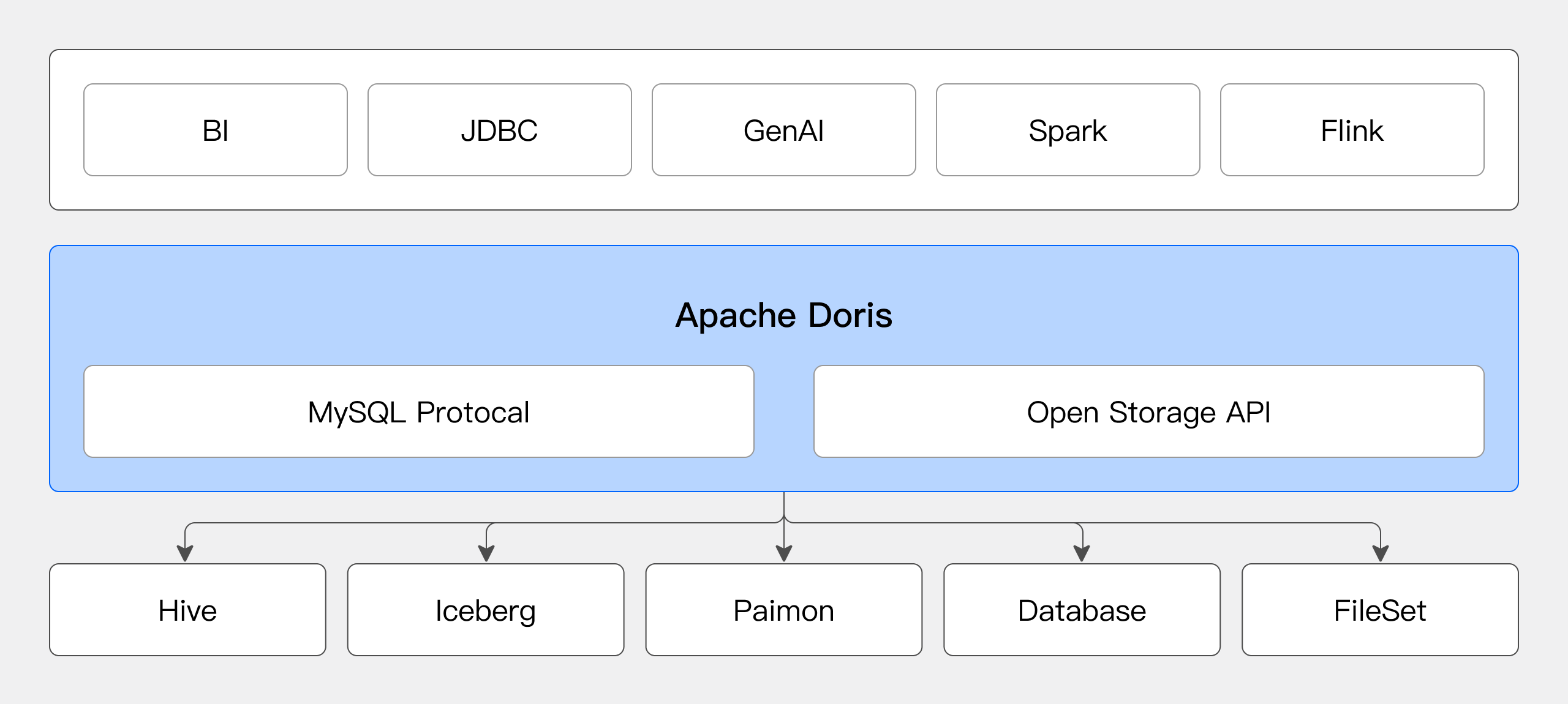
Federated queries can avoid a separate loading step, but still transfer data over the network and depend on source availability. For repeated, expensive joins, consider loading reusable results or building a materialized view.
Process lakehouse data
Read source data, transform it with SQL, and write results to a supported destination:
Schedule processing
Schedule supported SQL jobs for periodic transformations. Choose an interval that fits source update cadence and compute cost, and verify execution results before relying on the schedule.
Model reusable results
Load data into warehouse tables or create materialized views when the workload benefits from a persistent transformed result. Choose the table model and refresh policy based on update semantics and freshness requirements.
Write back to external systems
Write support differs by catalog. Consult the Hive, Iceberg, Paimon, MaxCompute, or JDBC guide for supported DDL, DML, permissions, and limitations.