Aggregate Model
Use the Aggregate Key model in VeloDB Cloud when queries need summaries by fixed dimensions rather than individual source records. Rows with the same Key values are combined using the aggregation method declared for each Value column. Pre-aggregation during ingestion and compaction can reduce storage use and query-time computation.
Applicable scenarios
Choose the Aggregate Key model for these workloads:
- Detail data summarization: multidimensional summary analysis such as monthly sales performance on e-commerce platforms, total customer transaction amounts in financial risk control, and ad click counts.
- Queries that do not depend on raw details: such as dashboards and summaries of user transactions. Raw detail data is kept in the data lake, and the warehouse only needs to store the summarized results.
How aggregation works
Each load creates a new data version. Aggregation occurs at three stages so queries return consistent results even when physical rows from separate loads have not yet been combined:
- Data ingestion stage: Data is ingested in batches. Each batch generates a version, and rows with the same aggregate key are pre-aggregated (for example, sum or count).
- Background merge stage (Compaction): Multiple version files are merged periodically to reduce redundancy and optimize storage.
- Query stage: The system performs a final aggregation on the data by the aggregate key to ensure accurate query results.
Create an Aggregate Key table
Use the AGGREGATE KEY keyword to specify the Aggregate Model, and declare Key columns used to aggregate Value columns.
CREATE TABLE IF NOT EXISTS example_tbl_agg
(
    user_id             LARGEINT    NOT NULL,
    load_date           DATE        NOT NULL,
    city                VARCHAR(20),
    last_visit_dt       DATETIME    REPLACE DEFAULT "1970-01-01 00:00:00",
    cost                BIGINT      SUM     DEFAULT "0",
    max_dwell           INT         MAX     DEFAULT "0"
)
AGGREGATE KEY(user_id, load_date, city)
DISTRIBUTED BY HASH(user_id) BUCKETS 10;
The example above defines a table of user information and visit behavior, using user_id, load_date, and city as Key columns for aggregation. During data ingestion, rows with the same Key column values are aggregated into a single row, and Value columns are aggregated by dimension according to the declared aggregate type.
Supported aggregation methods
Value columns in an aggregate table support the following aggregation methods:
| Aggregation Method | Description |
|---|---|
| SUM | Sums values; accumulates Values across multiple rows. |
| REPLACE | Replaces; the Value in the next batch replaces the Value from previous rows. |
| MAX | Keeps the maximum value. |
| MIN | Keeps the minimum value. |
| REPLACE_IF_NOT_NULL | Replaces with non-null values. Differs from REPLACE in that it does not replace null values. |
| HLL_UNION | Used for HLL-type columns; aggregates with the HyperLogLog algorithm. |
| BITMAP_UNION | Used for BITMAP-type columns; performs a bitmap union aggregation. |
Note:
If the aggregation methods above do not meet your business needs, you can use the AGG_STATE type.
Write and aggregate data
Rows are combined by Key columns using each Value column's aggregation method. Pre-aggregation happens during ingestion, but rows across separate load batches can remain in different physical versions. Query-time aggregation returns the final combined result.
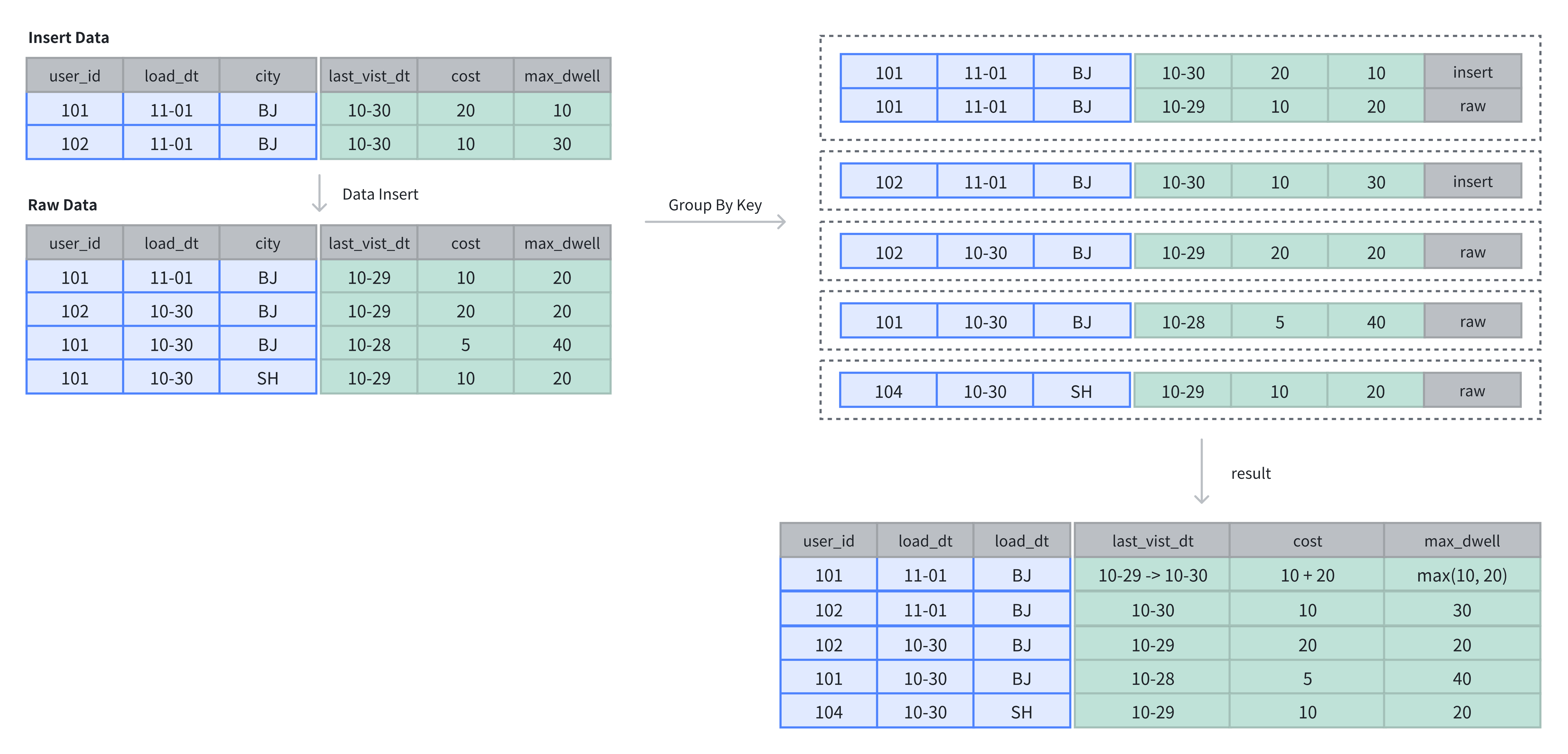
The example inserts 4 rows, then writes 2 more rows. One new row matches an existing aggregate key, so the query returns 5 logical rows. The output is illustrative. Without an ORDER BY clause, row order is not guaranteed.
-- 4 rows raw data
INSERT INTO example_tbl_agg VALUES
(101, '2024-11-01', 'BJ', '2024-10-29', 10, 20),
(102, '2024-10-30', 'BJ', '2024-10-29', 20, 20),
(101, '2024-10-30', 'BJ', '2024-10-28',  5, 40),
(101, '2024-10-30', 'SH', '2024-10-29', 10, 20);

-- insert into 2 rows
INSERT INTO example_tbl_agg VALUES
(101, '2024-11-01', 'BJ', '2024-10-30', 20, 10),
(102, '2024-11-01', 'BJ', '2024-10-30', 10, 30);

-- check the rows of table
SELECT * FROM example_tbl_agg;
+---------+------------+------+---------------------+------+----------------+
| user_id | load_date  | city | last_visit_dt       | cost | max_dwell       |
+---------+------------+------+---------------------+------+----------------+
| 102     | 2024-10-30 | BJ   | 2024-10-29 00:00:00 |   20 |             20 |
| 102     | 2024-11-01 | BJ   | 2024-10-30 00:00:00 |   10 |             30 |
| 101     | 2024-10-30 | BJ   | 2024-10-28 00:00:00 |    5 |             40 |
| 101     | 2024-10-30 | SH   | 2024-10-29 00:00:00 |   10 |             20 |
| 101     | 2024-11-01 | BJ   | 2024-10-30 00:00:00 |   30 |             20 |
+---------+------------+------+---------------------+------+----------------+
Aggregate state
Note:
AGG_STATEis an experimental feature. Use it in development and test environments.
AGG_STATE fits scenarios where the built-in aggregation methods cannot meet your needs. Note the following constraints when using it:
- It cannot be used as a Key column.
- The aggregate function signature must be declared at table creation.
- No length or default value needs to be specified; the actual storage size depends on the function implementation.
Create an aggregate-state table
set enable_agg_state = true;

CREATE TABLE aggstate
(
    k1   INT  NULL,
    v1   INT  SUM,
    v2   agg_state<group_concat(string)> generic
)
AGGREGATE KEY(k1)
DISTRIBUTED BY HASH(k1) BUCKETS 3;
In the example above, AGG_STATE declares a data type that stores an aggregate function's intermediate state rather than its final result. The declarations specify the signatures of SUM() and GROUP_CONCAT(). Use AGG_STATE with the state, merge, and union function combinators.
Write intermediate states
Data of the agg_state type must be generated using the state function. For this table, use group_concat_state:
INSERT INTO aggstate VALUES (1, 1, group_concat_state('a'));
INSERT INTO aggstate VALUES (1, 2, group_concat_state('b'));
INSERT INTO aggstate VALUES (1, 3, group_concat_state('c'));
INSERT INTO aggstate VALUES (2, 4, group_concat_state('d'));
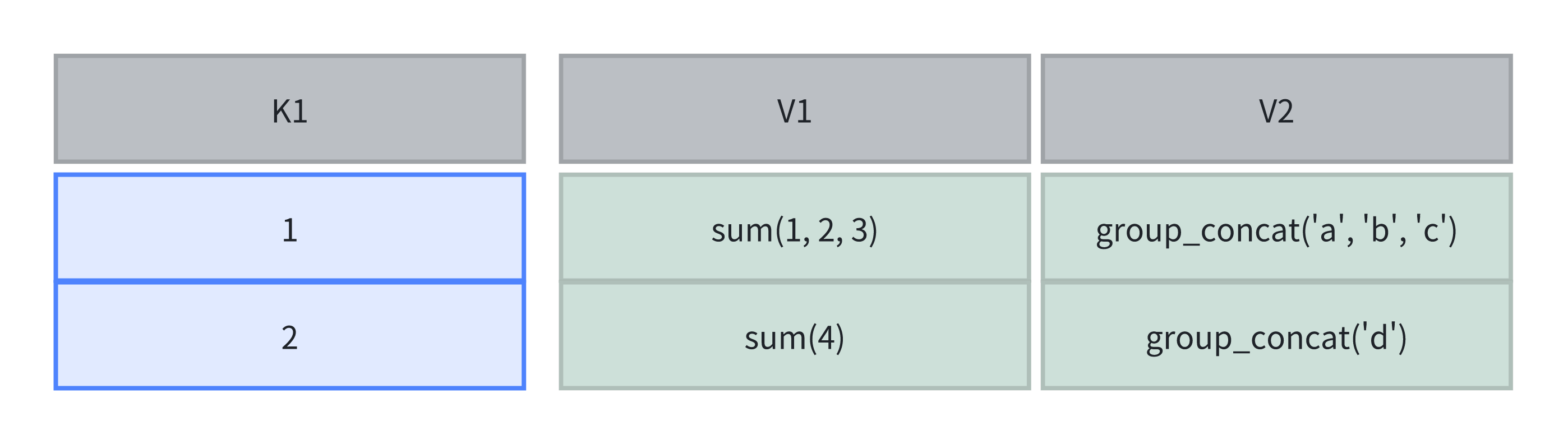
The computation in the table at this point is shown in the following figure:
Query the final result
At query time, you can use the merge operation to combine multiple states and return the final aggregated result. Because group_concat is order-sensitive, the concatenation order can vary. The output shows one possible order:
SELECT group_concat_merge(v2) FROM aggstate;
+------------------------+
| group_concat_merge(v2) |
+------------------------+
| d,c,b,a                |
+------------------------+
Retain intermediate states
If you do not need the final aggregated result and instead want to retain the intermediate result, use the union operation:
INSERT INTO aggstate
SELECT 3, sum(v1), group_concat_union(v2) FROM aggstate;
The computation in the table at this point is shown in the following figure:
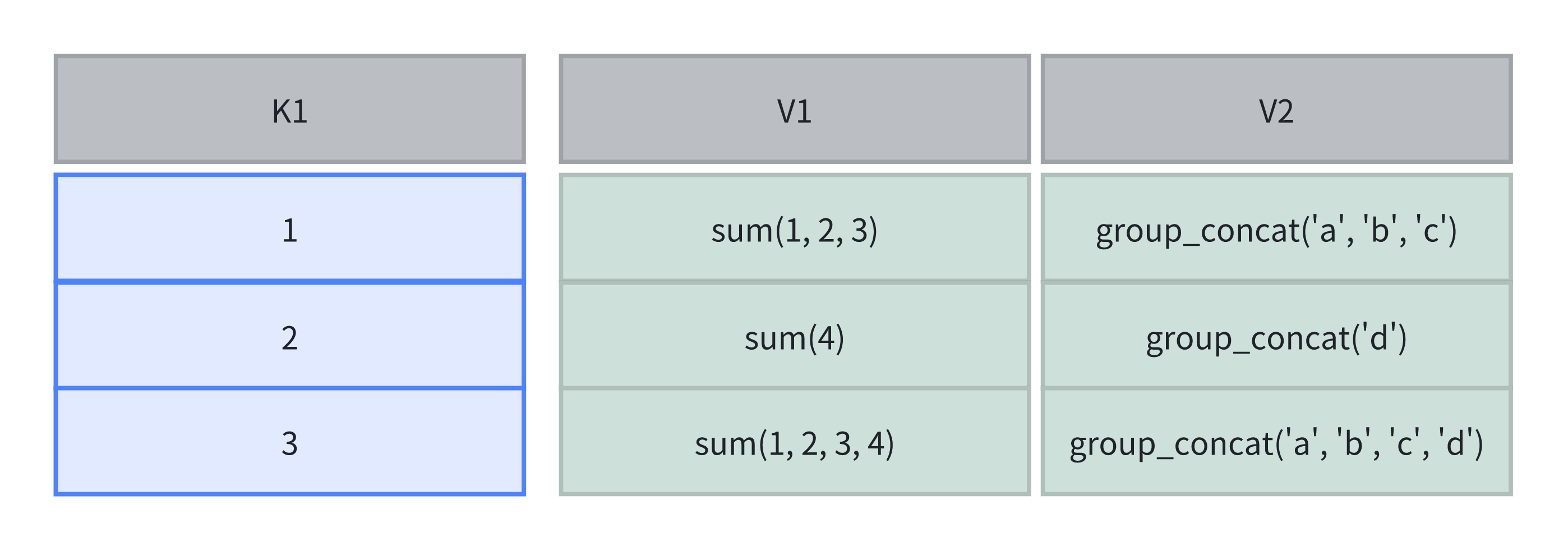
Because group_concat is order-sensitive, the concatenation order can vary. The outputs illustrate possible results:
mysql> SELECT sum(v1), group_concat_merge(v2) FROM aggstate;
+---------+------------------------+
| sum(v1) | group_concat_merge(v2) |
+---------+------------------------+
|      20 | c,b,a,d,c,b,a,d        |
+---------+------------------------+

mysql> SELECT sum(v1), group_concat_merge(v2) FROM aggstate WHERE k1 != 2;
+---------+------------------------+
| sum(v1) | group_concat_merge(v2) |
+---------+------------------------+
|      16 | c,b,a,d,c,b,a          |
+---------+------------------------+