Unique Key Model
The Unique Key Model keeps Key columns unique: when you insert or update a row, the new data overwrites any existing row with the same Key, so the table always holds the latest version. Use it when your data is updated by primary key.
When to use
The Unique Key Model fits three main scenarios:
- High-frequency data updates: Real-time synchronization of dimension tables from upstream OLTP databases, which requires efficient UPSERT operations.
- Efficient data deduplication: In ad delivery, customer relationship management (CRM), and similar systems, records are deduplicated by user ID.
- Partial column updates: For profile tagging where dynamic tags change frequently, or order scenarios where the transaction status changes, you can update only the affected columns.
Create a Unique Key table
Declare the primary key with the UNIQUE KEY keyword. Merge-on-write is enabled by default and recommended for most workloads. You do not need an additional property to use it:
CREATE TABLE IF NOT EXISTS example_tbl_unique
(
    user_id         LARGEINT        NOT NULL,
    user_name       VARCHAR(50)     NOT NULL,
    city            VARCHAR(20),
    age             SMALLINT,
    sex             TINYINT
)
UNIQUE KEY(user_id, user_name)
DISTRIBUTED BY HASH(user_id) BUCKETS 10;
Each row is identified by (user_id, user_name). Writing a row whose Key already exists overwrites it; a row with a new Key is inserted.
Upsert data
Writes to a Unique Key table use UPSERT semantics: rows with an existing key are updated, and rows with a new key are inserted. Key columns are used for sorting and deduplication. The example uses INSERT. Stream Load, Broker Load, and Routine Load also use UPSERT semantics for Unique Key tables.
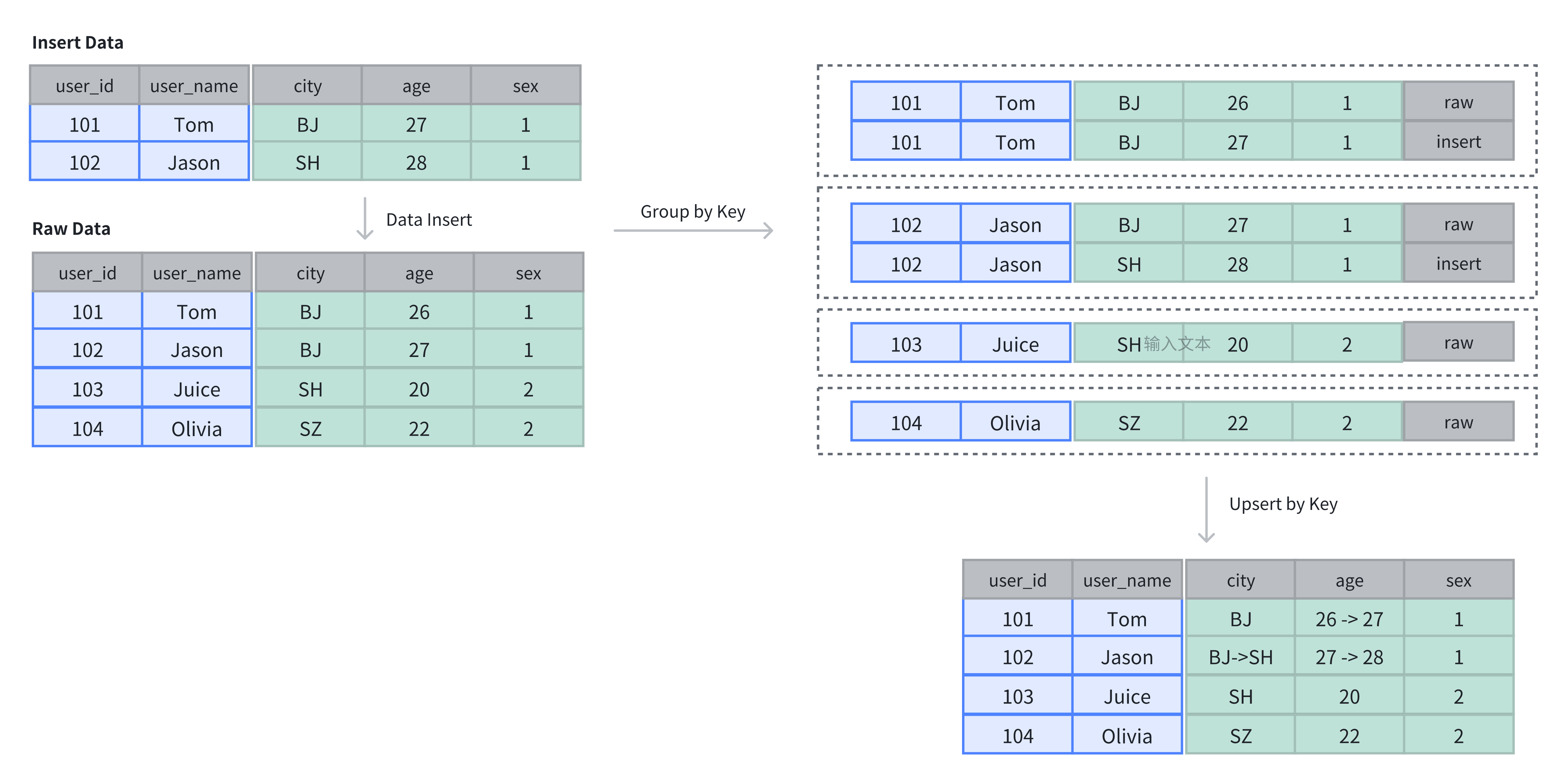
The example inserts 4 original rows, then writes 2 rows with existing keys. The queries return the new values for those keys. The output is illustrative. Without an ORDER BY clause, row order is not guaranteed:
-- Insert original data
INSERT INTO example_tbl_unique VALUES
(101, 'Tom', 'BJ', 26, 1),
(102, 'Jason', 'BJ', 27, 1),
(103, 'Juice', 'SH', 20, 2),
(104, 'Olivia', 'SZ', 22, 2);

-- Re-insert the same Keys with new values
INSERT INTO example_tbl_unique VALUES
(101, 'Tom', 'BJ', 27, 1),
(102, 'Jason', 'SH', 28, 1);

-- Query the updated data
SELECT * FROM example_tbl_unique;
+---------+-----------+------+------+------+
| user_id | user_name | city | age  | sex  |
+---------+-----------+------+------+------+
| 101     | Tom       | BJ   |   27 |    1 |
| 102     | Jason     | SH   |   28 |    1 |
| 104     | Olivia    | SZ   |   22 |    2 |
| 103     | Juice     | SH   |   20 |    2 |
+---------+-----------+------+------+------+
A whole-row upsert replaces the entire logical row. If your INSERT INTO lists only some columns, omitted columns receive their default values or NULL where allowed. Existing values in those columns are not preserved.
Update selected columns
To preserve omitted columns while changing selected fields, use partial column update. It requires merge-on-write and the partial-update setting for your load method. See Update Unique Key Tables through Loading.
Choose an implementation
The Unique Key Model has two storage implementations: merge-on-write (the default, recommended for most workloads) and merge-on-read (suited to write-heavy, read-light pipelines). The implementation is fixed at table creation and cannot be changed later through schema change.
For how each one works, their performance trade-offs, and how to enable merge-on-read, see Merge-on-Write.
Limitations
When using the Unique Key Model, note the following limitations:
- The implementation cannot be changed: merge-on-write or merge-on-read can only be set at table creation and cannot be modified through schema change.
- Whole-row UPSERT replaces omitted values: if
INSERT INTOspecifies only some columns, omitted columns receive their defaults or NULL where allowed. - Partial column updates require merge-on-write: enable the partial-update setting for the load method you use. See Update Unique Key Tables through Loading.
- Partition keys must be a subset of Key columns: This requirement preserves data uniqueness.