Auto Partitioning
Auto partitioning creates a missing partition when incoming data contains a new partition value. Use it when partition values are difficult to predict or historical data arrives outside a rolling time window. It addresses the following problems:
- The partition column has scattered, hard-to-predict data, so the required partitions cannot be enumerated accurately at table creation time.
- The number of partitions is too large to create manually.
- The partition column is unrelated to system time, so dynamic partitioning cannot cover the case.
VeloDB Cloud tables support two auto-partitioning forms:
| Type | Partitioning method | Partition function | Supported partition column types |
|---|---|---|---|
| AUTO RANGE PARTITION | Auto partition by range | date_trunc | DATE, DATETIME |
| AUTO LIST PARTITION | Auto partition by enumerated value | Function calls not supported | BOOLEAN, TINYINT, SMALLINT, INT, BIGINT, LARGEINT, DATE, DATETIME, CHAR, VARCHAR |
When to use auto partitioning
Take a time-typed partition column as an example:
- With dynamic partitioning, the scheduler can automatically create new partitions on a fixed time cycle to hold real-time data. For scenarios such as real-time user-behavior logs, this feature generally meets the need.
- In more complex scenarios, however (for example, processing non-real-time data), the partition column has nothing to do with the current system time and contains many discrete values. You still want to partition by this column, but the involved partitions cannot be known in advance, or the number of required partitions is too large.
In these cases, neither dynamic partitioning nor manual partitioning meets the need, and auto partitioning covers such scenarios well.
Example: a trade history table
Consider a trade history table partitioned by trade date. The following DDL excerpts compare manual partitioning with auto partitioning. Replace the ellipsis with the remaining columns before running either statement, use different table names when comparing them, and confirm that the replication setting is accepted by your warehouse.
With manual partitioning, each range is declared explicitly:
CREATE TABLE `DAILY_TRADE_VALUE`
(
    `TRADE_DATE`              datev2 NOT NULL COMMENT 'Trade date',
    `TRADE_ID`                varchar(40) NOT NULL COMMENT 'Trade ID',
    ......
)
UNIQUE KEY(`TRADE_DATE`, `TRADE_ID`)
PARTITION BY RANGE(`TRADE_DATE`)
(
    PARTITION p_2000 VALUES [('2000-01-01'), ('2001-01-01')),
    PARTITION p_2001 VALUES [('2001-01-01'), ('2002-01-01')),
    PARTITION p_2002 VALUES [('2002-01-01'), ('2003-01-01')),
    PARTITION p_2003 VALUES [('2003-01-01'), ('2004-01-01')),
    PARTITION p_2004 VALUES [('2004-01-01'), ('2005-01-01')),
    PARTITION p_2005 VALUES [('2005-01-01'), ('2006-01-01')),
    PARTITION p_2006 VALUES [('2006-01-01'), ('2007-01-01')),
    PARTITION p_2007 VALUES [('2007-01-01'), ('2008-01-01')),
    PARTITION p_2008 VALUES [('2008-01-01'), ('2009-01-01')),
    PARTITION p_2009 VALUES [('2009-01-01'), ('2010-01-01')),
    PARTITION p_2010 VALUES [('2010-01-01'), ('2011-01-01')),
    PARTITION p_2011 VALUES [('2011-01-01'), ('2012-01-01')),
    PARTITION p_2012 VALUES [('2012-01-01'), ('2013-01-01')),
    PARTITION p_2013 VALUES [('2013-01-01'), ('2014-01-01')),
    PARTITION p_2014 VALUES [('2014-01-01'), ('2015-01-01')),
    PARTITION p_2015 VALUES [('2015-01-01'), ('2016-01-01')),
    PARTITION p_2016 VALUES [('2016-01-01'), ('2017-01-01')),
    PARTITION p_2017 VALUES [('2017-01-01'), ('2018-01-01')),
    PARTITION p_2018 VALUES [('2018-01-01'), ('2019-01-01')),
    PARTITION p_2019 VALUES [('2019-01-01'), ('2020-01-01')),
    PARTITION p_2020 VALUES [('2020-01-01'), ('2021-01-01')),
    PARTITION p_2021 VALUES [('2021-01-01'), ('2022-01-01'))
)
DISTRIBUTED BY HASH(`TRADE_DATE`) BUCKETS 10
PROPERTIES (
  "replication_num" = "1"
);
This approach has the following problems:
- All partitions must be listed manually at table creation time.
- When the value range of the partition column changes (for example, when 2022 data is added), partitions must be modified through ALTER-TABLE-PARTITION, which is cumbersome.
- If you need to change partitions or use a finer granularity, the cost of modification is high.
With AUTO PARTITION, the partition definition becomes:
CREATE TABLE `DAILY_TRADE_VALUE`
(
    `TRADE_DATE`              datev2 NOT NULL,
    `TRADE_ID`                varchar(40) NOT NULL,
    ......
)
UNIQUE KEY(`TRADE_DATE`, `TRADE_ID`)
AUTO PARTITION BY RANGE (date_trunc(`TRADE_DATE`, 'year'))
(
)
DISTRIBUTED BY HASH(`TRADE_DATE`) BUCKETS 10
PROPERTIES (
  "replication_num" = "1"
);
After creating the auto-partitioned table, verify that it initially has no partitions. The output below is illustrative:
show partitions from `DAILY_TRADE_VALUE`;
Empty set (0.12 sec)
After data is inserted, the corresponding partitions are created automatically:
insert into `DAILY_TRADE_VALUE` values ('2012-12-13', 1), ('2008-02-03', 2), ('2014-11-11', 3);

show partitions from `DAILY_TRADE_VALUE`;
+-------------+-----------------+----------------+---------------------+--------+--------------+--------------------------------------------------------------------------------+-----------------+---------+----------------+---------------+---------------------+---------------------+--------------------------+----------+------------+-------------------------+-----------+
| PartitionId | PartitionName   | VisibleVersion | VisibleVersionTime  | State  | PartitionKey | Range                                                                          | DistributionKey | Buckets | ReplicationNum | StorageMedium | CooldownTime        | RemoteStoragePolicy | LastConsistencyCheckTime | DataSize | IsInMemory | ReplicaAllocation       | IsMutable |
+-------------+-----------------+----------------+---------------------+--------+--------------+--------------------------------------------------------------------------------+-----------------+---------+----------------+---------------+---------------------+---------------------+--------------------------+----------+------------+-------------------------+-----------+
| 180060      | p20080101000000 | 2              | 2023-09-18 21:49:29 | NORMAL | TRADE_DATE   | [types: [DATEV2]; keys: [2008-01-01]; ..types: [DATEV2]; keys: [2009-01-01]; ) | TRADE_DATE      | 10      | 1              | HDD           | 9999-12-31 23:59:59 |                     | NULL                     | 0.000    | false      | tag.location.default: 1 | true      |
| 180039      | p20120101000000 | 2              | 2023-09-18 21:49:29 | NORMAL | TRADE_DATE   | [types: [DATEV2]; keys: [2012-01-01]; ..types: [DATEV2]; keys: [2013-01-01]; ) | TRADE_DATE      | 10      | 1              | HDD           | 9999-12-31 23:59:59 |                     | NULL                     | 0.000    | false      | tag.location.default: 1 | true      |
| 180018      | p20140101000000 | 2              | 2023-09-18 21:49:29 | NORMAL | TRADE_DATE   | [types: [DATEV2]; keys: [2014-01-01]; ..types: [DATEV2]; keys: [2015-01-01]; ) | TRADE_DATE      | 10      | 1              | HDD           | 9999-12-31 23:59:59 |                     | NULL                     | 0.000    | false      | tag.location.default: 1 | true      |
+-------------+-----------------+----------------+---------------------+--------+--------------+--------------------------------------------------------------------------------+-----------------+---------+----------------+---------------+---------------------+---------------------+--------------------------+----------+------------+-------------------------+-----------+
Partitions created by auto partitioning are functionally identical to partitions created manually.
Syntax
Use the following syntax in the partitions_definition part of CREATE-TABLE.
AUTO RANGE PARTITION
[AUTO] PARTITION BY RANGE(<partition_expr>)
<origin_partitions_definition>
Where:
partition_expr ::= date_trunc(<partition_column>, '<interval>')
Tip:
In AUTO RANGE PARTITION, the
AUTOkeyword can be omitted. The partition expression still selects auto partitioning.
Example:
CREATE TABLE `date_table` (
    `TIME_STAMP` datev2 NOT NULL
) ENGINE=OLAP
DUPLICATE KEY(`TIME_STAMP`)
AUTO PARTITION BY RANGE (date_trunc(`TIME_STAMP`, 'month'))
(
)
DISTRIBUTED BY HASH(`TIME_STAMP`) BUCKETS 10
PROPERTIES (
    "replication_allocation" = "tag.location.default: 1"
);
AUTO LIST PARTITION
AUTO PARTITION BY LIST(`partition_col1` [, `partition_col2`, ...])
<origin_partitions_definition>
LIST auto partitioning supports multi-column partitioning, with the same syntax as a regular LIST partition: AUTO PARTITION BY LIST(col1, col2, ...). For each value of the partition column that does not yet have a corresponding partition, an independent new partition is created.
Example:
CREATE TABLE `str_table` (
    `str` varchar not null
) ENGINE=OLAP
DUPLICATE KEY(`str`)
AUTO PARTITION BY LIST (`str`)
()
DISTRIBUTED BY HASH(`str`) BUCKETS 10
PROPERTIES (
    "replication_allocation" = "tag.location.default: 1"
);
Compare constraints
| Constraint | AUTO RANGE PARTITION | AUTO LIST PARTITION |
|---|---|---|
| Supported partition functions | date_trunc only | Function calls not supported |
| Supported partition column types | DATE, DATETIME | BOOLEAN, TINYINT, SMALLINT, INT, BIGINT, LARGEINT, DATE, DATETIME, CHAR, VARCHAR |
| Multi-column partitioning supported | No | Yes |
| Partition name length limit | - | Must not exceed 50 (derived from concatenation and escaping of partition column content; the actual allowed length may be shorter) |
| Partition value rule | Divided by the time range truncated by date_trunc | Each new enumerated value with no existing partition creates an independent new partition |
Nullable partition columns
After enabling the session variable allow_partition_column_nullable, the two auto partitioning types differ in their support for NULLABLE columns:
| Auto partitioning type | NULLABLE partition column supported |
|---|---|
| AUTO LIST PARTITION | Supported. Writing NULL creates a NULL partition normally. |
| AUTO RANGE PARTITION | Not supported |
AUTO LIST PARTITION: nullable column supported
create table auto_null_list(
    k0 varchar null
)
auto partition by list (k0)
(
)
DISTRIBUTED BY HASH(`k0`) BUCKETS 1
properties("replication_num" = "1");

insert into auto_null_list values (null);

select * from auto_null_list;
+------+
| k0   |
+------+
| NULL |
+------+

select * from auto_null_list partition(pX);
+------+
| k0   |
+------+
| NULL |
+------+
AUTO RANGE PARTITION: nullable column not supported
CREATE TABLE `range_table_nullable` (
    `k1` INT,
    `k2` DATETIMEV2(3),
    `k3` DATETIMEV2(6)
) ENGINE=OLAP
DUPLICATE KEY(`k1`)
AUTO PARTITION BY RANGE (date_trunc(`k2`, 'day'))
()
DISTRIBUTED BY HASH(`k1`) BUCKETS 16
PROPERTIES (
    "replication_allocation" = "tag.location.default: 1"
);

ERROR 1105 (HY000): errCode = 2, detailMessage = AUTO RANGE PARTITION doesn't support NULL column
Lifecycle management
Note:
Choose one retention mechanism. Dynamic partitioning maintains a rolling time window, while retention count keeps a number of historical partitions. Do not combine enabled dynamic partitioning with the retention-count property.
AUTO RANGE PARTITION tables support managing the lifecycle of historical partitions through the partition.retention_count property. This property accepts a positive integer N, meaning only the N historical partitions with the largest partition values are retained; current and future partitions are all retained.
Usage limits:
- Only AUTO RANGE PARTITION tables can set this property. Otherwise the statement fails with
Only AUTO RANGE PARTITION table could set partition.retention_count. - It cannot be used together with dynamic partitioning that is already enabled (
dynamic_partition.enable = true). Otherwise the statement fails withCan not use partition.retention_count and dynamic_partition properties at the same time. In VeloDB Core 26.1.3, dynamic partition creation and retention-count cleanup are mutually exclusive scheduling modes. - In VeloDB Core 26.1.3, change this property with
ALTER TABLE ... SET ("partition.retention_count" = "N"). The CloudALTERpath updates the table property and registers it with the retention scheduler.
For warehouses running an earlier core release, confirm support before changing retention. These statements describe verified behavior in VeloDB Core 26.1.3, rather than the first Cloud release that supports every retention operation.
Warning:
Retention removes partitions and their data. A count of historical partitions is not a fixed number of days when some time ranges have no data. Verify the partition list and your retention requirement before enabling it.
Retention definitions
- Historical partition: For the Core 26.1.3 scheduler, a partition whose upper bound is strictly earlier than the current comparison time. A boundary equal to that time is retained in that scheduling pass.
- Current and future partitions: The partition containing the current time and partitions whose ranges begin later. The scheduler retains these partitions.
- Partition ordering: The scheduler sorts non-overlapping range partitions by their upper bounds and removes the oldest excess historical partitions. Adjacent partitions can share a boundary.
Example
create table auto_recycle(
    k0 datetime(6) not null
)
AUTO PARTITION BY RANGE (date_trunc(k0, 'day')) ()
DISTRIBUTED BY HASH(`k0`) BUCKETS 1
properties(
    "partition.retention_count" = "3"
);
This configuration means that only the 3 historical partitions with the largest date values are retained. Suppose the scheduler runs after midnight on 2025-10-21 and data is inserted for each day from 2025-10-16 to 2025-10-23. After one round of recycling, 6 partitions remain, as shown below:
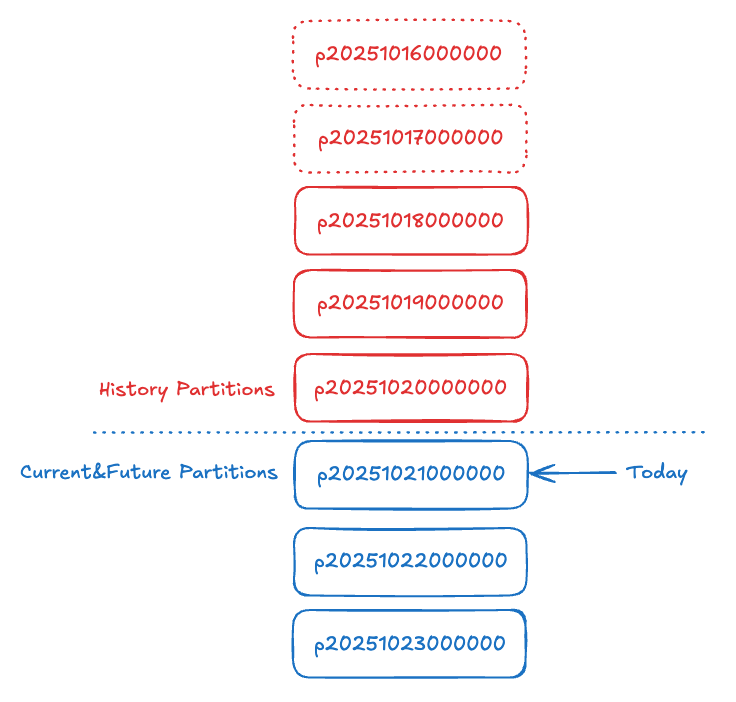
The remaining partition list:
- p20251018000000
- p20251019000000
- p20251020000000 (this partition and above: only three historical partitions are retained)
- p20251021000000 (this partition and below: current and future partitions are unaffected)
- p20251022000000
- p20251023000000
Combine with auto bucketing
Only AUTO RANGE PARTITION can be used together with the auto bucketing feature.
When using this combination, the query engine assumes that data is loaded into the table incrementally in time order, and that each load involves only one partition. Therefore, this combination is recommended only for tables loaded incrementally in batches.
Warning:
If the data load pattern does not follow the above paradigm and both auto partitioning and auto bucketing are used, the bucket number of new partitions may be highly unreasonable, which can significantly affect query performance.
Manage partitions
After enabling auto partitioning, you can locate partitions precisely with the following two tools:
- The
auto_partition_namefunction: Maps a partition column value to a partition name. - The
partitionstable function: Retrieves partition details by partition name.
Continuing with the DAILY_TRADE_VALUE table, after data is inserted, query the partition that a specific record belongs to:
select * from partitions("catalog"="internal","database"="optest","table"="DAILY_TRADE_VALUE") where PartitionName = auto_partition_name('range', 'year', '2008-02-03');
+-------------+-----------------+----------------+---------------------+--------+--------------+--------------------------------------------------------------------------------+-----------------+---------+----------------+---------------+---------------------+---------------------+--------------------------+-----------+------------+-------------------------+-----------+--------------------+--------------+
| PartitionId | PartitionName   | VisibleVersion | VisibleVersionTime  | State  | PartitionKey | Range                                                                          | DistributionKey | Buckets | ReplicationNum | StorageMedium | CooldownTime        | RemoteStoragePolicy | LastConsistencyCheckTime | DataSize  | IsInMemory | ReplicaAllocation       | IsMutable | SyncWithBaseTables | UnsyncTables |
+-------------+-----------------+----------------+---------------------+--------+--------------+--------------------------------------------------------------------------------+-----------------+---------+----------------+---------------+---------------------+---------------------+--------------------------+-----------+------------+-------------------------+-----------+--------------------+--------------+
|      127095 | p20080101000000 |              2 | 2024-11-14 17:29:02 | NORMAL | TRADE_DATE   | [types: [DATEV2]; keys: [2008-01-01]; ..types: [DATEV2]; keys: [2009-01-01]; ) | TRADE_DATE      |      10 |              1 | HDD           | 9999-12-31 23:59:59 |                     | \N                       | 985.000 B |          0 | tag.location.default: 1 |         1 |                  1 | \N           |
+-------------+-----------------+----------------+---------------------+--------+--------------+--------------------------------------------------------------------------------+-----------------+---------+----------------+---------------+---------------------+---------------------+--------------------------+-----------+------------+-------------------------+-----------+--------------------+--------------+
This approach lets you precisely select the ID and value of each partition for follow-up partition-specific operations (for example, insert overwrite partition).
Detailed syntax:
Notes
| Note | Description |
|---|---|
| Multi-column partitioning support | AUTO LIST PARTITION supports multi-column partitioning, with the same syntax as a regular LIST partition. |
| Partitions from failed loads are not cleaned up automatically | If partitions are created during a data insert or load but the entire load does not complete (fails or is canceled), the created partitions are not deleted automatically. |
| Same usage as regular partitions | For a table that uses AUTO PARTITION, only the way partitions are created changes from manual to automatic. All other usage of the table and its partitions is the same as for non-AUTO PARTITION tables. |
| Maximum partition count limit | The FE configuration max_auto_partition_num limits automatic partition creation. Choose partition columns that avoid excessive cardinality. Contact VeloDB Cloud Support if a required load reaches the managed limit. |
| Data send polling interval | When loading data into an AUTO PARTITION table, the polling interval at which the Coordinator sends data differs from that of regular tables. The BE configuration olap_table_sink_send_interval_auto_partition_factor controls this implementation behavior. With sink-node memtable (enable_memtable_on_sink_node = true), this variable does not take effect. Contact VeloDB Cloud Support for service-side investigation rather than editing BE configuration. |
INSERT OVERWRITE behavior | For the specific behavior of an AUTO PARTITION table when using insert-overwrite to insert data, see the INSERT OVERWRITE documentation. |
| Metadata conflicts may cause load failures | When a load creates partitions, if the table is undergoing other metadata operations (such as Schema Change or Rebalance), the load may fail. |