How Partitioning and Bucketing Work
A warehouse organizes table data in two levels: partitions group rows by column value, and buckets distribute rows within each partition into tablets. Query filters can prune partitions and, for hash distribution, buckets. This reduces the data that needs to be scanned. Use Partitioning and Bucketing to choose a starting design.
Overview
Tables in a VeloDB Cloud warehouse use two levels of data organization, partitions and buckets:
- Partition: horizontally divides the table into smaller subsets by column values (such as time or region), making it easier to perform query pruning and data lifecycle management.
- Bucket: further evenly distributes data within each partition into multiple data shards (Tablets), fully utilizing the parallelism of the cluster.
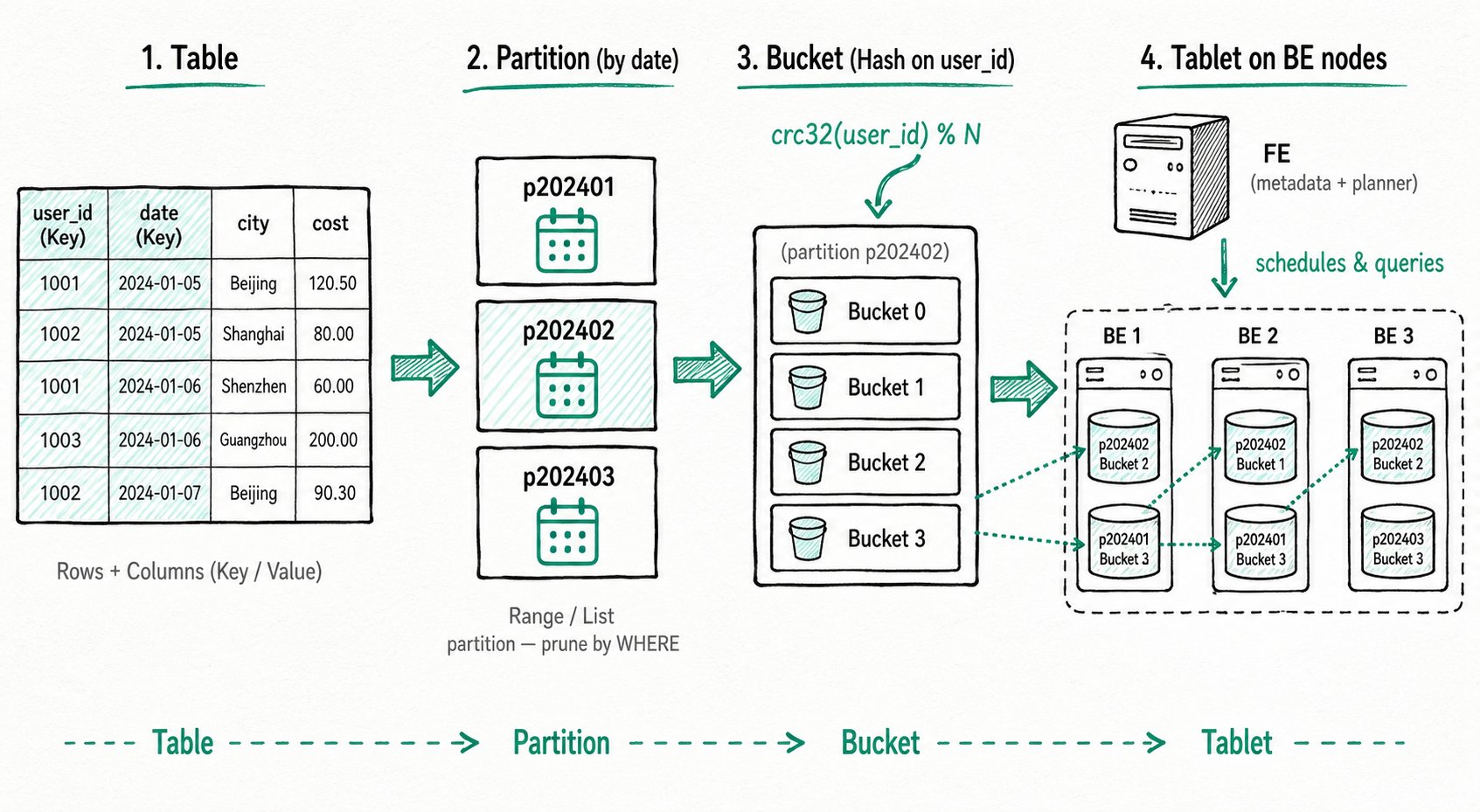
The data flow can be summarized as:
Table ──► Partition ──► Bucket ──► Tablet (data shard, stored on BE nodes)
In VeloDB Cloud, persistent tablet data resides in shared object storage. BE nodes in a compute cluster execute queries and cache data locally. The diagram describes logical data routing, rather than ownership of persistent data by a particular compute node.
Partition pruning reduces scan work, partition boundaries support retention management, and bucket distribution supports parallel reads and writes. The result depends on query filters and data distribution.
Core concepts
Table structure: rows and columns
Data in a warehouse is organized into tables. A table consists of rows (Row) and columns (Column):
| Concept | Description |
|---|---|
| Row | A row of user data |
| Column | Describes different fields in a row of data |
Columns can be further divided into two categories:
| Column Type | Business Mapping | Description |
|---|---|---|
| Key column | Dimension column | Columns specified after the unique key, aggregate key, or duplicate key keyword in the CREATE TABLE statement |
| Value column | Non-key data | Columns other than the Key columns. In an Aggregate Key table, their aggregation methods are specified at table creation time. |
In the Aggregate model, rows with identical Key columns are aggregated into one row, and the aggregation method for Value columns is specified by the user at table creation time. For more information about the Aggregate model, see Table Models.
Partition
A partition divides data into smaller, mutually disjoint subsets based on the values of specific columns in the table. Each row of data belongs to exactly one specific partition, and the partition is the smallest logical management unit.
The query engine supports two partition types:
- Range partition: divides by numeric or time range, commonly used for time-series data.
- List partition: divides by sets of enumerated values, commonly used to split by discrete dimensions such as region or category.
If no partition is specified at table creation time, the query engine generates a default partition that is transparent to the user, containing all the data in the table.
Good partition design provides:
- Faster queries: partition pruning skips partitions that can't match the query, so the query engine scans less data and does less I/O. This matters most on large datasets.
- Easier management: splitting by time or region makes archiving, cleanup, and backup simpler. For example, partitioning by time lets you manage historical and incoming data separately.
Bucket
Bucketing further divides the data within a partition into smaller, mutually disjoint data units according to certain rules. Each row of data belongs to exactly one specific bucket.
Partitions divide data by ranges or lists of column values. Bucketing aims to spread data evenly across the buckets in a partition, reducing skew and supporting parallel scans. The result depends on the bucketing method and key distribution.
The query engine supports two bucketing methods:
- Hash bucketing: computes the
crc32hash of the bucketing column values and takes the modulo with the number of buckets to evenly distribute the data. - Random bucketing: randomly assigns data to buckets. When using Random bucketing, you can combine the
load_to_single_tabletparameter to optimize fast writes for small-scale data.
Good bucketing provides:
- More even data distribution: a suitable bucket key reduces the risk of skew and uneven load on nodes or disks.
- Fewer hotspots: distributing work across buckets can reduce overload and improve stability.
- Better concurrency: the query engine reads different buckets in the same partition in parallel, which improves throughput.
Tablet and node architecture
A bucket physically corresponds to a Tablet (data shard). A tablet is a physical unit of data storage and query scheduling in the underlying query engine.
The underlying Apache Doris query engine uses two node roles. VeloDB Cloud manages these services:
- FE node (Frontend): manages cluster metadata (such as table and tablet information), and is responsible for SQL parsing and execution planning.
- BE node (Backend): executes computation tasks and caches tablet data locally. Persistent data is stored in shared object storage. Results from BEs are aggregated and returned to the user by the FE.
When data is written and queried, partitions and buckets work together as follows:
- Data writing: data rows are first assigned to the corresponding partition according to the partitioning strategy, and then mapped to a specific Tablet within the partition according to the bucketing strategy.
- Query execution: the FE optimizer prunes irrelevant partitions and buckets based on query conditions, minimizing the scan range. When JOIN or aggregation queries are involved, cross-node Shuffle may occur. A reasonable partitioning and bucketing design (combined with Colocate when necessary) can significantly reduce Shuffle costs.
Create a range-partitioned table
Creating a table in a warehouse is a synchronous command. The result is returned upon completion of the SQL statement, and successful return indicates the table is created. For the complete CREATE TABLE syntax, see CREATE TABLE, or use HELP CREATE TABLE for more help information.
Run the following CREATE TABLE example in a database where your SQL account can create tables. It combines range partitioning with hash bucketing. The replication setting is inherited from the source example. Confirm that it is accepted by your warehouse.
-- Range Partition
CREATE TABLE example_range_tbl
(
    `user_id` LARGEINT NOT NULL COMMENT "User ID",
    `date` DATE NOT NULL COMMENT "Data ingestion date",
    `timestamp` DATETIME NOT NULL COMMENT "Data ingestion timestamp",
    `city` VARCHAR(20) COMMENT "User's city",
    `age` SMALLINT COMMENT "User age",
    `sex` TINYINT COMMENT "User gender",
    `last_visit_date` DATETIME REPLACE DEFAULT "1970-01-01 00:00:00" COMMENT "User's last visit time",
    `cost` BIGINT SUM DEFAULT "0" COMMENT "Total user spending",
    `max_dwell_time` INT MAX DEFAULT "0" COMMENT "Maximum user dwell time",
    `min_dwell_time` INT MIN DEFAULT "99999" COMMENT "Minimum user dwell time"
)
PARTITION BY RANGE(`date`)
(
    PARTITION `p201701` VALUES LESS THAN ("2017-02-01"),
    PARTITION `p201702` VALUES LESS THAN ("2017-03-01"),
    PARTITION `p201703` VALUES LESS THAN ("2017-04-01"),
    PARTITION `p2018` VALUES [("2018-01-01"), ("2019-01-01"))
)
DISTRIBUTED BY HASH(`user_id`) BUCKETS 16
PROPERTIES
(
    "replication_num" = "1"
);
Understanding the write and query process with this example:
- During writes, each row of data first falls into the corresponding Range partition by
date(for example,2017-02-15falls intop201702), and is then mapped to one of the 16 Tablets under that partition by the hash value ofuser_id. - For a query with
WHERE date = '2017-02-15', the optimizer scans only thep201702partition. Ifuser_id = 123is also added, only one Tablet is hit.
Partition-management modes
Choose a partition-management mode based on when partitions need to be created and how you want to retain data:
| Partition Mode | When Partitions Are Created | Applicable Scenarios |
|---|---|---|
| Manual partition | Explicitly declared at table creation, or added via ALTER | Stable partition set, requiring fine-grained control |
| Dynamic partition | Automatically created/recycled by the system based on time scheduling rules | Time-series data, where you want to automatically maintain rolling partitions for the past N days/weeks/months |
| Auto partition | Created on demand when data is written | Partition values are unpredictable (such as multi-tenant or sparse time), where pre-creation should be avoided |
For the syntax and restrictions of each management mode, see Auto Partitioning, Dynamic Partitioning, and Manual Partitioning.
Additional bucketing options
Auto bucketing
When you are unsure how many buckets to use, set BUCKETS AUTO and let the query engine size them from an estimated data volume (estimate_partition_size). Validate the resulting tablet sizes against your data volume and query workload. For details, see Data Bucketing.
Colocate
For multiple large tables that frequently perform JOIN or aggregation queries, you can enable the Colocate strategy to place data with the same bucketing column values on the same physical node, avoiding cross-node Shuffle and significantly improving query performance. For detailed usage, see the Colocate Join documentation.
Design recommendations
A reasonable partitioning and bucketing design needs to balance query performance, data management, and system stability. The following are some general guidelines:
Design goals
- Even data distribution: choose high-cardinality columns as bucketing columns to avoid data skew that overloads some nodes.
- Optimized query performance: partition pruning reduces scan work when filters match partition columns. Bucket counts affect scan parallelism. For suitable joins, Colocate can reduce shuffle costs.
- Flexible data management: partitioning by time lets you remove expired data by dropping historical partitions. Dropping a partition removes its data, so verify the retention requirement first.
Sizing guidelines
- Metadata scale: each additional tablet adds metadata and scheduling work. Avoid creating many tiny partitions or buckets. Contact VeloDB Cloud Support if the table layout requires unusually many tablets.
- Write throughput:
- The number of buckets per partition is recommended to be < 128. Too many buckets significantly affect write performance.
- Each write should be concentrated on a small number of partitions to avoid generating too many small files from scattered writes.
- Partition/bucketing column selection:
- For partition columns, prefer time or low-cardinality enumerations.
- For bucketing columns, choose high-cardinality columns (such as
user_id) to ensure even distribution. - Use the tablet-size guidance in Data Bucketing as a starting point, then measure with your workload.
View and modify partitions
Inspect the table definition with SHOW CREATE TABLE
SHOW CREATE TABLE returns the table definition, including partition information. The output below is illustrative. Identifiers, timestamps, and storage-related fields vary by warehouse and engine version:
> show create table  example_range_tbl
+-------------------+---------------------------------------------------------------------------------------------------------+
| Table             | Create Table                                                                                            |
+-------------------+---------------------------------------------------------------------------------------------------------+
| example_range_tbl | CREATE TABLE `example_range_tbl` (                                                                      |
|                   |   `user_id` largeint(40) NOT NULL COMMENT 'User ID',                                                     |
|                   |   `date` date NOT NULL COMMENT 'Data ingestion date',                                                      |
|                   |   `timestamp` datetime NOT NULL COMMENT 'Data ingestion timestamp',                                             |
|                   |   `city` varchar(20) NULL COMMENT 'User city',                                                       |
|                   |   `age` smallint(6) NULL COMMENT 'User age',                                                            |
|                   |   `sex` tinyint(4) NULL COMMENT 'User gender',                                                             |
|                   |   `last_visit_date` datetime REPLACE NULL DEFAULT "1970-01-01 00:00:00" COMMENT 'User last visit time', |
|                   |   `cost` bigint(20) SUM NULL DEFAULT "0" COMMENT 'Total user spending',                                          |
|                   |   `max_dwell_time` int(11) MAX NULL DEFAULT "0" COMMENT 'Maximum user dwell time',                             |
|                   |   `min_dwell_time` int(11) MIN NULL DEFAULT "99999" COMMENT 'Minimum user dwell time'                          |
|                   | )                                                                                                       |
|                   | PARTITION BY RANGE(`date`)                                                                              |
|                   | (PARTITION p201701 VALUES [('0000-01-01'), ('2017-02-01')),                                             |
|                   | PARTITION p201702 VALUES [('2017-02-01'), ('2017-03-01')),                                              |
|                   | PARTITION p201703 VALUES [('2017-03-01'), ('2017-04-01')))                                              |
|                   | DISTRIBUTED BY HASH(`user_id`) BUCKETS 16                                                               |
|                   | PROPERTIES (                                                                                            |
|                   | "replication_allocation" = "tag.location.default: 1",                                                   |
|                   | "storage_format" = "V2",                                                                                |
|                   | "light_schema_change" = "true",                                                                         |
|                   | "disable_auto_compaction" = "false"                                                                     |
|                   | );                                                                                                      |
+-------------------+---------------------------------------------------------------------------------------------------------+
Inspect partitions with SHOW PARTITIONS
SHOW PARTITIONS FROM <table_name> lets you view the partition list and detailed information of a table:
> show partitions from example_range_tbl
+-------------+---------------+----------------+---------------------+--------+--------------+--------------------------------------------------------------------------------+-----------------+---------+----------------+---------------
+---------------------+---------------------+--------------------------+----------+------------+-------------------------+-----------+
| PartitionId | PartitionName | VisibleVersion | VisibleVersionTime  | State  | PartitionKey | Range                                                                          | DistributionKey | Buckets | ReplicationNum | StorageMedium
| CooldownTime        | RemoteStoragePolicy | LastConsistencyCheckTime | DataSize | IsInMemory | ReplicaAllocation       | IsMutable |
+-------------+---------------+----------------+---------------------+--------+--------------+--------------------------------------------------------------------------------+-----------------+---------+----------------+---------------
+---------------------+---------------------+--------------------------+----------+------------+-------------------------+-----------+
| 28731       | p201701       | 1              | 2024-01-25 10:50:51 | NORMAL | date         | [types: [DATEV2]; keys: [0000-01-01]; ..types: [DATEV2]; keys: [2017-02-01]; ) | user_id         | 16      | 1              | HDD
| 9999-12-31 23:59:59 |                     |                    | 0.000    | false      | tag.location.default: 1 | true      |
| 28732       | p201702       | 1              | 2024-01-25 10:50:51 | NORMAL | date         | [types: [DATEV2]; keys: [2017-02-01]; ..types: [DATEV2]; keys: [2017-03-01]; ) | user_id         | 16      | 1              | HDD
| 9999-12-31 23:59:59 |                     |                    | 0.000    | false      | tag.location.default: 1 | true      |
| 28733       | p201703       | 1              | 2024-01-25 10:50:51 | NORMAL | date         | [types: [DATEV2]; keys: [2017-03-01]; ..types: [DATEV2]; keys: [2017-04-01]; ) | user_id         | 16      | 1              | HDD
| 9999-12-31 23:59:59 |                     |                    | 0.000    | false      | tag.location.default: 1 | true      |
+-------------+---------------+----------------+---------------------+--------+--------------+--------------------------------------------------------------------------------+-----------------+---------+----------------+---------------
+---------------------+---------------------+--------------------------+----------+------------+-------------------------+-----------+
Modify partitions
ALTER TABLE ADD PARTITION lets you add new partitions to a table:
ALTER TABLE example_range_tbl ADD PARTITION p201704 VALUES LESS THAN("2020-05-01") DISTRIBUTED BY HASH(`user_id`) BUCKETS 5;
For more partition modification operations, see the SQL manual ALTER-TABLE-PARTITION.
Look up partitions
The partitions table function and the information_schema.partitions system table record the partition information of the cluster. When managing partitions automatically, you can use them to extract partition information.
Find the partition for a value
Find the partition corresponding to a value in an Auto Partition table:
mysql> select * from partitions("catalog"="internal", "database"="optest", "table"="DAILY_TRADE_VALUE") where PartitionName = auto_partition_name('range', 'year', '2008-02-03');
+-------------+-----------------+----------------+---------------------+--------+--------------+--------------------------------------------------------------------------------+-----------------+---------+----------------+---------------+---------------------+---------------------+--------------------------+-----------+------------+-------------------------+-----------+--------------------+--------------+
| PartitionId | PartitionName   | VisibleVersion | VisibleVersionTime  | State  | PartitionKey | Range                                                                          | DistributionKey | Buckets | ReplicationNum | StorageMedium | CooldownTime        | RemoteStoragePolicy | LastConsistencyCheckTime | DataSize  | IsInMemory | ReplicaAllocation       | IsMutable | SyncWithBaseTables | UnsyncTables |
+-------------+-----------------+----------------+---------------------+--------+--------------+--------------------------------------------------------------------------------+-----------------+---------+----------------+---------------+---------------------+---------------------+--------------------------+-----------+------------+-------------------------+-----------+--------------------+--------------+
|      127095 | p20080101000000 |              2 | 2024-11-14 17:29:02 | NORMAL | TRADE_DATE   | [types: [DATEV2]; keys: [2008-01-01]; ..types: [DATEV2]; keys: [2009-01-01]; ) | TRADE_DATE      |      10 |              1 | HDD           | 9999-12-31 23:59:59 |                     | \N                       | 985.000 B |          0 | tag.location.default: 1 |         1 |                  1 | \N           |
+-------------+-----------------+----------------+---------------------+--------+--------------+--------------------------------------------------------------------------------+-----------------+---------+----------------+---------------+---------------------+---------------------+--------------------------+-----------+------------+-------------------------+-----------+--------------------+--------------+
1 row in set (0.30 sec)
Find the corresponding partition in a List partition table:
mysql> select * from information_schema.partitions where TABLE_SCHEMA='optest' and TABLE_NAME='list_table1' and PARTITION_NAME=auto_partition_name('list', null);
+---------------+--------------+-------------+----------------+-------------------+----------------------------+-------------------------------+------------------+---------------------+----------------------+-------------------------+-----------------------+------------+----------------+-------------+-----------------+--------------+-----------+-------------+---------------------+---------------------+----------+-------------------+-----------+-----------------+
| TABLE_CATALOG | TABLE_SCHEMA | TABLE_NAME  | PARTITION_NAME | SUBPARTITION_NAME | PARTITION_ORDINAL_POSITION | SUBPARTITION_ORDINAL_POSITION | PARTITION_METHOD | SUBPARTITION_METHOD | PARTITION_EXPRESSION | SUBPARTITION_EXPRESSION | PARTITION_DESCRIPTION | TABLE_ROWS | AVG_ROW_LENGTH | DATA_LENGTH | MAX_DATA_LENGTH | INDEX_LENGTH | DATA_FREE | CREATE_TIME | UPDATE_TIME         | CHECK_TIME          | CHECKSUM | PARTITION_COMMENT | NODEGROUP | TABLESPACE_NAME |
+---------------+--------------+-------------+----------------+-------------------+----------------------------+-------------------------------+------------------+---------------------+----------------------+-------------------------+-----------------------+------------+----------------+-------------+-----------------+--------------+-----------+-------------+---------------------+---------------------+----------+-------------------+-----------+-----------------+
| internal      | optest       | list_table1 | pX             | NULL              |                          0 |                             0 | LIST             | NULL                | str                  | NULL                    | (NULL)                |          1 |           1266 |        1266 |               0 |            0 |         0 |           0 | 2024-11-14 19:58:45 | 0000-00-00 00:00:00 |        0 |                   |           |                 |
+---------------+--------------+-------------+----------------+-------------------+----------------------------+-------------------------------+------------------+---------------------+----------------------+-------------------------+-----------------------+------------+----------------+-------------+-----------------+--------------+-----------+-------------+---------------------+---------------------+----------+-------------------+-----------+-----------------+
1 row in set (0.24 sec)
Find partitions with a given starting point
mysql> select * from information_schema.partitions where TABLE_NAME='DAILY_TRADE_VALUE' and PARTITION_DESCRIPTION like "[('2012-01-01'),%";
+---------------+--------------+-------------------+-----------------+-------------------+----------------------------+-------------------------------+------------------+---------------------+----------------------+-------------------------+----------------------------------+------------+----------------+-------------+-----------------+--------------+-----------+-------------+---------------------+---------------------+----------+-------------------+-----------+-----------------+
| TABLE_CATALOG | TABLE_SCHEMA | TABLE_NAME        | PARTITION_NAME  | SUBPARTITION_NAME | PARTITION_ORDINAL_POSITION | SUBPARTITION_ORDINAL_POSITION | PARTITION_METHOD | SUBPARTITION_METHOD | PARTITION_EXPRESSION | SUBPARTITION_EXPRESSION | PARTITION_DESCRIPTION            | TABLE_ROWS | AVG_ROW_LENGTH | DATA_LENGTH | MAX_DATA_LENGTH | INDEX_LENGTH | DATA_FREE | CREATE_TIME | UPDATE_TIME         | CHECK_TIME          | CHECKSUM | PARTITION_COMMENT | NODEGROUP | TABLESPACE_NAME |
+---------------+--------------+-------------------+-----------------+-------------------+----------------------------+-------------------------------+------------------+---------------------+----------------------+-------------------------+----------------------------------+------------+----------------+-------------+-----------------+--------------+-----------+-------------+---------------------+---------------------+----------+-------------------+-----------+-----------------+
| internal      | optest       | DAILY_TRADE_VALUE | p20120101000000 | NULL              |                          0 |                             0 | RANGE            | NULL                | TRADE_DATE           | NULL                    | [('2012-01-01'), ('2013-01-01')) |          1 |            985 |         985 |               0 |            0 |         0 |           0 | 2024-11-14 17:29:02 | 0000-00-00 00:00:00 |        0 |                   |           |                 |
+---------------+--------------+-------------------+-----------------+-------------------+----------------------------+-------------------------------+------------------+---------------------+----------------------+-------------------------+----------------------------------+------------+----------------+-------------+-----------------+--------------+-----------+-------------+---------------------+---------------------+----------+-------------------+-----------+-----------------+
1 row in set (0.65 sec)