Dynamic Partitioning
Note:
Dynamic partitioning creates and removes partitions on a schedule. Use auto partitioning when partitions should be created on demand as data arrives. Choose the retention mode according to whether you need a time window or a count of historical partitions.
Use dynamic partitioning for a rolling time window, such as daily log retention. A scheduler creates partitions ahead of incoming data and drops partitions older than the configured start offset. Unlike auto partitioning, partition creation follows the current time rather than values arriving in a load.
Warning:
A retention start offset can automatically drop partitions and their data. Check the required retention period before enabling or changing these properties.
When to use dynamic partitioning
| Scenario | Description |
|---|---|
| Log data management | Retain the last N days of logs by day or hour, and automatically drop expired partitions |
| Time-series data management | Automatically maintain partitions along the time dimension for monitoring, IoT, and similar scenarios |
| Data lifecycle management | Use TTL to control the data retention range and reduce storage cost |
| Pre-creating future partitions | Create partitions for the next N days in advance to avoid write failures caused by missing partitions |
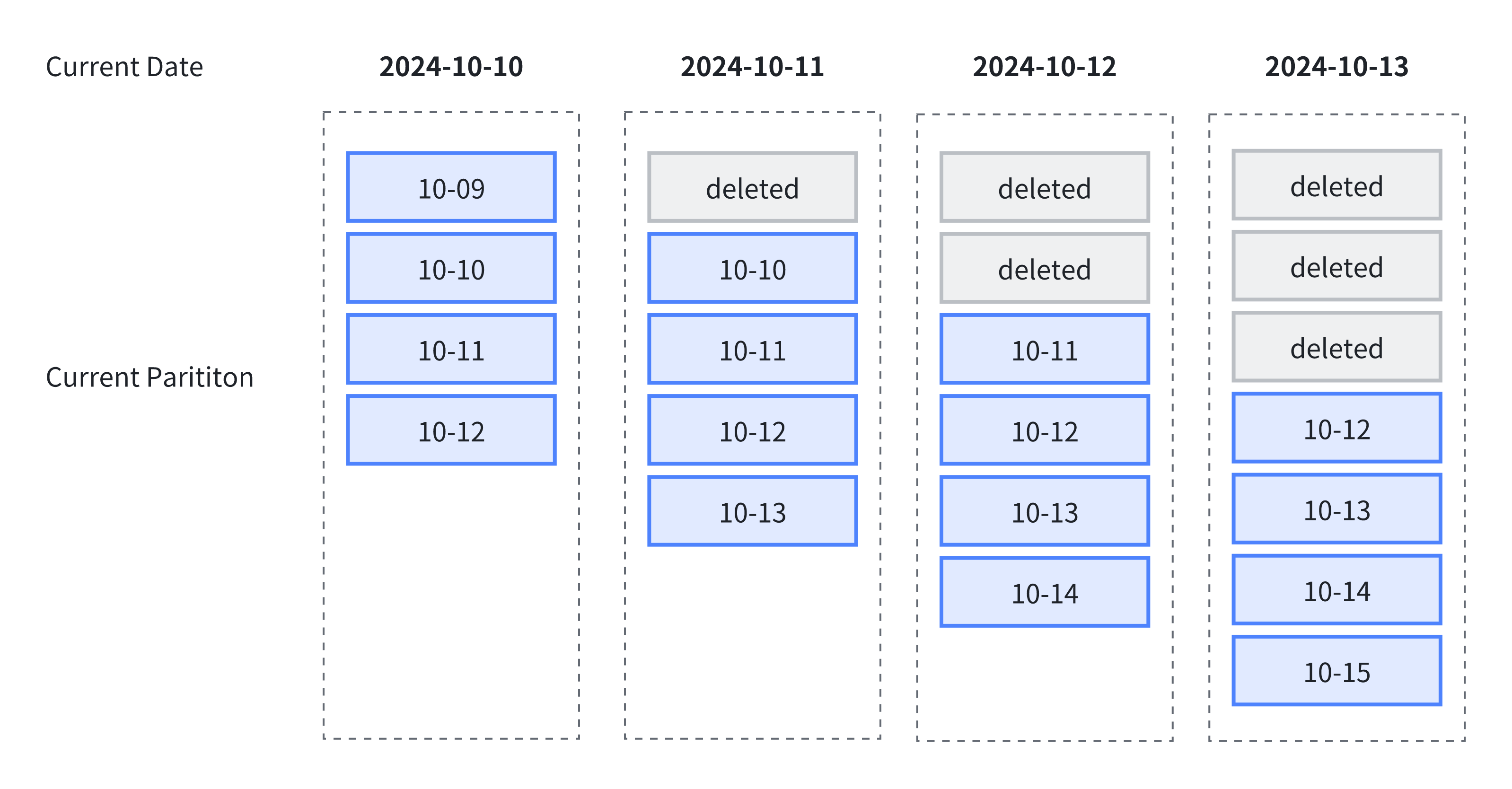
The following diagram shows an example of using dynamic partitioning for lifecycle management. The example specifies the following rules:
- The scheduling unit
dynamic_partition.time_unitisDAY, organizing partitions by day. - The start offset
dynamic_partition.startis set to-1, which retains the partition from one day ago. - The end offset
dynamic_partition.endis set to2, which retains partitions for the next two days.
After the scheduler completes successfully, the example maintains four daily partitions: yesterday, today, and the next two days. The exact time at which partitions appear or expire depends on scheduling.
Limitations
The following limitations apply when using dynamic partitioning:
- Dynamic partitioning supports only Range partitioning on
DATE/DATETIMEcolumns. - Dynamic partitioning supports only a single partition key.
Create a dynamic-partitioned table
Run the following statement in a database where your SQL account can create tables. The dynamic_partition properties configure partition creation and retention:
CREATE TABLE test_dynamic_partition(
    order_id    BIGINT,
    create_dt   DATE,
    username    VARCHAR(20)
)
DUPLICATE KEY(order_id)
PARTITION BY RANGE(create_dt) ()
DISTRIBUTED BY HASH(order_id) BUCKETS 10
PROPERTIES(
    "dynamic_partition.enable" = "true",
    "dynamic_partition.time_unit" = "DAY",
    "dynamic_partition.start" = "-1",
    "dynamic_partition.end" = "2",
    "dynamic_partition.prefix" = "p",
    "dynamic_partition.create_history_partition" = "true"
);
For details on the dynamic_partition parameters, see Dynamic Partition Properties.
Manage dynamic partitions
Modify dynamic partition properties
Note:
Modifying dynamic partitions with the
ALTER TABLEstatement does not take effect immediately. The scheduler polls dynamic partitions at the interval specified bydynamic_partition_check_interval_secondsand performs the required partition creation and drop operations. This is a managed service setting. Use the scheduling-status query below to check progress.
The following example uses an ALTER TABLE statement to convert a non-dynamic partitioned table into a dynamic partitioned table:
CREATE TABLE test_partition(
    order_id    BIGINT,
    create_dt   DATE,
    username    VARCHAR(20)
)
DUPLICATE KEY(order_id)
PARTITION BY RANGE(create_dt) ()
DISTRIBUTED BY HASH(order_id) BUCKETS 10;

ALTER TABLE test_partition SET (
    "dynamic_partition.enable" = "true",
    "dynamic_partition.time_unit" = "DAY",
    "dynamic_partition.start" = "-1",
    "dynamic_partition.end" = "2",
    "dynamic_partition.prefix" = "p",
    "dynamic_partition.create_history_partition" = "true"
);
Check scheduling status
Use SHOW-DYNAMIC-PARTITION to view the scheduling status of all dynamic partitioned tables in the current database:
SHOW DYNAMIC PARTITION TABLES;
+-----------+--------+----------+-------------+------+--------+---------+-----------+----------------+---------------------+--------+------------------------+----------------------+-------------------------+
| TableName | Enable | TimeUnit | Start       | End  | Prefix | Buckets | StartOf   | LastUpdateTime | LastSchedulerTime   | State  | LastCreatePartitionMsg | LastDropPartitionMsg | ReservedHistoryPeriods  |
+-----------+--------+----------+-------------+------+--------+---------+-----------+----------------+---------------------+--------+------------------------+----------------------+-------------------------+
| d3        | true   | WEEK     | -3          | 3    | p      | 1       | MONDAY    | N/A            | 2020-05-25 14:29:24 | NORMAL | N/A                    | N/A                  | [2021-12-01,2021-12-31] |
| d5        | true   | DAY      | -7          | 3    | p      | 32      | N/A       | N/A            | 2020-05-25 14:29:24 | NORMAL | N/A                    | N/A                  | NULL                    |
| d4        | true   | WEEK     | -3          | 3    | p      | 1       | WEDNESDAY | N/A            | 2020-05-25 14:29:24 | NORMAL | N/A                    | N/A                  | NULL                    |
| d6        | true   | MONTH    | -2147483648 | 2    | p      | 8       | 3rd       | N/A            | 2020-05-25 14:29:24 | NORMAL | N/A                    | N/A                  | NULL                    |
| d2        | true   | DAY      | -3          | 3    | p      | 32      | N/A       | N/A            | 2020-05-25 14:29:24 | NORMAL | N/A                    | N/A                  | NULL                    |
| d7        | true   | MONTH    | -2147483648 | 5    | p      | 8       | 24th      | N/A            | 2020-05-25 14:29:24 | NORMAL | N/A                    | N/A                  | NULL                    |
+-----------+--------+----------+-------------+------+--------+---------+-----------+----------------+---------------------+--------+------------------------+----------------------+-------------------------+
7 rows in set (0.02 sec)
Create historical partitions
When you specify the number of dynamic partitions with the start and end properties, historical partitions are not created by default to avoid the long waiting time caused by creating all partitions at once. Only partitions after the current time are created. To create all partitions at once, enable the create_history_partition parameter.
For example, if the current date is 2024-10-11 and you specify start = -2, end = 2:
- When
create_history_partition = true, the scheduler creates 5 partitions for the range[10-09, 10-13]. - When
create_history_partition = false, only 3 partitions are created for the range[10-11, 10-13].
Dynamic partition parameters
Dynamic partition properties
Dynamic partition rule parameters use the dynamic_partition prefix. The following rule parameters are available:
| Parameter | Required | Description |
|---|---|---|
dynamic_partition.enable | No | Whether to enable the dynamic partitioning feature. Can be set to TRUE or FALSE. If other required dynamic partition parameters are specified, it defaults to TRUE. |
dynamic_partition.time_unit | Yes | The scheduling unit for dynamic partitioning. Can be set to HOUR, DAY, WEEK, MONTH, or YEAR, indicating that partitions are created or dropped by hour, day, week, month, or year, respectively. |
dynamic_partition.start | No | The start offset for dynamic partitioning, expressed as a negative number. The default value is -2147483648, which means historical partitions are not dropped. Based on the time_unit property, partitions whose range is before this offset relative to the current day (week / month) are dropped. Whether historical partitions between this offset and the current time are created if they do not exist is controlled by dynamic_partition.create_history_partition. |
dynamic_partition.end | Yes | The end offset for dynamic partitioning, expressed as a positive number. Based on the time_unit property, partitions for the corresponding range are pre-created relative to the current day (week / month). |
dynamic_partition.prefix | Yes | The prefix for the names of dynamically created partitions. |
dynamic_partition.buckets | No | The number of buckets for dynamically created partitions. Setting this parameter overrides the bucket number specified in DISTRIBUTED. |
dynamic_partition.replication_num | No | The number of replicas for dynamically created partitions. If not specified, it defaults to the number of replicas specified when the table was created. |
dynamic_partition.create_history_partition | No | Defaults to false, so the creation window starts at the current interval. Set to true to include historical intervals. Specify dynamic_partition.start or dynamic_partition.history_partition_num to bound historical creation. The rule is subject to the partition-generation limit. |
dynamic_partition.history_partition_num | No | When dynamic_partition.create_history_partition is true, this property bounds how many historical intervals to create. The default is -1, meaning unset. If both this property and dynamic_partition.start are set, creation starts at the later of the two offsets. This property does not replace the retention boundary set by dynamic_partition.start. |
dynamic_partition.start_day_of_week | No | When time_unit is WEEK, this parameter specifies the start of the week. The valid range is 1 to 7, where 1 means Monday and 7 means Sunday. The default is 1, meaning Monday is the start of the week. |
dynamic_partition.start_day_of_month | No | When time_unit is MONTH, this parameter specifies the start of the month. The valid range is 1 to 28, where 1 means the 1st of the month and 28 means the 28th of the month. The default is 1, meaning the 1st of the month is the start. The 29th, 30th, and 31st are not supported as start dates to avoid ambiguity caused by leap years or months of varying length. |
dynamic_partition.reserved_history_periods | No | The historical partition time ranges to retain. When dynamic_partition.time_unit is DAY / WEEK / MONTH / YEAR, set the value in the format [yyyy-MM-dd,yyyy-MM-dd],[...,...]. When dynamic_partition.time_unit is HOUR, set the value in the format [yyyy-MM-dd HH:mm:ss,yyyy-MM-dd HH:mm:ss],[...,...]. If not set, the default is "NULL". |
dynamic_partition.time_zone | No | The time zone for dynamic partitioning. Defaults to the system time zone of the current server, for example, Asia/Shanghai. For more time zone settings, see Time Zone Management. |
Managed scheduler settings
The following settings belong to the managed frontend service. Contact VeloDB Cloud Support to investigate scheduling behavior or request a configuration change. Editing FE configuration files or running ADMIN SET FRONTEND CONFIG is not a warehouse-user procedure.
The values below are compiled defaults verified in VeloDB Core 26.1.3 source. Effective warehouse settings can differ:
| Parameter | Default | Description |
|---|---|---|
dynamic_partition_enable | true | Service-level switch for the dynamic partition scheduler. Table-level rules still determine which partitions are created or dropped. |
dynamic_partition_check_interval_seconds | 600 | The execution frequency of the dynamic partition thread, in seconds. |
max_dynamic_partition_num | 20000 | Limits the window estimate when an enabled dynamic partition rule is created or modified. See the calculation below. |
Partition-generation limit
When you create or modify an enabled dynamic partition rule, the frontend checks the window estimate dynamic_partition.end - effective_start against max_dynamic_partition_num:
- If
dynamic_partition.create_history_partitionisfalse,effective_startis0. - If it is
true,effective_startisdynamic_partition.start. Ifdynamic_partition.history_partition_numis also set, the frontend uses the larger ofdynamic_partition.startand the negative ofdynamic_partition.history_partition_num.
If the estimate exceeds the effective limit, the operation fails with Too many dynamic partitions: ... Limit: .... This check uses the rule's offsets, without subtracting partitions that already exist.
The estimate is not an exact count of new partitions or a cap on the table's total partitions. The scheduler includes both effective_start and dynamic_partition.end, including the current interval, and skips ranges that already exist. For example, with historical creation enabled, dynamic_partition.start = -2, dynamic_partition.end = 2, and no history-count bound, the validation estimate is 4, while the window contains 5 intervals.
Dynamic partitioning examples
The following examples each create a table named tbl1. Run them independently, or choose a different table name for each example.
Example 1: Rolling retention of log data
Partition by day, retain only the last 7 days plus the current day, and pre-create partitions for the next 3 days:
CREATE TABLE tbl1 (
    order_id    BIGINT,
    create_dt   DATE,
    username    VARCHAR(20)
)
PARTITION BY RANGE(create_dt) ()
DISTRIBUTED BY HASH(create_dt)
PROPERTIES (
    "dynamic_partition.enable" = "true",
    "dynamic_partition.time_unit" = "DAY",
    "dynamic_partition.start" = "-7",
    "dynamic_partition.end" = "3",
    "dynamic_partition.prefix" = "p",
    "dynamic_partition.buckets" = "32"
);
Example 2: Partition by month and retain all history
Partition by month, do not drop historical partitions, pre-create partitions for the next 2 months, and set the 3rd of each month as the start day:
CREATE TABLE tbl1 (
    order_id    BIGINT,
    create_dt   DATE,
    username    VARCHAR(20)
)
PARTITION BY RANGE(create_dt) ()
DISTRIBUTED BY HASH(create_dt)
PROPERTIES (
    "dynamic_partition.enable" = "true",
    "dynamic_partition.time_unit" = "MONTH",
    "dynamic_partition.end" = "2",
    "dynamic_partition.prefix" = "p",
    "dynamic_partition.buckets" = "8",
    "dynamic_partition.start_day_of_month" = "3"
);
Example 3: Retain specified historical ranges
Partition by day, retain partitions for the last 10 days and the next 10 days, and additionally retain historical data for the periods [2020-06-01, 2020-06-20] and [2020-10-31, 2020-11-15]:
CREATE TABLE tbl1 (
    order_id    BIGINT,
    create_dt   DATE,
    username    VARCHAR(20)
)
PARTITION BY RANGE(create_dt) ()
DISTRIBUTED BY HASH(create_dt)
PROPERTIES (
    "dynamic_partition.enable" = "true",
    "dynamic_partition.time_unit" = "DAY",
    "dynamic_partition.start" = "-10",
    "dynamic_partition.end" = "10",
    "dynamic_partition.prefix" = "p",
    "dynamic_partition.buckets" = "8",
    "dynamic_partition.reserved_history_periods" = "[2020-06-01,2020-06-20],[2020-10-31,2020-11-15]"
);