Prefix Index and Sort Key
The Prefix Index is a sparse index that VeloDB Cloud builds in and maintains automatically. It narrows row ranges using leading sort-key columns, with no manual index creation required. Choosing an appropriate sort key during table schema design significantly accelerates equality and range queries in WHERE conditions.
How it works
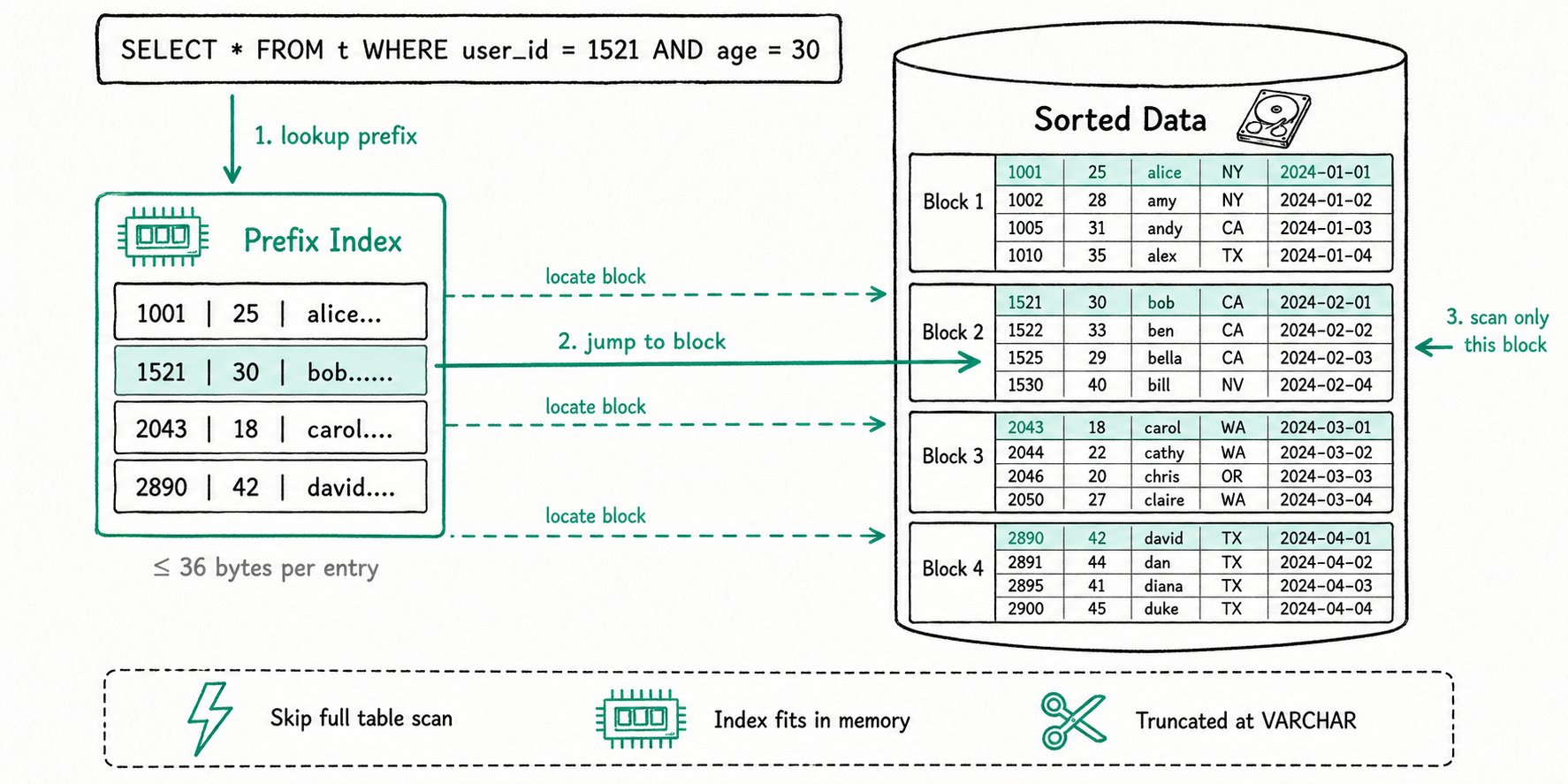
Sort key
Rows are sorted within each segment by the table's sort key. This does not make the entire distributed table globally sorted. The leading sort-key columns determine which filters can use the prefix index.
Different data models derive the sort key from different sources:
| Data model | Sort key source |
|---|---|
| Aggregate | AGGREGATE KEY in the CREATE TABLE statement |
| Unique | UNIQUE KEY in the CREATE TABLE statement |
| Duplicate | DUPLICATE KEY in the CREATE TABLE statement |
With the sort key, when a query's WHERE condition hits the sort columns, VeloDB Cloud can quickly jump to the matching data range and avoid a full table scan, reducing search complexity and accelerating the query.
Prefix index
Building on the sort key, VeloDB Cloud also introduces the Prefix Index:
- Every several rows in a table form one logical Data Block.
- Each logical block has a sparse index entry derived from the first row's selected leading sort-key columns.
- The sparse index is small relative to the table data and can reduce the row ranges that a query scans.
36-byte truncation rule
By default in Core 26.1.3, index-column selection is bounded by three leading sort-key columns and a 36-byte budget. Selection also stops after a VARCHAR column. An explicit short_key table property can change the selected column count, subject to validation:
- When the concatenation of sort columns reaches a
VARCHARcolumn, truncation occurs at the end of that column, regardless of whether 36 bytes have been filled. - If the first column itself is a
VARCHAR, truncation occurs at the end of that column even if its length is less than 36 bytes, and subsequent columns are not added to the prefix index.
Applicable scenarios
The Prefix Index mainly serves the following query scenarios:
- Equality queries:
col = value,col IN (...) - Range queries:
col > value,BETWEEN ... AND ..., and similar
As long as the WHERE condition hits a prefix of the sort key (that is, several leftmost columns starting from the first one), the prefix index can accelerate the query.
Table schema design recommendations
A table has only one sort key definition, so a table can have only one set of prefix indexes. The choice of sort key at table creation time directly determines how much acceleration the prefix index provides. Consider the following guidelines:
- Prefer columns that appear most frequently in
WHEREfilter conditions as Key columns. - Place columns queried more frequently first, because the prefix index only takes effect on conditions that hit consecutively from the leftmost column.
- Be careful when placing
VARCHARcolumns at the front of the sort key, to avoid triggering truncation that prevents subsequent columns from entering the prefix index.
Tip:
If a high-frequency query condition cannot hit the prefix index by adjusting the sort key, see the section Alternatives When the Prefix Index Cannot Be Hit below.
Usage examples
Example 1: Prefix selection through a VARCHAR column
Select leading columns through the first VARCHAR column
In this illustrative layout, the first three columns can contribute to the prefix. Selection stops at message, which is VARCHAR. The byte count of the stored key also depends on key encoding, so the declared SQL column widths do not establish an exact serialized prefix size:
| ColumnName | Type |
|---|---|
user_id | BIGINT |
age | INT |
message | VARCHAR(100) |
max_dwell_time | DATETIME |
min_dwell_time | DATETIME |
Example 2: First column is VARCHAR and triggers truncation
First column is VARCHAR and triggers truncation
Only user_name contributes to the prefix because it is the first column and has type VARCHAR. The remaining byte budget does not cause later columns to be added:
| ColumnName | Type |
|---|---|
user_name | VARCHAR(20) |
age | INT |
message | VARCHAR(100) |
max_dwell_time | DATETIME |
min_dwell_time | DATETIME |
Example 3: Query hitting vs. missing the prefix index
Query hitting vs. missing the prefix index
The query templates below assume an example_table whose sort key follows the column order in Example 1:
-
Hits the prefix index (the condition covers the two leftmost sort columns, with high efficiency):
SELECT * FROM example_table WHERE user_id = 1829239 AND age = 20; -
Misses the prefix index (the condition skips
user_id, so the prefix cannot be used for location):SELECT * FROM example_table WHERE age = 20;
Therefore, choosing the correct column order at table creation time greatly improves query efficiency.
Verify index effectiveness
The Prefix Index takes effect automatically when it can accelerate a query, with no special syntax required. You can verify the acceleration with the following metric in Query Profile:
| Metric | Meaning |
|---|---|
RowsKeyRangeFiltered | The number of rows filtered out by the prefix index. Compare it with other Rows* metrics to evaluate the filtering effect of the index. |
Alternatives when the prefix index cannot be hit
When a high-frequency query condition cannot hit the prefix index (for example, when commonly used filter columns are not a prefix of the sort key), consider the following two options:
- Create an inverted index: A table can have multiple inverted indexes, flexibly covering columns used in different query conditions.
- Use a single-table materialized view (Duplicate model): By creating a strongly consistent single-table synchronous materialized view with a different column order, you can indirectly achieve multiple sets of prefix indexes.
FAQ
Q1: Does the Prefix Index need to be created manually?
No. The prefix index is maintained automatically. Default column selection uses up to three leading sort-key columns and a 36-byte budget, stopping after VARCHAR. You do not create it with CREATE INDEX.
Q2: Can a single table have multiple sets of prefix indexes?
No. Because the sort key is unique, a table can have only one set of prefix indexes. If multiple sets are required, use inverted indexes or materialized views.
Q3: Why is my prefix index much shorter than expected?
The most common reason is that a VARCHAR column appears early in the sort key and triggers the truncation rule. Place fixed-length types (such as BIGINT, INT, and DATETIME) at the front of the sort key.
Q4: Can the Prefix Index accelerate LIKE queries or text retrieval?
No. For LIKE fuzzy matching and full-text retrieval, use the NGram BloomFilter Index and the inverted index, respectively.