Wide Table Storage Format V3
Tip:
This feature is available starting with VeloDB Core 26.1.1. Set
"storage_format" = "V3"in thePROPERTIESclause when creating a table to enable it. See the Core v26.1 release notes.
The wide table storage format V3 restructures the Segment metadata layout for tables with a very large number of columns. By splitting column metadata out of the Footer and loading it on demand, V3 can reduce segment-opening latency and memory use when queries read only a subset of a wide table's columns.
Applicable scenarios
If your queries show that the "Segment opening" phase is very slow and memory usage is unusually high, and your case matches any scenario in the table below, enabling the V3 storage format is recommended:
| User scenario | Typical symptom | V3 recommended? |
|---|---|---|
| Wide tables (hundreds to thousands of columns) | Segment opening takes a lot of time and memory even when only a few columns are queried | Recommended |
Tables with VARIANT columns | After dynamic subcolumn expansion, the actual number of stored columns far exceeds the surface definition | Recommended |
| Cold-cache queries in Cloud | Remote reads are needed to load metadata before scanning data | Evaluate with the workload |
| Regular tables (a few dozen columns or fewer) | Segment opening overhead is negligible | No need to switch |
Root cause
The old format packs the metadata of all columns (ColumnMetaPB) together at the end of the Segment file inside the Footer, which leads to:
- Full metadata loading: Opening a Segment requires deserializing the entire Footer first. Even if the query only uses two columns, the full cost is paid.
- Footer size inflation: When the column count reaches several thousand, the Footer itself can grow to several MB.
- Amplification effect on remote storage: Network latency and high read costs on object storage further amplify the overhead above.
In other words, even if a SQL statement only queries 2 columns, the engine still has to read the metadata of all columns in the Segment into memory and deserialize it before scanning can begin. The more columns and the more Segments there are, the more dramatic this overhead becomes.
Key V3 optimizations
V3 restructures the storage format along three dimensions:
Optimization 1: On-demand column metadata loading
V3 splits column metadata out of the Footer and places it in a separate region of the file. The Footer only keeps lightweight pointers to the metadata of each column.
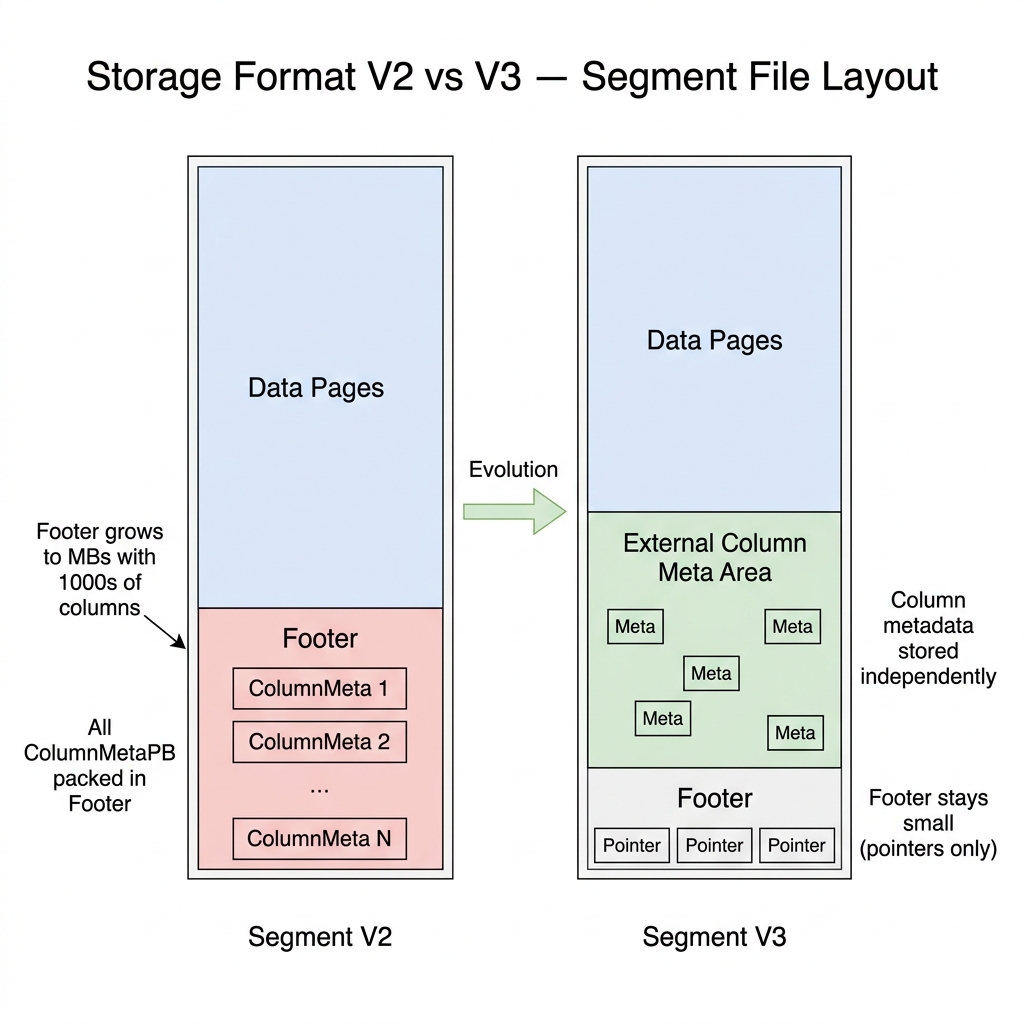
When opening a Segment, the system only reads a slim Footer; the metadata of the columns actually used is fetched only when needed. This reduces the metadata work for narrow projections on wide tables. Measure the effect for your warehouse and cache state.
Optimization 2: Plain encoding by default for signed integers
V3 switches the default encoding for signed integer types such as INT and BIGINT from bit shuffle to PLAIN_ENCODING (raw binary). Floating-point, date, and decimal types retain their type-specific encodings. Evaluate the combined effect of encoding and LZ4 or ZSTD compression on your workload.
Optimization 3: More compact plain encoding for strings
For plain-encoded string and JSONB data, V3 introduces BINARY_PLAIN_ENCODING_V2, which uses a streaming layout of [length(varuint)][raw data]. It eliminates the trailing offset table required by the old encoding and is more compact in storage.
Measured results
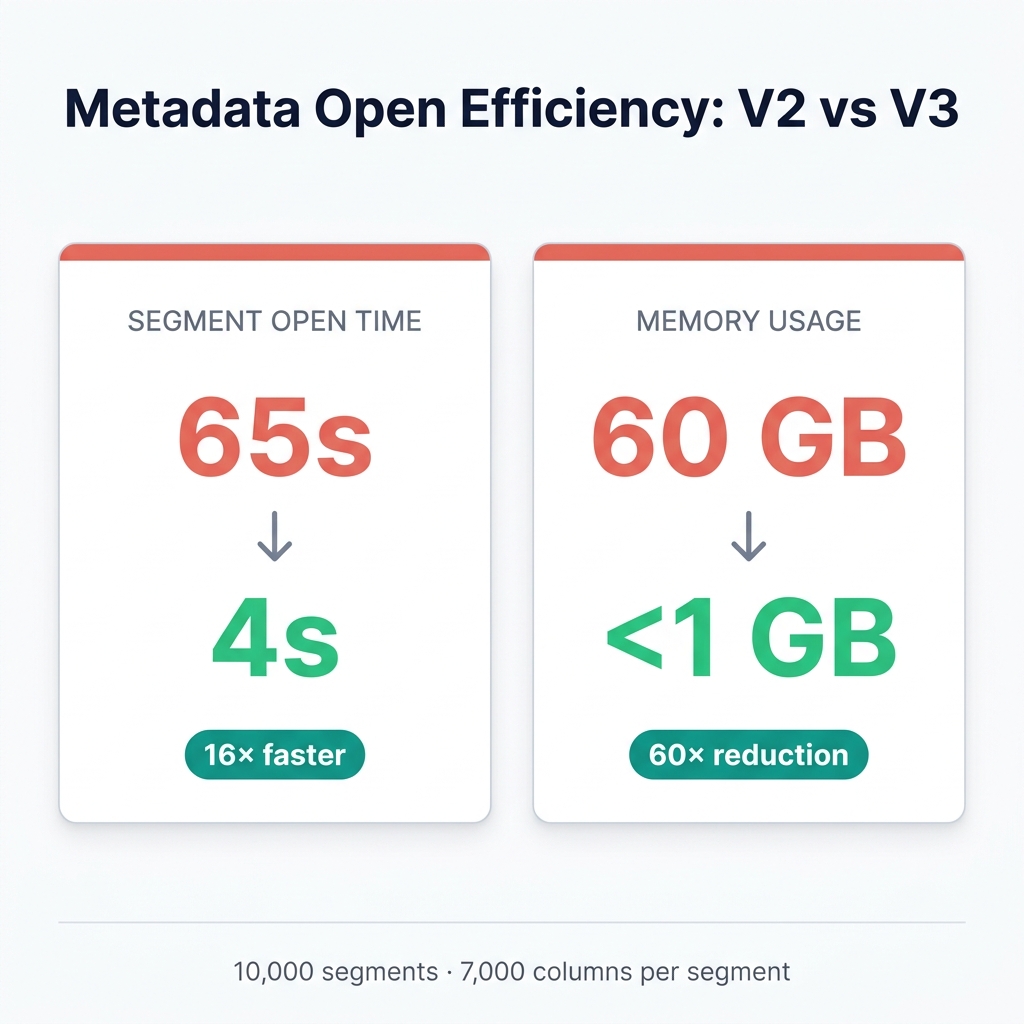
The Apache Doris storage format documentation reports the following results for a wide table with 7,000 columns and 10,000 segments in total:
| Metric | Old format | V3 format | Reported improvement |
|---|---|---|---|
| Segment opening time | 65 s | 4 s | 16x faster |
| Memory usage when opening | 60 GB | < 1 GB | 60x lower |
These are upstream Apache Doris test results. The source does not provide the full hardware and query configuration, and these results have not been independently reproduced in VeloDB Cloud. Use them to understand the potential benefit of V3, then measure performance with your warehouse and workload.
Enable V3
Explicitly specify storage_format as V3 in the PROPERTIES clause of the CREATE TABLE statement:
CREATE TABLE table_v3 (
    id BIGINT,
    name VARCHAR(128),
    attrs VARIANT
)
DUPLICATE KEY(id)
DISTRIBUTED BY HASH(id) BUCKETS 32
PROPERTIES (
    "storage_format" = "V3"
);
Recommendations
- Evaluate V3 for wide tables with many columns, tables with expanded
VARIANTsubcolumns, or queries where segment-opening overhead is significant. - Keep the existing format when segment-opening overhead is negligible.
- Compare segment-opening time, query latency, and memory with the same data and query projections, including warm-cache and cold-cache runs.
Use SHOW CREATE TABLE table_v3 to verify the property. This example creates a new table; it does not convert an existing table's stored segments. Segment storage V3 is separate from inverted index V3 and Iceberg V3.
See also
- Data Compression: learn about V3's coordinated optimizations of encoding and compression for numeric and string types.