Apache Polaris
Apache Polaris is an open-source catalog service that complies with the Iceberg REST Catalog specification. By creating an Apache Polaris Catalog, you can query Iceberg tables managed by Polaris in VeloDB Cloud, enabling data sharing across multiple compute engines.
Polaris supports the OAuth2 authentication mechanism and can securely issue temporary storage access credentials to clients via the Vended Credentials feature.
Prerequisites
Before creating an Apache Polaris Catalog, please ensure the following conditions are met:
Polaris Side Preparation
- The Apache Polaris service is deployed and accessible by VeloDB Cloud.
- A Catalog and Namespace have been created in Polaris.
- A Principal (containing Client ID and Client Secret) has been created for authentication.
- Appropriate roles and permissions have been assigned to the Principal.
Storage Side Preparation
- Data files are stored in cloud object storage (e.g., Amazon S3).
- If Vended Credentials are not used, storage access credentials with read/write permissions must be prepared.
Network Requirements
- VeloDB Cloud can access the Polaris Server Endpoint.
- VeloDB Cloud can access data storage (e.g., S3).
For SaaS Mode VeloDB Cloud
- Accessing your Polaris Server Endpoint may require allowing VeloDB to access your VPC. Refer to VeloDB Accesses Your VPC.
- Can only access S3 buckets in the same region as the Warehouse.
For BYOC Mode VeloDB Cloud
- Accessing your Polaris Server Endpoint and S3 buckets requires reference to the network policies during deployment. Refer to Create VPC Network Resources.
Create Catalog
Follow these steps to create an Apache Polaris Catalog in VeloDB Cloud.
Step 1: Enter Creation Page
- Log in to the VeloDB Cloud console.
- In the left navigation bar, click Catalogs.
- Click the Add External Catalog button.
- Under the Data Lake category, select Apache Polaris.
Step 2: Fill in Basic Information
In the Basic Information section, configure the basic identification information for the Catalog.

| Field | Required | Description |
|---|---|---|
| Catalog Name | ✓ | The unique name of the Catalog, used to identify the data source in SQL queries. |
| Comment | Optional description information. |
Step 3: Configure Metastore
In the Metastore section, configure the information required to connect to the Apache Polaris service.
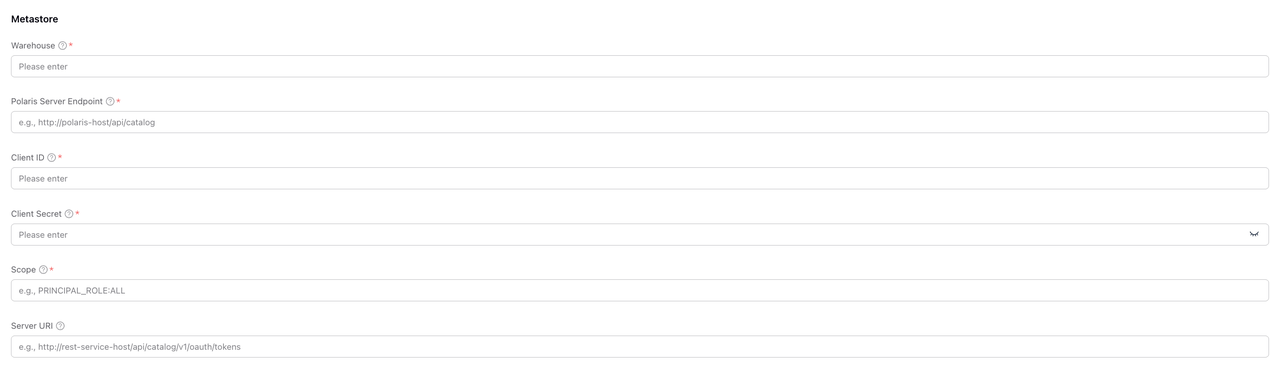
Connection Configuration
| Field | Required | Description |
|---|---|---|
| Warehouse | ✓ | The Catalog name in Polaris. This is the Catalog you created in the Polaris service, and VeloDB Cloud will access the corresponding metadata via this name. |
| Polaris Server Endpoint | ✓ | The endpoint address of the Polaris REST API, in the format http(s)://<polaris-host>:<port>/api/catalog. |
OAuth2 Authentication Configuration
Polaris uses the OAuth2 Client Credentials flow for authentication. You need to create a Principal in Polaris and obtain credentials.
| Field | Required | Description |
|---|---|---|
| Client ID | ✓ | OAuth2 Client ID, the identifier generated when creating a Principal in Polaris. |
| Client Secret | ✓ | OAuth2 Client Secret, paired with the Client ID for authentication. |
| Scope | ✓ | OAuth2 permission scope, defining the range of resources this credential can access. |
| Server URI | OAuth2 Token endpoint address, used to obtain access tokens. |
About Scope:
PRINCIPAL_ROLE:ALL: Use all roles assigned to the Principal.PRINCIPAL_ROLE:<role-name>: Use only the specified role.
Step 4: Configure Storage Access
In the Storage section, configure credentials to access underlying data files.
Iceberg table data managed by Polaris is stored in cloud object storage (e.g., S3). VeloDB Cloud needs to obtain storage access permissions to read data files.
Vended Credentials (Recommended)
The Enable Vended Credentials switch controls whether to use temporary credentials issued by Polaris to access storage.
Enable Vended Credentials:

- Polaris dynamically issues temporary storage access credentials for each request.
- No need to configure long-term storage credentials in VeloDB Cloud.
- Credentials rotate automatically for higher security.
- Prerequisite: Storage integration is correctly configured on the Polaris server side.
Applicable Scenarios:
- Polaris has configured Storage Integration.
- Desire to centrally manage storage access permissions.
- Pursuit of higher security.
Manually Configure Storage Credentials
Disable Vended Credentials:
You need to manually configure credentials with S3 access permissions.

| Field | Required | Description |
|---|---|---|
| Region | ✓ | The region where the storage bucket is located, e.g., us-east-1. |
| Authentication | ✓ | Authentication method, currently supports Access Key. |
| AK | ✓ | AWS Access Key ID. |
| SK | ✓ | AWS Secret Access Key. |
Applicable Scenarios:
- Polaris is not configured with Vended Credentials.
- Need to use different storage access permissions than Polaris.
- Testing and development environments.
Step 5: Advanced Settings (Optional)
Click Advanced Settings to expand more configuration options.

Advanced settings typically include:
- Metadata cache configuration
- Connection timeout settings
Tip: In most scenarios, the default values are sufficient.
Step 6: Confirm Creation
- Check if all configuration information is correct.
- Click the Confirm button to create the Catalog.
- Wait for connection verification to complete.
After successful creation, you can see the newly created Apache Polaris Catalog in the Catalog list.
Use Catalog
After successful creation, you can use this Catalog to query data in the SQL Editor.
View Databases and Tables
-- View all Namespaces (Databases) under the Catalog
SHOW DATABASES FROM polaris_iceberg;

-- View all tables under a Namespace
SHOW TABLES FROM polaris_iceberg.my_namespace;

-- View table structure
DESCRIBE polaris_iceberg.my_namespace.my_table;
Query Data
-- Query data
SELECT * FROM polaris_iceberg.my_namespace.my_table LIMIT 100;

-- Query with conditions
SELECT column1, column2
FROM polaris_iceberg.my_namespace.my_table
WHERE created_at >= '2024-01-01';