Sample Data Catalog
Overview
| Catalog | Description | Applicable Scenarios |
|---|---|---|
| TPCDS | TPC-DS benchmark data, simulating retail decision support scenarios, containing 24 tables. | Complex analytical queries, data warehouse performance testing. |
| TPCH | TPC-H benchmark data, simulating business decision scenarios, containing 8 tables. | OLAP query performance testing, introductory learning. |
These Catalogs support dynamic data generation. You can write the generated data to VeloDB internal tables, Iceberg tables, or Hive tables for testing.
Create Catalog
Step 1: Enter Creation Page
- Log in to the VeloDB Cloud console.
- In the left navigation bar, click Catalogs.
- Click the Add External Catalog button.
- Under the Sample Data category, select TPCDS or TPCH.
Step 2: Configure Catalog
TPCDS Configuration
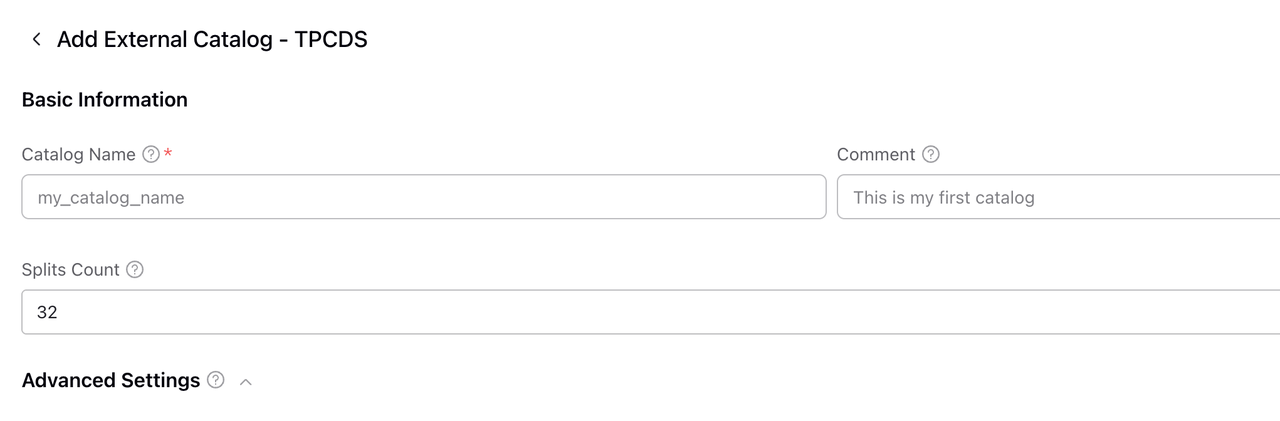
| Field | Required | Description |
|---|---|---|
| Catalog Name | ✓ | Unique name of the Catalog. |
| Comment | Optional description information. | |
| Splits Count | Concurrency per node. Default is 32. |
TPCH Configuration

| Field | Required | Description |
|---|---|---|
| Catalog Name | ✓ | Unique name of the Catalog. |
| Comment | Optional description information. | |
| Splits Per Node | Concurrency per node. Default is 32. |
Step 3: Confirm Creation
Click the Confirm button to complete creation.
Use Catalog
View Available Data
-- View databases (datasets of different scales)
SHOW DATABASES FROM tpcds_catalog;
-- Result example: sf1, sf10, sf100, sf1000 ...

-- View tables
SHOW TABLES FROM tpcds_catalog.sf1;
sf in the database name stands for Scale Factor:
sf1: Approx. 1GB datasf10: Approx. 10GB datasf100: Approx. 100GB datasf1000: Approx. 1TB data
Query Sample Data
-- Query TPCH data
SELECT * FROM tpch_catalog.sf1.customer LIMIT 10;

-- Query TPCDS data
SELECT * FROM tpcds_catalog.sf1.store_sales LIMIT 10;
Write Data to VeloDB Tables
-- Create VeloDB table and import TPCH data
CREATE TABLE my_db.customer AS
SELECT * FROM tpch_catalog.sf1.customer;

-- Or use INSERT INTO
INSERT INTO my_db.lineitem
SELECT * FROM tpch_catalog.sf10.lineitem;
TPCH Table Structure
| Table Name | Description |
|---|---|
| customer | Customer information |
| lineitem | Order details |
| nation | Nation |
| orders | Orders |
| part | Parts |
| partsupp | Part suppliers |
| region | Region |
| supplier | Suppliers |
TPCDS Table Structure
TPCDS contains 24 tables, simulating retail scenarios:
| Category | Table Name |
|---|---|
| Fact Tables | store_sales, store_returns, catalog_sales, catalog_returns, web_sales, web_returns, inventory |
| Dimension Tables | customer, customer_address, customer_demographics, date_dim, time_dim, item, store, catalog_page, web_page, web_site, warehouse, promotion, household_demographics, income_band, ship_mode, reason, call_center |