Ingesting data from PostgreSQL to VeloDB (using Flink CDC)
Prerequisites
VeloDB Cloud Account (Required)
You need a VeloDB Cloud account with an active cluster. If you don't have one, follow the VeloDB Quick Start Guide to create your account and cluster.
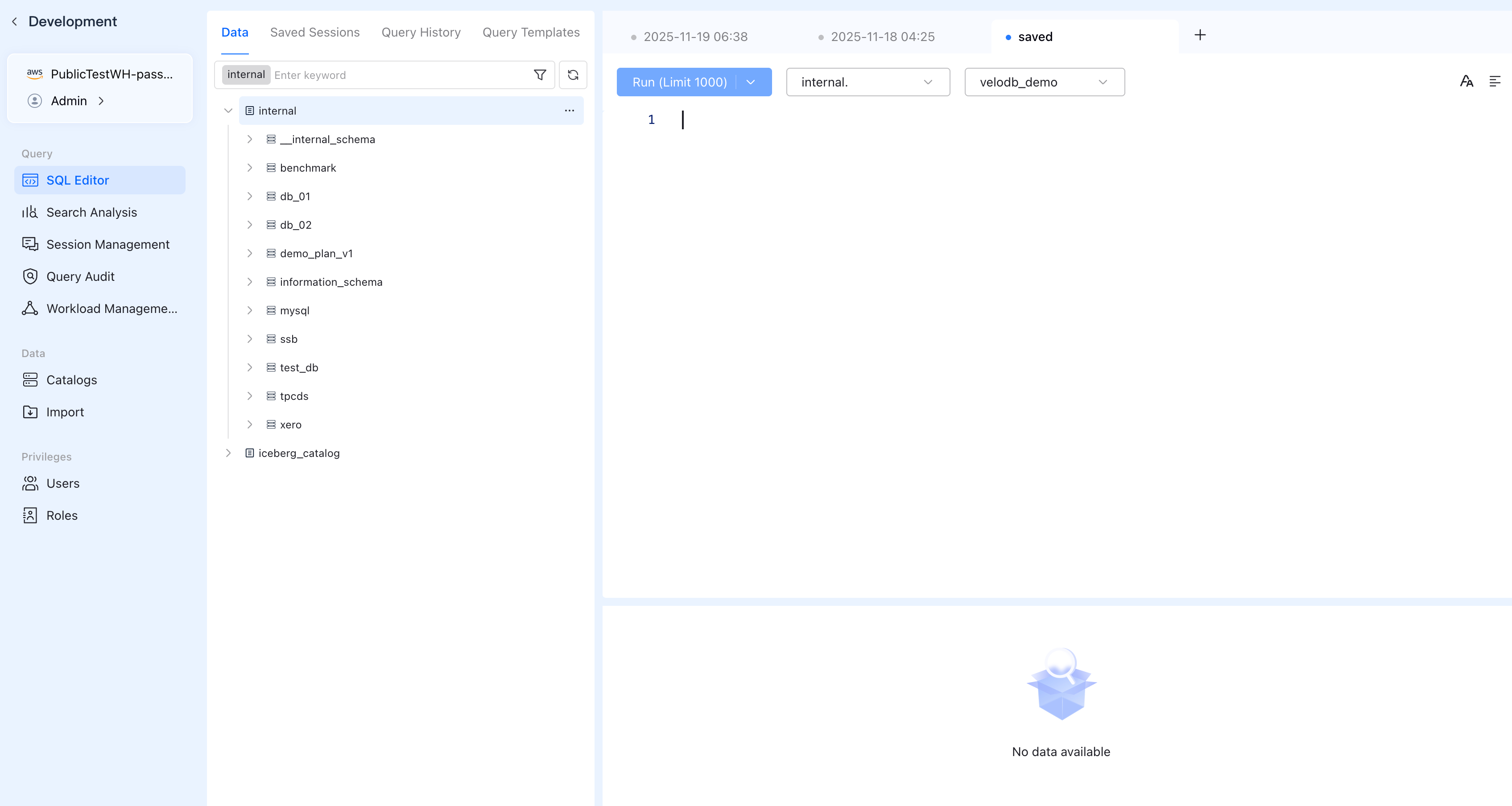
To run SQL queries and create databases in VeloDB:
- Log in to the VeloDB Cloud console.
- In the upper-left corner, select the warehouse that you want to use.
- In the left navigation pane, click SQL Editor.
PostgreSQL Source Configuration
Ensure your PostgreSQL database is configured for CDC:
| Source Type | Setup Guide |
|---|---|
| Self-hosted PostgreSQL | Local PostgreSQL Source Setup |
| Amazon Aurora RDS PostgreSQL | Aurora RDS PostgreSQL Source Setup |
| Amazon Aurora Serverless v2 PostgreSQL | Aurora Serverless PostgreSQL Source Setup |
Required PostgreSQL configuration:
wal_level = logicalmax_replication_slots >= 1max_wal_senders >= 1- CDC user with
REPLICATION, LOGINprivileges andSELECTon tables - For Aurora: CDC user with
rds_replication,rds_superuser,pg_read_all_dataroles
1. (Optional) Create Sample Table
Run the following SQL in your PostgreSQL database:
CREATE DATABASE test_db;

\c test_db

CREATE TABLE student (
    id INT PRIMARY KEY,
    name VARCHAR(100) NOT NULL,
    age INT,
    email VARCHAR(255),
    phone VARCHAR(20),
    score NUMERIC(5,2),
    created_at TIMESTAMP DEFAULT CURRENT_TIMESTAMP
);

INSERT INTO student (id, name, age, email, phone, score) VALUES
(1, 'Alice Zhang', 22, 'alice@example.com', '13800138000', 89.50),
(2, 'Bob Li', 21, 'bob@example.com', '13900139000', 76.80),
(3, 'Charlie Wang', 23, 'charlie@example.com', '13600136000', 92.00);
For capturing DELETE operations: Enable REPLICA IDENTITY FULL on your tables:
ALTER TABLE student REPLICA IDENTITY FULL;
This ensures DELETE events include full row data, not just the primary key.
2. Install Flink with Connectors
- Pre-packaged Bundle (Recommended)
- Manual Download
Download the pre-packaged Flink bundle that includes Flink, all required connectors, and JDK:
curl -O https://apache-doris-releases.oss-accelerate.aliyuncs.com/extention/flink-1.17.2-with-doris-connector.tar.gz
tar -xzf flink-1.17.2-with-doris-connector.tar.gz
cd flink-1.17.2-with-doris-connector
export JAVA_HOME=$(pwd)/jdk
This package includes Flink 1.17.2, Doris Connector, PostgreSQL CDC Connector, JDBC drivers, and bundled JDK for Linux. No separate Java installation required.
Warning:
If you prefer to download components individually:
| Package | File |
|---|---|
| Flink 1.17 | flink-1.17.2-bin-scala_2.12.tgz |
| Flink PostgreSQL CDC | flink-sql-connector-postgres-cdc-3.1.0.jar |
| Flink Doris Connector | flink-doris-connector-1.17-25.1.0.jar |
| PostgreSQL JDBC Driver | postgresql-42.7.1.jar |
| MySQL JDBC Driver | mysql-connector-j-8.0.33.jar |
# Download Flink
curl -O https://archive.apache.org/dist/flink/flink-1.17.2/flink-1.17.2-bin-scala_2.12.tgz
tar -xzf flink-1.17.2-bin-scala_2.12.tgz

# Download connectors to lib/
curl -o flink-1.17.2/lib/flink-sql-connector-postgres-cdc-3.1.0.jar \
  https://repo1.maven.org/maven2/org/apache/flink/flink-sql-connector-postgres-cdc/3.1.0/flink-sql-connector-postgres-cdc-3.1.0.jar

curl -o flink-1.17.2/lib/flink-doris-connector-1.17-25.1.0.jar \
  https://repo1.maven.org/maven2/org/apache/doris/flink-doris-connector-1.17/25.1.0/flink-doris-connector-1.17-25.1.0.jar

curl -o flink-1.17.2/lib/postgresql-42.7.1.jar \
  https://jdbc.postgresql.org/download/postgresql-42.7.1.jar

curl -o flink-1.17.2/lib/mysql-connector-j-8.0.33.jar \
  https://repo1.maven.org/maven2/com/mysql/mysql-connector-j/8.0.33/mysql-connector-j-8.0.33.jar
3. Create Target Database in VeloDB
Before running Flink CDC, create the target database in VeloDB using the SQL Editor:
CREATE DATABASE IF NOT EXISTS <your_velodb_database>;
Database must exist in VeloDB. Tables are auto-created by Flink Doris Connector based on PostgreSQL schema.
4. Run
- Local
- Standalone
- YARN
- Kubernetes
bin/flink run -t local \
    -Dexecution.checkpointing.interval=10s \
    -Dparallelism.default=1 \
    -c org.apache.doris.flink.tools.cdc.CdcTools \
    lib/flink-doris-connector-1.17-25.1.0.jar \
    postgres-sync-database \
    --database "<YOUR_VELODB_DATABASE>" \
    --postgres-conf hostname="<YOUR_POSTGRES_HOST>" \
    --postgres-conf port="5432" \
    --postgres-conf username="<YOUR_POSTGRES_USER>" \
    --postgres-conf password="<YOUR_POSTGRES_PASSWORD>" \
    --postgres-conf database-name="<YOUR_POSTGRES_DATABASE>" \
    --postgres-conf schema-name="public" \
    --postgres-conf slot.name="velodb_cdc_slot" \
    --postgres-conf decoding.plugin.name=pgoutput \
    --including-tables ".*" \
    --sink-conf fenodes="<YOUR_VELODB_HOST>:8080" \
    --sink-conf username="<YOUR_VELODB_USER>" \
    --sink-conf password="<YOUR_VELODB_PASSWORD>" \
    --sink-conf jdbc-url="jdbc:mysql://<YOUR_VELODB_HOST>:9030" \
    --sink-conf sink.label-prefix=postgres_cdc
For Aurora/RDS: Add --postgres-conf publication.name="<YOUR_PUBLICATION_NAME>" parameter.
For Standalone cluster deployment, ensure your Flink cluster is running and submit the job using -t remote:
bin/flink run -t remote \
    -Dexecution.checkpointing.interval=10s \
    -Dparallelism.default=1 \
    -c org.apache.doris.flink.tools.cdc.CdcTools \
    lib/flink-doris-connector-1.17-25.1.0.jar \
    postgres-sync-database \
    --database "<YOUR_VELODB_DATABASE>" \
    --postgres-conf hostname="<YOUR_POSTGRES_HOST>" \
    --postgres-conf port="5432" \
    --postgres-conf username="<YOUR_POSTGRES_USER>" \
    --postgres-conf password="<YOUR_POSTGRES_PASSWORD>" \
    --postgres-conf database-name="<YOUR_POSTGRES_DATABASE>" \
    --postgres-conf schema-name="public" \
    --postgres-conf slot.name="velodb_cdc_slot" \
    --postgres-conf decoding.plugin.name=pgoutput \
    --including-tables ".*" \
    --sink-conf fenodes="<YOUR_VELODB_HOST>:8080" \
    --sink-conf username="<YOUR_VELODB_USER>" \
    --sink-conf password="<YOUR_VELODB_PASSWORD>" \
    --sink-conf jdbc-url="jdbc:mysql://<YOUR_VELODB_HOST>:9030" \
    --sink-conf sink.label-prefix=postgres_cdc
For YARN deployment, ensure Hadoop is configured and YARN is accessible:
bin/flink run -t yarn-per-job \
    -Dexecution.checkpointing.interval=10s \
    -Dparallelism.default=1 \
    -c org.apache.doris.flink.tools.cdc.CdcTools \
    lib/flink-doris-connector-1.17-25.1.0.jar \
    postgres-sync-database \
    --database "<YOUR_VELODB_DATABASE>" \
    --postgres-conf hostname="<YOUR_POSTGRES_HOST>" \
    --postgres-conf port="5432" \
    --postgres-conf username="<YOUR_POSTGRES_USER>" \
    --postgres-conf password="<YOUR_POSTGRES_PASSWORD>" \
    --postgres-conf database-name="<YOUR_POSTGRES_DATABASE>" \
    --postgres-conf schema-name="public" \
    --postgres-conf slot.name="velodb_cdc_slot" \
    --postgres-conf decoding.plugin.name=pgoutput \
    --including-tables ".*" \
    --sink-conf fenodes="<YOUR_VELODB_HOST>:8080" \
    --sink-conf username="<YOUR_VELODB_USER>" \
    --sink-conf password="<YOUR_VELODB_PASSWORD>" \
    --sink-conf jdbc-url="jdbc:mysql://<YOUR_VELODB_HOST>:9030" \
    --sink-conf sink.label-prefix=postgres_cdc
For Kubernetes deployment, ensure you have a Flink session cluster running:
bin/flink run -t kubernetes-session \
    -Dexecution.checkpointing.interval=10s \
    -Dparallelism.default=1 \
    -c org.apache.doris.flink.tools.cdc.CdcTools \
    lib/flink-doris-connector-1.17-25.1.0.jar \
    postgres-sync-database \
    --database "<YOUR_VELODB_DATABASE>" \
    --postgres-conf hostname="<YOUR_POSTGRES_HOST>" \
    --postgres-conf port="5432" \
    --postgres-conf username="<YOUR_POSTGRES_USER>" \
    --postgres-conf password="<YOUR_POSTGRES_PASSWORD>" \
    --postgres-conf database-name="<YOUR_POSTGRES_DATABASE>" \
    --postgres-conf schema-name="public" \
    --postgres-conf slot.name="velodb_cdc_slot" \
    --postgres-conf decoding.plugin.name=pgoutput \
    --including-tables ".*" \
    --sink-conf fenodes="<YOUR_VELODB_HOST>:8080" \
    --sink-conf username="<YOUR_VELODB_USER>" \
    --sink-conf password="<YOUR_VELODB_PASSWORD>" \
    --sink-conf jdbc-url="jdbc:mysql://<YOUR_VELODB_HOST>:9030" \
    --sink-conf sink.label-prefix=postgres_cdc
5. Verify
In the SQL Editor, select your database.
Check initial sync in VeloDB:
SELECT * FROM student;
Expected result:
+----+--------------+------+---------------------+-------------+-------+---------------------+
| id | name         | age  | email               | phone       | score | created_at          |
+----+--------------+------+---------------------+-------------+-------+---------------------+
|  1 | Alice Zhang  |   22 | alice@example.com   | 13800138000 | 89.50 | 2025-12-22 14:30:25 |
|  2 | Bob Li       |   21 | bob@example.com     | 13900139000 | 76.80 | 2025-12-22 14:30:25 |
|  3 | Charlie Wang |   23 | charlie@example.com | 13600136000 | 92.00 | 2025-12-22 14:30:25 |
+----+--------------+------+---------------------+-------------+-------+---------------------+
Test real-time CDC:
-- Run in PostgreSQL
INSERT INTO student (id, name, age, email, phone, score)
VALUES (4, 'David Chen', 24, 'david@example.com', '13400134000', 88.75);

UPDATE student SET score = 95.00 WHERE id = 2;

DELETE FROM student WHERE id = 3;
-- Verify in VeloDB (changes appear within seconds)
SELECT * FROM student ORDER BY id;
Expected result:
+----+-------------+------+-------------------+-------------+-------+---------------------+
| id | name        | age  | email             | phone       | score | created_at          |
+----+-------------+------+-------------------+-------------+-------+---------------------+
|  1 | Alice Zhang |   22 | alice@example.com | 13800138000 | 89.50 | 2025-12-22 14:30:25 |
|  2 | Bob Li      |   21 | bob@example.com   | 13900139000 | 95.00 | 2025-12-22 14:30:25 |
|  4 | David Chen  |   24 | david@example.com | 13400134000 | 88.75 | 2025-12-22 14:35:40 |
+----+-------------+------+-------------------+-------------+-------+---------------------+
-- id=2: score updated 76.80 → 95.00
-- id=3: deleted
-- id=4: inserted