Aurora Serverless v2 PostgreSQL Source Setup for VeloDB CDC
This guide covers Aurora Serverless v2 PostgreSQL configuration for CDC (Change Data Capture) synchronization with VeloDB using Flink CDC.
Supported Versions
| Database | Versions |
|---|---|
| Aurora Serverless v2 PostgreSQL | 13.x, 14.x, 15.x, 16.x |
Reference: Aurora PostgreSQL CDC
Enable Logical Replication
Aurora uses parameter groups instead of direct postgresql.conf editing.
1. Create Parameter Group
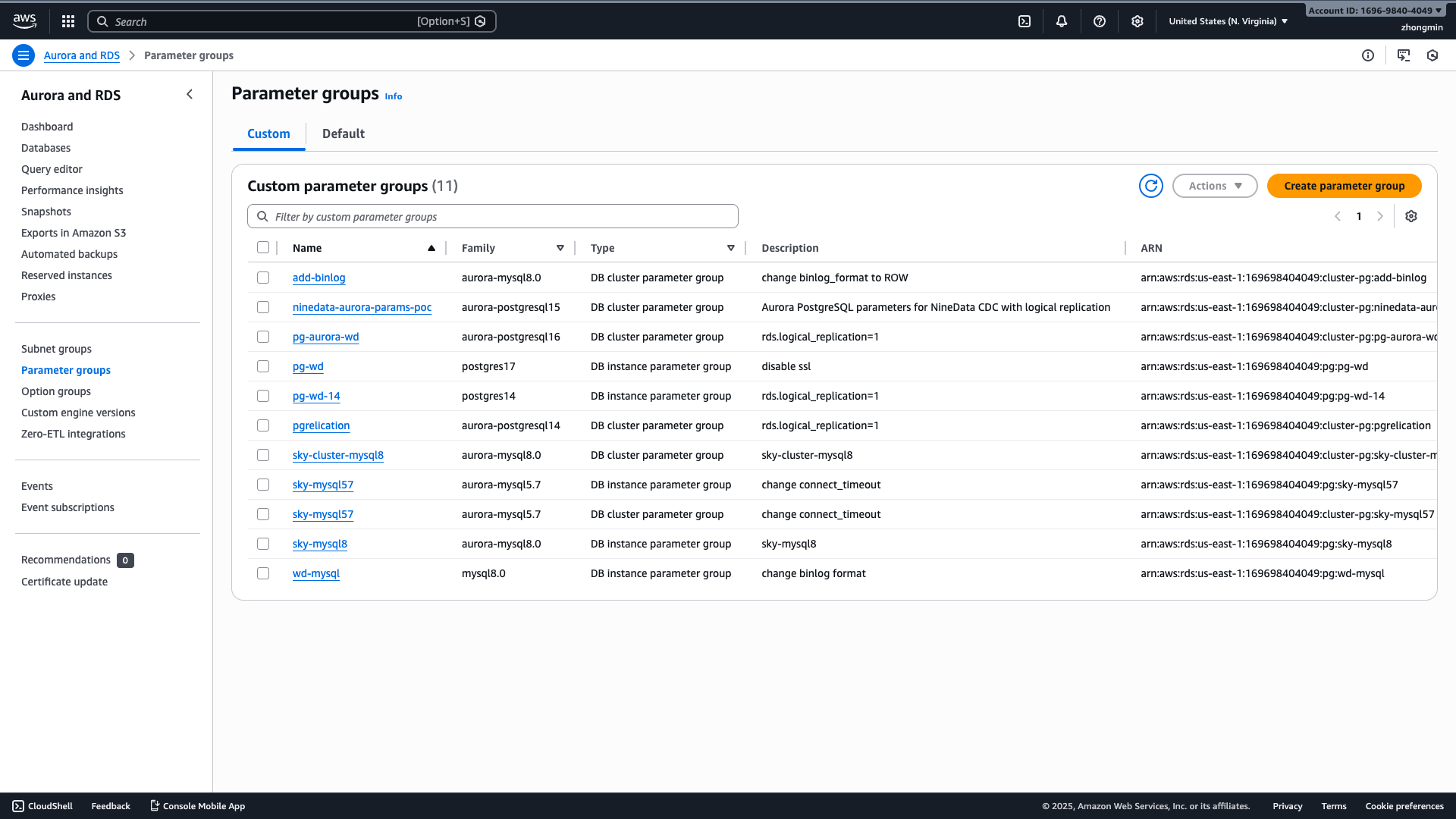
Navigate to RDS > Parameter groups to view existing parameter groups:
Create a custom cluster parameter group with logical replication enabled:
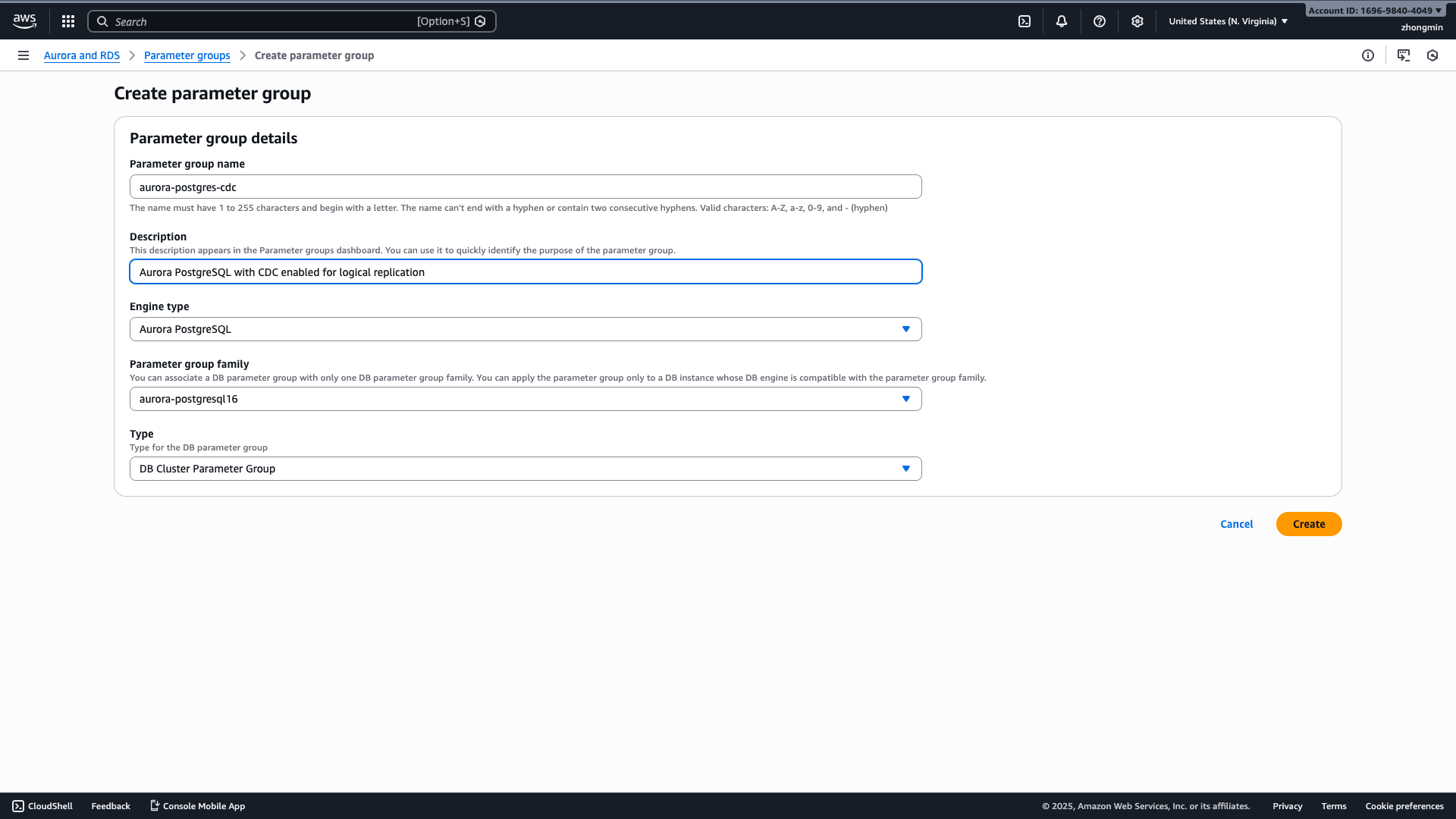
Important: Select DB Cluster Parameter Group as the type (not DB Parameter Group) for Aurora clusters.
aws rds create-db-cluster-parameter-group \
    --db-cluster-parameter-group-name aurora-pg-cdc \
    --db-parameter-group-family aurora-postgresql16 \
    --description "Aurora PostgreSQL with CDC enabled"

aws rds modify-db-cluster-parameter-group \
    --db-cluster-parameter-group-name aurora-pg-cdc \
    --parameters "ParameterName=rds.logical_replication,ParameterValue=1,ApplyMethod=pending-reboot"
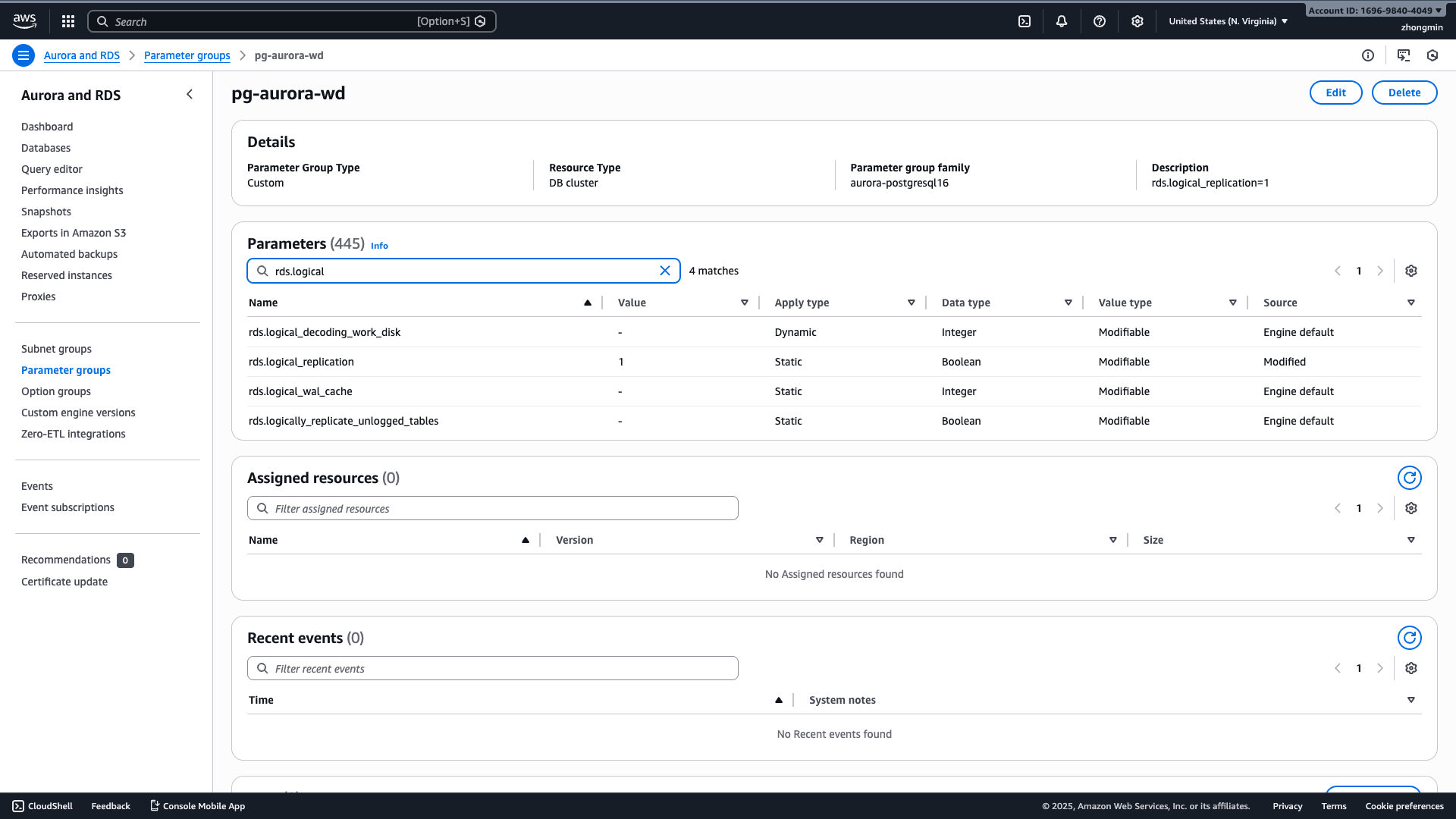
Or configure via AWS Console by editing the parameter group and setting rds.logical_replication to 1:
2. Apply to Cluster
aws rds modify-db-cluster \
    --db-cluster-identifier your-cluster-name \
    --db-cluster-parameter-group-name aurora-pg-cdc \
    --apply-immediately
3. Reboot Cluster
Reboot required for rds.logical_replication to take effect:
aws rds reboot-db-instance --db-instance-identifier your-instance-name
Verify Configuration
SHOW rds.logical_replication;
Expected result:
 rds.logical_replication
-------------------------
 on
(1 row)
User Permissions
Aurora requires specific roles instead of SUPERUSER attribute.
Create CDC User
-- Create user (no REPLICATION or SUPERUSER attributes)
CREATE USER cdc_user WITH LOGIN PASSWORD 'your_password';

-- Grant Aurora-specific roles
GRANT rds_replication TO cdc_user;
GRANT rds_superuser TO cdc_user;
GRANT pg_read_all_data TO cdc_user;

-- Grant database-level permissions
GRANT CONNECT ON DATABASE your_database TO cdc_user;
GRANT ALL ON DATABASE your_database TO cdc_user;

-- Grant schema permissions
GRANT USAGE ON SCHEMA public TO cdc_user;
GRANT SELECT ON ALL TABLES IN SCHEMA public TO cdc_user;
ALTER DEFAULT PRIVILEGES IN SCHEMA public GRANT SELECT ON TABLES TO cdc_user;
Required Aurora Roles
| Role | Purpose |
|---|---|
rds_replication | Create replication slots and read WAL |
rds_superuser | Manage publications (required for CDC) |
pg_read_all_data | Read all tables in all schemas |
Note: Aurora master user does NOT have full SUPERUSER privileges. Use roles instead.
Verify User Permissions
SELECT r.rolname, ARRAY(
    SELECT b.rolname
    FROM pg_catalog.pg_auth_members m
    JOIN pg_catalog.pg_roles b ON (m.roleid = b.oid)
    WHERE m.member = r.oid
) as memberof
FROM pg_roles r
WHERE r.rolname = 'cdc_user';
Expected result:
  rolname  |                     memberof
-----------+--------------------------------------------------
 cdc_user  | {pg_read_all_data,rds_superuser,rds_replication}
(1 row)
Publication Setup
Create publication as master user (postgres):
-- As postgres user
CREATE PUBLICATION velodb_publication FOR ALL TABLES;
Verify publication:
SELECT * FROM pg_publication WHERE pubname = 'velodb_publication';
Important: Pass
--postgres-conf publication.name=velodb_publicationto Flink CDC when using Aurora.
REPLICA IDENTITY (Required for DELETEs)
ALTER TABLE your_table_name REPLICA IDENTITY FULL;
Connection Test
Verify CDC user can:
- Connect:
psql -h your-cluster.cluster-xxxxx.us-west-2.rds.amazonaws.com -p 5432 -U cdc_user -d your_database
- List publications:
SELECT * FROM pg_publication;
- Read tables:
SELECT COUNT(*) FROM your_table;
Next Steps
Once Aurora Serverless v2 is configured for CDC, follow the Flink CDC Ingestion Guide to set up real-time sync to VeloDB.
Remember to add --postgres-conf publication.name=velodb_publication when running Flink CDC with Aurora.