High Availability
High availability (HA) helps keep a workload available when infrastructure in one availability zone fails. VeloDB Cloud separates warehouse data from compute, protects the service and shared data across availability zones, and lets you place clusters in different zones. Your cluster topology and application connection strategy determine whether compute recovery is manual or automatic.
Multi-AZ (Availability Zone) HA covers failures within one region. It does not protect against accidental data changes or the loss of an entire region. Use Backups for retained recovery points and Disaster Recovery for regional outages.
How multi-AZ high availability works
A VeloDB Cloud warehouse has three relevant layers:
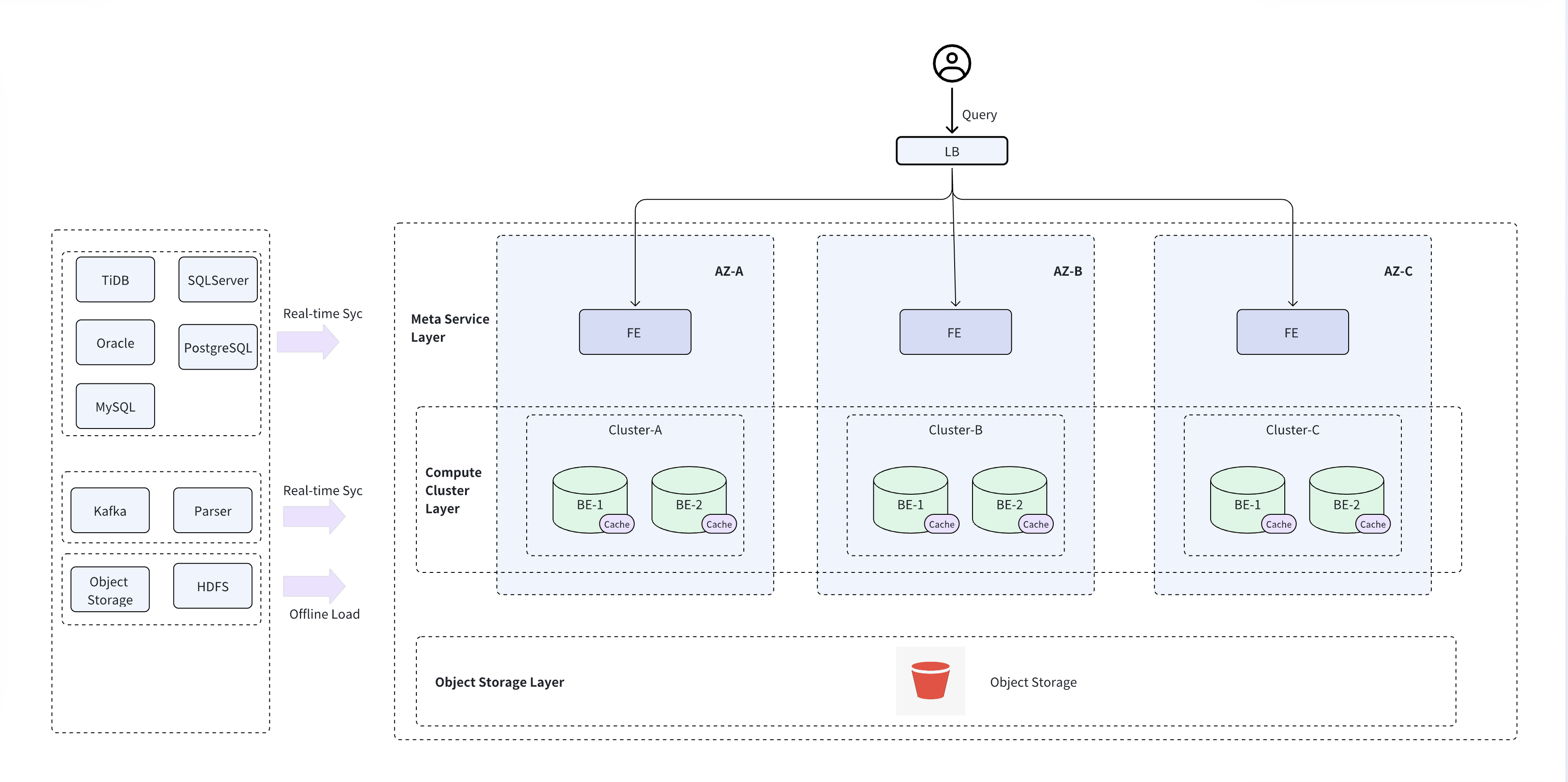
| Layer | Multi-AZ behavior | What you configure |
|---|---|---|
| Service and metadata | VeloDB Cloud distributes the managed service and metadata components across availability zones in a supported region. | Select a region that supports multi-AZ deployment when you create the warehouse. |
| Compute | Each cluster runs in one availability zone and accesses the warehouse's shared data. Clusters in other zones provide alternate compute capacity. | Decide whether to use one cluster with manual recovery or an active-standby virtual cluster with automatic failover. |
| Storage | The warehouse stores persistent data in shared object storage that uses the cloud provider's cross-zone availability within the region. | No separate storage replica is required for a cluster in another zone. |
This separation limits the impact of a compute failure. Creating or promoting another cluster does not require copying the warehouse's persistent data, but the cluster might need time to start and warm its local cache.
Choose an HA configuration
Choose the configuration based on the workload's recovery time objective (RTO), tolerance for failed in-flight requests, and cost constraints.
| Configuration | Failure response | Use when | Tradeoffs |
|---|---|---|---|
| One cluster | After the cluster or its zone fails, create a replacement cluster in another availability zone and redirect the workload. | The workload can tolerate manual recovery and cache warmup. | Uses less compute capacity, but recovery depends on operator response and cluster startup time. |
| Multiple independent clusters | Direct the workload to another running cluster in a different availability zone. | The application or routing layer can select a healthy cluster. | Provides ready compute capacity, but the application must manage cluster selection and failover. |
| Primary-standby virtual cluster | VeloDB Cloud detects an active cluster failure and promotes the standby cluster automatically. | The workload needs automatic failover through one logical cluster name. | Requires two eligible clusters. Failover is not instantaneous, and requests running during the transition can fail. |
For an active-standby virtual cluster, place the physical clusters in different availability zones and give them the same CPU architecture, compute capacity, and cache capacity. VeloDB Cloud synchronizes cached data from the active cluster to the standby to reduce performance degradation after failover.
Prepare the warehouse and clusters
Multi-AZ deployment is enabled by default for a new SaaS warehouse when you select a region that supports it. A warehouse created in a region without multi-AZ support remains in one availability zone. After you create the warehouse, verify its availability zones on the warehouse details page.
When you create a cluster, select one of the availability zones assigned to the warehouse. For redundant compute, create clusters in different availability zones.
For automatic failover, follow Create and Manage a Virtual Cluster.
For cluster creation and sizing, see Manage Clusters.
Make applications resilient to failover
HA requires application behavior that tolerates a short interruption. Configure clients to:
- Connect through the warehouse domain name or the virtual cluster name instead of a physical node address.
- Retry failed connections and idempotent requests with bounded backoff. A connection or query that is active when failover starts can fail and must be retried.
- Re-establish sessions after reconnecting. Do not assume session state or an open transaction survives a connection failure.
- Size the standby cluster for the workload it must accept after failover. Matching the active cluster avoids an unexpected capacity reduction.
- Monitor errors and latency so the application can detect recovery and so operators can identify a degraded standby before an incident.
Public connections
Use the warehouse domain name provided by VeloDB Cloud. The service routes the connection to available frontend components across availability zones.
Private connections
For private access, create network connectivity that does not depend on one availability zone. The exact topology depends on the cloud provider and connection type. On AWS, see Access VeloDB Cloud from Your VPC.
Failure behavior
| Failure | Expected behavior | Your action |
|---|---|---|
| Managed service component or storage path in one zone | VeloDB Cloud uses the service and storage redundancy available in the other zones. | Monitor the workload. Retry requests that fail during the transition. |
| Only cluster in the warehouse | Compute is unavailable until another cluster is ready. | Create a cluster in an available zone, warm it if needed, and redirect the workload. |
| Active cluster in a virtual cluster | VeloDB Cloud promotes the standby after detecting the failure. | Let clients reconnect and retry failed requests. Verify that capacity and performance are healthy after failover. |
| Standby cluster or its zone | The active cluster continues serving traffic, but automatic failover is unavailable. | Restore or replace the standby cluster in a different availability zone. |
| Private connection path in one zone | Clients using only that path can lose connectivity. | Switch to a healthy path. Design multiple private endpoints or equivalent provider-specific connectivity in advance. |
Test high availability
Test the complete application path before relying on an HA configuration:
- Verify that the active and standby compute capacity can serve the production workload.
- For a virtual cluster, perform a planned Switchover and confirm that clients reconnect through the same virtual cluster name.
- Confirm that failed queries and writes are retried safely and that session-dependent operations recover as expected.
- Measure detection, failover, reconnection, and cache warmup time against the workload's RTO.
- Verify monitoring and incident procedures, then record the results in the recovery runbook.
Repeat the test after material changes to cluster sizing, connection topology, client retry behavior, or workload volume.
See also
- Reliability explains how HA, backups, and disaster recovery work together.
- Create and Manage a Virtual Cluster provides the active-standby configuration and management steps.
- Metrics and Alerts help you monitor warehouse and cluster health.