Deployment Models
A VeloDB Cloud warehouse includes compute clusters, metadata, and data storage. An organization can have multiple warehouses, and each warehouse's resources and data are isolated from the others.
VeloDB Cloud offers two deployment models: SaaS (Software as a Service) and BYOC (Bring Your Own Cloud). Pick one to get started:
| Model | Where it runs | Get started |
|---|---|---|
| SaaS | VeloDB Cloud's infrastructure | Create a SaaS Warehouse |
| BYOC | Your own cloud VPC | Create a BYOC warehouse |
Not sure which one fits? Jump to Which model should I choose?
SaaS warehouses
A SaaS warehouse runs entirely on infrastructure that VeloDB Cloud provides and operates. It works out of the box, with no infrastructure for you to manage.
Product architecture of SaaS warehouses
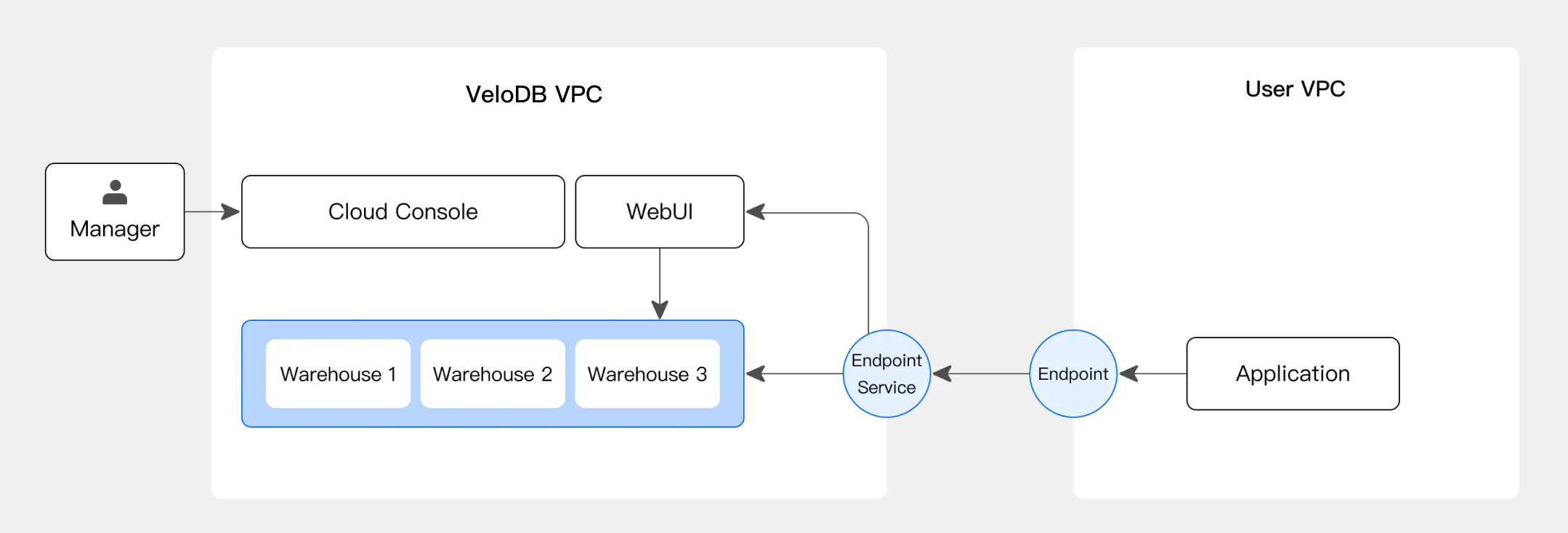
A SaaS warehouse runs entirely in VeloDB Cloud's own VPC. You can reach it through a private connection or the provided public endpoint.
The following diagram shows the architecture of a SaaS warehouse.
To create one, see Create a SaaS Warehouse.
BYOC warehouses
A BYOC (Bring Your Own Cloud) warehouse runs the VeloDB Cloud service inside your own cloud account. When you start a compute cluster, the virtual machines launch in your VPC (Virtual Private Cloud), and your cloud provider bills you for them directly. You also pay VeloDB a usage-based service fee.
Product architecture of BYOC warehouses
The following diagram shows the architecture of a BYOC warehouse.
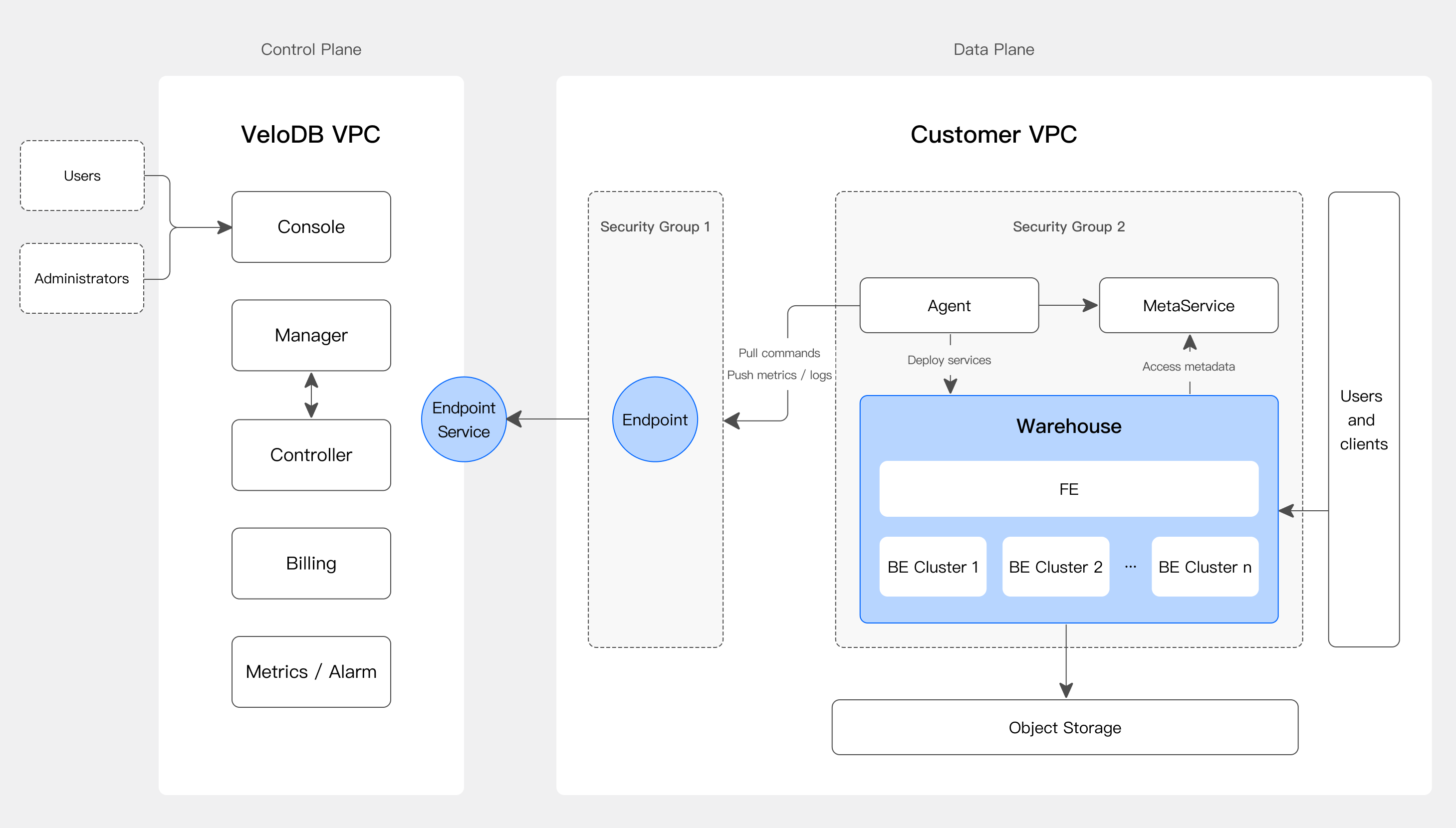
A BYOC warehouse installs a control Agent, along with monitoring and logging components, in your VPC. The Agent fetches commands from VeloDB Cloud over a private connection (PrivateLink) and carries out cluster creation, scaling, and upgrades.
The Agent's code is open and auditable, so you can verify that your data stays in your VPC and never leaves it.
On AWS, the entire BYOC stack runs on EC2: there is no Kubernetes or container platform (such as EKS) involved. A deployment consists of a connection load balancer, the compute cluster virtual machines (VMs) running in a high-availability setup, the control Agent on an EC2 instance, and a VPC interface endpoint (PrivateLink) for private access to the VeloDB Cloud service. The CloudFormation template that provisions this stack is open and runs in your own account.
Fore more information, see Prepare Cloud Resources for an AWS BYOC Warehouse.
To create a BYOC warehouse, see Create a BYOC Warehouse.
Comparison between SaaS and BYOC warehouses
The engine and the managed experience are the same in both models. The models differ in where the infrastructure runs and what that location makes possible:
| Dimension | SaaS | BYOC |
|---|---|---|
| Infrastructure and data location | VeloDB Cloud's account | Your cloud account and VPC |
| Warehouse creation | Minutes | Longer, provisions resources in your account |
| Client access to the warehouse | Public Endpoint or Private Endpoint | Your VPC network |
| Access to your data sources (RDS, Kafka, self-managed databases, external catalogs) | Via PrivateLink (data transfer fees apply) or public endpoints | Direct, within your VPC |
| UDFs (Java, Python) | ❌ | ✅ |
| Arrow Flight SQL | On request through VeloDB Cloud support | ✅ Recommended |
| Spark connector | ❌ | ✅ |
| Encryption at rest | TDE, EBS encryption with cloud-provider-managed keys, customer-managed keys | TDE plus EBS encryption, your KMS keys |
| Billing | Usage-based | Your cloud cost plus service fee |
| Remote support access | Standard operational access | Time-bounded, approval-gated |
Which model should I choose?
SaaS is easier to manage than BYOC, so start there unless your workloads need what BYOC provides.
Choose SaaS when:
- You want a fully managed service and don't want to spend time on infrastructure, resource management, or permissions.
- You get little or no discount from your cloud provider. SaaS usually costs less overall in that case.
Choose BYOC when:
- Compliance requires your data to stay in your own cloud account. Both models meet industry compliance standards, but only BYOC keeps your data in your account.
- You have significant discounts with your cloud provider. BYOC compute is billed by your provider directly.
- Your workloads depend on the Spark connector or Arrow Flight SQL.
- Your workloads move large volumes of data between the warehouse and data sources in your VPC, such as RDS or Kafka. In SaaS, those sources are reached through PrivateLink, which adds data transfer fees. Staging data through S3 avoids the fees, but for sustained heavy transfer BYOC is the better fit.
BYOC runs in your environment, so you need a working knowledge of your cloud, including network planning and load balancing.