Build a Customer Support 360 View from MySQL with VeloDB Cloud
A customer asks, “Where is my order?” The support team needs an answer that includes the customer's details, the latest order state, and the status of the related support ticket.
This tutorial keeps MySQL as the operational system of record. VeloDB receives a continuously updated analytical copy of three selected tables. A SQL query then identifies the customer cases that need follow-up. When the order ships and the support ticket is resolved in MySQL, the query result changes after the next sync cycle.
Customer, order, and ticket updates in MySQL
        ↓
Initial load and incremental sync into VeloDB Cloud
        ↓
Join the latest records with SQL
        ↓
Identify customer cases that need attention
All names, email addresses, IDs, regions, timestamps, and amounts in this tutorial are synthetic. This is a functional tutorial, not a performance benchmark.
Prerequisites
You need:
- A MySQL database that VeloDB Cloud can reach.
- A VeloDB Cloud warehouse. Follow the VeloDB Cloud Quick Start if you need to create one.
- A MySQL user that can read the selected tables and their changes.
- MySQL change logging configured for incremental synchronization.
This tutorial can use any reachable MySQL deployment. It does not require a particular hosting provider.
1. Create the synthetic source data
Run the following SQL in the source MySQL database. It creates one customer case that needs attention: Olivia Carter has a paid but unshipped order and an open, high-priority ticket.
CREATE DATABASE IF NOT EXISTS customer_360_demo;
USE customer_360_demo;

CREATE TABLE IF NOT EXISTS customers (
  customer_id BIGINT PRIMARY KEY,
  customer_name VARCHAR(100) NOT NULL,
  email VARCHAR(255) NOT NULL,
  region VARCHAR(50) NOT NULL,
  plan VARCHAR(50) NOT NULL,
  updated_at DATETIME NOT NULL
);

CREATE TABLE IF NOT EXISTS orders (
  order_id BIGINT PRIMARY KEY,
  customer_id BIGINT NOT NULL,
  status VARCHAR(20) NOT NULL,
  paid_at DATETIME,
  shipped_at DATETIME,
  amount DECIMAL(10, 2) NOT NULL,
  updated_at DATETIME NOT NULL
);

CREATE TABLE IF NOT EXISTS support_tickets (
  ticket_id BIGINT PRIMARY KEY,
  customer_id BIGINT NOT NULL,
  subject VARCHAR(255) NOT NULL,
  status VARCHAR(20) NOT NULL,
  priority VARCHAR(20) NOT NULL,
  updated_at DATETIME NOT NULL
);

INSERT INTO customers VALUES
  (20001, 'Olivia Carter', 'olivia.carter@example.com', 'East', 'Plus', NOW()),
  (20002, 'Ethan Brooks', 'ethan.brooks@example.com', 'South', 'Standard', NOW())
ON DUPLICATE KEY UPDATE
  customer_name = VALUES(customer_name),
  email = VALUES(email),
  region = VALUES(region),
  plan = VALUES(plan),
  updated_at = VALUES(updated_at);

INSERT INTO orders VALUES
  (50001, 20001, 'paid', DATE_SUB(NOW(), INTERVAL 2 HOUR), NULL, 299.00, NOW()),
  (50002, 20002, 'shipped', DATE_SUB(NOW(), INTERVAL 3 HOUR),
   DATE_SUB(NOW(), INTERVAL 2 HOUR), 499.00, NOW())
ON DUPLICATE KEY UPDATE
  customer_id = VALUES(customer_id),
  status = VALUES(status),
  paid_at = VALUES(paid_at),
  shipped_at = VALUES(shipped_at),
  amount = VALUES(amount),
  updated_at = VALUES(updated_at);

INSERT INTO support_tickets VALUES
  (70001, 20001, 'Where is my order?', 'open', 'high', NOW()),
  (70002, 20002, 'Delivery confirmation', 'resolved', 'low', NOW())
ON DUPLICATE KEY UPDATE
  customer_id = VALUES(customer_id),
  subject = VALUES(subject),
  status = VALUES(status),
  priority = VALUES(priority),
  updated_at = VALUES(updated_at);
The ON DUPLICATE KEY UPDATE clauses make the setup repeatable. Running the script again restores the same synthetic starting state instead of creating duplicate rows.
2. Synchronize the tables into VeloDB Cloud
-
Log in to the VeloDB Cloud console.
-
In the upper-left corner, select the warehouse that you want to use.
-
In the left navigation pane, click SQL Editor and create the target database:
CREATE DATABASE IF NOT EXISTS customer_360_velodb; -
In the left navigation pane, click Data Integration. Click Add Import Job on the initial page. If this page already contains jobs, in the upper-right corner, choose Add Data > Import data into VeloDB if integration records already exist. Select MySQL, then click Continue. For more information about the wizard, see Import Data.
Configure the source connection:
| Setting | Example value |
|---|---|
| Job Name | mysql_customer_360_to_velodb |
| Host | <your-mysql-host> |
| Port | <your-mysql-port> |
| User | <your-mysql-user> |
| Password | Enter the password in the console. Do not add it to source code. |
| Enable SSL | Enable it when the MySQL provider requires TLS. |
Then configure the destination and tables:
| Setting | Value used in this tutorial |
|---|---|
| Target Database | customer_360_velodb |
| Sync Type | Initial Load + Incremental Sync |
| Tables to Migrate | customer_360_demo.customers, customer_360_demo.orders, and customer_360_demo.support_tickets |
| Sync Interval | 60 seconds |
Keep Reverse Private Endpoint disabled for a publicly reachable demo database. A private production database may require private networking.
The first sync copies the existing rows. Incremental sync then captures later source changes. When the job is running, verify the copied tables:
SELECT COUNT(*) AS customer_count
FROM customer_360_velodb.customers;

SELECT COUNT(*) AS order_count
FROM customer_360_velodb.orders;

SELECT COUNT(*) AS ticket_count
FROM customer_360_velodb.support_tickets;
The expected counts are two customers, two orders, and two support tickets.
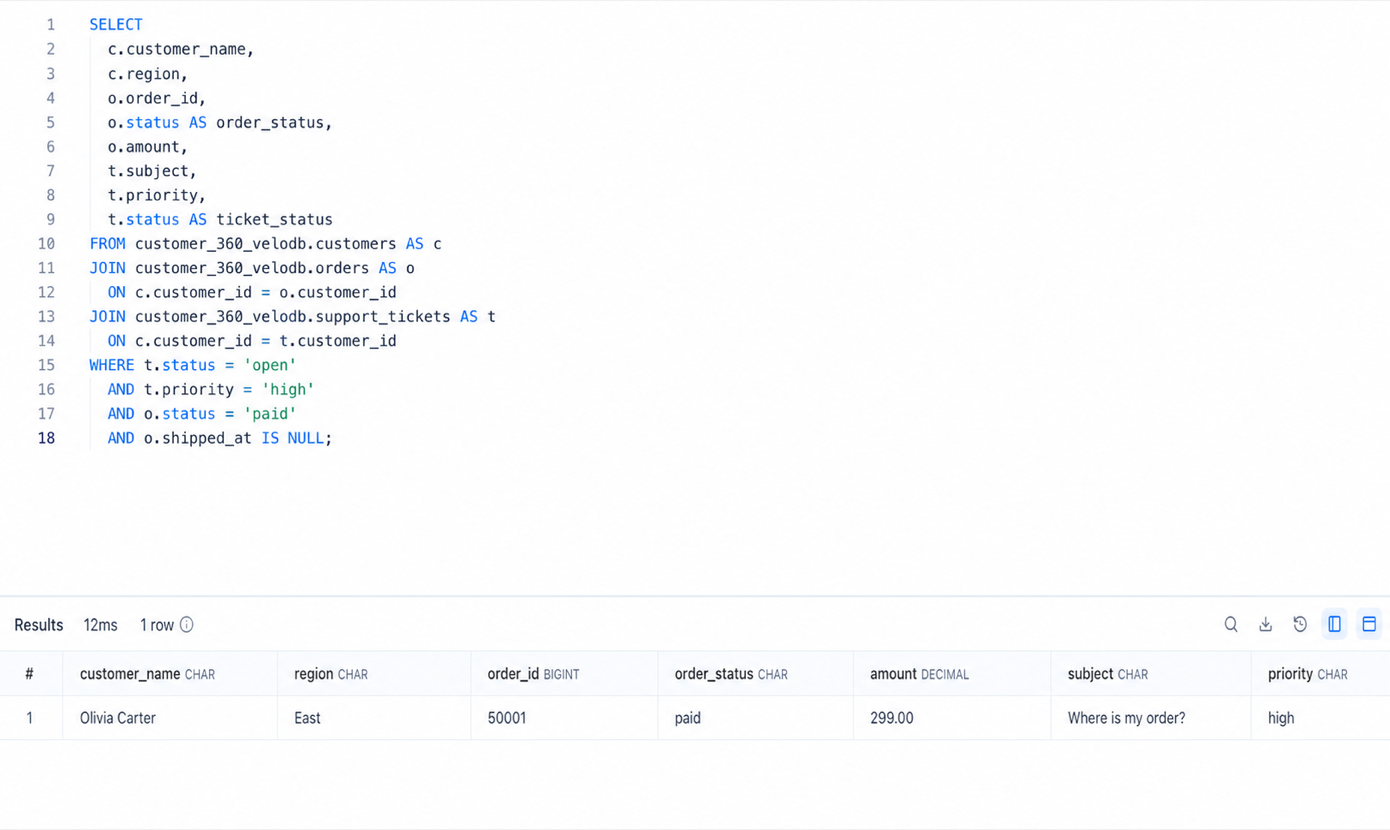
3. Find customer cases that need attention
Run the following query in VeloDB Cloud:
SELECT
  c.customer_name,
  c.region,
  o.order_id,
  o.status AS order_status,
  o.amount,
  t.subject,
  t.priority,
  t.status AS ticket_status
FROM customer_360_velodb.customers AS c
JOIN customer_360_velodb.orders AS o
  ON c.customer_id = o.customer_id
JOIN customer_360_velodb.support_tickets AS t
  ON c.customer_id = t.customer_id
WHERE t.status = 'open'
  AND t.priority = 'high'
  AND o.status = 'paid'
  AND o.shipped_at IS NULL
ORDER BY t.updated_at DESC;
The query returns Olivia Carter's case. It joins the latest customer, order, and ticket context, then applies the conditions that make the case urgent.
4. Resolve the case in MySQL
Update the source order and support ticket when the shipment is confirmed:
USE customer_360_demo;

UPDATE orders
SET status = 'shipped',
    shipped_at = NOW(),
    updated_at = NOW()
WHERE order_id = 50001;

UPDATE support_tickets
SET status = 'resolved',
    updated_at = NOW()
WHERE ticket_id = 70001;
This represents the normal operational change: the order has shipped and the support team has closed the customer case.
5. Confirm the updated result in VeloDB Cloud
Wait for the configured synchronization interval, then run the same VeloDB Cloud query again. It returns no rows because Olivia's order is now shipped and the related ticket is resolved.
To confirm that the records are still present with their latest values, run:
SELECT
  c.customer_name,
  o.order_id,
  o.status AS order_status,
  t.ticket_id,
  t.status AS ticket_status
FROM customer_360_velodb.customers AS c
JOIN customer_360_velodb.orders AS o
  ON c.customer_id = o.customer_id
JOIN customer_360_velodb.support_tickets AS t
  ON c.customer_id = t.customer_id
WHERE c.email = 'olivia.carter@example.com';
The result shows shipped for the order and resolved for the ticket.
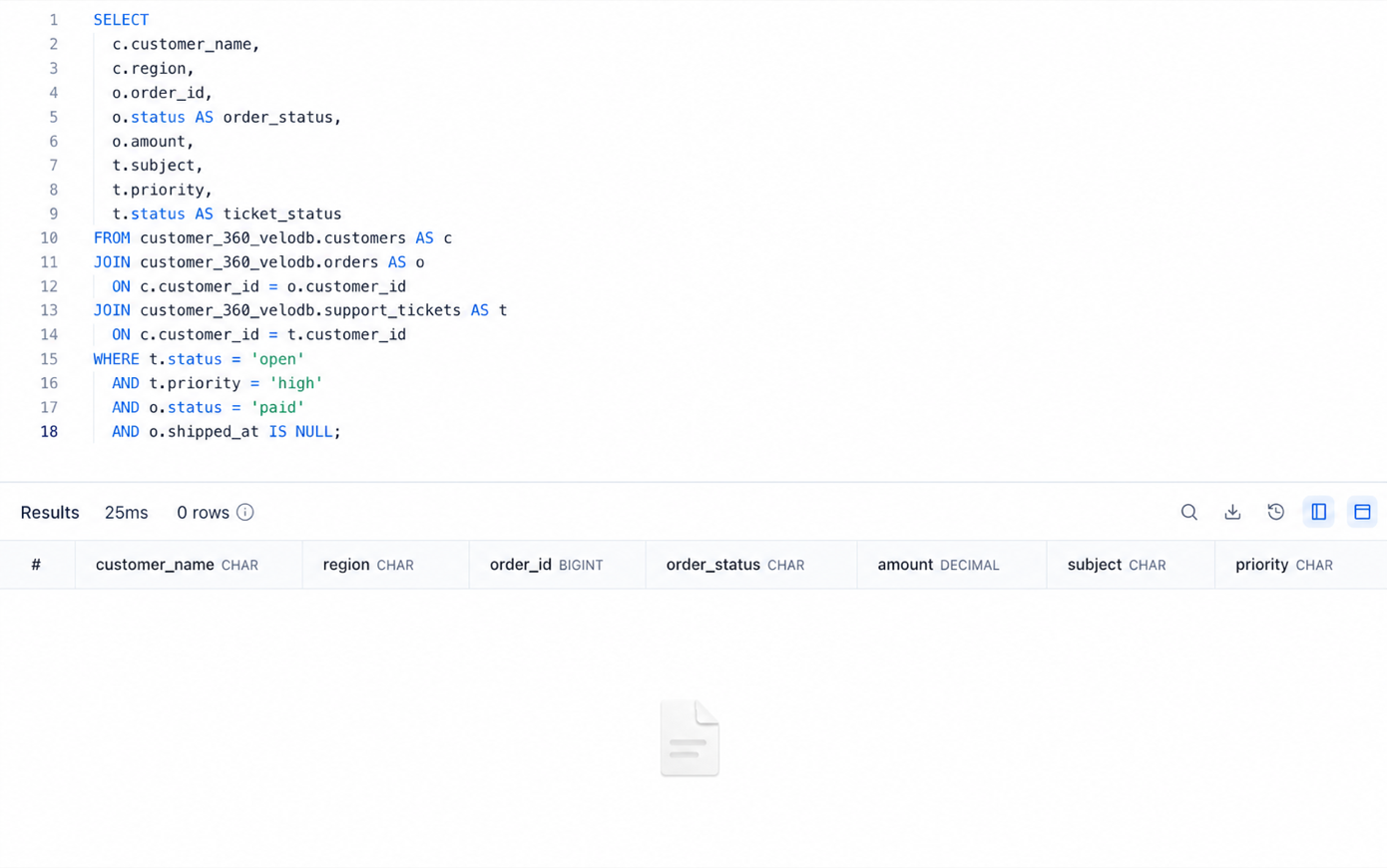
The empty result is expected. The attention query no longer matches the resolved case, while the source records remain available in VeloDB with their latest values.
This tutorial used a 60-second sync interval, and the source update appeared in a subsequent sync cycle. This observation describes the tutorial configuration, not a general latency guarantee.
Why use VeloDB Cloud for this workflow?
MySQL remains the system that processes customer, order, and ticket updates. VeloDB Cloud receives a continuously updated analytical copy and handles the cross-table operational query.
This separation lets support and operations teams investigate live customer cases without placing the same analytical workload on the transactional database. You can extend the pattern with more order history, additional ticket attributes, payment events, or an optional selective-search index for larger datasets.
Production considerations
- Use a dedicated MySQL account with only the permissions required for synchronization.
- Store credentials in a secret manager instead of scripts or screenshots.
- Use TLS certificate verification and private networking when appropriate.
- Choose a synchronization interval that matches the operational requirement, then validate it under the expected workload.
- Monitor synchronization status and lag before using the data for alerts.
- Replace the synthetic sample with approved and properly governed production data.
Return to the Customer Support 360 overview to review the business scenario and the VeloDB Cloud capabilities it uses.