Monitor Order Fulfillment with MySQL and VeloDB Cloud
A paid order can still sit unshipped for hours. Operations teams need a simple way to find these orders before they become customer complaints.
In this tutorial, MySQL continues to process order updates while VeloDB maintains an analytical copy of the relevant tables. A single query finds paid orders that have not shipped within one hour and adds the merchant information needed to investigate them.
Order updates in MySQL
        ↓
Full and incremental sync into VeloDB Cloud
        ↓
Join orders with merchant information
        ↓
Find paid orders that are more than one hour late
All names, IDs, regions, timestamps, and amounts in this tutorial are synthetic.
Prerequisites
You need:
- A MySQL database that VeloDB Cloud can reach.
- A VeloDB Cloud warehouse. Follow the VeloDB Cloud Quick Start if you need to create one.
- A MySQL user that can read the selected tables and their changes.
- MySQL change logging configured for incremental synchronization.
This tutorial used a hosted MySQL instance from Aiven as a reproducible source. Aiven is not required. You can use Amazon RDS for MySQL, Amazon Aurora MySQL, or another reachable MySQL deployment.
1. Create the sample order data
Run the following SQL in the source MySQL database. Orders 10001 and 10003 are overdue, while order 10002 has already shipped.
CREATE DATABASE IF NOT EXISTS order_demo;
USE order_demo;

CREATE TABLE IF NOT EXISTS merchants (
  merchant_id BIGINT PRIMARY KEY,
  merchant_name VARCHAR(100) NOT NULL,
  region VARCHAR(50) NOT NULL
);

CREATE TABLE IF NOT EXISTS orders (
  order_id BIGINT PRIMARY KEY,
  merchant_id BIGINT NOT NULL,
  customer_id BIGINT NOT NULL,
  status VARCHAR(20) NOT NULL,
  paid_at DATETIME,
  shipped_at DATETIME,
  amount DECIMAL(10, 2) NOT NULL,
  updated_at DATETIME NOT NULL
);

INSERT INTO merchants VALUES
  (101, 'Northstar Home', 'East'),
  (102, 'Greenfield Electronics', 'South')
ON DUPLICATE KEY UPDATE
  merchant_name = VALUES(merchant_name),
  region = VALUES(region);

INSERT INTO orders VALUES
  (10001, 101, 90001, 'paid',
   DATE_SUB(NOW(), INTERVAL 2 HOUR), NULL, 299.00, NOW()),
  (10002, 102, 90002, 'shipped',
   DATE_SUB(NOW(), INTERVAL 2 HOUR),
   DATE_SUB(NOW(), INTERVAL 80 MINUTE), 499.00, NOW()),
  (10003, 101, 90003, 'paid',
   DATE_SUB(NOW(), INTERVAL 110 MINUTE), NULL, 99.00, NOW())
ON DUPLICATE KEY UPDATE
  merchant_id = VALUES(merchant_id),
  customer_id = VALUES(customer_id),
  status = VALUES(status),
  paid_at = VALUES(paid_at),
  shipped_at = VALUES(shipped_at),
  amount = VALUES(amount),
  updated_at = VALUES(updated_at);
The ON DUPLICATE KEY UPDATE clauses make the sample reusable. Running the script again resets the same fictional rows instead of creating duplicates.
2. Sync MySQL into VeloDB Cloud
-
Log in to the VeloDB Cloud console.
-
In the upper-left corner, select the warehouse that you want to use.
-
In the left navigation pane, click SQL Editor.
-
In the SQL Editor, create the target database:
CREATE DATABASE IF NOT EXISTS order_demo_velodb; -
In the left navigation pane, under INGESTION, click Import Data.
-
Click + Add Import Job, and select MySQL. For more information about the wizard, see Import Data.
Configure the source connection:
| Setting | Example value |
|---|---|
| Job Name | mysql_order_demo_to_velodb |
| Host | <your-mysql-host> |
| Port | <your-mysql-port> |
| User | <your-mysql-user> |
| Password | Enter the password in the console. Do not add it to source code. |
| Enable SSL | Enable it when the MySQL provider requires TLS. |
Then configure the destination and tables:
| Setting | Value used in this tutorial |
|---|---|
| Target Database | order_demo_velodb |
| Sync Type | Full + Incremental |
| Tables to Migrate | order_demo.orders and order_demo.merchants |
| Sync Interval | 60 seconds |
Keep Reverse Private Endpoint disabled for a publicly reachable demo database. A private production database may require private networking.
The initial full sync copies the existing rows. Incremental sync then captures later source changes. When the job is running, verify the copied data:
SELECT COUNT(*) AS order_count
FROM order_demo_velodb.orders;

SELECT COUNT(*) AS merchant_count
FROM order_demo_velodb.merchants;
The expected counts are three orders and two merchants.
3. Find overdue orders
Run the following query in VeloDB Cloud SQL Editor. It returns paid orders that have not shipped within one hour, along with the merchant name and region.
SELECT
  o.order_id,
  m.merchant_name,
  m.region,
  o.amount,
  o.paid_at,
  TIMESTAMPDIFF(MINUTE, o.paid_at, NOW()) AS minutes_waiting
FROM order_demo_velodb.orders AS o
JOIN order_demo_velodb.merchants AS m
  ON o.merchant_id = m.merchant_id
WHERE o.status = 'paid'
  AND o.shipped_at IS NULL
  AND o.paid_at < DATE_SUB(NOW(), INTERVAL 1 HOUR)
ORDER BY o.paid_at;
The query combines the latest order status with merchant context and returns only orders that have exceeded the one-hour fulfillment threshold.
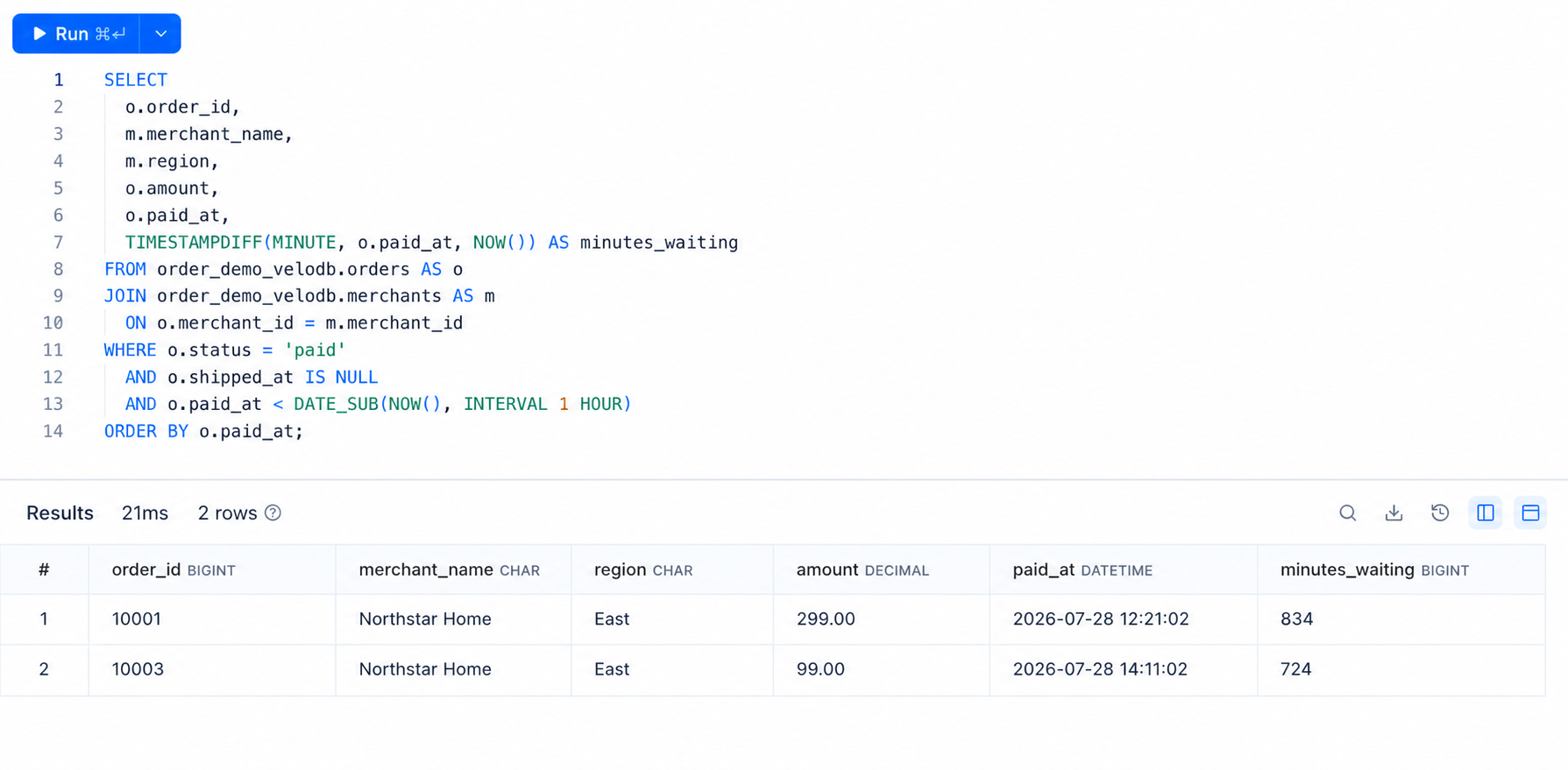
Orders 10001 and 10003 both require attention.
4. Mark an order as shipped in MySQL
Update order 10001 in the source MySQL database:
USE order_demo;

UPDATE orders
SET status = 'shipped',
    shipped_at = NOW(),
    updated_at = NOW()
WHERE order_id = 10001;
This update represents the normal business event that occurs when the warehouse ships an order.
Optional: run the update with Python
The following example prompts for connection details at runtime, so no credentials are stored in the script:
python3 -m pip install pymysql
import getpass
import pymysql

connection = pymysql.connect(
    host=input("MySQL host: "),
    port=int(input("MySQL port: ")),
    user=input("MySQL user: "),
    password=getpass.getpass("MySQL password: "),
    database="order_demo",
)

with connection.cursor() as cursor:
    cursor.execute("""
        UPDATE orders
        SET status = 'shipped',
            shipped_at = NOW(),
            updated_at = NOW()
        WHERE order_id = 10001
    """)

connection.commit()
connection.close()
Add the TLS options required by your MySQL provider. Never publish the source hostname, username, password, connection URI, or certificate.
5. Confirm the change in VeloDB Cloud
Wait for the configured synchronization interval, then run the overdue-order query again.
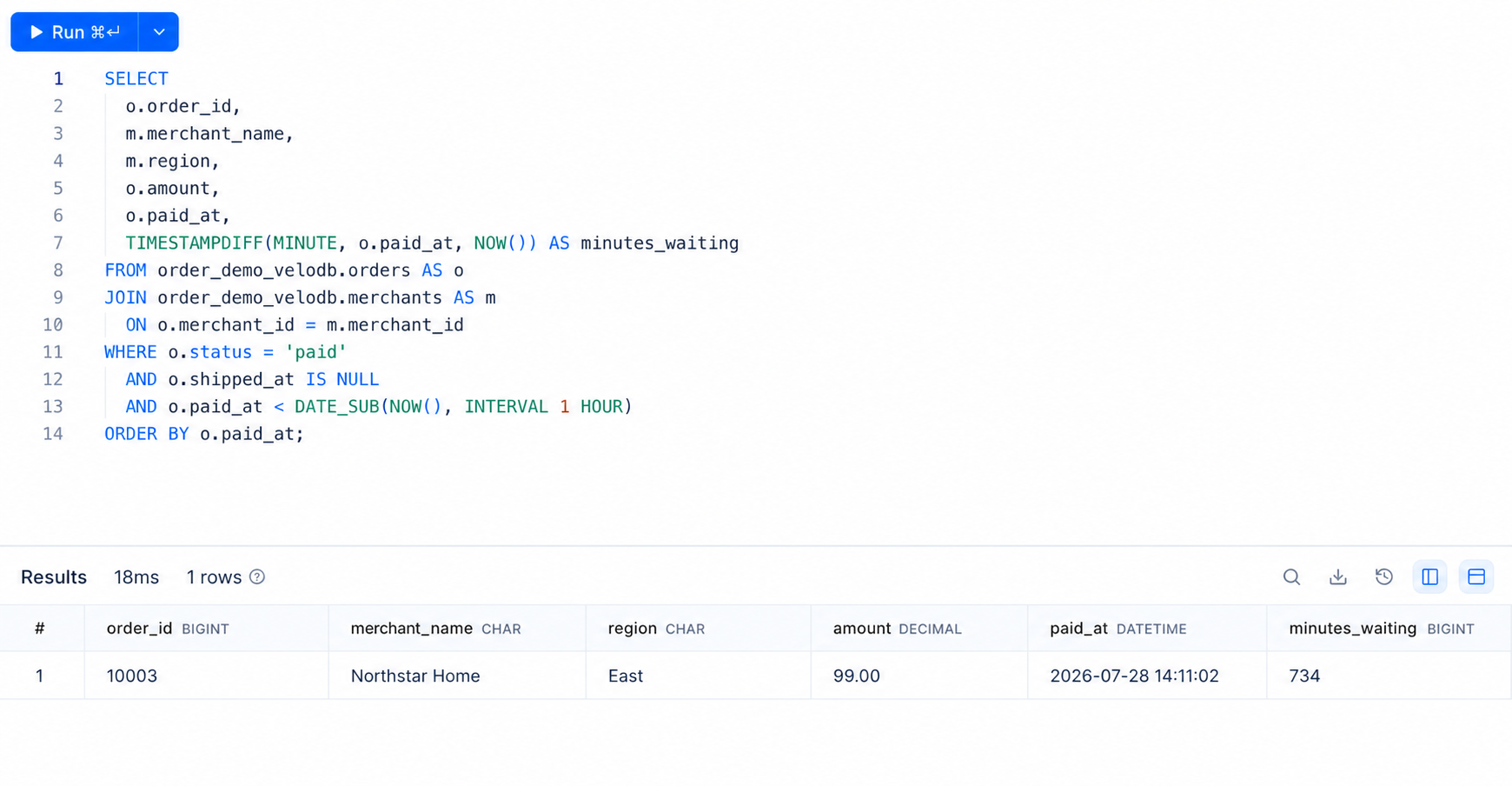
Order 10001 is no longer returned because it is now marked as shipped. The row was not deleted from VeloDB. It simply no longer matches the exception filter. Order 10003 remains because it is still paid, overdue, and unshipped.
This tutorial used a 60-second sync interval, and the update appeared in a subsequent sync cycle. This observation describes the tutorial configuration, not a general latency guarantee.
Why use VeloDB Cloud for this workflow?
MySQL remains the system that processes transactions. VeloDB Cloud receives a continuously updated analytical copy and handles the operational query, including the join between order and merchant data.
This separation lets teams build fulfillment dashboards and exception reports without placing the same analytical workload on the transactional database. You can extend the pattern to cancellations, payment failures, warehouse delays, inventory shortages, and regional fulfillment trends.
Production considerations
- Use a dedicated MySQL account with only the permissions required for synchronization.
- Store credentials in a secret manager instead of scripts or screenshots.
- Use TLS certificate verification and private networking when appropriate.
- Choose a synchronization interval that matches the operational requirement, then validate it under the expected workload.
- Monitor synchronization status and lag before using the data for alerts.
- Replace the synthetic sample with approved and properly governed production data.
To build the same workflow from a PostgreSQL source, see Monitor Order Fulfillment with PostgreSQL and VeloDB Cloud.