GCP Preparation
本記事では主に、BYOCタイプのウェアハウスを作成する際に関わるGCP操作について紹介します。これにはVPCとサブネットの準備、**Resource Orchestrationについて理解する(オプション)**が含まれます。
VPCとサブネットの準備
BYOCタイプのウェアハウスを作成する前に、要件を満たす既存のVPCとサブネットがない場合、事前にVPCとサブネットを作成する必要があります。具体的な操作は以下の通りです:
注意:
- リージョン、アベイラビリティーゾーン、サブネットの要件を満たすVPCとサブネットが存在し、このVPCにBYOCウェアハウスをデプロイしたい場合、新しいVPCとサブネットを作成する以下のステップをスキップしてください。
- 現在サポートされているリージョンとアベイラビリティーゾーンは以下の通りです:
| Cloud Platform | Region Name | Region ID | Availability Zone ID |
|---|---|---|---|
| GCP | US West 1 | us-west1 | all |
| GCP | US East 4 | us-east4 | all |
VPCとサブネットの作成
GCP VPC Network コンソールを開き、BYOCウェアハウスをデプロイしたいリージョンに切り替えます。
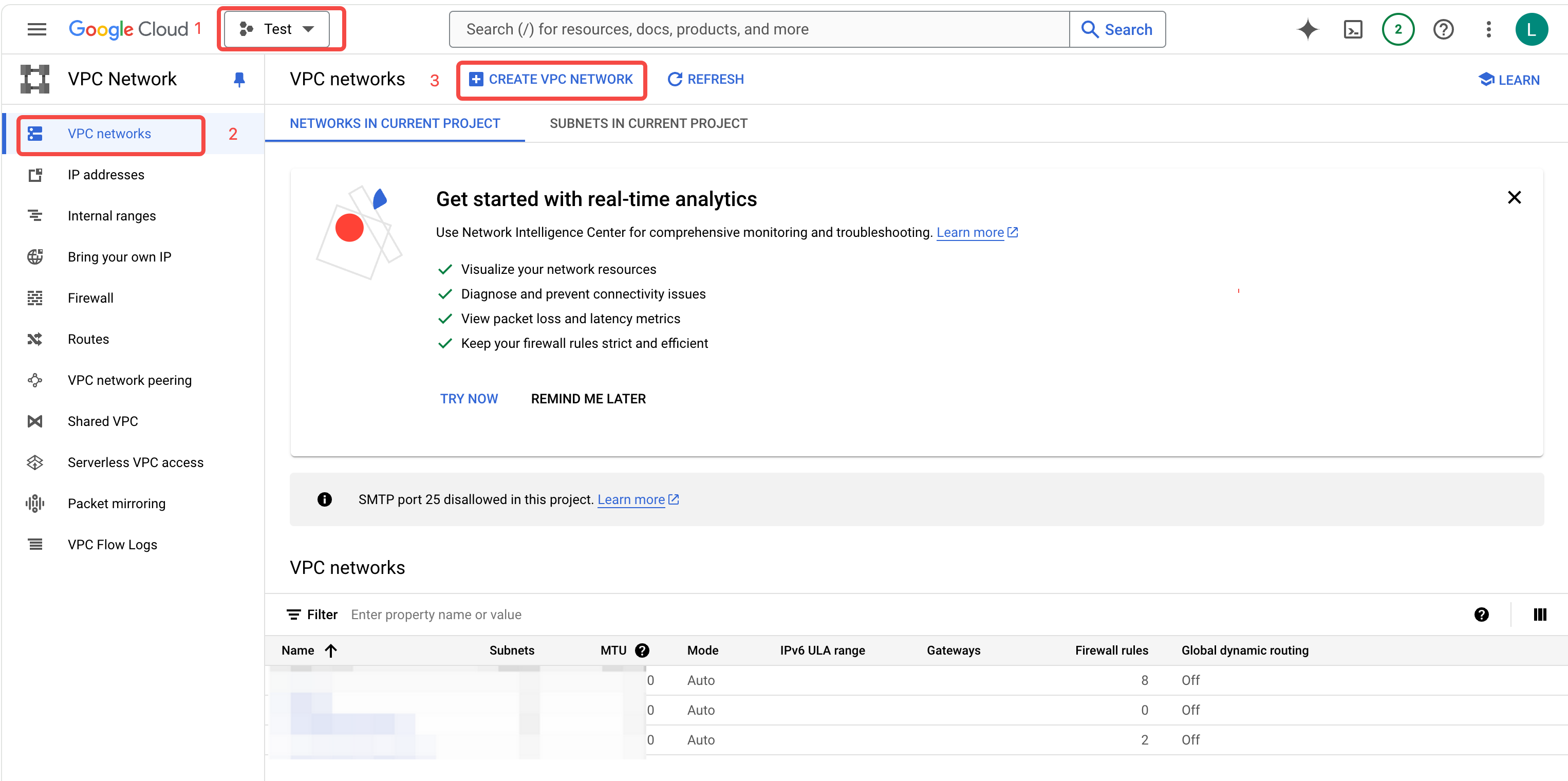
VPC networks > CREATE VPC NETWORK をクリックして、VPC作成ページに移動します。
VPCのNameを入力し、Customモードを選択します。
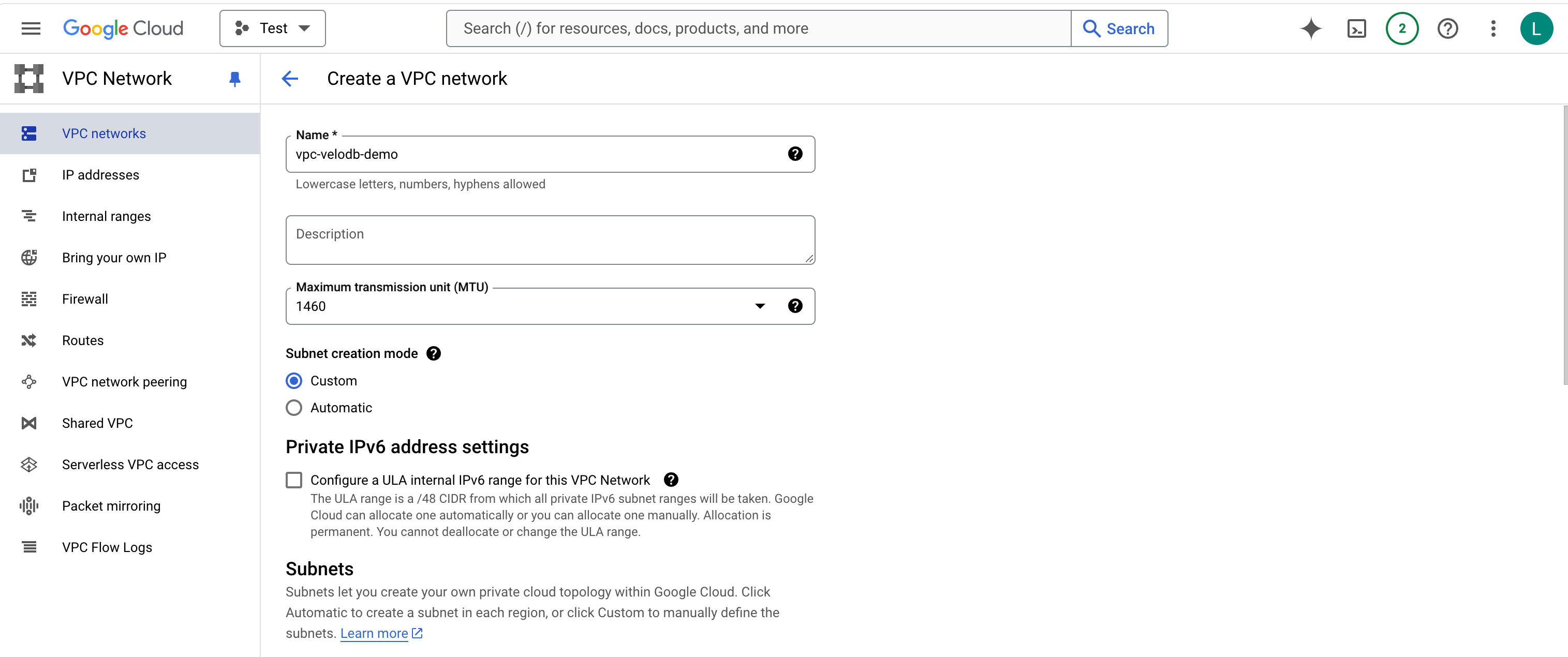
サブネットのNameを入力し、Regionを選択し、IPv4 rangeを入力します。
注意: 現在サポートされているリージョンとアベイラビリティーゾーンは以下の通りです:
| Cloud Platform | Region Name | Region ID | Availability Zone ID |
|---|---|---|---|
| GCP | US West 1 | us-west1 | all |
| GCP | US East 4 | us-east4 | all |
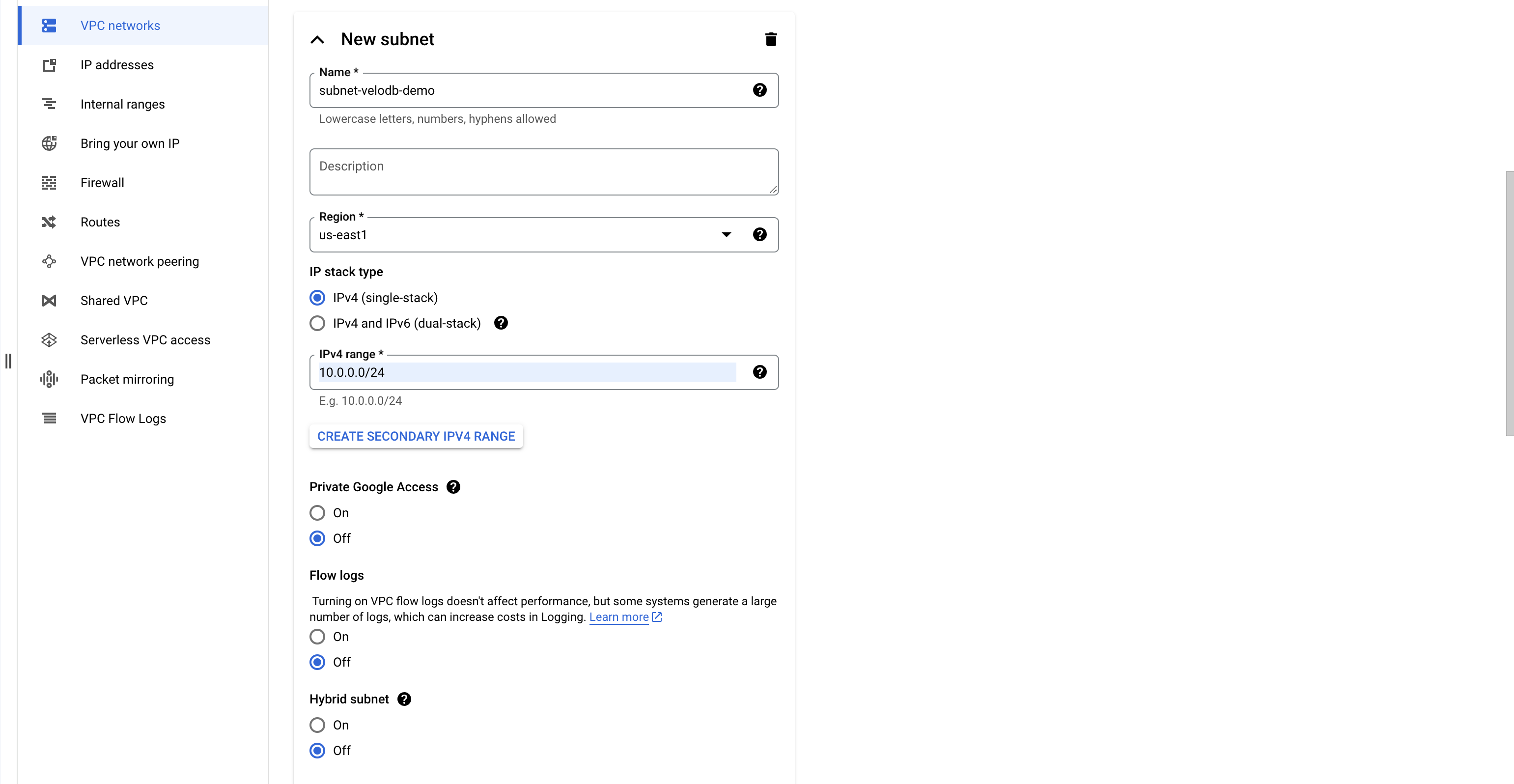
Private Google Access、Flow logs、Hybrid subnetでoffを選択します。
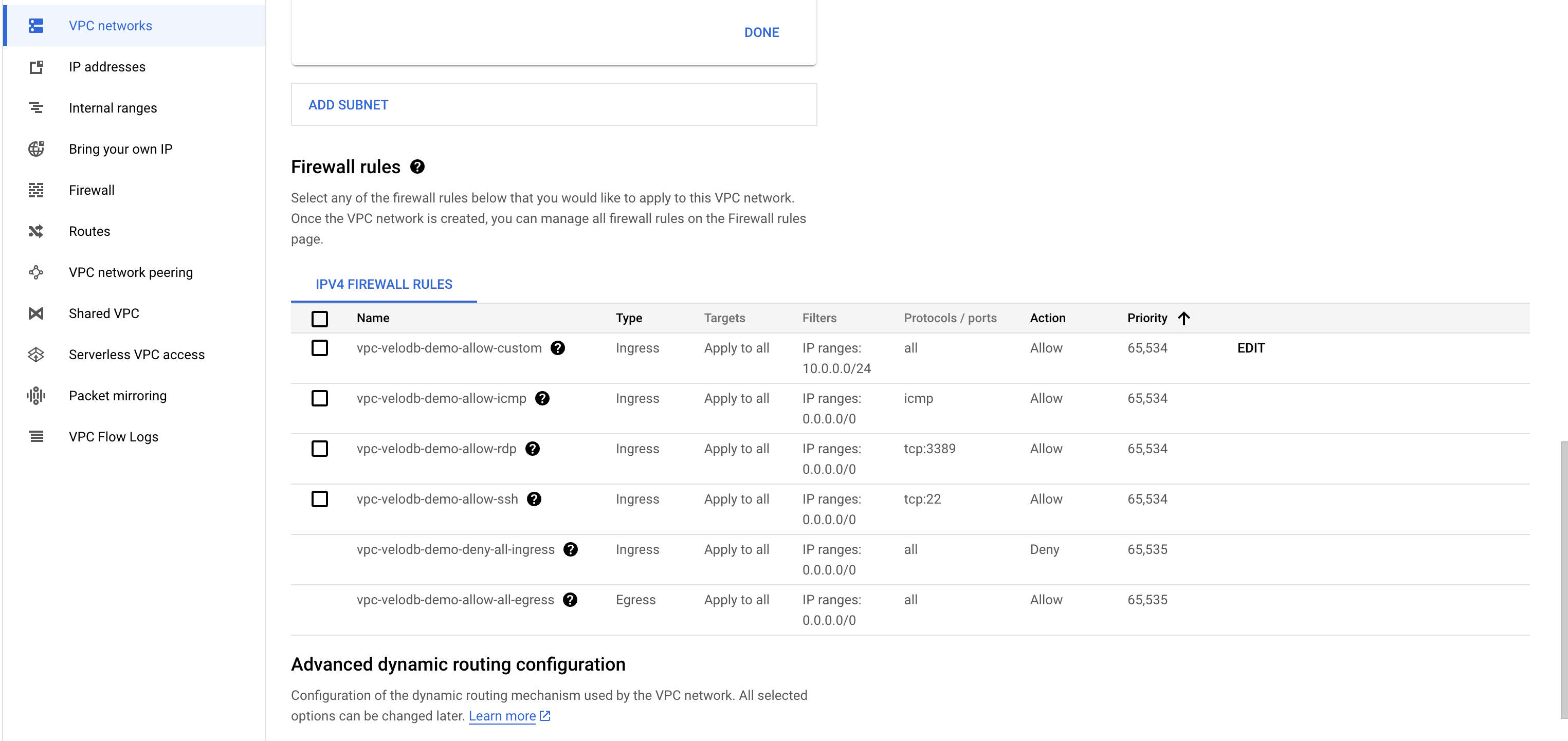
Firewallルールリストのチェックを外します。
Dynamic RoutingモードでRegionalを選択し、Best path selectionモードでLegacyを選択します。
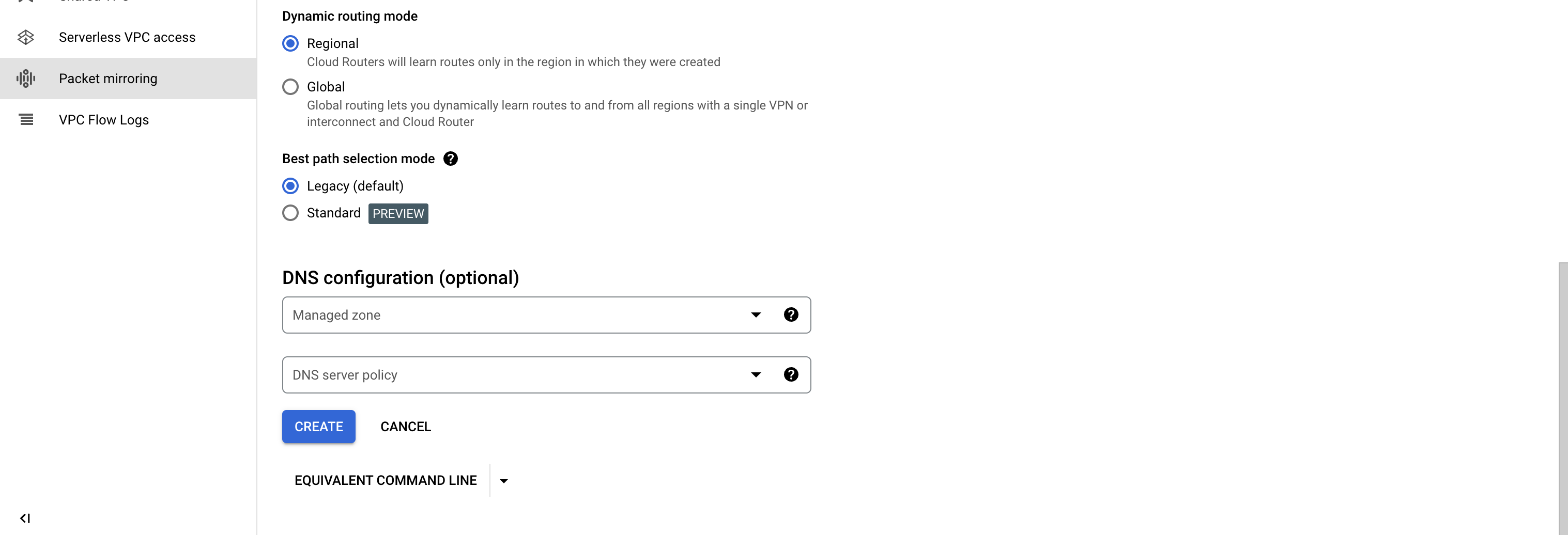
CREATEをクリックして、VPCとサブネットの作成を完了します。
Resource Orchestrationについて理解する(オプション)
注意:この章では何も実行する必要はありません。仕組みについてより詳しく知りたい場合は、読み続けてください。
お客様のクラウドアカウント下でGCP CloudShellを通じてterraformテンプレートを実行する際、VPC、Compute Engine、Buckets等のクラウドリソースに対して関連する操作を実行するため、一連のIAM権限が必要になります。
このスクリプトを実行するには管理者権限を使用するか、管理者にこのスクリプトを実行してもらってください。そうしない場合、権限不足によりテンプレート実行に失敗する可能性があります。
Terraformテンプレートの説明
VeloDBが提供するTerraformリソースオーケストレーションテンプレートは、お客様のGCPアカウント下で実行され、テンプレートコードは可視化され監査可能で、VPC内のお客様のデータや他の環境を操作することはありません。以下のリンクからVeloDBが提供するTerraformテンプレートを取得できます:
https://storage.googleapis.com/velodb-cloud-online-us-west-1/public/gcp-byoc.tf
上記のTerraformテンプレートをGCP CloudShellで実行すると、自動的にAgentが作成・デプロイされます。その後、AgentはVeloDB Cloudとプライベート接続を確立し、ウェアハウスの初期化プロセスを完了します。
リソースオーケストレーションスクリプトの実行後、VeloDB Cloudプラットフォームから対応するウェアハウスに入り、通常のウェアハウスを使用するのと同様にデータ分析用のコンピューティングクラスターの作成を開始できます。
リソース情報
-
Compute Engine Instance
- 名前: VeloDBAgent
- 目的: エージェント、Prometheus、FluentBitおよび他のプログラムのデプロイに使用
-
Private Service Connect Endpoint
- 名前: VeloDBEndpoint
- 目的: VeloDB Manageサービスとのプライベートネットワーク接続を確立し、制御命令を取得してモニタリングとログの一方向プッシュを有効にする
-
VPC Firewall Rules
- 名前: VeloDBSecurityGroupIngress、VeloDBSecurityGroupEgress
- 目的: VeloDBによって起動されるすべてのVMインスタンスにバインドされ、セキュリティグループルールを通じてトラフィックを制限する(同一セキュリティグループからのすべてのトラフィックによるすべてのポートへのアクセス、同一サブネットからのポート5000へのトラフィック、およびすべてのアウトバウンドトラフィックを許可)
-
Cloud Storage バケット
- 名前: VeloDBBucket
- 目的: データウェアハウスデータの保存に使用
-
VPC Firewall Rules
- 名前: VeloDBSecurityGroupIngress、VeloDBSecurityGroupEgress
- 目的: エンドポイントおよびVeloDBによって作成されるすべてのVMインスタンスにバインドされ、ファイアウォールルールを通じて特定のポートとソースに対するインバウンドおよびアウトバウンドトラフィックを制限する
-
IAM & Service Account & Custom Role
- 名前:
- VeloDBControlPlaneRole(コントロールプレーンサービスアカウント)
- VeloDBControlPlaneRolePolicy(カスタムロールポリシー)
- VeloDBBucketKey(バケットキー)
- VeloDBDataAccessRole(カーネルサービスアカウント)
- 目的: 作成されたサービスアカウントはAgentに必要な最小限の権限ポリシーを持ち、以降のすべての制御操作はこのサービスアカウントのIDを使用して実行される
- 名前:
作成されたサービスアカウントの権限
terraformテンプレートの初回実行後、VPC内のデータウェアハウス関連コンポーネントの後続管理のためにサービスアカウントが作成されます。以下は、サービスアカウントの権限の説明です。
-
権限の概要:
compute.addresses.create
compute.addresses.createInternal
compute.addresses.delete
compute.addresses.deleteInternal
compute.addresses.setLabels
compute.addresses.get
compute.addresses.list
compute.addresses.use
compute.addresses.useInternal
compute.disks.create
compute.disks.createTagBinding
compute.disks.delete
compute.disks.deleteTagBinding
compute.disks.get
compute.disks.list
compute.disks.resize
compute.disks.setLabels
compute.disks.use
compute.firewalls.create
compute.firewalls.createTagBinding
compute.firewalls.delete
compute.firewalls.deleteTagBinding
compute.firewalls.get
compute.firewalls.list
compute.firewalls.update
compute.forwardingRules.create
compute.forwardingRules.delete
compute.forwardingRules.get
compute.forwardingRules.setLabels
compute.instanceGroups.create
compute.instanceGroups.delete
compute.instanceGroups.update
compute.instanceGroups.use
compute.instances.attachDisk
compute.instances.create
compute.instances.createTagBinding
compute.instances.delete
compute.instances.deleteTagBinding
compute.instances.detachDisk
compute.instances.get
compute.instances.getEffectiveFirewalls
compute.instances.list
compute.instances.listTagBindings
compute.instances.osAdminLogin
compute.instances.osLogin
compute.instances.reset
compute.instances.resume
compute.instances.setDiskAutoDelete
compute.instances.setLabels
compute.instances.setMachineType
compute.instances.setMetadata
compute.instances.setName
compute.instances.setServiceAccount
compute.instances.setTags
compute.instances.start
compute.instances.stop
compute.instances.suspend
compute.instances.update
compute.instances.use
compute.networks.get
compute.networks.list
compute.networks.updatePolicy
compute.networks.use
compute.regionBackendServices.create
compute.regionBackendServices.createTagBinding
compute.regionBackendServices.delete
compute.regionBackendServices.deleteTagBinding
compute.regionBackendServices.get
compute.regionBackendServices.getIamPolicy
compute.regionBackendServices.list
compute.regionBackendServices.update
compute.regionBackendServices.use
compute.regionHealthChecks.create
compute.regionHealthChecks.delete
compute.regionHealthChecks.useReadOnly
compute.subnetworks.get
compute.subnetworks.list
compute.subnetworks.use
compute.zoneOperations.get
特定の権限は以下のように分類されます:
-
Compute Engine権限:
-
VM インスタンスの管理
compute.disks.create
compute.disks.createTagBinding
compute.disks.delete
compute.disks.deleteTagBinding
compute.disks.get
compute.disks.list
compute.disks.resize
compute.disks.setLabels
compute.disks.use
compute.instanceGroups.create
compute.instanceGroups.delete
compute.instanceGroups.update
compute.instanceGroups.use
compute.instances.attachDisk
compute.instances.create
compute.instances.createTagBinding
compute.instances.delete
compute.instances.deleteTagBinding
compute.instances.detachDisk
compute.instances.get
compute.instances.getEffectiveFirewalls
compute.instances.list
compute.instances.listTagBindings
compute.instances.osAdminLogin
compute.instances.osLogin
compute.instances.reset
compute.instances.resume
compute.instances.setDiskAutoDelete
compute.instances.setLabels
compute.instances.setMachineType
compute.instances.setMetadata
compute.instances.setName
compute.instances.setServiceAccount
compute.instances.setTags
compute.instances.start
compute.instances.stop
compute.instances.suspend
compute.instances.update
compute.instances.use
-
-
ファイアウォールルールを管理する
compute.firewalls.create
compute.firewalls.createTagBinding
compute.firewalls.delete
compute.firewalls.deleteTagBinding
compute.firewalls.get
compute.firewalls.list
compute.firewalls.update -
VPCネットワーク権限:
-
VPC関連のリソース情報を取得
compute.networks.get
compute.networks.list
compute.networks.updatePolicy
compute.networks.use
compute.subnetworks.get
compute.subnetworks.list
compute.subnetworks.use
compute.zoneOperations.get
-
-
LBリソースの管理
compute.addresses.create
compute.addresses.createInternal
compute.addresses.delete
compute.addresses.deleteInternal
compute.addresses.setLabels
compute.addresses.get
compute.addresses.list
compute.addresses.use
compute.addresses.useInternal
compute.forwardingRules.create
compute.forwardingRules.delete
compute.forwardingRules.get
compute.forwardingRules.setLabels
compute.regionBackendServices.create
compute.regionBackendServices.createTagBinding
compute.regionBackendServices.delete
compute.regionBackendServices.deleteTagBinding
compute.regionBackendServices.get
compute.regionBackendServices.getIamPolicy
compute.regionBackendServices.list
compute.regionBackendServices.update
compute.regionBackendServices.use
compute.regionHealthChecks.create
compute.regionHealthChecks.delete
compute.regionHealthChecks.useReadOnly -
Cloud Storage permissions:
-
バケットを管理し、バケットとその内容の読み取りおよび書き込み(特定のバケット用)
roles/storage.admin
-
-
アカウント権限:
-
新しく作成されたサービスアカウントがVM インスタンスに関連付けられるように許可し、VM インスタンスがサービスアカウントとして関連する操作を実行できるようにします
roles/iam.serviceAccountUser
-