VeloDB MCP Service Overview
The VeloDB MCP Service connects AI agents to VeloDB Cloud through the Model Context Protocol (MCP). After you add the MCP Server URL to a supported client, you can explore warehouse metadata, run read-only SQL, and query governed business metrics in natural language.
You can use the service from MCP-compatible clients such as Claude Code, Cursor, Visual Studio Code, and Codex, or route it through an MCP gateway such as LiteLLM.
Query paths
The service supports two query paths:
- Metadata discovery and read-only SQL: available without a semantic model. The agent discovers databases, tables, and columns before it generates a read-only query.
- Semantic queries: available when an administrator has published a semantic model. The agent discovers governed metrics and dimensions, then the service generates the SQL.
A semantic model is not required to connect to the service. A new deployment can report no_models and still serve metadata and read-only SQL queries.
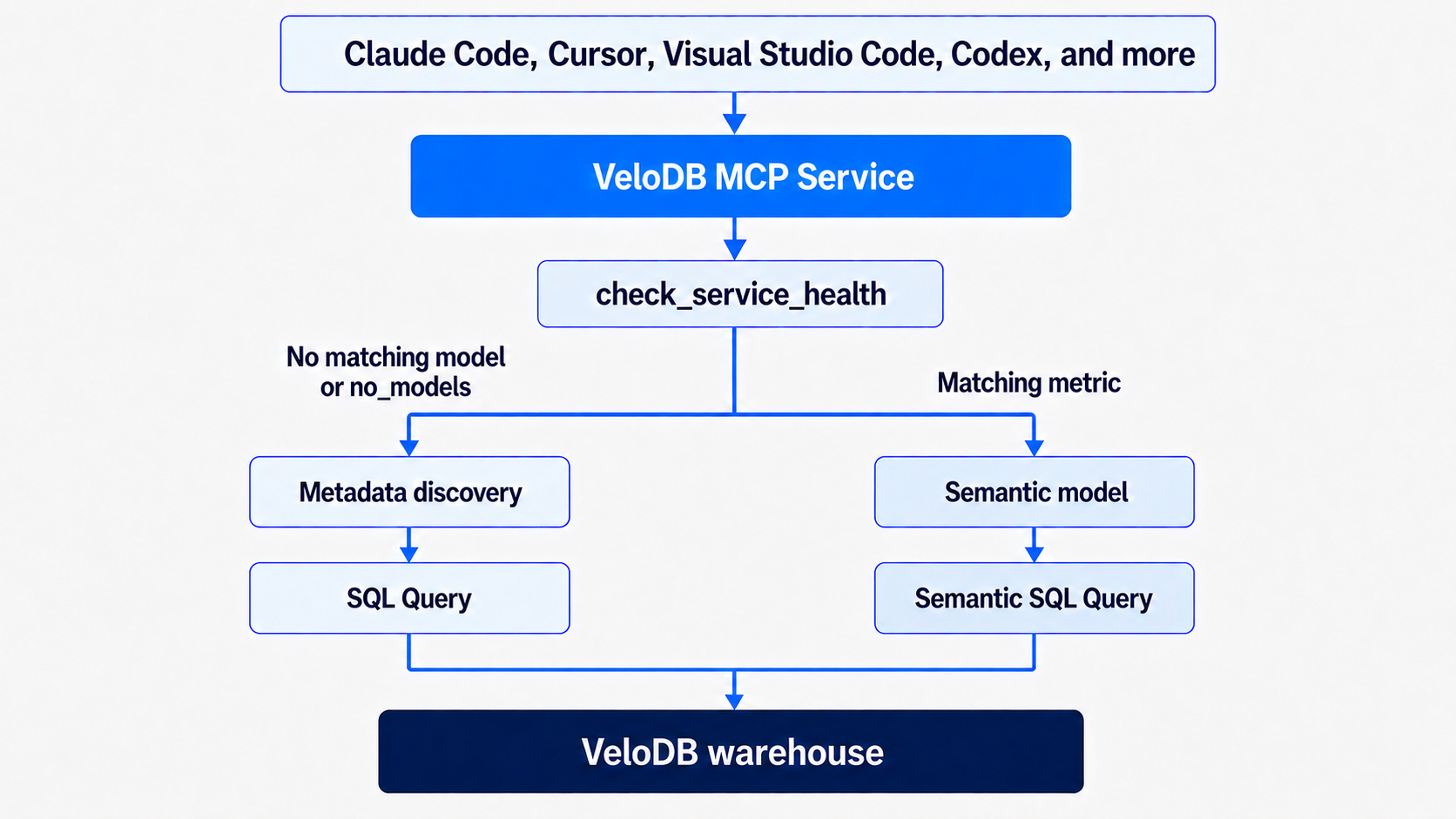
Query capabilities
Once connected, you ask questions in plain language, and the AI agent calls the matching MCP tool automatically.
Metadata discovery
| What you want | Just say | Tool called |
|---|---|---|
| See the databases | "List all databases" | list_databases |
| See the tables in a database | "List the tables in the sales database" | list_tables |
| See a table's structure | "Show the columns of the orders table" | describe_table |
Without a semantic model: SQL queries
If no healthy workspace contains a semantic model with a metric that matches the request, the agent discovers the available tables and columns, generates a read-only SQL statement, and calls execute_query. In this path, the result depends on how accurately the agent interprets the request and generates the SQL.
| What you want | Just say | Tool called |
|---|---|---|
| Query data | "Show the top 10 orders" | execute_query |
| Aggregate analysis without a matching metric | "Count orders by status" | execute_query |
execute_query accepts read-only SQL only: SELECT, SHOW, DESCRIBE, and EXPLAIN. DML, DDL, stacked statements, and SELECT INTO OUTFILE/DUMPFILE are blocked.
With a semantic model: semantic queries
If a healthy workspace contains a semantic model that defines a metric matching the request, the agent prioritizes the semantic query path instead of recreating the metric in generated SQL. The agent completes the metric query in three steps:
list_metricslists the available metrics and their descriptions.list_dimensions_for_metriclists the dimensions that can group or filter the selected metric.query_metriccompiles and runs the semantic query.
The semantic model governs metric calculations, dimensions, relationships, and filters. The consistency and accuracy of the result therefore depend on the accuracy of those definitions. An incorrect or incomplete model can produce an incorrect result even when the query succeeds.
| What you want | Just say | Tool called |
|---|---|---|
| See the metrics | "List all metrics" | list_metrics |
| Check a revenue trend | "Show revenue for the past 7 days, grouped by day" | query_metric |
| See available dimensions | "Which dimensions can total_amount be analyzed by?" | list_dimensions_for_metric |
| Check service status | "Check service health" | check_service_health |
The metric tools require a workspace parameter. The bundled example workspace is available only after a warehouse administrator deploys the example.
AI agent query workflow
The agent follows this workflow for each conversation:
- Call
get_query_guideto load the query workflow. - Call
check_service_healthto verify the VeloDB Cloud connection and discover workspace states. - If the request is about databases, tables, or columns, use the metadata tools.
- If a healthy workspace contains a matching metric, call
list_metrics,list_dimensions_for_metric, andquery_metric. - If no semantic model or matching metric is available, call
list_databases,list_tables,describe_table, andexecute_query.
When a matching semantic metric is available, the agent uses query_metric instead of recreating the metric in raw SQL. If no metric matches, the agent explains that the semantic layer does not cover the request before it uses read-only SQL. If the warehouse admin user has disabled Semantic queries for a workspace, its semantic query tools are blocked and the agent uses the read-only SQL path for that workspace.
Security and permissions
- Each request uses the warehouse SQL user credentials supplied by the MCP client. Queries run with that warehouse SQL user's privileges.
execute_queryaccepts read-only SQL statements only.- Regular warehouse users can query data and view published semantic models.
- The warehouse
adminuser manages workspaces and semantic models through Semantic Web UI.
See also
- Get Started to connect an AI client and complete your first query.
- Semantic model concepts to understand entities, dimensions, measures, and metric definitions.
- Create and manage semantic models to create, validate, commit, and publish governed business metrics.