GCP 準備
この記事では、主にBYOCタイプのウェアハウスを作成する際に関わるGCPの操作について紹介します。VPCとサブネットの準備、**リソースオーケストレーションについて学ぶ(オプション)**が含まれます。
VPCとサブネットの準備
BYOCタイプのウェアハウスを作成する前に、要件を満たす既存のVPCとサブネットがない場合は、事前にVPCとサブネットを作成する必要があります。具体的な操作は以下の通りです:
注意:
- リージョン、アベイラビリティーゾーン、サブネット要件を満たすVPCとサブネットが存在し、このVPCにBYOCウェアハウスをデプロイしたい場合は、以下の新しいVPCとサブネット作成手順をスキップしてください。
- 現在サポートされているリージョンとアベイラビリティーゾーンは以下の通りです:
| Cloud Platform | Region Name | Region ID | Availability Zone ID |
|---|---|---|---|
| GCP | US West 1 | us-west1 | all |
| GCP | US East 4 | us-east4 | all |
VPCとサブネットの作成
GCP VPC Network コンソールを開き、BYOCウェアハウスをデプロイしたいリージョンに切り替えます。
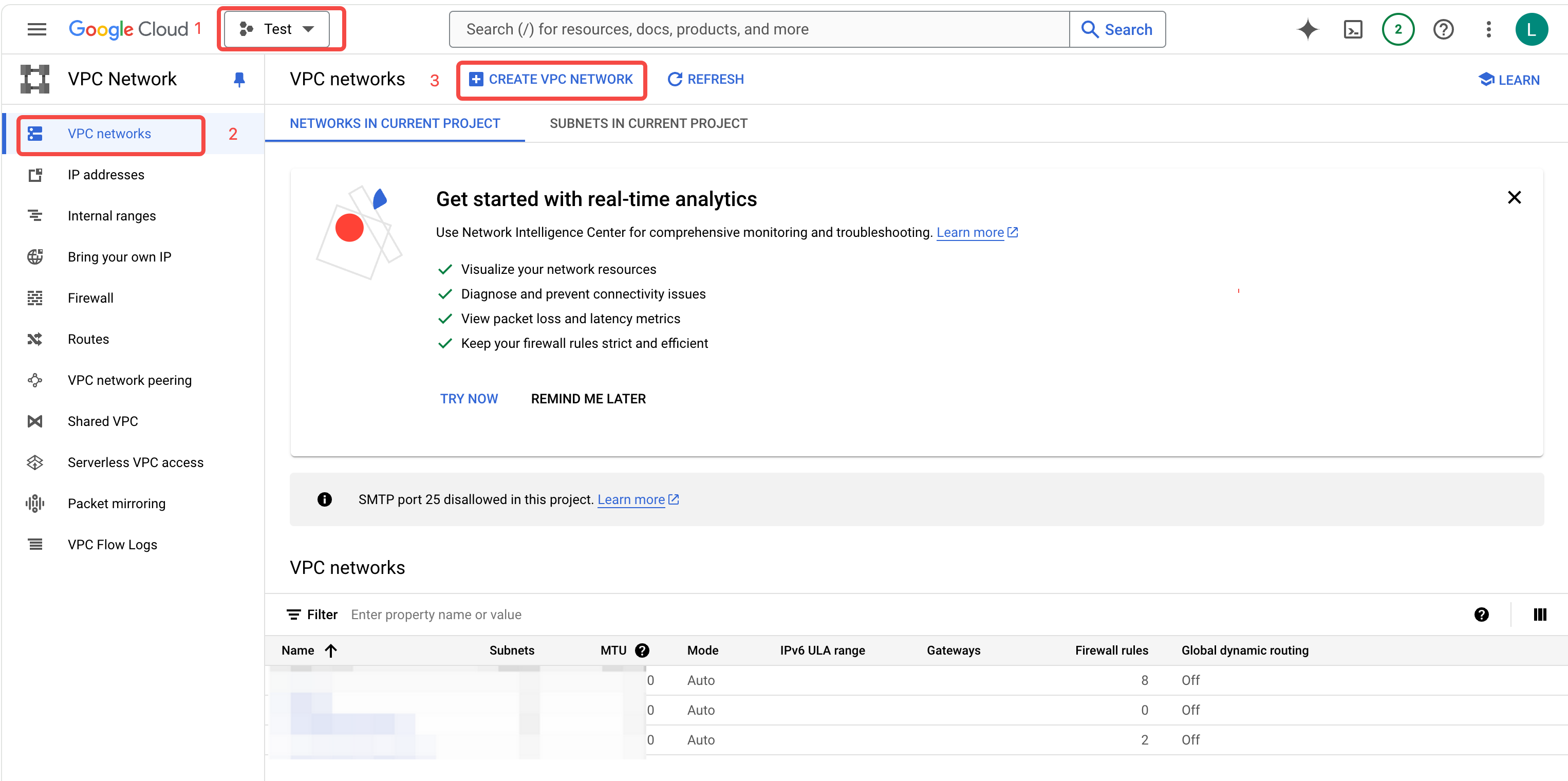
VPC networks > CREATE VPC NETWORK をクリックして、VPC作成ページに入ります。
VPC Name を入力し、Custom モードを選択します。
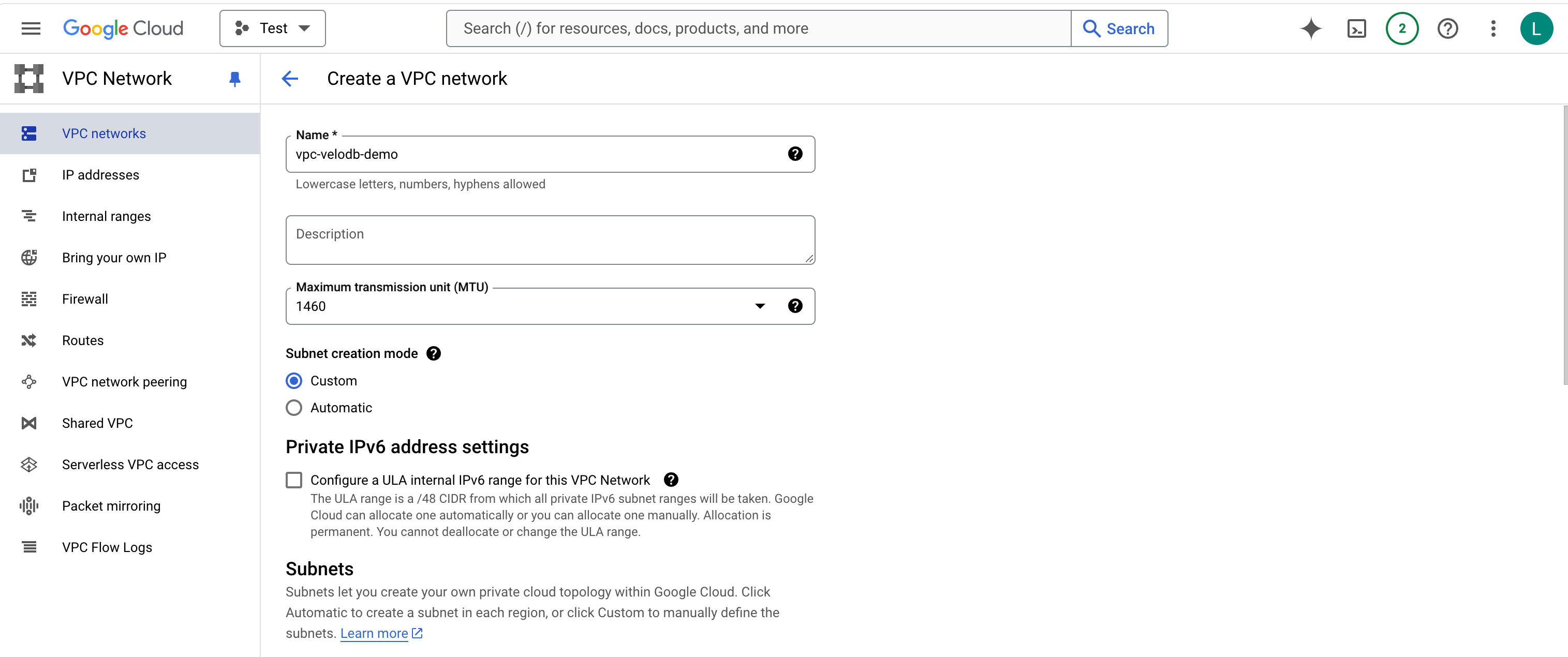
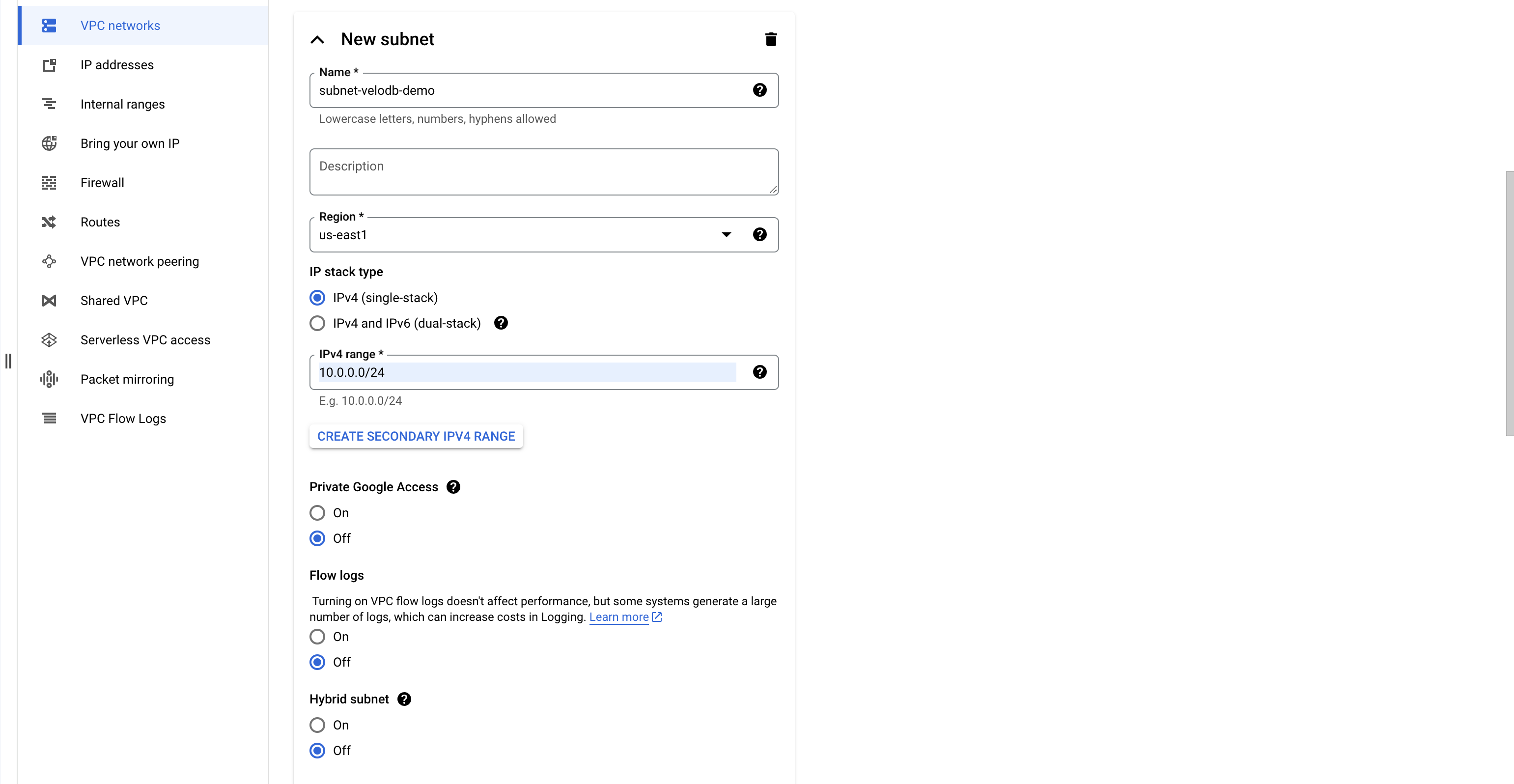
サブネット Name を入力し、Region を選択し、IPv4 range を入力します。
注意: 現在サポートされているリージョンとアベイラビリティーゾーンは以下の通りです:
| Cloud Platform | Region Name | Region ID | Availability Zone ID |
|---|---|---|---|
| GCP | US West 1 | us-west1 | all |
| GCP | US East 4 | us-east4 | all |
Private Google Access、Flow logs、Hybrid subnet については off を選択します。
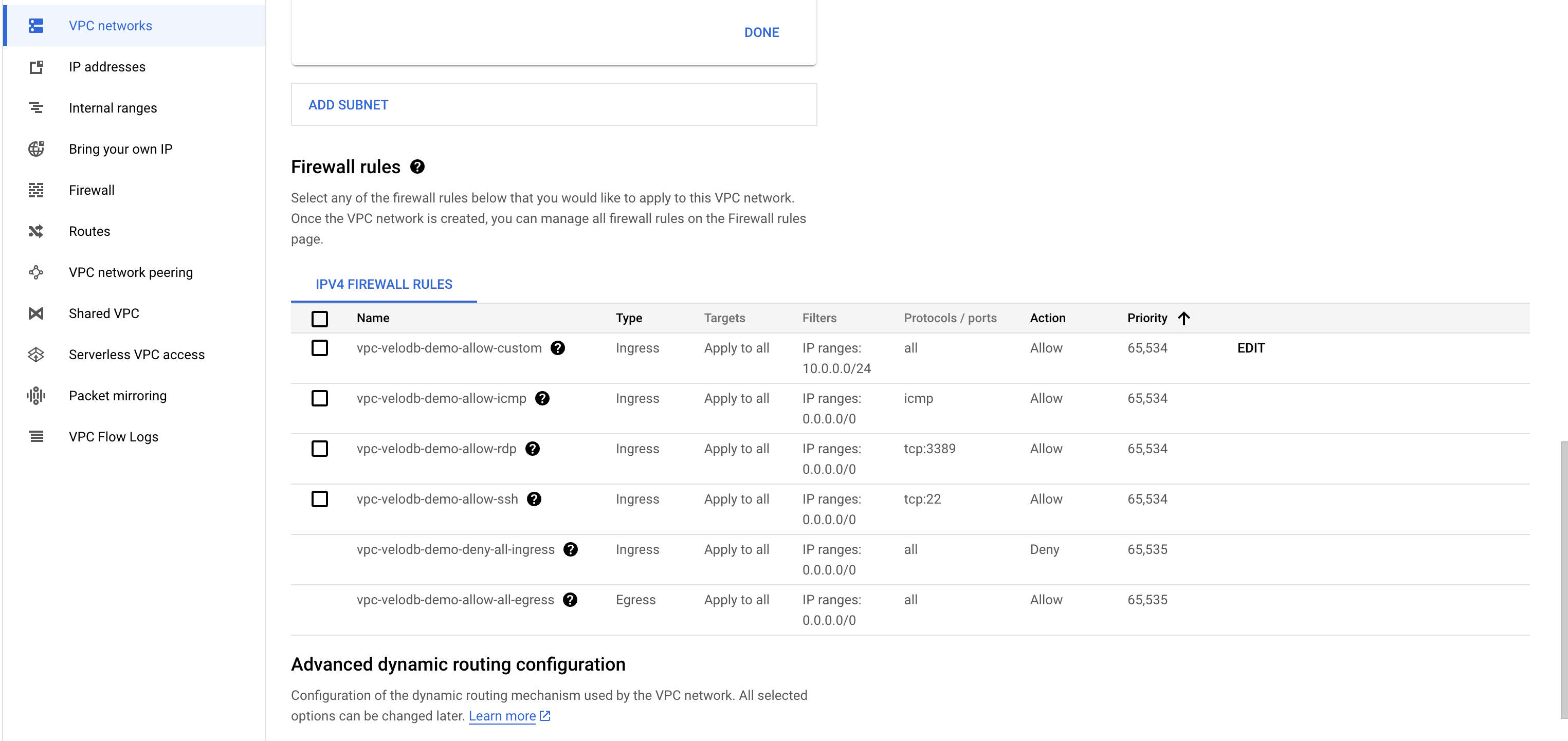
Firewall rule list のチェックを外します。
Dynamic Routing mode については Regional を選択し、Best path selection mode については Legacy を選択します。
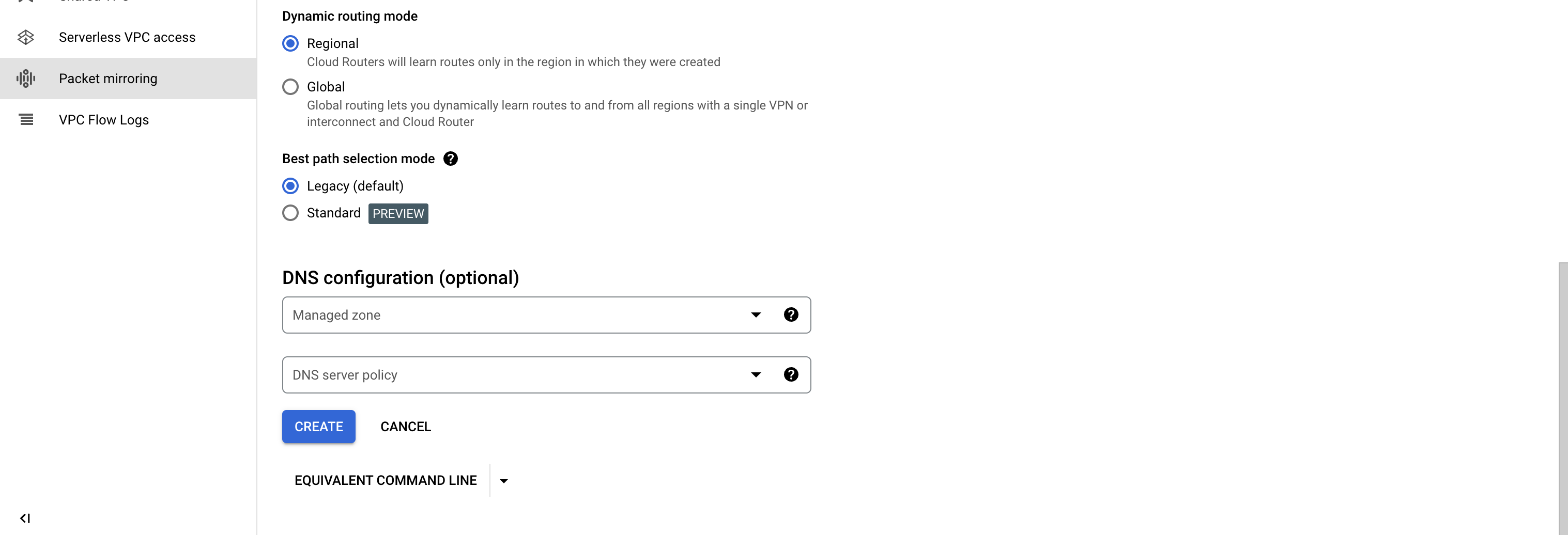
CREATE をクリックしてVPCとサブネットの作成を完了します。
リソースオーケストレーションについて学ぶ(オプション)
注意:この章では何かを実行する必要はありません。動作原理についてより詳しく学びたい場合は、読み続けることができます。
あなたのクラウドアカウント下でGCP CloudShellを通じてterraformテンプレートを実行する際、VPC、Compute Engine、Bucketsなどのクラウドリソースに対して関連操作を実行するため、一連のIAM権限が必要となります。
このスクリプトを実行するには管理者権限を使用するか、管理者にこのスクリプトを実行してもらってください。そうしないと、権限不足によりテンプレート実行の失敗が発生する可能性があります。
Terraformテンプレートの説明
VeloDBが提供するTerraformリソースオーケストレーションテンプレートは、あなたのGCPアカウント下で実行され、テンプレートコードは可視的かつ監査可能で、VPC内のあなたのデータやその他の環境に対して操作を行うことはありません。以下のリンクからVeloDBが提供するTerraformテンプレートを取得できます:
https://storage.googleapis.com/velodb-cloud-online-us-west-1/public/gcp-byoc.tf
上記のTerraformテンプレートをGCP CloudShellで実行すると、Agentが自動的に作成・デプロイされます。その後、AgentはVeloDB Cloudとのプライベート接続を確立し、ウェアハウスの初期化プロセスを完了します。
リソースオーケストレーションスクリプトが実行された後、VeloDB Cloudプラットフォームから対応するウェアハウスに入り、通常のウェアハウスを使用するのと同様に、データ分析用のコンピューティングクラスターの作成を開始できます。
リソース情報
-
Compute Engine Instance
- 名前: VeloDBAgent
- 目的: Agent、Prometheus、FluentBitおよびその他のプログラムのデプロイに使用
-
Private Service Connect Endpoint
- 名前: VeloDBEndpoint
- 目的: VeloDB Manageサービスとのプライベートネットワーク接続を確立し、制御命令をプルし、監視とログの一方向プッシュを有効にする
-
VPC Firewall Rules
- 名前: VeloDBSecurityGroupIngress、VeloDBSecurityGroupEgress
- 目的: VeloDBによって起動されたすべてのVMインスタンスにバインドされ、セキュリティグループルールを通じてトラフィックを制限する(同じセキュリティグループからのすべてのトラフィックがすべてのポートへのアクセスを許可し、同じサブネットからのトラフィックがポート5000へのアクセスを許可し、すべてのアウトバウンドトラフィックを許可)
-
Cloud Storage Bucket
- 名前: VeloDBBucket
- 目的: データウェアハウスデータの保存に使用
-
VPC Firewall Rules
- 名前: VeloDBSecurityGroupIngress、VeloDBSecurityGroupEgress
- 目的: エンドポイントとVeloDBによって作成されたすべてのVMインスタンスにバインドされ、ファイアウォールルールを通じて特定のポートとソースのインバウンドおよびアウトバウンドトラフィックを制限する
-
IAM & Service Account & Custom Role
- 名前:
- VeloDBControlPlaneRole(コントロールプレーンサービスアカウント)
- VeloDBControlPlaneRolePolicy(カスタムロールポリシー)
- VeloDBBucketKey(バケットキー)
- VeloDBDataAccessRole(カーネルサービスアカウント)
- 目的: 作成されたサービスアカウントは、Agentに必要な最小権限ポリシーを持ち、その後のすべての制御操作は、このサービスアカウントのアイデンティティを使用して実行される
- 名前:
作成されたサービスアカウントの権限
terraformテンプレートが初回実行された後、VPC内のデータウェアハウス関連コンポーネントの後続管理用にサービスアカウントが作成されます。以下は、サービスアカウントの権限の説明です。
-
権限の概要:
compute.addresses.create
compute.addresses.createInternal
compute.addresses.delete
compute.addresses.deleteInternal
compute.addresses.setLabels
compute.addresses.get
compute.addresses.list
compute.addresses.use
compute.addresses.useInternal
compute.disks.create
compute.disks.createTagBinding
compute.disks.delete
compute.disks.deleteTagBinding
compute.disks.get
compute.disks.list
compute.disks.resize
compute.disks.setLabels
compute.disks.use
compute.firewalls.create
compute.firewalls.createTagBinding
compute.firewalls.delete
compute.firewalls.deleteTagBinding
compute.firewalls.get
compute.firewalls.list
compute.firewalls.update
compute.forwardingRules.create
compute.forwardingRules.delete
compute.forwardingRules.get
compute.forwardingRules.setLabels
compute.instanceGroups.create
compute.instanceGroups.delete
compute.instanceGroups.update
compute.instanceGroups.use
compute.instances.attachDisk
compute.instances.create
compute.instances.createTagBinding
compute.instances.delete
compute.instances.deleteTagBinding
compute.instances.detachDisk
compute.instances.get
compute.instances.getEffectiveFirewalls
compute.instances.list
compute.instances.listTagBindings
compute.instances.osAdminLogin
compute.instances.osLogin
compute.instances.reset
compute.instances.resume
compute.instances.setDiskAutoDelete
compute.instances.setLabels
compute.instances.setMachineType
compute.instances.setMetadata
compute.instances.setName
compute.instances.setServiceAccount
compute.instances.setTags
compute.instances.start
compute.instances.stop
compute.instances.suspend
compute.instances.update
compute.instances.use
compute.networks.get
compute.networks.list
compute.networks.updatePolicy
compute.networks.use
compute.regionBackendServices.create
compute.regionBackendServices.createTagBinding
compute.regionBackendServices.delete
compute.regionBackendServices.deleteTagBinding
compute.regionBackendServices.get
compute.regionBackendServices.getIamPolicy
compute.regionBackendServices.list
compute.regionBackendServices.update
compute.regionBackendServices.use
compute.regionHealthChecks.create
compute.regionHealthChecks.delete
compute.regionHealthChecks.useReadOnly
compute.subnetworks.get
compute.subnetworks.list
compute.subnetworks.use
compute.zoneOperations.get
特定の権限は以下のように分けられています:
-
Compute Engine権限:
-
VMインスタンスの管理
compute.disks.create
compute.disks.createTagBinding
compute.disks.delete
compute.disks.deleteTagBinding
compute.disks.get
compute.disks.list
compute.disks.resize
compute.disks.setLabels
compute.disks.use
compute.instanceGroups.create
compute.instanceGroups.delete
compute.instanceGroups.update
compute.instanceGroups.use
compute.instances.attachDisk
compute.instances.create
compute.instances.createTagBinding
compute.instances.delete
compute.instances.deleteTagBinding
compute.instances.detachDisk
compute.instances.get
compute.instances.getEffectiveFirewalls
compute.instances.list
compute.instances.listTagBindings
compute.instances.osAdminLogin
compute.instances.osLogin
compute.instances.reset
compute.instances.resume
compute.instances.setDiskAutoDelete
compute.instances.setLabels
compute.instances.setMachineType
compute.instances.setMetadata
compute.instances.setName
compute.instances.setServiceAccount
compute.instances.setTags
compute.instances.start
compute.instances.stop
compute.instances.suspend
compute.instances.update
compute.instances.use
-
-
ファイアウォールルールを管理する
compute.firewalls.create
compute.firewalls.createTagBinding
compute.firewalls.delete
compute.firewalls.deleteTagBinding
compute.firewalls.get
compute.firewalls.list
compute.firewalls.update -
VPC Network権限:
-
VPC関連のリソース情報を取得
compute.networks.get
compute.networks.list
compute.networks.updatePolicy
compute.networks.use
compute.subnetworks.get
compute.subnetworks.list
compute.subnetworks.use
compute.zoneOperations.get
-
-
LBリソースを管理する
compute.addresses.create
compute.addresses.createInternal
compute.addresses.delete
compute.addresses.deleteInternal
compute.addresses.setLabels
compute.addresses.get
compute.addresses.list
compute.addresses.use
compute.addresses.useInternal
compute.forwardingRules.create
compute.forwardingRules.delete
compute.forwardingRules.get
compute.forwardingRules.setLabels
compute.regionBackendServices.create
compute.regionBackendServices.createTagBinding
compute.regionBackendServices.delete
compute.regionBackendServices.deleteTagBinding
compute.regionBackendServices.get
compute.regionBackendServices.getIamPolicy
compute.regionBackendServices.list
compute.regionBackendServices.update
compute.regionBackendServices.use
compute.regionHealthChecks.create
compute.regionHealthChecks.delete
compute.regionHealthChecks.useReadOnly -
Cloud Storage権限:
-
バケットの管理およびバケットとその内容の読み取りと書き込み(特定のバケット用)
roles/storage.admin
-
-
アカウント権限:
-
新しく作成されたサービスアカウントがVMインスタンスに関連付けられるように許可し、VMインスタンスがサービスアカウントとして関連する操作を実行できるようにします
roles/iam.serviceAccountUser
-