New Data Transfer Fee for SaaS Deployments
Starting from September 1, 2026, VeloDB Cloud SaaS deployments will include a new Data Transfer Fee for billable customer data transfer over VeloDB-supported public or private connectivity paths.
Data transfer usage before this date will not be charged retroactively.
Scope
This billing item applies to VeloDB Cloud SaaS deployments.
Bring Your Own Cloud (BYOC) deployments are not affected by this VeloDB Cloud Data Transfer Fee. For BYOC deployments, any related network charges are billed directly by the customer's cloud provider.
Billable data transfer
The following diagram summarizes the main data transfer paths covered by this billing item:
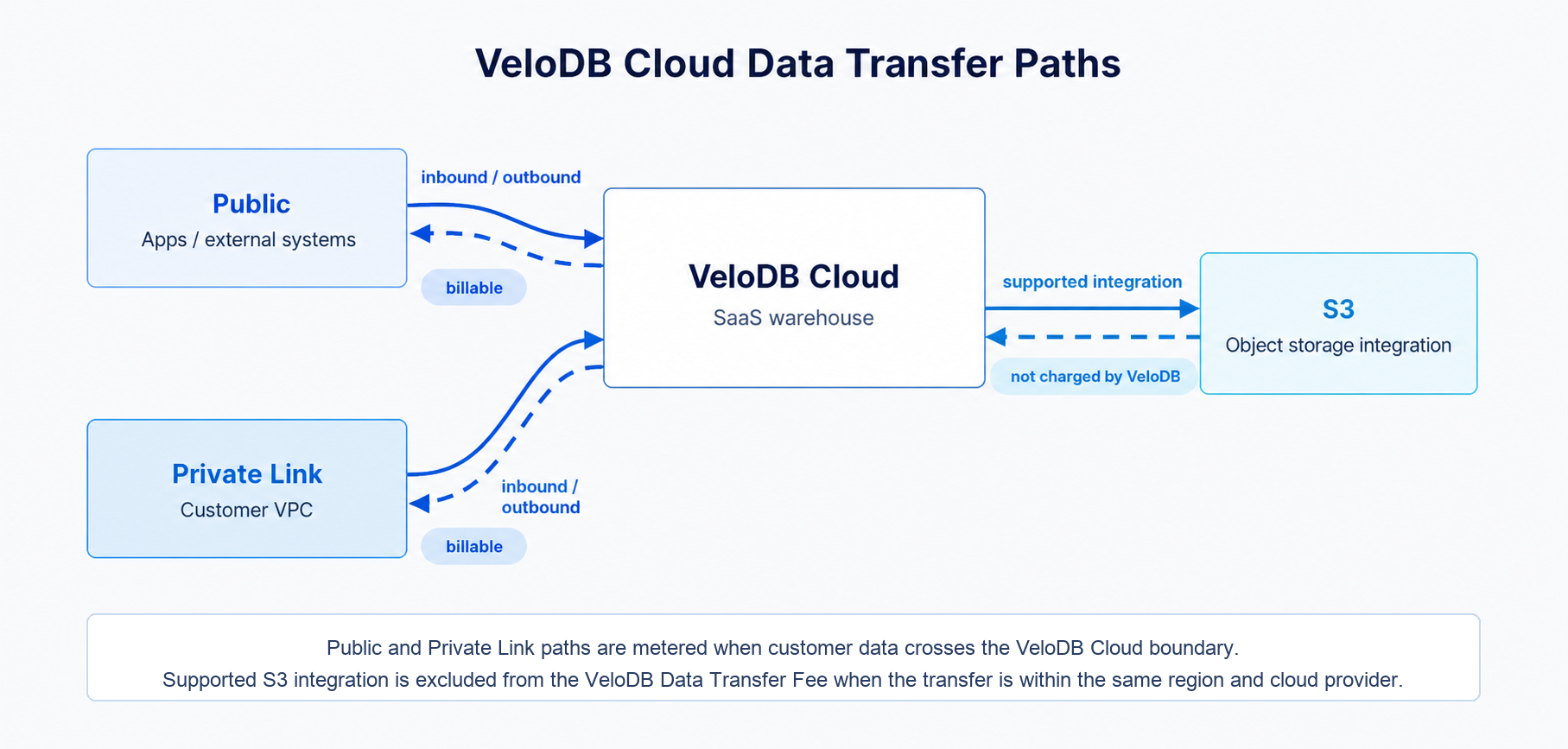
For this billing item, Data Transfer refers to inbound or outbound customer data traffic that crosses the boundary between a VeloDB Cloud SaaS warehouse and customer-managed or third-party systems through a billable connectivity path, unless listed as non-billable below.
Billable connectivity paths include:
- Public connectivity: Customer data transferred between VeloDB Cloud and external systems through public endpoints.
- Private connectivity: Customer data transferred between VeloDB Cloud and customer environments or third-party systems through private connectivity paths, including reverse private endpoints.
Non-billable data transfer
The following traffic is not billed as customer data transfer:
- Internal communication between VeloDB Cloud services.
- System management, monitoring, maintenance, and operational traffic within VeloDB Cloud.
- Data transfer through supported object storage integration paths is excluded from the VeloDB Cloud Data Transfer Fee when the transfer is within the same region and cloud provider.
Cloud providers or third-party services may apply their own network or data egress charges. Those charges are not controlled by VeloDB Cloud and may appear separately on the customer's cloud provider bill.
Pricing
| Billing Item | Unit | Price |
|---|---|---|
| Data Transfer Fee | GB | USD 0.03 / GB |
For billing purposes, data transfer usage is metered based on the amount of customer data transferred across billable connectivity paths during each billing cycle. Usage is aggregated and charged in GB.
Examples
Example 1: billable data transfer
If your account transfers 500 GB of customer data through a billable public or private connectivity path during one billing cycle, the data transfer fee is:
500 GB x USD 0.03 / GB = USD 15.00
Example 2: supported object storage integration
If data is loaded from Amazon S3 or Azure Blob Storage through a VeloDB Cloud-supported object storage integration path, VeloDB Cloud does not charge a Data Transfer Fee for that transfer.
Your cloud provider may still charge for data transfer, requests, or related network usage according to its own pricing policies.
View usage and charges
After the fee takes effect, you can view your data transfer usage and charges in the VeloDB Cloud billing console.
If you need help estimating or optimizing your data transfer costs, contact VeloDB Cloud Support or your account representative.