Continuous Load Overview
Doris supports continuously loading data from multiple data sources into Doris tables through Streaming Job. After a Job is submitted, Doris keeps the load job running, reading data from the source in real time and writing it into the Doris table.
This feature is supported starting from version 4.1.0.
This document helps you answer the following questions:
- Which data sources and sync modes does continuous load support?
- How do you choose between SQL Mapping Sync and Auto Table Creation Sync?
- How do job states transition, and how does automatic recovery work?
- How do you view, pause, resume, and delete load jobs in daily operations?
- What are the common FE and Job configuration parameters?
Supported Data Sources and Sync Modes
Continuous load supports the following data sources and sync modes:
| Data Source | Supported Versions | SQL Mapping Sync | Auto Table Creation Sync | Configuration Guide |
|---|---|---|---|---|
| MySQL | 5.6, 5.7, 8.0.x | MySQL CDC with SQL Mapping | MySQL CDC with Auto Table Creation | Amazon RDS MySQL · Amazon Aurora MySQL |
| PostgreSQL | 14, 15, 16, 17 | PostgreSQL CDC with SQL Mapping | PostgreSQL CDC with Auto Table Creation | Amazon RDS PostgreSQL · Amazon Aurora PostgreSQL |
| OceanBase | MySQL compatibility mode | - | OceanBase CDC with Auto Table Creation (since version 4.1.4) | - |
| S3 | - | S3 Continuous Load | - | - |
For how upstream column types map to Doris types, see Data Type Mapping for MySQL, PostgreSQL, and OceanBase.
How to Choose a Sync Method
SQL Mapping Sync and Auto Table Creation Sync are two continuous load methods with completely different underlying mechanisms, not a difference in "number of tables." Auto Table Creation Sync also supports syncing only a single table through include_tables, so the choice should be based on capability requirements.
Capability Comparison
| Capability | SQL Mapping Sync | Auto Table Creation Sync |
|---|---|---|
| Underlying mechanism | Job + TVF (INSERT INTO tbl SELECT * FROM tvf()) | Job + native whole-database DDL (FROM src TO DATABASE db) |
| Target level | An existing Doris table | A Doris database container |
| Sync scope | A single table | One to multiple tables to the entire database (controlled by include_tables) |
| Automatic table creation | Tables must be pre-created | Primary key tables are created automatically on first sync |
| SQL flexibility | Supports column mapping, filtering, and transformation (SELECT clause) | Copies as-is, does not support ETL |
| Semantic guarantee | exactly-once | at-least-once |
| Required privileges | Load | Load + Create (when creating tables automatically) |
| Typical scenarios | Real-time sync that requires column pruning, field renaming, type conversion, or conditional filtering | Mirror replication of an entire database or a group of tables, where downstream table schemas should automatically follow the upstream |
Selection Recommendations
- You need to apply SQL processing to the data, or you have strict requirements for exactly-once semantics -> choose SQL Mapping Sync
- You want Doris to create tables automatically and sync a group of tables with one configuration -> choose Auto Table Creation Sync
- The data source is OceanBase -> currently, only Auto Table Creation Sync in MySQL compatibility mode is supported
- The data source is S3 object storage -> only SQL Mapping Sync is supported (using the S3 TVF)
Job State Transitions
A Streaming Job transitions between the following states during execution. SQL Mapping Sync and Auto Table Creation Sync follow the same state machine:
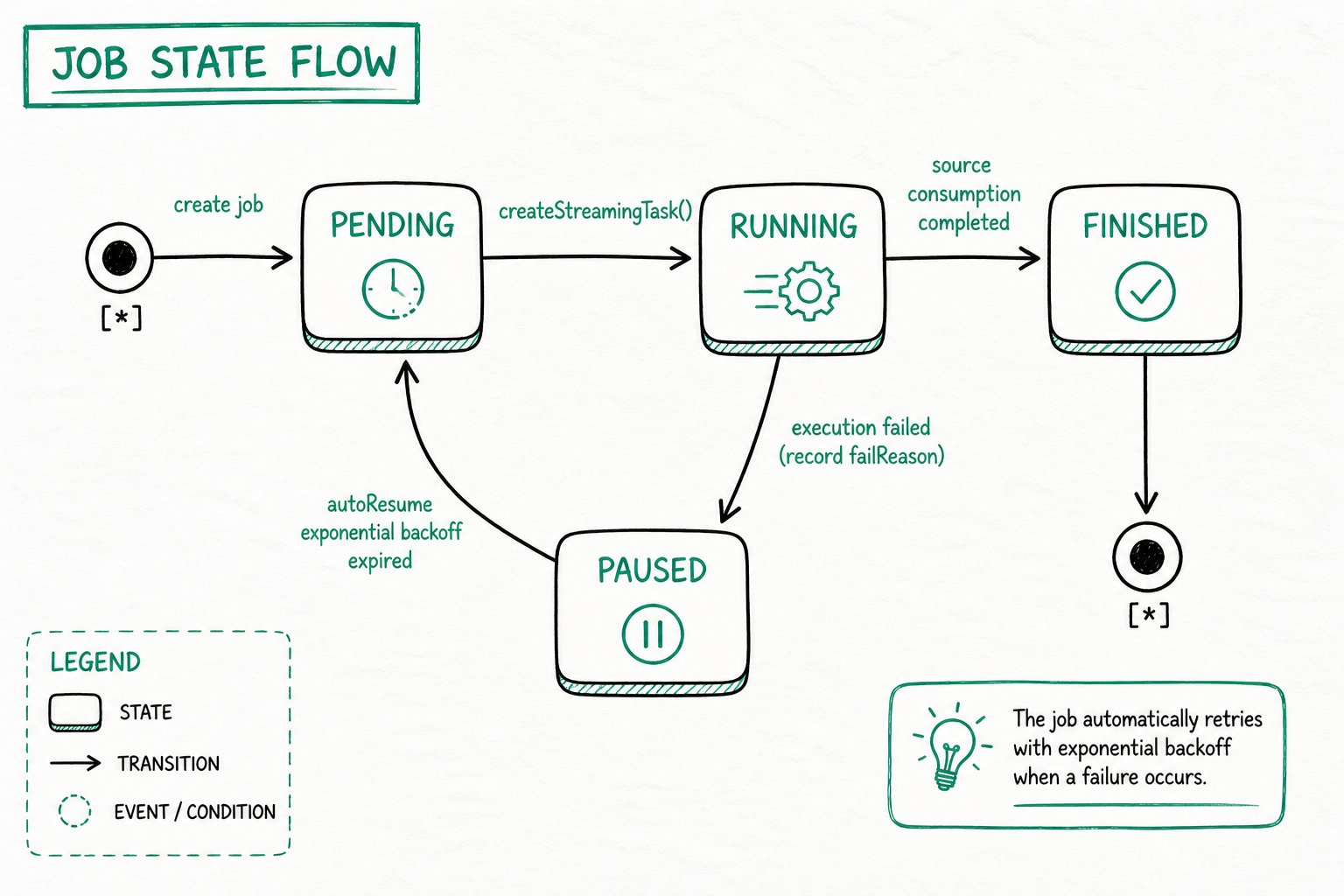
State Descriptions
| State | Meaning |
|---|---|
| PENDING | The job has been created but has not yet scheduled any subtasks; it is waiting for the next scheduling round to create a StreamingTask. |
| RUNNING | A subtask has been spawned and is executing, reading incremental data from the source and writing it into Doris. |
| FINISHED | The source has been fully consumed and the job is terminated. An S3 TVF job enters this state after all files have been loaded. |
| PAUSED | A subtask failed, the job is automatically paused, and failReason is recorded. You can check the cause through the ErrorMsg field of select * from jobs(...). |
Automatic Recovery (autoResume)
After a job enters PAUSED, the scheduler periodically tries to recover it using an exponential backoff strategy. On recovery, the job returns to PENDING and continues to create subtasks. No manual intervention is required: transient failures (network jitter, brief upstream unavailability, and so on) are absorbed automatically.
Use the appropriate command for each scenario:
- Resume immediately, or start manually after troubleshooting: use
RESUME JOB - Stop completely and no longer schedule: use
PAUSE JOB(a manually paused job is not woken up by autoResume) orDROP JOB
Common Operations
View Load Status
Query all Streaming-type Insert Jobs:
select * from jobs("type"="insert") where ExecuteType = "STREAMING";
Result columns:
| Column | Description |
|---|---|
| ID | Job ID |
| NAME | Job name |
| Definer | Job definer |
| ExecuteType | Job scheduling type: ONE_TIME/RECURRING/STREAMING/MANUAL |
| RecurringStrategy | Recurring strategy. Used by regular Insert. Empty when ExecuteType=Streaming |
| Status | Job status |
| ExecuteSql | The Insert SQL statement of the Job |
| CreateTime | Job creation time |
| SucceedTaskCount | Number of successful tasks |
| FailedTaskCount | Number of failed tasks |
| CanceledTaskCount | Number of canceled tasks |
| Comment | Job comment |
| Properties | Job properties |
| CurrentOffset | The offset that the Job has finished processing. Only set when ExecuteType=Streaming |
| EndOffset | The maximum EndOffset retrieved from the data source. Only set when ExecuteType=Streaming |
| LoadStatistic | Job statistics |
| ErrorMsg | Error message of the Job |
| JobRuntimeMsg | Runtime hints of the Job |
| LagBytes | Number of backlog bytes in the source log (MySQL / OceanBase binlog or PostgreSQL WAL). -1 means the value is currently unavailable, for example for an S3 data source or during the full snapshot phase. Since version 4.1.4, this column replaces the former Lag column (in seconds) and is reported in bytes |
| LastSourceEventTimestamp | Timestamp (in Unix seconds) of the latest source event recorded in the committed offset. Empty when unavailable. Added in version 4.1.4 |
| LastTaskSuccessTime | Time when the most recent Task completed successfully |
View Task Status
Query all subtasks under a Job by Job ID:
select * from tasks("type"="insert") where jobId='<job_id>';
Result columns:
| Column | Description |
|---|---|
| TaskId | Task ID |
| JobID | JobID |
| JobName | Job name |
| Label | The label used by the Task for loading |
| Status | Task status |
| ErrorMsg | Task failure message |
| CreateTime | Task creation time |
| StartTime | Task start time |
| FinishTime | Task finish time |
| LoadStatistic | Task statistics |
| User | Task executor |
| RunningOffset | Offset information currently being synced by the task. Only set when Job.ExecuteType=Streaming |
Pause a Load Job
Manually pause the specified job (a paused job is not woken up by autoResume):
PAUSE JOB WHERE jobname = <job_name>;
Resume a Load Job
Resume a job that is in the PAUSED state:
RESUME JOB WHERE jobName = <job_name>;
Delete a Load Job
Permanently delete the specified job. After deletion, the job is no longer scheduled:
DROP JOB WHERE jobName = <job_name>;
Common Parameters
FE Configuration Parameters
| Parameter | Default | Description |
|---|---|---|
| max_streaming_job_num | 1024 | Maximum number of Streaming jobs |
| job_streaming_task_exec_thread_num | 10 | Number of threads used to execute StreamingTask |
| max_streaming_task_show_count | 100 | Maximum number of StreamingTask execution records kept in memory |
Job Common Load Configuration Parameters
| Parameter | Default | Description |
|---|---|---|
| max_interval | 10 | Idle scheduling interval in seconds when the upstream has no new data. Only an integer (number of seconds) is accepted, e.g. 10; a unit suffix such as 10s is not supported. Must be >= 1. |
Limitations
Sync scope, automatic table creation, and semantic guarantees (exactly-once / at-least-once) are described in Capability Comparison. This section only lists the constraints and behaviors that are not supported.
Primary Key Tables
Only upstream tables with a primary key can be synchronized (both sync methods). The corresponding Doris table is a Unique Key table — auto-created as such in Auto Table Creation Sync, or created by you in SQL Mapping Sync. Tables without a primary key are not supported.
Schema Change (DDL)
DDL sync applies only to Auto Table Creation Sync; SQL Mapping (TVF) does not sync any DDL — the cdc_stream() table function always forces schema_change_enabled to false.
- PostgreSQL (supported since 4.1): only
ADD COLUMNandDROP COLUMNare synced. Column type changes,RENAME COLUMN, and constraint / index / partition changes are NOT synced — apply them manually in Doris. - MySQL (supported since 4.1.4): only
ADD COLUMNandDROP COLUMNare synced. Column type changes,RENAME COLUMN, and constraint / index / partition changes are NOT synced — apply them manually in Doris. - OceanBase (supported since 4.1.4): only
ADD COLUMNandDROP COLUMNare synced. Column type changes,RENAME COLUMN, and primary key / constraint / index / partition changes are NOT synced — apply them manually in Doris.
Auto Table Creation Sync enables Schema Change Sync by default. Doris 4.1 currently does not provide a SQL property to disable it.
- Starting from version 4.1.4, an added column no longer carries the
DEFAULTvalue of the upstream column (for MySQL, PostgreSQL, and OceanBase). The new column has no default value in Doris, and historical rows are not backfilled. - PostgreSQL schema change detection is now driven by Relation events: only
ADD COLUMNandDROP COLUMNare recognized; a change that both adds and drops columns (possibly aRENAME) is skipped, as are column type changes. This capability applies only to the Auto Table Creation Sync (at-least-once) path; the TVF / exactly-once path does not support it.
FAQ
MySQL Connection Error: Public Key Retrieval is not allowed
Cause: The configured MySQL user uses SHA256 password authentication, which requires the password to be transmitted over a protocol such as TLS.
Solution 1: Add the allowPublicKeyRetrieval=true parameter to the JDBC URL:
jdbc:mysql://127.0.0.1:3306?allowPublicKeyRetrieval=true
Solution 2: Change the MySQL user's authentication method to mysql_native_password:
ALTER USER 'username'@'%' IDENTIFIED WITH mysql_native_password BY 'password';
FLUSH PRIVILEGES;